

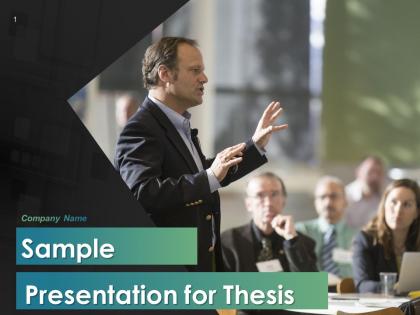
Apresentação de Amostra para Slides de Apresentação de Tese




Try Before you Buy Download Free Sample Product
 Impress Your
 Audience
 100%
100% Editable
 Save Hours
 of Time


Um leitor deve ser capaz de identificar facilmente a tese de qualquer plano de negócios. Para este fim, nossa equipe de designers dedicados criou esta apresentação de amostra para o modelo de apresentação de tese PPT, que pode exibir sua declaração de tese de uma maneira profissional e atraente. Combine esta apresentação de amostra profissionalmente projetada para a apresentação de tese do PowerPoint com sua apresentação e experimente um desempenho de alta qualidade que deixará um impacto duradouro em seus espectadores. Esta apresentação de amostra para o deck de apresentação de tese possui um conjunto de vários slides PPT pré-feitos representando fundamentos importantes, como revisão da literatura, declaração de finalidade, hipótese, análise estatística, etc. Uma declaração de tese deve ser facilmente identificável por um leitor e deve ser clara e não ambígua. Escolha nossa apresentação de tese ppt e crie slides PPT lindos com base no resumo de sua apresentação e por que a apresentação vale a pena ser observada. Então, baixe agora e incorpore nossos incríveis shows de slides em suas apresentações de negócios. Seja aceito como um capitão eficaz com nossas Slides de Apresentação de Amostra Para Apresentação de Tese do PowerPoint.
People who downloaded this PowerPoint presentation also viewed the following :
Conteúdo desta apresentação em PowerPoint
Depois de meses de trabalho árduo, chega uma hora em que você precisa compilar seus achados de pesquisa em uma única apresentação, o que chamamos de 'tese'. Ela incluirá o propósito de sua pesquisa, os dados ou insights que você reuniu e o processo de pesquisa que você usou.
Apresentar seu trabalho de pesquisa original de maneira estruturada é uma experiência desafiadora, e nós entendemos totalmente. Na solução, modelos de tese prontos para uso podem agilizar sua apresentação por meio de um design impressionante e layout organizado. Confira nossas slides de proposta de pesquisa para comunicar seus achados de maneira profissional.
Este blog é sobre uma amostra de apresentação para tese em PPT, onde você obterá 33 slides editáveis para exibir sua hipótese, revisão de literatura, análise estatística e muito mais. Depois de concluir sua pesquisa, sabemos que você tem muitas informações para apresentar, é por isso que os modelos de tese do Slideteam têm slides focados e visualizações de dados. Ele pode compreender sua proposta profissionalmente.
Vamos direto ao resumo dos 10 principais slides que você pode achar úteis.
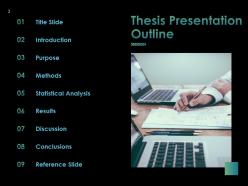
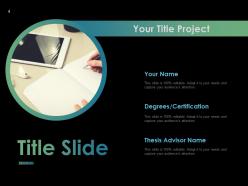
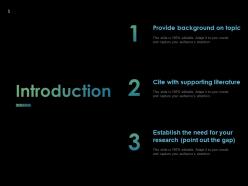
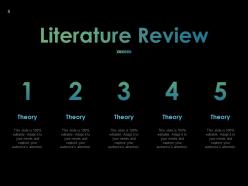
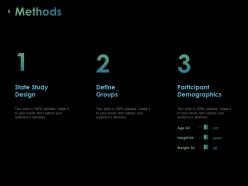
Slide 1: Título da Tese Slide 2: Introdução - Contexto e motivação da pesquisa - Objetivos e questões de pesquisa Slide 3: Revisão da Literatura - Principais conceitos e teorias relacionadas ao tema - Trabalhos relevantes na área Slide 4: Metodologia - Abordagem metodológica adotada - Técnicas e procedimentos de coleta e análise de dados Slide 5: Resultados - Principais descobertas e insights da pesquisa - Análise e interpretação dos dados Slide 6: Discussão - Implicações teóricas e práticas dos resultados - Limitações do estudo e direções futuras Slide 7: Conclusão - Síntese dos principais achados - Contribuições e considerações finais Slide 8: Referências - Lista das referências bibliográficas utilizadas Slide 9: Apêndice A - Detalhes adicionais sobre a metodologia Slide 10: Apêndice B - Dados complementares e análises adicionais Slide 11: Apêndice C - Outros materiais relevantes Slide 12: Obrigado! - Agradecimentos e informações de contato
Aumente as chances de ser eleito com nossos Slides de Apresentação de Tese de Amostra para Apresentação de PowerPoint. Crie uma boa impressão como candidato.


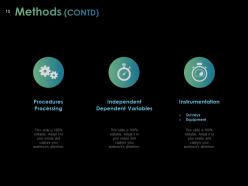
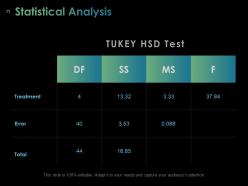
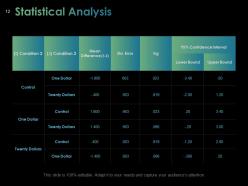


FAQs for Sample Presentation For Thesis
So for your thesis presentation, you'll want the obvious stuff: title slide, research question, lit review summary, methodology, findings, implications, and conclusions. Honestly the methodology part always feels like the most boring section but whatever. Build in some transition slides between the big sections - it helps people follow along. Oh and definitely do a "questions" slide at the end. Practice with your actual template beforehand so you're not fumbling around. Aim for about one slide per minute, so maybe 15-20 minutes total. I'm getting nervous just thinking about those presentations again!
Oh definitely use visuals! Charts and graphs make complex data way easier to digest. I've watched some really solid research presentations completely bomb because they were just endless text slides - it's painful. Diagrams can show your methodology better than trying to explain it all verbally too. Plus your committee's brains need visual breaks from processing all that dense info. Photos, screenshots, simple infographics - they all help reinforce your main points. Just don't throw in random pretty pictures though. Each visual should actually do something useful for your argument.
Honestly, focus on telling a story with your slides. Problem first, then how you tackled it, what you found, and why it matters. Visual stuff works way better than walls of text - trust me on this one. You'll want at least one slide that really shows off your best finding, something that makes people go "oh damn." Oh and throw in some transition slides between big sections so people don't get lost. Practice your timing too because you don't want to rush through everything. Maybe a minute per slide? But some will be faster, some slower obviously.
Honestly, just pick your top 3 findings and hit people with why they should care right off the bat. Don't get bogged down explaining your methods unless they specifically ask - nobody really wants to hear about that part anyway. I like to pretend I'm just telling a friend about it over drinks. Let your charts and visuals do most of the work when the data gets messy. Practice how you'll move between points so you don't end up rambling (I'm terrible at this). After each finding, give them one punchy sentence about what it actually means. Trust me, they'll forget all the nitty-gritty details but remember the big picture stuff.
Look, you don't want people zoning out during your thesis defense - that's just painful for everyone. Eye contact is huge. Ask questions, throw in a poll if you can, whatever keeps them awake. The best presentations feel like conversations, not lectures. I always try to connect my research to stuff people actually care about in real life (makes a difference, trust me). Read the room though - if they look confused, slow down and break things down more. Engaged audiences ask better questions and actually remember what you said afterward.
Know your crowd first - stalk their LinkedIn if you have to lol. Academics want the deep stuff: methodology, how it connects to existing research, all those theoretical details. Industry people? They care about real-world impact and practical solutions. Skip the jargon with them. Mixed audiences are honestly the worst but manageable. I'd prep different versions of your main slides so you can switch on the fly. Practice explaining your big idea both ways - academic speak and normal human language. That way you won't panic if the room isn't what you expected.
Don't read straight off your slides - that's the worst thing you can do. Practice your timing with someone first, trust me on this one. Your slides should just have key points, not paragraphs of text. Oh and face your audience! I've seen so many people turn around and talk to their slides instead. The Q&A afterwards is usually where people freak out most, so think through potential questions beforehand. Your committee wants to see you actually understand your work, not just memorize a script. Body language matters way more than you'd expect too.
So basically, think of your thesis like telling a story. Start with something that grabs people - like a real situation that shows why anyone should care about your research. Then walk them through it like a story: here's the problem (your research question), here's what I did to figure it out (methodology), and here's what I discovered. Structure it with a beginning, middle, end instead of just dumping data on them. I swear this works way better than boring bullet points - people actually stay awake! Maybe run through it with someone first to see if it makes sense.
Take your time with each question - seriously, the pause won't kill you. When you're stumped, just say "good question, I'd have to dig deeper into that" instead of bullshitting (they'll catch you instantly). Thank them for feedback and scribble notes even if you think they're wrong. Most questions come from genuine interest, not some gotcha attempt. Keep answers short and sweet, then loop back to your main results. Oh, and definitely do a practice round with your advisor first - anticipate the scary questions beforehand. You've got this!
Dude, less is more with slides. Go big on fonts - 24pt minimum or people will squint. High-quality images work way better than walls of text. I swear, nothing's worse than watching someone just read their slides out loud for 20 minutes. One idea per slide, keep your colors bold so the back row can actually see stuff. Oh and definitely test it on their projector first if you can - sometimes colors look totally different. Your slides should back up what you're saying, not BE what you're saying. Consistent formatting throughout and you're golden.
Honestly, just go with PowerPoint or Google Slides - they work and won't crash on you mid-presentation. Canva's actually pretty sweet if you want something that looks professional without spending hours on design (their academic templates are legit). If you're into coding, LaTeX with Beamer gives you perfect formatting, especially for math stuff. Prezi's kinda cool with the zooming thing, but it might be too flashy for professors. My roommate used it once and the committee seemed... confused? Anyway, don't overthink it. Your research is what matters, not whether you have fancy animations.
Dude, your color scheme will totally make or break this thing. Go dark text on light backgrounds - trust me, those gradient backgrounds are not it. For fonts, stick with something clean like Arial or Calibri, nothing fancy. Make your text at least 24pt because the people in back need to actually read it too. High contrast is clutch. Oh and definitely test it on the actual projector first! I learned this the hard way - colors look completely different on the big screen than your laptop. Had slides that looked great on my computer but were basically unreadable projected.
Honestly, record yourself doing sections and watch it back - you'll spot weird habits you never realized you had. Get friends or coworkers to watch and give real feedback about pacing. I used to speed through complicated parts when I got nervous, but going slower actually helps people keep up. Oh, and try explaining your whole thesis in like 2 minutes first, then build out from there. Practice standing up since that's probably how you'll present. The transitions between sections are huge - practice those so you don't blank out halfway through and just stand there awkwardly.
Honestly, the best presentations I've seen use tech to back up their points, not show off. Clean slides with charts or key quotes work way better than walls of text nobody reads anyway. Videos are clutch for demonstrating stuff or showing real examples. But here's the thing - I've watched people get so caught up in flashy animations that it totally kills their momentum. Keep it simple, test everything twice (trust me on this), and have a backup ready because Murphy's Law loves thesis presentations. Your research should be the star, not your PowerPoint skills.
Okay so definitely practice out loud a bunch - like until you can do the main parts without even looking at your notes. You'll want to know your stuff so well that nerves can't throw you off completely. Here's the thing though - your committee actually wants you to pass! They're not there to destroy you or anything. Oh and if you get asked something you don't know? Just be honest and say "great question, I'd have to dig into that more." Don't try to BS your way through it. Take deep breaths between sections too.
-
Good