

Thesis presentation outline ppt summary inspiration




Try Before you Buy Download Free Sample Product
 Impress Your
 Audience
 100%
100% Editable
 Save Hours
 of Time


Force the boastful to accept their error with our Thesis Presentation Outline Ppt Summary Inspiration. Disprove any exaggerated claims.
People who downloaded this PowerPoint presentation also viewed the following :
Content of this Powerpoint Presentation
Description:
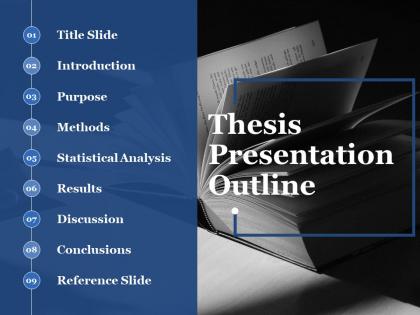
The image displays a PowerPoint slide titled "Thesis Presentation Outline," which is designed to structure a formal presentation of academic research. The outline is presented as a numbered list, indicating the order of sections typically included in a thesis presentation:
1. Title Slide - The starting point of the presentation that usually includes the thesis title, the author's name, and the institution.
2. Introduction - An opening section that sets the stage for the audience, outlining the background and the context of the research.
3. Purpose - This section specifies the research objectives or questions the thesis aims to address.
4. Methods - A detailed account of the research methodology, including how the research was conducted.
5. Statistical Analysis - An explanation of the statistical tools and processes used to analyze the collected data.
6. Results - Presentation of the findings of the research, typically supported by data visualizations such as graphs and tables.
7. Discussion - An interpretation of the results, discussing their implications, significance, and how they relate to existing research.
8. Conclusions - A summary of what has been learned, the importance of the findings, and potential future research directions.
9. Reference Slide - The final slide, listing the bibliographic details of the scholarly works cited throughout the presentation.
The slide uses a monochrome theme with a black-and-white image of open books in the background, symbolizing the academic nature of the content. The layout is clean and professional, designed to guide the presenter through the critical elements of their research in a logical sequence.
Use Cases:
A thesis presentation outline is a structured framework for presenting detailed academic research, essential in various scholarly and professional contexts.
1. Academia
Use: Presenting research findings and methodologies.
Presenter: Graduate Students, Researchers.
Audience: Academic Peers, Professors.
2. Healthcare
Use: Discussing clinical research outcomes or medical trials.
Presenter: Medical Researchers, PhD Candidates.
Audience: Medical Professionals, Academics.
3. Engineering
Use: Explaining technical advancements or experimental results.
Presenter: Engineering Graduates, Research Scientists.
Audience: Engineers, Industry Experts.
4. Environmental Science
Use: Illustrating environmental studies and conservation efforts.
Presenter: Environmental Researchers.
Audience: Environmental Agencies, Non-profits.
5. Pharmaceutical
Use: Detailing drug development research and clinical trial results.
Presenter: Pharmaceutical Researchers.
Audience: Healthcare Professionals, Regulatory Bodies.
6. Education
Use: Outlining educational theories or teaching methodology research.
Presenter: Education Majors, Academic Researchers.
Audience: Educators, Policy Makers.
7. Economics
Use: Presenting economic models, market analysis, or fiscal policy studies.
Presenter: Economists, Financial Analysts.
Audience: Economists, Business Professionals.
Thesis presentation outline ppt summary inspiration with all 5 slides:
Be the boss of their dreams with our Thesis Presentation Outline Ppt Summary Inspiration. Give clear and concise directions to follow.
FAQs for Thesis presentation outline
For your thesis outline, hit the main stuff: research question intro, lit review summary, methodology, findings, and conclusions. Honestly, spend most of your time on findings - that's what they actually care about. Don't drag out your intro too long since your committee already knows the background. Maybe 2-3 slides tops? Oh, and definitely prep for Q&A beforehand. Wrap up with future research or how people can actually use this stuff. Practice your timing so you don't speed through the good parts at the end.
Hit them with your best point right off the bat - you want to grab attention immediately. After that, I'd arrange everything else chronologically or by how important each point is. Whatever makes the most sense for your topic. Each argument should tie back to your main thesis somehow. And don't forget transitions! They're what stop your presentation from sounding like a choppy mess. Honestly, I always read my outline out loud because if it sounds weird to me, it'll definitely sound weird to everyone else. You'll catch those awkward spots way easier that way.
Your intro is basically your elevator pitch - hook them and give a roadmap of what's coming. State your research question clearly, explain why anyone should care, then outline what you'll cover. First impressions matter big time, so this is where you build credibility before hitting them with all the methodology stuff. Practice it till it sounds natural because honestly, if you lose people here, you're kinda screwed for the rest. Oh and don't overthink it - just make sure it flows when you say it out loud.
Mark visual cues right in your outline - stuff like "[SLIDE: methodology flowchart]" or "[DEMO: software interface]." Keeps everything organized. I always add timing estimates too because honestly, it's so easy to get stuck rambling about one chart for way too long. Map your visuals to back up your main points, not just fill space. Oh, and definitely have a backup plan for when tech inevitably crashes - learned that one the hard way. Basically, treat visuals like they're part of your actual argument from the start, not something you'll just throw together later.
Stick to one main point per section and use action verbs to kick off each part - like "Present" or "Analyze." Makes it way clearer what you're actually trying to do. Keep your bullet points short and punchy, more like headlines than full sentences. Here's something I picked up from bombing a few presentations: do the "so what?" test on every section. If you can't quickly say why it matters to your overall argument, either cut it or merge it somewhere else. Oh, and definitely read through your outline out loud while timing yourself. You'll catch the parts that drag on forever way faster that way. Short sentences work. Don't overthink it.
Honestly, it's all about reading the room. Academics want you to get into the weeds - methodology, theory, all that nerdy stuff they love. Industry people? They don't care about your fancy equations. Show them how it actually works in practice. General audiences are trickier though - go too technical and you'll lose them in like 30 seconds. I learned that the hard way once. Oh, and flip your timing too. Non-experts need way more background setup, but experts get annoyed if you spend forever on basics. I always make backup slides just in case I need to switch gears mid-presentation.
Biggest thing? Don't jam every slide with text walls - you'll lose them immediately. I've watched so many people bomb because they tried cramming their whole thesis onto PowerPoint slides. Also, skip the endless background stuff. Like seriously, I sat through one where methodology took forever and we barely heard actual results. Structure it simple: problem, your approach, what you found, why it matters. Oh and practice those transitions between sections or you'll end up rambling (guilty of this myself). Finish with takeaways they'll actually remember walking out.
Okay so first thing - sort feedback into big structural stuff vs tiny edits. Hit the major changes first because honestly, fixing typos when you might delete whole sections is just wasted time. If three people all hate the same paragraph? Yeah, that's gotta go. Don't just slap a band-aid on structural issues either - sometimes you need to completely reorder chapters or merge sections. I'd make a basic spreadsheet tracking each comment and whether you've dealt with it. Sounds nerdy but trust me, you don't want to accidentally ignore your advisor's feedback. When people contradict each other, just ask them directly what they meant instead of guessing.
Definitely use bridging phrases to connect your sections - like "so now that we've covered X, here's how it connects to Y." Pausing between sections helps too, gives people a second to catch up. I used to be terrible at this honestly! Would just jump around and confuse everyone. Now I do a quick recap before moving to the next point. Works way better. Oh and those numbered roadmaps are clutch - people love knowing where you're headed. Practice those transition moments specifically though, that's usually where things get awkward if you haven't rehearsed.
Build your presentation like a pyramid - core stuff at the top, extras at the bottom. Figure out your absolute must-haves first: main question, key findings, wrap-up. Everything else gets ranked by importance. I usually throw some "backup slides" at the end that I can ditch if I'm running behind (learned this the hard way). Practice cutting different sections so you're not scrambling mid-presentation. Oh, and mark up your outline with little symbols - stars for essential, parentheses for optional. That way you'll know what to skip without totally losing your train of thought.
Okay so your conclusion needs to hit three things: sum up what you found, be honest about limitations, and throw in some future research ideas. Don't just rehash your intro - actually tell them what you discovered and why anyone should care. Practice this part like crazy because people will definitely ask questions right after! You've got to say how your work adds to the field, even though it feels weird bragging about yourself. Oh, and end with "thank you" then just... pause. That awkward silence actually works - it signals people can jump in with questions.
Put a solid methodology section right after your lit review. Seriously, don't rush through this part. Break it into subsections - research design, data collection, sample size, analysis approach. Justify why you picked each method and mention limitations upfront. Your committee will grill you on methodology more than anything else, so practice explaining it without all the jargon. A flowchart helps if your process gets complicated (mine was a mess until I mapped it out visually). This section proves you actually know your stuff.
Honestly, I'd skip straight to PowerPoint or Google Slides if you're comfortable with them - the outline view is perfect for mapping out your main points first. But if you're like me and need to see the big picture, try mind mapping with Miro or XMind (or just grab some paper). Notion's pretty clutch for keeping everything organized in one spot. Canva has cool templates too that might give you ideas. Here's the thing though - figure out your story first, then worry about making it look pretty. The content matters way more than fancy transitions or whatever.
Put this section right after your main evidence but before wrapping up. Pick 2-3 real objections people would actually have—not weak ones you can easily knock down. Then show how you'd counter each with solid evidence or reasoning. Don't just brush them off; engage with them properly. Honestly, this part makes you look way more legit than most presenters. Oh, and budget like 10-15% of your time for it. It's tempting to skip but it'll make your whole argument stronger.
You definitely need a Q&A section - it's where you actually prove you know what you're talking about beyond just reading off slides. Your committee wants to see that you've thought about the tricky stuff and can handle pushback on your methods or results. Honestly, this is where a lot of people crash and burn because they haven't prepped for the obvious questions about limitations or what else they could've tried. I'd set aside like 15-20 minutes for it in your timeline. Oh, and definitely practice with some friends first so you don't get blindsided by something basic.
-
very nice
-
perfect
-
Thanks for all your great templates they have saved me lots of time and accelerate my presentations. Great product, keep them up!
-
Wonderful templates design to use in business meetings.