

Sample Roadmap Ppt Powerpoint Presentation Slides






Try Before you Buy Download Free Sample Product
 Impress Your
 Audience
 100%
100% Editable
 Save Hours
 of Time


Introducing Sample Roadmap Ppt PowerPoint Presentation Slides that can help you to present your business journey in a professional way. The roadmap timeline PPT slide will make the audience understand the overview of processes without going through complex details. This contains a set of six professionally designed slides where you can easily highlight your business information. Roadmap summarizes the vision and direction of your business. The project roadmap PPT slides give an overview of the project goals and deliverables. Additionally, business timeline PowerPoint template helps to showcase concepts such as business strategy, project planning, business plan, strategic planning, business development, product roadmap, project management, business milestones, business journey and many more. Its visual graphic elements can assist your team to understand the business strategy. Furthermore, you can also use this to present the business development process to stakeholders. Download roadmap journey presentation graphics to illustrate the business process. Awaken joy in their hearts with our Sample Roadmap Ppt Powerpoint Presentation Slides. Instil faith in the glory of God.
People who downloaded this PowerPoint presentation also viewed the following :
Content of this Powerpoint Presentation
Slide 1: This slide introduces Sample Roadmap Template. State Your company name and get started.
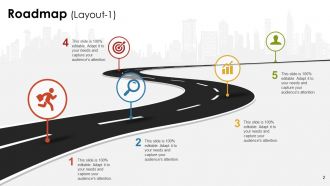
Slide 2: This slide presents the first Roadmap Layout.
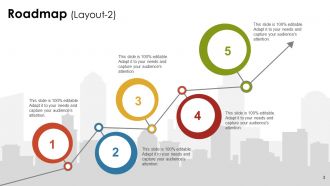
Slide 3: This slide presents the second Roadmap Layout.
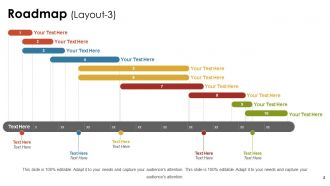
Slide 4: This slide presents the third Roadmap Layout in Gantt Chart form.
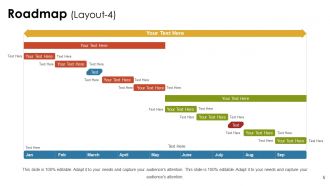
Slide 5: This slide presents the fourth Roadmap Layout in Gantt Chart form.
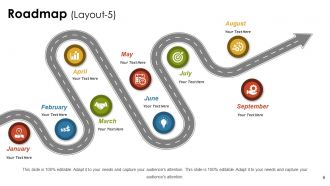
Slide 6: This slide presents the fifth Roadmap Layout for a better presentation.
Sample Roadmap Ppt Powerpoint Presentation Slides with all 6 slides:
Establish yourself as a good candidate with our Sample Roadmap Ppt Powerpoint Presentation Slides. Convince them you have what they desire.

FAQs for Sample Roadmap Ppt
So you need timeline with major milestones, plus what you're actually delivering at each step. Don't forget resources - team size, budget, tools you'll need. Dependencies are huge (I always screw this part up first time around). Build in success metrics so people know when you've hit the goal. Oh, and call out your assumptions and risks right upfront - saves headaches later. Keep slides super visual. Honestly, execs hate walls of text anyway. Your audience wants to see what you're building, when it'll be done, and what might blow up the plan. End by asking for feedback on timeline and priorities specifically.
Dude, trust me on this - visuals are everything for roadmaps. Color coding helps group similar features together, and icons make it super easy to spot different work types. Progress bars show completion status without anyone having to dig around. Honestly, walls of text are the worst - people just zone out immediately. Try swimlanes to separate your teams or products. Different shapes and sizes work great for showing priority levels too. The goal is someone can glance at it and instantly get what's happening. No one should need a PhD to understand your roadmap, you know?
Honestly, the biggest trap is being way too vague with your timelines. You'll go insane if you try cramming everything in at once - trust me on this one. Prioritize like your life depends on it. Don't get crazy detailed in early planning since stuff always changes anyway. Oh, and actually talk to stakeholders during planning instead of blindsiding them later (learned that the hard way). Focus on real problems, not just features that seem neat. I always start with whatever's causing the biggest headaches and figure out the path from there. Works way better than the other way around.
Okay so basically start with your big deliverables and work backwards from there. Map out the key milestones and dependencies, but here's the thing - always add like 20% buffer time because I swear everything takes way longer than you think it will. For long-term stuff use quarters or months, but get more granular with weeks when you're looking at immediate work. Make sure you're crystal clear about which deadlines are internal vs external commitments. Oh and make it visual! Stakeholders need to scan it quickly and see what's happening when without squinting at a wall of text.
Dude, there are so many good options! Miro and Lucidchart are my go-to for visual stuff - you can just drag things around super easily. PowerPoint actually doesn't suck for basic roadmaps if you're already used to it. ProductPlan and Roadmunk are built specifically for this kind of thing, so they're pretty solid. Figma's cool too if you want more design control. Honestly though? Just use whatever your team's already on since getting everyone to actually collaborate is way more important than having the fanciest features. Start with one and migrate later if needed.
Yeah definitely! Agile roadmaps should be way more flexible - think big themes and epics instead of getting into the weeds. I usually plan in quarters or sprints rather than locking down exact dates. Waterfall's the opposite though. You can go super detailed and sequential since you're mapping everything upfront anyway. Honestly, the main difference is how rigid your timeline feels. Agile is more "we're generally heading north" vs Waterfall's "turn left at Main Street, right after 0.3 miles" approach. Oh and don't forget to actually update the thing regularly - I've seen too many roadmaps gathering dust that help nobody.
Look, stakeholder feedback is what stops you from building stuff nobody wants. Sales will bug you about client requests. Support sees where users actually get stuck. Leadership has the strategy view - though sometimes their priorities are... questionable. Yeah, managing all those opinions feels like chaos, but the tension helps you figure out what really matters. I'd set up regular sessions to collect input properly. Otherwise you're just guessing what people need. The conflicting feedback forces better decisions anyway, even when it's annoying to sort through.
Look, roadmaps are basically how you connect what your team does every day to what the company actually wants to accomplish. Without one, people just end up doing random stuff - I've watched entire teams waste months like this. Your roadmap breaks down those big company goals into actual milestones your people can get behind. Everyone sees how their work fits the bigger picture, which honestly makes a huge difference for motivation. Just start by looking at your current projects and figure out which company goals they're hitting. You'll probably find some gaps pretty quickly.
Look, always build in buffer time between big milestones - I learned this the hard way. Only plan for like 70-80% of what you think your team can actually pull off. Priorities will shift (they literally always do), so stick with timeboxed sprints so you can pivot fast. Don't get too detailed planning months ahead either. Monthly stakeholder check-ins are non-negotiable. Oh, and review it weekly with your team - trust me on this one. Spotting problems early beats scrambling later. Your roadmap should flex, not break.
Honestly, just start with what'll actually move the needle for your business and customers. I use this super basic framework - high impact but easy to do = quick wins. High impact but hard = your big strategic moves. Customer feedback is everything, though don't build every random thing they ask for or you'll create a monster. What actually drives retention or revenue? That's your north star. Also factor in technical stuff and be real about what your team can handle. Oh and always pad your timelines because things WILL expand, then tell people early when stuff changes. Trust me on that last part.
Look, roadmaps change constantly - that's just reality. User feedback will make you add stuff you never thought of. Technical problems push back your timelines (always happens). Market shifts force you to completely flip priorities sometimes. I've watched teams where their 6-month roadmap looked totally different from day one. Big features get broken into smaller pieces once you actually dig into the work. Sometimes you realize what seemed simple is actually a nightmare to build. Just treat it like a living doc, not some unchangeable bible. The flexibility is honestly what keeps you sane.
Make it visual and tell a story - nobody wants to stare at boring spreadsheets on a wall (trust me, I've sat through too many of those). Show timelines and milestones so people actually see how their work fits together. Focus on outcomes, not just feature lists. Be upfront about trade-offs and risks - they'll respect the honesty. Always connect everything back to business goals they actually care about. Leave room for pushback and questions. That means they're engaged. Oh, and don't just read slides at them - make it a real conversation.
Honestly, roadmaps are lifesavers for getting teams on the same page. Everyone can see what's happening when, so you don't get engineering confused about marketing deadlines or sales promising stuff that doesn't exist yet. They're basically like a translator between departments - shows priorities, flags dependencies, keeps budgets aligned. The key thing? Make sure all departments can access it and actually update the damn thing regularly. I've seen too many companies create these elaborate roadmaps then forget about them. Once people stop trusting it, they just go back to doing their own thing in silos.
Look, there's two main things to track. First - are you actually hitting your milestones and delivering what you promised? But here's the thing, that's only half the story. You also need to check if what you built actually moved the needle - user adoption, revenue, whatever your main goal was. Customer satisfaction scores help too. I've worked with teams who nailed every deadline but built stuff nobody used (awkward). The sweet spot? Pick maybe 3-4 metrics that matter to your situation. Some should be about delivery, others about real impact. Check them regularly but don't go crazy tracking everything.
It's really about who's gonna read it, honestly. Internal roadmaps can get into the weeds - talk about technical milestones, resources, all that backend stuff your team gets. But client ones? You gotta translate that into what actually matters to them. Like instead of "complete API integration," say "launch date." Keep client roadmaps cleaner and focus on outcomes that'll make their business better. Internal ones can be messier and more detailed since your team won't freak out about shifting timelines. I always think about it this way - what's keeping this person awake at 2am? That's what belongs on their roadmap.
-
I discovered this website through a google search, the services matched my needs perfectly and the pricing was very reasonable. I was thrilled with the product and the customer service. I will definitely use their slides again for my presentations and recommend them to other colleagues.
-
Awesome use of colors and designs in product templates.