

Services sales pitch deck ppt template





Try Before you Buy Download Free Sample Product
 Impress Your
 Audience
 100%
100% Editable
 Save Hours
 of Time


Sales deck presentation is an effective tool in aiding sales pitches presented by a salesperson to potential prospects. It caters to details about service overview offering value proposition in leveraging customer relationships, leading prospects to purchase from the firm. Check out our efficiently designed pitch deck on Services Sales that provides an overview of the firm as a service provider in terms of firm background, mission statement, how the firm is progressing with crucial facts, and service deliverables on a global scale. Business challenges faced by prospects and unified solutions are presented in slides. The Pitch deck provides details about the service providers business model, and it reinvents its subscription-based model. It gives details about different service pricing packages for clients. Service provider firms potential will be determined by financial performance, key milestones achieved, customer story addressing the firms capability in rendering services. Pitch deck caters to slides that depict the firms future potential services managed by the firm in the future. The existing client portfolio is presented with critical members involved in the firms leadership. Get access to this 100 percent editable pitch deck now.
People who downloaded this PowerPoint presentation also viewed the following :
Content of this Powerpoint Presentation
Slide 1: This slide introduces Services Sales Pitch Deck. State Your Company Name and begin.
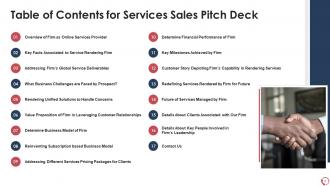
Slide 2: This slide shows Table of Content for the presentation.
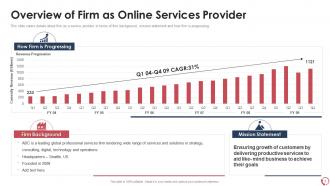
Slide 3: This slide presents about firm as a service provider in terms of firm background, mission statement and how firm is progressing.
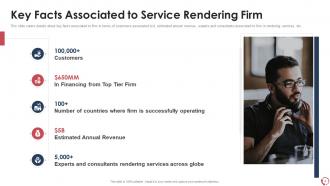
Slide 4: This slide displays details about key facts associated to firm in terms of customers.
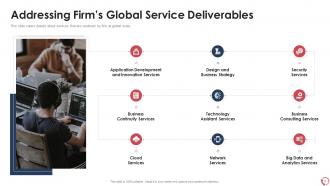
Slide 5: This slide represents details about services that are rendered by firm at global scale.
Slide 6: This slide showcases details about key business challenges are faced by prospects.
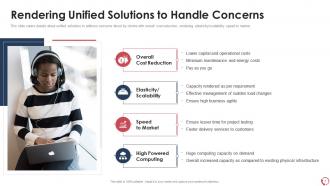
Slide 7: This slide shows unified solutions to address concerns faced by clients.
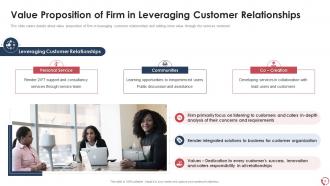
Slide 8: This slide presents Value Proposition of Firm in Leveraging Customer Relationships.
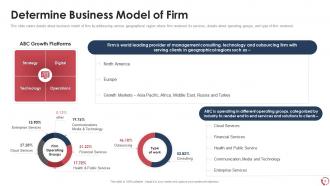
Slide 9: This slide displays business model of firm by addressing various geographical region.
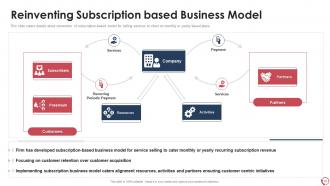
Slide 10: This slide represents reinvention of subscription-based model for selling services to client.
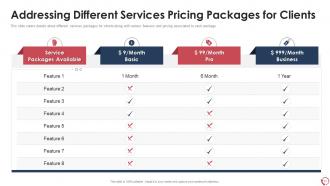
Slide 11: This slide showcases details about different services packages for clients along with various features.
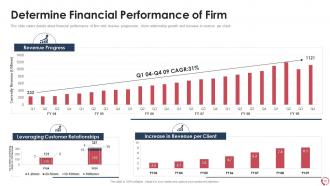
Slide 12: This slide shows financial performance of firm with revenue progression, client relationship, etc.
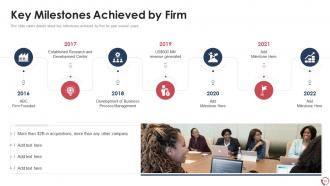
Slide 13: This slide presents details about key milestones achieved by firm for past several years.
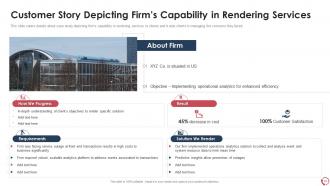
Slide 14: This slide displays Customer Story Depicting Firm’s Capability in Rendering Services.
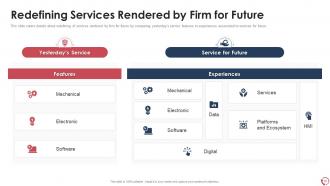
Slide 15: This slide represents details about redefining of services rendered by firm for future by comparing yesterday’s service features.
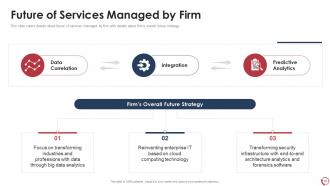
Slide 16: This slide showcases future of services managed by firm with details about firm’s overall future strategy.
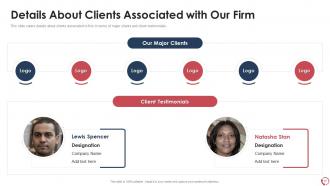
Slide 17: This slide shows details about clients associated to firm in terms of major clients and client testimonials.
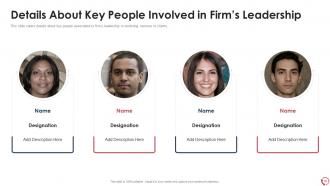
Slide 18: This slide presents Details About Key People Involved in Firm’s Leadership.
Slide 19: This is a Contact Us slide with address, contact numbers and email address.
Slide 20: This slide shows Icon for Services Sales Pitch Deck.
Slide 21: This slide is titled as Additional Slides for moving forward.
Slide 22: This is Our Mission slide with related imagery and text.
Slide 23: This is About Us slide to show company specifications etc.
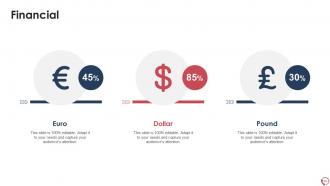
Slide 24: This is a Financial slide. Show your finance related stuff here.
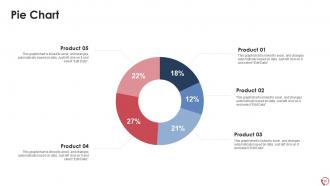
Slide 25: This slide shows Pie Chart with data in percentage.
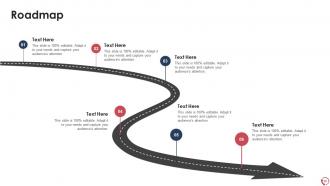
Slide 26: This slide presents Roadmap with additional textboxes.
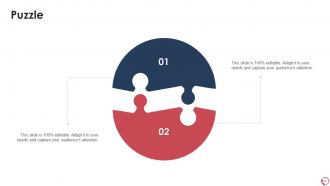
Slide 27: This slide shows Puzzle with related icons and text.
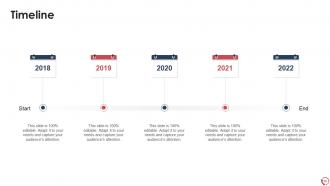
Slide 28: This is a Timeline slide. Show data related to time intervals here.
Slide 29: This is a Thank You slide with address, contact numbers and email address.
Services sales pitch deck ppt template with all 34 slides:
Use our Services Sales Pitch Deck Ppt Template to effectively help you save your valuable time. They are readymade to fit into any presentation structure.










FAQs for Services sales pitch
Okay so first thing - lead with their actual problem, not some generic intro slide. Then jump into how you'd tackle it differently than everyone else. Case studies are huge here, like seriously don't skip this part. I've watched so many people bomb because they couldn't prove they've done this before. Talk about your team's background and why you're not just another consultant. Oh and definitely end with concrete next steps plus what it'll cost - none of that "let's discuss pricing later" nonsense. Keep it tight though, maybe 8-10 slides tops. Focus on what they'll actually get out of this, not a laundry list of services.
Skip the boring company stats and open with how you transformed an actual client. Your prospect should be the hero, you're just the guide helping them win. Honestly, I've watched so many pitches die because they're just feature dumps. Instead, tell them "here's how we took Company X from drowning in problem Y to crushing goal Z." Sprinkle in real quotes and before/after moments. Each section should loop back to their potential success story. Those narrative arcs just hit different than bullet points ever will.
Keep it clean with tons of white space - makes everything look way more expensive. Stick to maybe 2-3 colors max and don't go crazy with fonts. Charts beat bullet points every single time, trust me on this. I swear half the decks I see are just text walls that put everyone to sleep. One idea per slide, and make your text big enough so people in the back can actually read it. Oh, and test it on a projector first - learned that one the hard way when my "perfect" slides turned into a blurry mess during the actual pitch.
Honestly, you just gotta swap out the examples and pain points for each audience. Healthcare folks care about compliance and patient outcomes, right? Tech startups want scalability and getting to market fast. I keep the same basic structure but change all the case studies to match their industry. Use their lingo (but don't go overboard - sounds fake). Your success stories should mirror what they actually deal with. I usually keep 2-3 versions ready for my main targets. Way less work than starting over each time, and you'll hit their specific problems instead of generic stuff that doesn't land.
Honestly, data is what separates you from all the other consultants making empty promises. Numbers don't lie - executives eat that stuff up. You'll want to throw in client success stories, industry benchmarks, maybe some solid ROI figures that actually back up what you're claiming. Without real metrics, you're just another person talking about "digital transformation" or whatever buzzword is trending. Case study results work great too. I always lead with whatever number will make their ears perk up most - could be cost savings, revenue growth, doesn't matter as long as it hits home for your specific audience.
Drop testimonials right after you mention each big benefit - boom, instant proof with real voices. Get specific numbers like "40% revenue boost" instead of fluffy "amazing results" garbage. For case studies, stick to problem-solution-outcome but keep them short because honestly? People zone out fast during presentations. Client names and titles are clutch for credibility if you can swing permissions. Oh, and definitely open with your best testimonial upfront. You'll hook them before they start checking their phones. Trust me on this one - I've sat through way too many boring pitches where they buried the good stuff.
Biggest mistake? Making it all about YOU instead of their problems. Lead with what's bugging them, then show your solution. Also, resist the urge to list every single service you offer - honestly, seeing 47 capabilities on one slide makes my eyes glaze over. Keep the story simple and ditch those awful stock photos. They scream "generic consultant." Oh, and be upfront about pricing ranges from the start. I know it feels scary, but being mysterious about costs just creates weird tension later. End with super clear next steps so they know exactly what happens if they're interested.
Honestly? Interactive stuff is a game-changer for sales decks. Try clickable prototypes or those ROI calculators where they punch in their actual numbers - way more engaging than just talking at them. I've seen some wild "choose your adventure" style presentations where prospects click different paths based on what matters most to them. Pretty genius, actually. Before/after sliders work great too, especially for showing transformations. The whole point is getting them involved instead of just sitting there. Oh, and don't go crazy with it - pick maybe one or two interactive elements that actually help tell your story. Otherwise it's just flashy for no reason.
Definitely share your screen and go slow - people's attention spans are terrible on video calls. Big fonts are crucial since everyone's squinting at different devices. I bombed a presentation once because nobody could see my text! Test everything beforehand and have a backup ready. Chat feature is your friend - ask questions during the presentation, not just at the end. Oh, and pause way more than feels natural. Virtual crowds need extra time to process stuff. Send the slides afterward with your contact info. Trust me on the pausing thing - it feels awkward but works.
Honestly, just ask them straight up after you present - I know it feels weird but you'll get solid info about what clicked and what didn't. Watch how fast they respond to your follow-ups too. Engaged people actually get back to you quickly. Do they book next meetings within a week? Request proposals? Introduce you to their team? Those are good signs. But here's the thing - track everything in a simple spreadsheet. Which deck versions actually turn into deals? I've been surprised by what works versus what I thought would work. The conversion data doesn't lie.
Keep it to 10-15 slides tops. I've sat through way too many 30-slide death marches - they're brutal. Here's what works: one main point per slide, and ask yourself "so what?" about each one. Can't answer why it matters? Delete it. Your flow should hit: problem, your solution, proof you can actually pull this off, then what's next. Oh, and definitely prep some backup slides for when they start drilling into details during Q&A. You want them talking, not zoning out while you drone on. Short presentations get better conversations going anyway.
Dude, CTAs are what separate actual closers from people who just give nice presentations. You don't want prospects walking away thinking "neat slides" and then doing absolutely nothing. Be super specific about next steps - schedule that follow-up, sign the contract, whatever. Don't just dump them at the end either, sprinkle them throughout because honestly? People's attention spans are trash. Make them pop visually and sound decisive: "Let's kick off your pilot next Tuesday" hits way harder than some weak "please contact us" nonsense. Oh, and give multiple response options so you're not missing easy wins.
Honestly? Just stick with PowerPoint or Google Slides for pitch decks. Clients can actually open them without issues, which matters more than you'd think. Canva's solid if design isn't your thing - though yeah, some templates scream "I used Canva." Keynote's beautiful if your whole team's on Mac (big if). Figma works too but might be overkill. Here's what I'd do: nail your content first, worry about the fancy stuff later. Whatever you pick, make sure everyone can edit it and it exports to PDF cleanly. Nothing worse than a deck that breaks right before a meeting.
Start with your brand guidelines - same colors, fonts, logo stuff. Can't tell you how many pitches I've seen that look like they're from totally different companies! Your messaging should match what's already on your website. Same tone, same key phrases people know you for. Otherwise prospects get this weird disconnect vibe. Get someone from marketing to eyeball it before you present. Honestly, they'll catch stuff you missed. Your pitch deck should feel like it naturally flows from everything else you do, not some random slideshow you threw together last minute.
Okay so first thing - practice out loud a bunch, your mirror won't judge you. I actually record myself because you catch all the "ums" and weird pauses you don't notice otherwise. Time each section too so you're not rushing at the end. The transitions between slides are where people usually mess up, so drill those especially. Know your key stats and client stories really well so if someone asks random questions, you can roll with it. Oh and practice handling pushback with coworkers first - way less awkward than figuring it out live. Your opening needs to sound natural, not like you memorized a script. Day of, get there early to test the tech and maybe do some vocal exercises or whatever works for you.
-
Best way of representation of the topic.
-
Best Representation of topics, really appreciable.