

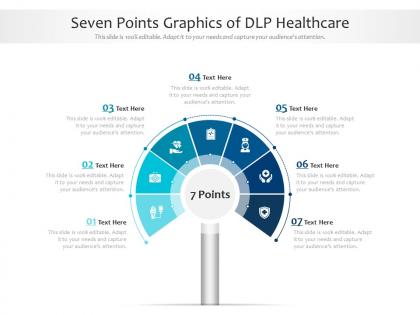
Seven points graphics of dlp healthcare infographic template




Try Before you Buy Download Free Sample Product
 Impress Your
 Audience
 100%
100% Editable
 Save Hours
 of Time


Our Seven Points Graphics Of DLP Healthcare Infographic Template are topically designed to provide an attractive backdrop to any subject. Use them to look like a presentation pro.
People who downloaded this PowerPoint presentation also viewed the following :
Seven points graphics of dlp healthcare infographic template with all 2 slides:
Use our Seven Points Graphics Of DLP Healthcare Infographic Template to effectively help you save your valuable time. They are readymade to fit into any presentation structure.
FAQs for Seven points graphics of dlp
First, map out where all your PHI actually lives - spoiler alert, it's everywhere. Get data discovery tools running, then focus on endpoint protection and network monitoring. Encryption is non-negotiable for data whether it's moving around or just sitting there. Access controls come next, but honestly user training might be your biggest win since people mess up constantly. Activity monitoring helps catch weird stuff happening. Oh, and have an incident response plan ready because something will eventually go wrong. Start with your most sensitive data first, then build out from there once you've got a handle on things.
Honestly, infographics are perfect for this stuff because healthcare workers are swamped and need info fast. Complex DLP policies? Nobody has time to read through pages of that. Visual breakdowns with flowcharts and color coding actually make sense - they can spot data classification levels and breach protocols in seconds. Focus on real scenarios they deal with daily, like patient records or mobile device usage. Short, scannable format works best. Oh, and definitely put them somewhere visible where staff hang out regularly - break rooms work great for this kind of thing.
Honestly, most breaches happen because of basic human mistakes - not some Hollywood hacker scenario. Your biggest risks are probably unsecured emails, lost devices, and staff accidentally sending patient info to the wrong people. Those medical IoT gadgets are sketchy too since nobody thinks to secure them properly during setup. I'd bet money that someone's forwarding PHI to their personal Gmail right now or leaving computers unlocked. Super frustrating but totally preventable. Start with training your team and encrypting everything. Email security policies can wait until you've got the basics down.
Dude, infographics are perfect for this! Start with the breach itself, then show how everything falls apart - patient trust tanks, fines pile up, legal bills explode. Charts work great for the money stuff over time. Icons can show how many patients got hit or which rules were broken. What really works though? Real case studies with clear before/after shots. Executives need to *see* the damage, not just read some boring report about it. The visual thing actually makes them panic a little (in a good way) because they finally get what could happen to them.
Honestly, training is where most DLP projects live or die. People need to actually understand what counts as sensitive data and how to handle it without setting off alarms constantly. One-time sessions are pretty much useless - you need ongoing education since everything keeps changing. False positives will absolutely kill morale if staff don't know what they're doing. Role-specific scenarios work way better than generic training because people can actually see how it applies to their daily work. Otherwise they'll just find workarounds or ignore the whole system. It's really about making it relevant to what they're already doing.
Look, HIPAA basically tells you what counts as PHI and how to protect it - that's your starting point for DLP policies. Your system needs to catch unauthorized PHI whether it's going out via email, cloud uploads, whatever. The annoying thing is HIPAA doesn't give you exact tech specs, so you have flexibility but also have to figure out the implementation yourself. Configure your DLP around that "minimum necessary" rule they love. Log everything for audits - trust me on that one. I'd start by mapping out how your data actually moves around right now, then check it against what HIPAA wants.
So there's a few main types you'll run into. Network DLP watches data moving around your systems. Endpoint DLP sits on individual computers and laptops. Storage DLP guards stuff sitting in databases - that one honestly catches way more violations than the others in my experience. You've also got CASBs for cloud apps, plus email security gateways since PHI has this annoying habit of leaking through email. Oh, and definitely map out where your sensitive data actually lives first before you start throwing technology at the problem. Makes everything way easier.
Track your detection rates and false positives first - those are pretty straightforward. But honestly? The behavioral stuff matters way more. Are people actually completing training and changing how they handle data? Response times tell you a lot too. I'd set up baselines now and check quarterly - you want to see fewer accidents happening over time, plus faster cleanup when things go sideways. Oh, and don't get too caught up in perfect metrics at first. Start simple, then build from there once you see what actually moves the needle.
Here's what I'd do - visual hierarchy is everything, especially with healthcare data since it gets messy quick. Stick with simple messaging and colors/fonts that match your brand. Honestly, I always go with way less text than I think I need. Structure it so info flows top to bottom logically. Throw in some icons to break up text walls - nobody wants to read paragraphs of DLP stuff. The whole point is making it digestible at a glance. Oh, and definitely test it on someone who doesn't work with you. If they're confused after 30 seconds, it's too complex.
For telehealth DLP, endpoint security is huge since patients connect from who-knows-where outside your network. You'll need application-level monitoring that can catch sensitive data getting shared during video calls. Most telehealth platforms have some built-in DLP for chat and file sharing - honestly, audit what you've already got first before buying more stuff. The balance between security and usability is brutal here. Patients already think telehealth is complicated, so don't make it worse with clunky security. Mobile devices are critical too since half your patients probably use their phones for appointments.
Look, patient confidentiality makes healthcare DLP way trickier than regular business stuff. You can't just blanket-block all medical data because doctors actually need to share patient info for treatment - which is obvious but complicates everything. HIPAA makes it even messier since you need super granular controls for different data types. Role-based rules are your best bet here. The system has to know who can access what and when, otherwise you'll either expose PHI or completely hamstring your medical staff. It's honestly a nightmare to balance security with workflow efficiency.
Honestly, infographics are perfect for this stuff. Show your sensitive data - PHI, lab results, billing info - moving through departments with arrows and color coding. Swimlanes work great for different user roles. I'd highlight the risky spots where data might leak since those are usually the problem areas. Way better than slogging through compliance documents that put everyone to sleep! You can spot DLP gaps instantly and actually get stakeholders to pay attention. Oh, and use icons to show where data enters and exits your system - makes the whole flow super obvious even to non-tech people.
Honestly? Legacy systems are gonna be your biggest headache. Healthcare IT wasn't designed for modern DLP - you're stuck with weird proprietary formats and ancient APIs that hate each other. Data flows everywhere too: EMRs, imaging, billing software, the works. Mapping all those connections is brutal. Oh and performance takes a hit since DLP scanning slows everything down (which doctors absolutely love, as you can imagine). I'd say start small with just one system as a pilot. Work out the bugs there first, then expand slowly. Way less painful than trying to do everything at once.
Honestly, social media's pretty solid for this stuff. Post quick DLP tips and privacy reminders that people will actually look at - nobody's reading those massive policy docs on their phone anyway. LinkedIn's perfect for HIPAA infographics, and if you've got Yammer or something internal, even better for reinforcing training. Facebook groups work too for smaller practices discussing real scenarios. I'd skip Twitter obviously since it's basically a wasteland now. Visual content is where it's at - break down complex DLP concepts into simple dos and don'ts. Start with one post weekly and see what your team engages with most.
So AI-powered DLP is getting crazy good at understanding medical context now. Cloud-native stuff that plays nice with telehealth platforms is another big one. Zero-trust is everywhere - just assume everything's already hacked, honestly. Behavioral analytics can flag weird patterns too, like when someone suddenly pulls way more patient files than normal. The compliance rules keep changing (ugh), so you want tools that adapt automatically. I'd honestly start looking at vendors who built this stuff from scratch instead of just tacking it on later. Way less headaches down the road.
-
The Designed Graphic are very professional and classic.
-
Topic best represented with attractive design.
-
Best Representation of topics, really appreciable.
-
Wonderful templates design to use in business meetings.
-
Very unique, user-friendly presentation interface.