


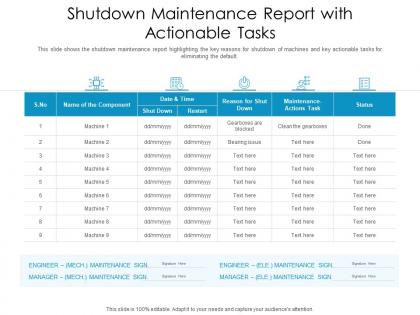
Shutdown maintenance report with actionable tasks




Try Before you Buy Download Free Sample Product
 Impress Your
 Audience
 100%
100% Editable
 Save Hours
 of Time


Our Shutdown Maintenance Report With Actionable Tasks are topically designed to provide an attractive backdrop to any subject. Use them to look like a presentation pro.
People who downloaded this PowerPoint presentation also viewed the following :
Shutdown maintenance report with actionable tasks with all 2 slides:
Use our Shutdown Maintenance Report With Actionable Tasks to effectively help you save your valuable time. They are readymade to fit into any presentation structure.

FAQs for Shutdown maintenance report
So you'll need the basics: scope of what got done, timeline comparisons, budget stuff, and any problems that came up. Safety metrics are huge - incidents, near-misses, injury-free hours. Don't skip the lessons learned section (seriously, that's where the gold is). Equipment condition notes and deferred work should be in there too. Oh, and recommendations for next time. Your report needs to tell the actual story of what went down, not just be a boring task list. Definitely throw in photos of the major work - way better than trying to explain everything in words.
Look, nobody wants to dig through 20 pages of maintenance logs when they could just glance at a chart instead. Your shutdown reports need visuals - bar charts for completion rates, Gantt charts showing timelines, heat maps for equipment problems. Makes everything way easier to understand. Plus your execs will actually read it if they can grasp what's happening in 5 minutes instead of an hour. I'd start simple with basic completion charts, then add the fancy stuff later. Trust me, turning all that text into pictures saves everyone's sanity.
Ugh, don't be vague about what you actually did and how long it took - specifics are everything. I learned this the hard way when I waited until the last minute and couldn't remember jack from two weeks prior. Document your wins too, not just the disasters. Oh, and make sure you note anything that got pushed to next time with reasons why. Honestly, the best move is jotting stuff down as it happens rather than trying to piece together the whole shutdown later. Your brain during those crazy weeks isn't gonna remember half the details you think it will.
Look at your past shutdown data - it's seriously useful for setting realistic timelines. I'd pull records from previous ones to spot patterns, like which equipment always runs over schedule or what issues keep coming back to bite you. Compare costs and downtime from similar shutdowns too, helps validate if you're on the right track. Honestly, most people don't document this stuff well enough, but if you track everything consistently you'll start seeing trends. Then you can actually make smart decisions instead of just winging it every time.
Dude, you absolutely can't do this shutdown report solo. Operations has all the equipment data you need. Maintenance crews know what actually got done (versus what was supposed to happen). Safety team handles any incidents that went sideways. Planning deals with schedule stuff. Getting everyone's input on time is honestly like herding cats - some people always wait until the last minute, you know? But you need all those pieces to make sense of everything. Set deadlines early and give each team their own section to fill out. Oh, and make a template so they know what format you want.
Honestly, just follow whatever standards your industry uses - API, ASME, etc. Use their exact terminology and formats since they've basically done the work for you already. Grab all their required data points, especially safety stuff and inspection results. Build those compliance checks into your process from the start rather than scrambling later (learned that the hard way). Short sentences work better than rambling paragraphs. Create a simple checklist you can mark off as you go. Way easier than trying to remember everything. The maintenance intervals are usually the trickiest part to track properly.
Look, you really want to nail down schedule performance first - did you hit your planned timeline or not? Budget variance is huge too, obviously. Work completion rates round out the big three that actually matter. Don't skip safety metrics either, that's just common sense. Post-shutdown equipment reliability tells you if the work was done right, and rework percentages are brutal but honest indicators. Honestly, some people track way too much stuff and miss the forest for the trees. Just compare these against your original targets and you'll know exactly where you stand.
Get those shutdown reports done right after each planned maintenance - like within 48-72 hours max. Your brain's gonna forget the important stuff if you wait longer (learned this the hard way). Document what worked, what was a disaster, and any curveballs that hit you. Pull in maintenance, operations, and planning people for the review so you're not missing anything obvious. The real money's in updating your procedures based on what you learned. Otherwise you're just doing paperwork for no reason. Oh, and actually USE those lessons next time - shocking concept, right?
Capture stuff while it's still fresh in everyone's head - seriously, don't wait weeks because people forget everything. Do quick daily debriefs during shutdown where team leads jot down what worked and what was a disaster. I've watched so many good insights vanish because everyone thinks they'll remember later (they won't). Simple template works best - technical problems, resource issues, process fixes. Oh and actually assign someone to compile this mess into your final report. Raw notes just sitting around are useless for next time.
Be super specific with your recommendations - none of that vague corporate nonsense. "Replace," "Inspect," "Upgrade" - start with action verbs and include exactly what equipment, when, and how urgent it is. I can't tell you how many useless reports I've seen because they were too generic. Group everything by system or priority level so the maintenance guys can actually plan around it. Throw in cost estimates if you've got them. The "why" behind critical stuff is huge - don't skip that part. Each recommendation should make sense even if someone only reads that one section.
So for shutdown maintenance reports, I'd go with CMMS software like SAP PM or Maximo to track your work orders. That's your foundation. But honestly? Their reporting sucks, so most people export everything to Excel or Power BI for the actual reports. Way easier to format that way. Tableau's solid if you're pulling from multiple sources and need to visualize downtime trends. Oh, and cost analysis - can't forget that part. The main thing is capturing everything in one system during shutdown, then use whatever tool your team doesn't hate. No point picking fancy software nobody knows how to use.
Build feedback loops right into your process from the start. I'd send drafts to ops, finance, and safety teams with a 24-48 hour window to comment. Honestly, shared docs work great for this - people can drop comments right where they spot issues. For bigger shutdowns, quick face-to-face meetings help way more than email chains. Trust me on this one - I missed some major input once because I was being too casual about collecting feedback. Oh, and use a simple template with specific questions about accuracy and completeness. Makes it systematic instead of just hoping people will speak up.
So basically, planned shutdowns let you prep everything beforehand - you'll have detailed schedules, who's doing what, the whole nine yards. Unplanned ones? You're scrambling to figure out what went wrong and document the damage. Both need the same core maintenance data though, just different focus. With planned stuff, you're being proactive about documentation. Unplanned is all about incident response and root cause analysis. Oh, and definitely track your actual hours vs what you planned - that data's gold for next time. Honestly, the unplanned reports are way more stressful to write!
Look, you've gotta document both your upfront risks AND what actually happened during the shutdown. Write down which mitigation strategies worked and which ones totally flopped - plus any curveballs nobody saw coming. Near-misses are just as important as the stuff that actually went wrong. I honestly get annoyed when people skip this part because it's incredibly valuable for the next team. Don't forget risk ratings, who owned what, and timeline impacts. Being brutally honest about what blindsided you will save future shutdowns from stepping in the same mess.
Honestly, that shutdown maintenance report is pure gold for getting better each time. It shows you what worked, what didn't, and all the weird stuff that happened in between. Look for patterns - like if the same equipment keeps failing or if certain processes always take longer than expected. I always forget the little details between shutdowns (brain fog is real), so having everything documented helps a ton. The trick is actually sitting down afterward and turning those insights into real changes for next time, not just filing it away somewhere.
-
Thanks for all your great templates they have saved me lots of time and accelerate my presentations. Great product, keep them up!
-
Great quality slides in rapid time.