

Six Phases Of Google Data Analytics




Try Before you Buy Download Free Sample Product
 Impress Your
 Audience
 100%
100% Editable
 Save Hours
 of Time


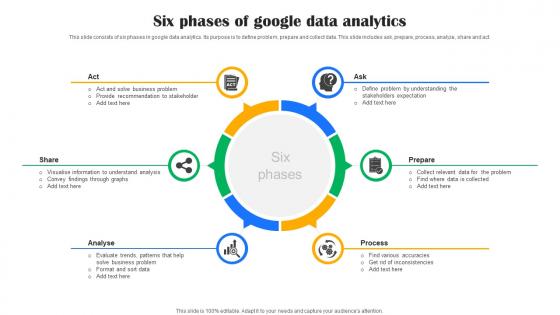
This slide consists of six phases in google data analytics. Its purpose is to define problem, prepare and collect data. This slide includes ask, prepare, process, analyze, share and act.
People who downloaded this PowerPoint presentation also viewed the following :
Six Phases Of Google Data Analytics with all 9 slides:
Use our Six Phases Of Google Data Analytics to effectively help you save your valuable time. They are readymade to fit into any presentation structure.








FAQs for Six Phases Of
Google Data Analytics comprises data collection methods, audience segmentation, conversion tracking, real-time reporting, and goal configuration tools. These components work together by monitoring user behavior, measuring campaign effectiveness, and identifying traffic sources, with many businesses finding that mastering these fundamentals enables better decision-making and significantly improved marketing ROI.
I notice your question appears to be incomplete - it ends with "How does Google Data" but doesn't specify what aspect you'd like me to address (e.g., "How does Google Data Analytics work?" or "How does Google Data Studio help businesses?"). Could you please complete your question so I can provide you with a comprehensive 50-60 word answer that matches the specified writing style and covers the specific aspect of Google Data Analytics you're interested in? For example, you might be asking: - How does Google Data Analytics track user behavior? - How does Google Data Analytics help businesses? - How does Google Data Analytics integrate with other tools? - How does Google Data Analytics measure ROI? Please provide the complete question and I'll generate the appropriate response following all the guidelines above.
-
Designs have enough space to add content.
-
“Excellent information with easy access.”