


Smart Manufacturing Dashboard For Inventory Management Smart Manufacturing Implementation




Try Before you Buy Download Free Sample Product
 Impress Your
 Audience
 100%
100% Editable
 Save Hours
 of Time


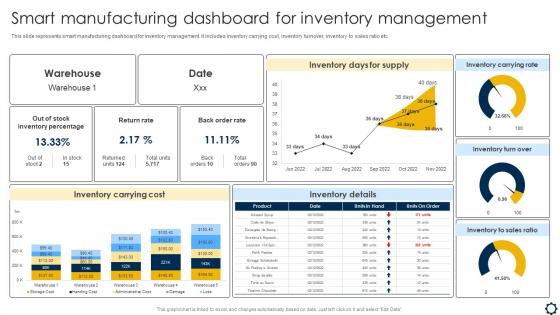
This slide represents smart manufacturing dashboard for inventory management. It includes inventory carrying cost, inventory turnover, inventory to sales ratio etc.
People who downloaded this PowerPoint presentation also viewed the following :
Smart Manufacturing Dashboard For Inventory Management Smart Manufacturing Implementation with all 7 slides:
Use our Smart Manufacturing Dashboard For Inventory Management Smart Manufacturing Implementation to effectively help you save your valuable time. They are readymade to fit into any presentation structure.






FAQs for Smart Manufacturing Dashboard For Inventory Management
Honestly, start with the basics - inventory turnover and stock levels by SKU are huge. Days of supply remaining too. Lead times from your suppliers matter way more than people think since they mess with your planning if they're off. Track your order fill rates and how often you stock out (trust me, those angry customer calls get old fast). ABC analysis helps you figure out which inventory actually matters. Don't forget carrying costs and how much obsolete stuff you're sitting on - that adds up quick. Oh, and if you're in manufacturing, add work-in-progress tracking and component availability for production schedules.
So basically you get instant updates instead of waiting for yesterday's reports. Materials get tracked through production automatically, bottlenecks show up before they wreck everything, and reorders trigger when you hit certain stock levels. Honestly beats those awful "oh crap we're out of parts" moments that destroy your whole schedule. Sensors and machines feed data continuously so inventory stays current - though setting it up can be a bit of a pain initially. I'd connect your most critical stuff first then expand out. Game changer once it's running.
Dude, IoT sensors are pretty sweet for inventory tracking. They automatically update stock levels and tell you exactly where materials are on the production floor. When you're running low on something, boom - instant alert. No more walking around with clipboards doing manual counts (honestly, who has time for that?). The data feeds straight into your dashboard so you can see everything in real-time. Really helps prevent those "oh crap, we're out of parts" moments and cuts down on waste too. I'd say start with whatever inventory headache bugs you most - that's where you'll see results fastest.
So predictive analytics is basically like having a crystal ball for your inventory - it looks at your past usage, seasonal patterns, production schedules, all that stuff to predict when you'll run low before it actually happens. Way better than just guessing or panic-ordering everything. You won't be stuck with tons of extra stock eating up your cash flow, but you also won't be scrambling for emergency orders that cost way more. Honestly, the ROI on this stuff is pretty solid once you get it dialed in. I'd start with your top 20% SKUs first - easier to manage that way.
Heat maps are your best friend for inventory - you can instantly see which locations are running low on stock. Bar charts are solid for comparing SKU quantities or looking at different time periods. Honestly, gauge charts are pretty clutch for fill rates since they give you that immediate "oh crap, we're in the red" moment. Line graphs track trends over time, which helps catch seasonal stuff. Skip pie charts though, they're basically worthless for this kind of data. I'd start with heat maps and bars as your base, then add the others depending on what your team actually looks at every day.
So these dashboards basically show you real-time data on how fast stuff is moving - which products are flying off shelves vs just sitting there collecting dust. They track seasonal patterns too, which is super helpful since nobody wants to be stuck with Valentine's candy in March, you know? The cool part is they use your historical sales data to actually predict when demand might spike or tank. I'd definitely set up alerts for when your forecasted demand is way higher than what you've got in stock. Honestly beats guessing when to reorder by a mile.
Honestly, the biggest pain will probably be getting your old systems to talk to new IoT stuff - integration's always messier than expected. Data quality's huge too since garbage in means garbage out, you know? Your team's gonna need time to learn the new setup, which means training and getting everyone on board. The upfront costs can be brutal - sensors, software, maybe new infrastructure. Also random thought but I've seen companies rush this and regret it. Definitely pilot it in just one area first. Work out the issues there before rolling it everywhere.
So basically, ML algorithms look at your past demand data, supplier timing, and seasonal stuff to figure out when you should reorder. Way better than guessing with static numbers. They keep learning from real consumption patterns and adjust automatically - honestly beats doing it manually every time. The cool part is they factor in production schedules, how reliable your suppliers actually are, plus random things like weather trends. You'll need at least 12-18 months of good data though, otherwise the results are kinda useless. Takes time but it's worth it.
So for manufacturing inventory dashboards, I'd probably go with Power BI first - especially if you're already using Microsoft stuff. Tableau and Grafana are solid too though. Power BI just connects easier with Excel and whatever else your team's already working with. Grafana's more customizable but you'll spend way more time setting it up (learned that the hard way on a project last year). Main thing is making sure it can actually talk to your ERP and IoT sensors without costing a fortune. I'd start small - maybe one dashboard to test everything out before going all in.
Dude, UI design can totally make or break your inventory dashboard. I've watched expensive systems completely tank because the interface was trash. Your team needs to find critical metrics instantly - not hunt through three different menus. Make navigation super intuitive and put your most important KPIs right up front where they're impossible to miss. Clean layouts help a ton. Also, group related stuff together logically. Honestly? Test it with real users first because what makes sense to you might confuse everyone else. Bad design means people miss alerts and make crappy decisions.
Honestly, just build different dashboards for each group - they all care about totally different stuff. Plant managers want the big picture KPIs like equipment effectiveness and production targets. Your floor supervisors need real-time machine alerts and bottleneck warnings. Finance people? They're obsessed with inventory costs and waste numbers, as usual. Maintenance teams should get the predictive analytics and health scores for equipment. Use filters and permissions so nobody's drowning in irrelevant data. I'd start by actually talking to each team about what's driving them crazy day-to-day, then build around that.
Honestly, cloud tech is a game changer for this stuff. You can pull up your inventory dashboard from literally anywhere - your phone while you're getting coffee, laptop at home, whatever. The whole team sees updates in real time, so no more of that "are we looking at the same spreadsheet?" chaos. Multiple people can work on the same data without stepping on each other's toes. Permission settings let you control who sees what, and everything backs up automatically. I probably should've mentioned this earlier, but the coordination improvement happens pretty much immediately once you get it set up.
Start with authentication and encryption - that's your foundation. Multi-factor auth for everyone, and encrypt everything in transit and at rest. Role-based access is huge too. Like, why would your floor managers need executive-level data access? Makes no sense. Regular security audits help catch stuff early, plus keep everything patched and updated. If you're connecting to other manufacturing systems, don't forget API security - that's where a lot of breaches happen these days. NIST framework is solid to build from, then tweak it based on how sensitive your manufacturing data actually is.
So these smart manufacturing dashboards are basically lifesavers for all that compliance stuff nobody wants to deal with. Real-time inventory tracking, automated FDA batch records, ISO docs - you name it. The system pulls everything straight from your existing setup, which honestly saves so much time. No more panicking before audits or hunting down missing paperwork at the last minute. It'll even catch issues early, like when materials are about to expire. Set up the automated reporting once and you're golden - future you will definitely appreciate not missing those regulatory deadlines again.
Honestly, it's a game changer once you get your supplier feeds talking to your dashboard. Real-time data means you'll actually know what's in your warehouse instead of playing that awful guessing game we've all been there with. Live updates from suppliers and transport kick those outdated spreadsheets to the curb. You can spot delays instantly, track shipments properly, see actual stock levels. No more "wait, didn't we get that delivery last week?" moments. I'd start with your biggest suppliers first - way less headache that way. The whole point is getting rid of those annoying gaps between what your system thinks you have versus what's really there.
-
Crisp and neat slides. Makes it fun and easier to curate presentations.
-
What a stunning collection of customizable templates! Really a time-saver..