


Major Social Media Security And Privacy Issues




Try Before you Buy Download Free Sample Product
 Impress Your
 Audience
 100%
100% Editable
 Save Hours
 of Time


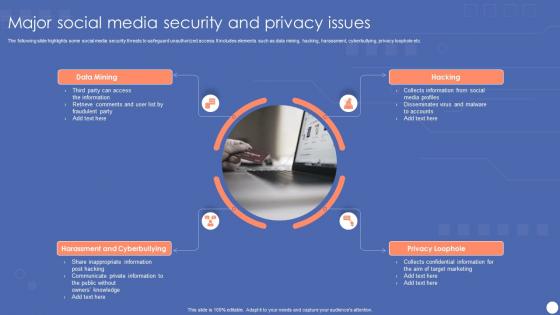
The following slide highlights some social media security threats to safeguard unauthorized access. It includes elements such as data mining, hacking, harassment, cyberbullying, privacy loophole etc.
People who downloaded this PowerPoint presentation also viewed the following :
Major Social Media Security And Privacy Issues with all 6 slides:
Use our Major Social Media Security And Privacy Issues to effectively help you save your valuable time. They are readymade to fit into any presentation structure.





FAQs for Major Social Media Security
Phishing scams are probably the worst - fake profiles trying to grab your info and those sketchy clickbait links with malware. Hackers love taking over accounts too, they'll lock you out and pretend to be you. Oh and those random quiz apps? Total data miners. Some scammers even play the long game, building fake friendships to slowly get your personal stuff. Two-factor authentication is a lifesaver honestly. Just be suspicious of random messages, even if they look like they're from friends you know.
Lock down your privacy settings - make everything private so randos can't see your stuff. Don't post your full birthday or where you live, and never announce vacation plans while you're gone (learned that one the hard way lol). Only accept friend requests from people you actually know in real life. Location tracking? Turn that off unless you specifically need it for something. Oh and your friend lists don't need to be public either - honestly not sure why that's even a default setting. These changes are pretty quick to make but they'll protect you way better.
Honestly, you should really tighten up your privacy settings if you haven't already. They're what stop random weirdos from seeing all your stuff and potentially stealing your info. Go through each app and switch everything to friends-only, turn off that creepy location tracking, and block third-party data sharing. I spent way too much time last month fixing my Instagram settings - apparently everything was public by default? Super annoying. It's like leaving your front door wide open. Takes maybe 10 minutes but totally worth it to keep scammers and identity thieves away from your personal info.
Dude, grab those usernames on all the big platforms NOW. Even Instagram, TikTok, whatever - doesn't matter if you're not using them yet. Trust me, someone will snatch them up otherwise. Keep everything consistent - same profile pic, bio, the whole deal. Oh and get strong passwords plus two-factor auth set up. I know it's annoying but whatever. Check for fake accounts every so often too. Just search your brand name and see what pops up. Report the sketchy ones right away. Getting a trademark is smart if you can swing it - gives you way more power against copycats later.
Get a password manager - seriously, Bitwarden or 1Password will save your life. They create super strong passwords you don't need to memorize. At least 12 characters with uppercase, lowercase, numbers, and symbols if you're making your own. Random word passphrases work too, like "Coffee47!Mountain$Blue." Don't you dare reuse your social media passwords for banking or email. That's just asking for trouble. Two-factor authentication is a must - I know it's annoying but trust me. Start with your bank and email first, then work down to less critical stuff.
So basically 2FA just means you need two things to log in - your password plus a code from your phone. Even if someone figures out your password, they can't get in without that second code. Honestly such a game changer once you actually set it up (took me forever to do it lol). You can either use your phone number or get an app like Google Authenticator. Takes like 5 minutes to set up on Instagram, Twitter, whatever. I'd definitely turn it on for your main accounts, especially if you've got any business stuff on there.
Oh man, that's rough. First thing - change every password immediately and cut off access to anything compromised. You need to figure out what data got exposed, then tell your users right away (they'll be pissed if they find out later). Document everything as you go - total pain but you'll need it for legal stuff. Contact your platform's support team to lock things down and investigate. The whole thing honestly sucks but speed is everything here. Your reputation depends on how fast you move. Once it's contained, update your security based on whatever went wrong.
So basically scammers create fake posts, profiles, or send sketchy messages that look real to steal your info. They'll impersonate brands or even your friends - honestly, the fake giveaway thing is so overdone at this point. Watch for bad grammar, weird URLs, or anything asking for passwords. Those "your account expires in 24 hours!" messages? Total BS. Here's what I do: hover over links first to see where they actually go, double-check friend requests from people you already know (why would they need a second account?), and just go straight to the real website instead of clicking through social media.
Ugh, honestly social media data mining is sketchy as hell. Companies are grabbing way more than you think - where you go, who you talk to, what you're into politically. They're building these crazy detailed profiles for ads and selling your info to random third parties. Most people don't even realize how deep the tracking goes. Even your "deleted" stuff might still be sitting on their servers somewhere, which is wild. I'd definitely check your privacy settings more often and maybe don't post everything publicly. There are some privacy-focused apps out there too if you're really paranoid about it.
Oh man, this is such a pain but totally worth doing. First thing - dig up ALL your social accounts, even that weird Pinterest one from 2021 nobody uses anymore. Check who's got admin access and boot anyone who shouldn't be there. Turn on two-factor auth everywhere if you haven't already. Also, your account logs might show weird login attempts or sketchy activity. Honestly? Fake accounts copying your brand are everywhere these days, so search for those too. Write down what you find and set a reminder to check everything again in like 3 months. Trust me, catching this stuff early saves you from way bigger headaches later.
Definitely get a password manager first - I can't stress this enough, remembering dozens of passwords is impossible. Turn on two-factor authentication everywhere too. Check your privacy settings every few months and clean out old app permissions you forgot about. Those login alerts are clutch for catching weird activity early. Never click sketchy DM links, even from friends since accounts get hacked all the time. Oh, and make sure your passwords are actually unique and strong. Honestly, most people think they're being careful but still reuse the same password everywhere.
Look, social engineering totally flips the script on social media security. These scammers aren't breaking into your accounts - they're tricking you into handing over the keys. They'll fake profiles, buddy up to your team, pretend they're someone you trust. Then boom, people are sharing passwords thinking they're helping a coworker. It's wild how convincing they are now. You've gotta train everyone to spot this stuff, not just rely on firewalls and whatever. Double-check through another channel before sharing anything important, even if that "urgent" request looks totally real.
Honestly, the legal stuff around social media security is getting pretty scary. GDPR violations can cost millions, and the FTC doesn't mess around either. If hackers get into your accounts and steal customer data, you're looking at class action lawsuits - which seem to happen constantly these days. What's really sneaky is when they use your compromised accounts to scam your followers. That opens up a whole other can of worms legally. Set up 2FA on everything ASAP. Document whatever security measures you have because regulators want proof you tried. Oh, and limit who has access to your accounts - fewer people = fewer problems.
Honestly, I just follow security researchers on Twitter - they're always first to catch new stuff. Google alerts for "social media security" help too. KrebsOnSecurity is solid, and SANS has good blog posts. Reddit's security communities are where people actually share what they're seeing in the wild, which I find way more useful than official reports sometimes. Takes like 10 minutes a week to stay current. Oh, and definitely turn on those security notifications for your accounts - saved my butt twice already when someone tried logging in from random places.
You definitely need social media policies - they're like guardrails that stop employees from accidentally sharing sensitive company stuff online. Without them, people overshare or fall for those sneaky social engineering scams way too easily. Plus when something does go wrong on social (and it will), you'll have a game plan for how to respond consistently. The tricky part is actually getting people to follow the policy though. Can't just stick it in some employee handbook and call it a day. You've got to train folks on it and keep updating as new platforms pop up.
-
My search for complete decks ended with SlideTeam. Such a surplus collection of HD PowerPoints. Moreover, their standard and widescreen formats have helped me in delivering bullseye presentations.
-
You guys are life-saver when it comes to presentations. Honestly I cannot do much without your services. Thank you!!!