


Stakeholders Quarterly Meeting Schedule With Agenda




Try Before you Buy Download Free Sample Product
 Impress Your
 Audience
 100%
100% Editable
 Save Hours
 of Time


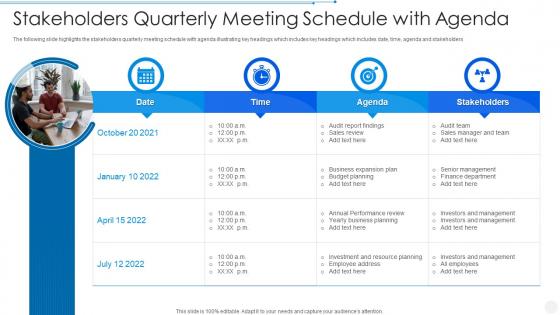
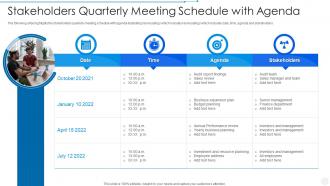
The following slide highlights the stakeholders quarterly meeting schedule with agenda illustrating key headings which includes key headings which includes date, time, agenda and stakeholders
People who downloaded this PowerPoint presentation also viewed the following :
Stakeholders Quarterly Meeting Schedule With Agenda with all 6 slides:
Use our Stakeholders Quarterly Meeting Schedule With Agenda to effectively help you save your valuable time. They are readymade to fit into any presentation structure.





FAQs for Stakeholders Quarterly Meeting
So basically we need everyone on the same page about priorities and timeline - plus getting actual buy-in this time. Half our problems lately are people not knowing who's responsible for what, which is honestly getting ridiculous. Come ready with your resource needs and any roadblocks you're already seeing. We should also flag dependencies right upfront instead of discovering them later. The whole point is walking out with clear commitments from each team and knowing exactly what happens next. Oh, and definitely prepare to clarify roles since that's been a mess.
Okay so first thing - map out literally everyone who touches your project, even the random people you wouldn't think of. Obviously get your main players (decision makers, actual users) but don't forget the secondary folks who get affected indirectly. I always space on the IT security team until they're breathing down my neck lol. Figure out who has influence vs. who just cares a lot - there's usually a difference. Some people want formal sit-downs, others are fine with a quick coffee thing. Don't just check in once and disappear either. Honestly, just keep a basic spreadsheet of who you've talked to and what they said.
Honestly, PowerPoint and Google Slides are solid but kinda boring at this point. Prezi's way cooler if you want that zoomy, dynamic vibe - though some people find it distracting, whatever. Miro and Mural are clutch for collaborative stuff where everyone's throwing ideas on digital boards. Got heavy data? Tableau's dashboard features are sick, or just screen share Excel if your numbers already tell the story. Oh, and Mentimeter's great for polls to keep people engaged instead of zoning out on their phones. Really depends on your audience though. Don't pick something flashy just because it exists - match the tool to what you're actually trying to accomplish.
Map out everyone's concerns first and group them by how urgent/impactful they are. Tackle the big stuff early, but don't let the loudest people hijack everything - I've seen way too many meetings where someone spends 45 minutes debating logo colors while layoffs get brushed over. Give each major group their own time slot. Try rotating who speaks first so the quiet ones actually get heard. Set time limits and actually stick to them (this is key). Share the agenda beforehand so people can see their issues are really on there, not just getting lip service.
Track the obvious stuff first - attendance, whether people actually do their action items afterward, meeting follow-ups staying on schedule. But honestly, the soft stuff matters more sometimes. Send out quick surveys asking what worked and what sucked (within 24 hours while it's fresh). Pay attention to how engaged people seem during discussions and if you're making real decisions or just talking in circles. Oh, and those "parking lot" items? If you're constantly dumping issues there, that's a red flag. The feedback will tell you everything you need to know for next time.
Honestly, just tell everyone upfront that you want to hear from everybody - no stupid questions, all that. Send the agenda early so people aren't caught off guard. I've been in way too many meetings where one person just talks the entire time, it's awful. Try doing round-robin stuff or even anonymous polls to get the quiet people involved. Don't just wait for volunteers either - actually ask specific people what they think. Oh, and definitely follow up with anyone who looked like they wanted to say something but didn't. Those are usually the ones with the best ideas anyway.
Honestly, you gotta nail down who's doing what and by when - that's the only way this stuff actually gets done. Give each task to a specific person with a real deadline, not some wishy-washy "soon" nonsense. I've seen too many meetings end with everyone nodding along but nothing happens after. Send a follow-up email within a day listing everything out. Maybe throw it in a shared doc too. Check in before deadlines hit so you can catch problems early. Trust me, people actually appreciate the organization even if they grumble about it initially.
Honestly, get that feedback organized right after your meetings - like same day if you can. Don't be me and let it pile up in random notebooks lol. I sort everything by what's realistic vs. pie-in-the-sky stuff, then figure out who's handling what. Quick wins first - shows people you're actually paying attention. Our PM tool gets everything within 24 hours while I still remember the context. Regular team check-ins are clutch for staying on track. Oh, and definitely loop back to stakeholders about what you're doing and what you're not. Being upfront about the "no's" saves everyone headaches later.
Stick with clean dashboards and simple charts - bar graphs, line charts, that kind of stuff. Executives honestly have zero patience for complicated visuals. I always start with one really strong summary slide that tells the whole story, then keep detailed backup slides just in case they want more. Interactive charts are perfect for virtual meetings since people love clicking around (gives them something to do with their hands, I guess). Templates showing clear trends and before/after comparisons work best. The key is keeping it simple - they want the story behind the numbers, not a data dump.
Don't let conflicts just sit there and fester - tackle them right away. Listen to everyone's perspective first, even the ones that sound completely ridiculous (trust me, this matters). Then try to find what everyone actually agrees on. I've watched so many meetings go completely sideways because someone felt ignored. Can't solve it on the spot? Table it and set up a separate chat with whoever's involved. You want to keep things moving while still making people feel heard. Nobody likes walking away thinking their concerns got brushed off.
Honestly, a solid agenda is everything - send it out early so people can't claim they didn't know what was coming. Time-box each topic and get someone to be the bad guy with keeping time. When people inevitably go off on tangents (they always do), just say "let's park that for later" and actually write it down somewhere. Only invite people who absolutely need to be there, not the whole company. Oh, and here's the thing nobody talks about - end every discussion with who's doing what by when. Otherwise you'll have the same meeting next week. Trust me on this one.
Use Zoom or Teams - way better than just having people dial in. Multiple cameras help so remote folks can actually see what's happening in the room. Screen sharing is clutch for presentations. Oh and those collaborative tools like Miro? Total game changer - everyone can jump in with ideas at once. I swear remote people sometimes participate more than the ones sitting right there! Ask them directly for input throughout. Send stuff beforehand and record everything. That way if someone's kid has a meltdown during the meeting, they can catch up later.
Here's what I'd do - hit them with three main things: measurable impact, how you're optimizing resources, and how everything ties to company goals. Honestly, stakeholders care way more about ROI than your actual process (unless something's totally broken). Lead with your wins and quick data that shows value. Then transition into future opportunities where you'll need their buy-in. Each point should connect to what they specifically care about. Oh, and definitely have 2-3 backup slides ready with deeper metrics. You know how these meetings go - someone always wants to dig into the numbers during Q&A.
Write everything down right after - decisions, who's doing what, deadlines. Use a basic template so you don't miss stuff. Trust me, I've sat through way too many meetings where we're basically having the same conversation again because no one documented what we agreed on the first time. Send it out within 24 hours while people actually remember what happened. Oh and put it somewhere everyone can find later - shared folder, project tool, whatever works for your team. The worst is when you know you discussed something but can't find the notes anywhere.
Figure out who actually gives a shit about your meeting first. Map out their influence and what keeps them up at night - trust me, I've watched so many meetings implode because people skipped this step. Once you know what each person cares about, you can be smart about ordering your agenda items. Maybe tackle the drama early when everyone's fresh, or build up some momentum before dropping controversial stuff. Oh and definitely write down each stakeholder's main concerns before you even touch the agenda structure. Sounds boring but it works.
-
The customer care of SlideTeam is very responsive. I was having a payment issue and they fixed it for me in no time.
-
The design is clean-cut, modern, and sleek, keeping the users' needs in mind. The multiple uses make this product worth every penny!