

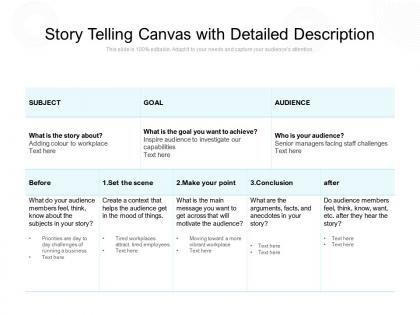
Story telling canvas with detailed description




Try Before you Buy Download Free Sample Product
 Impress Your
 Audience
 100%
100% Editable
 Save Hours
 of Time


Our Story Telling Canvas With Detailed Description are topically designed to provide an attractive backdrop to any subject. Use them to look like a presentation pro.
People who downloaded this PowerPoint presentation also viewed the following :
Story telling canvas with detailed description with all 2 slides:
Use our Story Telling Canvas With Detailed Description to effectively help you save your valuable time. They are readymade to fit into any presentation structure.
FAQs for Story telling canvas
So basically, a Storytelling Canvas stops you from just word-vomiting data at people during presentations. Instead, you map out actual story elements - like who's the hero (usually your audience), what problem they're facing, how they get through it, etc. Makes your whole presentation flow like a story instead of a boring info dump. I honestly wish more people used these because most business presentations are painful to sit through. It's kind of like outlining a movie but for work stuff. You figure out what your audience actually cares about, then organize everything so they stay hooked. Definitely try it next time.
So basically, storytelling canvas gives your presentation actual structure instead of just random bullet points everywhere. Your audience becomes the hero facing some challenge, and you guide them to the solution. Way more engaging than typical corporate dreck, honestly. People connect emotionally when there's a clear arc - conflict, journey, transformation. Much easier to follow than jumping around between disconnected ideas. I'd sketch one out next time you're prepping. It's weird how much more focused everything becomes when you think of it as an actual story instead of just... information dump.
So you need your main character (basically the hero), then whatever conflict they're dealing with. What's at stake? How does it get resolved or how do they change? Figure out your key message first though - like what do you actually want people remembering when they leave? The emotional hook is huge too, that's what makes stories sticky. Oh and obviously your call-to-action if you need one. Honestly, I'd start with character and conflict. Once you nail those down, everything else kind of falls into place. Way less overwhelming that way.
Okay so layout is honestly everything when you're telling a story visually. I've watched amazing ideas completely bomb just because the canvas looked like someone threw information at a wall. You want your strongest visual right up front, then guide people's eyes naturally through each section. White space is your friend - don't cram everything together! Make clear pathways between your story beats. Actually, here's what I always do: grab someone who hasn't seen it before and watch them try to follow along. If they're squinting or looking confused, you'll know exactly where to fix things.
Don't try shoving everything onto your canvas at once - you'll just create a confusing mess. Figure out your audience first (seriously, this gets skipped way too often). People build whole narratives without knowing who they're even talking to. Keep your conflict simple and relatable too. Complex abstract stuff rarely works. The canvas is meant to guide your thinking, not trap it in some rigid box. I'd start with audience and core message, then let everything else build from there naturally. Oh and honestly? Sometimes the best insights come when you're willing to break the "rules" a bit.
Ditch the bullet points and treat your presentation like telling a story instead. Open with something that hooks people - a problem or "what if" scenario that gets them curious. Then walk them through how you'd solve it, like you're taking them on a journey. Honestly, stories stick in people's heads way longer than boring data slides ever will. Paint actual scenarios they can picture. Include some conflict or challenge they'll relate to. Oh, and try starting with "Imagine if..." instead of those awful agenda slides everyone hates. Makes your audience feel invested rather than trapped.
Okay so design is literally make-or-break for your Storytelling Canvas. I've watched amazing stories completely bomb because they looked chaotic on screen. You need visual hierarchy to guide people's eyes through your story beats – left to right works great. Colors and fonts should connect related stuff while separating different sections. Short version: messy design kills good content. But when it's clean? Your story hits so much harder. People can actually follow complex info instead of getting lost. Consistency is your friend here – same styling throughout ties everything together nicely.
Yeah, you can definitely customize those storytelling canvases for different industries. Tech companies might zero in on user journeys and pain points. Healthcare? Patient outcomes and emotional stuff usually matters more. Finance people love their risk mitigation stories - honestly, they're obsessed with ROI narratives. Every field has its own "story DNA" that stakeholders actually care about. The basic structure stays put (character, conflict, resolution), but you tweak the prompts to match what drives decisions in your space. I'd start by figuring out the 3-4 key story elements your audience always wants to hear. Makes the whole thing way more relevant.
So basically, storytelling canvases make you think about the actual story first - like who's your main character, what problem are they facing, how does it get solved. Standard templates? They're just "put your title here, bullet points there." Super boring honestly. The canvas approach gets people actually invested in following along. I mean, nobody wants to sit through another presentation that reads like a shopping list, right? Start with mapping out your story arc, then worry about the slides later. Trust me, your audience will actually stay awake for once! It's way more engaging when there's a real narrative pulling everything together.
Your Storytelling Canvas isn't set in stone - keep tweaking it based on feedback. Show it to your team, stakeholders, maybe even some actual users. Ask them straight up: does this make sense? Does it hit emotionally? Are the main messages clear? People will be brutally honest about stories (honestly, it's kind of refreshing). Don't get defensive about your first version. Look for patterns in what they're telling you and make changes fast. Maybe your character needs stronger motivation, or the story arc feels off. I always mess up the messaging on my first try anyway. Test it early and often - that's how you'll nail it.
So Airbnb totally crushed this with their "belonging anywhere" thing - they figured out travelers were their hero, boring hotels were the problem, and authentic local stays were the fix. Nike does the classic athlete-overcoming-obstacles story (kinda predictable but hey, it works). Patagonia's doing something similar with all their environmental stuff. Even tiny companies map this out first before they write anything. Honestly, the canvas just helps you get super clear on what your actual story is. You should definitely check out some brand story breakdowns online - they're pretty interesting to read through.
Honestly, Miro is amazing for this - you can create those branching story paths that look super clean. Figma works great too, and even Notion if you want something simpler. The cool thing is you can embed videos, audio, hyperlinks, whatever you need. Way better than those boring static canvases we used to be stuck with. Real-time collaboration is clutch when you're working with a team. I'd say start basic with a template first, then go crazy with the interactive stuff once you get the hang of it. Just pick something that handles multimedia well and you'll be set.
Dude, stories are like brain hacks. When people hear a narrative, their brains pump out oxytocin and dopamine - basically the feel-good chemicals that make stuff memorable. Way more effective than boring bullet points, trust me. Your audience gets emotionally hooked instead of just zoning out. I swear, wrap your main points in a simple before/after story and watch how much better they retain everything. The emotional connection makes them actually care about what you're saying rather than just sitting there waiting for it to end.
Don't just throw numbers at people - that's boring as hell. Put your biggest stats in the conflict part to show how bad things are, then use data in your resolution to prove your fix actually works. Charts are pretty solid for this too since they're like visual backup. Here's the thing though: every number needs to push your story forward, not just sit there because you found it. Think of data as your sidekicks, not the hero. Figure out which parts of your story need some extra punch, then grab the stats that'll make those moments hit harder. Makes way more sense than randomly scattering data everywhere.
Get different people involved from day one when you're mapping out those Canvas sections. I'm talking about folks with totally different backgrounds and experiences - not just tacked on later. Your audience personas should actually reflect real diversity, not just one "standard" user type. Watch your language too. I've watched teams accidentally shut out whole groups because they used too much insider jargon or made weird assumptions. Oh, and set up check-ins where you step back and ask "who are we missing here?" It honestly makes such a difference. Your stories will be way more solid.
No Reviews