


Technical design powerpoint presentation templates




Try Before you Buy Download Free Sample Product
 Impress Your
 Audience
 100%
100% Editable
 Save Hours
 of Time


Ensure bouquets with our Technical Design Powerpoint Presentation Templates. You will earn all the accolades.
People who downloaded this PowerPoint presentation also viewed the following :
Content of this Powerpoint Presentation
Technical design, like the framework of a building, is hidden but critical to the success of any product. More than just the appearance, it's about the structure, the details, and the very essence of creation. Designing for technical purposes. PowerPoint presentation templates are an effective tool for communicating complex designs in a manageable format.
These templates help you to describe complex processes, break down detailed blueprints, and present technical data that speaks volumes about the topic under discussion. These are clear, precise, and impactful, allowing you to communicate the complexities of your technical design in a simple manner.
Our templates are ideal for architects, engineers, and designers because they walk the audience through the complexities of your technical knowledge. The 100% editable and customizable nature of SlideTeam’s PowerPoint Templates provides you with the structure and the desired flexibility to edit your presentations.
Let’s explore!
Template 1: Technical Design PowerPoint Presentation
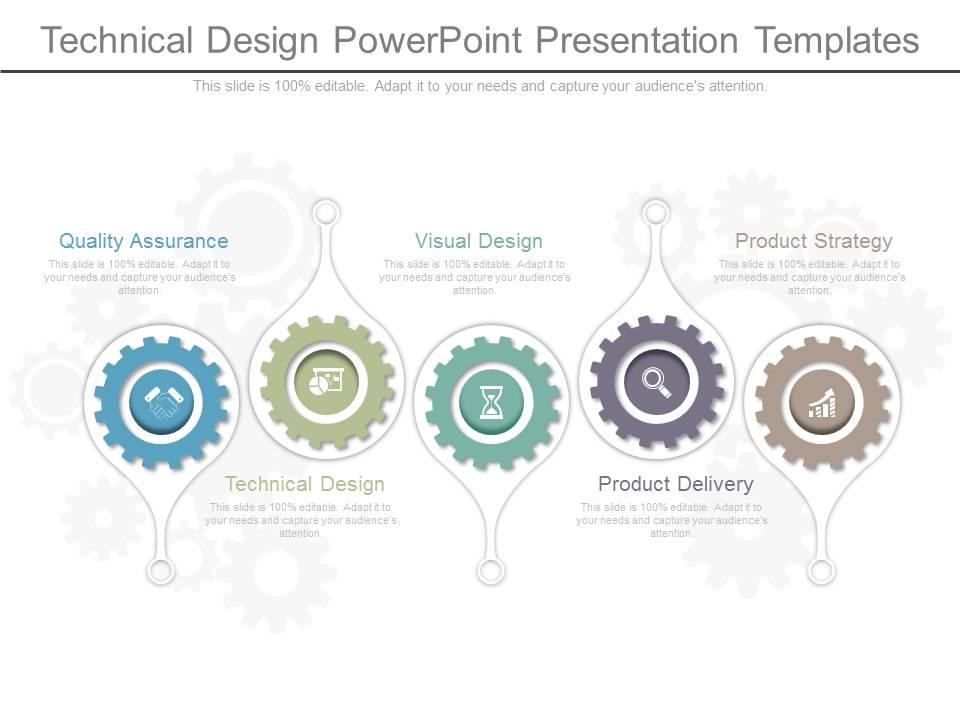
This PPT Slide divides the technical design process into a five-step plan. It covers quality assurance, technical design, virtual design, product delivery, and product strategy. The PPT assigns gear graphics with presentable icons to each stage. There are dedicated sections to record notes/key findings adjacent to each step.
TO BE SIMPLE IS COMPLEX
Design principles and practices, though outwardly creative, can be hard to follow due to the technical content. We can all stay relaxed, however, as expertise will anyways be hard to reach overnight. Our slide on technical design articulates complex design concepts with ease and clarity. Use our PPT Templates to improve the precision of your work, from early sketches to final blueprints.
Technical design powerpoint presentation templates with all 7 slides:
Build glamorous aspirations with our Technical Design Powerpoint Presentation Templates. They combine beauty and brains.
FAQs for Technical design
So for your tech design template, definitely include problem statement, system architecture, data flow diagrams, and API specs. Security considerations and performance requirements are must-haves too. Oh, and don't skip error handling and monitoring - I've literally watched projects implode when teams forget these basics. You'll also want deployment strategy, testing approach, and risk assessment covered. Each section should clearly explain the what, why, and how. Honestly, start simple then tweak it based on your team's style and how complex the project gets.
Okay so basically you want to use different text sizes and colors to guide people through your content. Big bold headings for main sections, then smaller stuff for everything else. White space is clutch - nobody wants to read a giant wall of text. I always use the same colors for similar info so it feels organized. Oh and definitely highlight warnings or important stuff so it pops. The whole point is making it easy to scan quickly. Like, someone should be able to glance at it and find what they need without reading every word. Try squinting at your layout - wherever your eyes go first, that's what everyone else will see too.
Build feedback sections right into your template from day one. Honestly, I've watched so many teams crash and burn by waiting until everything's "done" - don't be those people. Set up regular check-ins with stakeholders and collect input at major decision points. Short feedback forms work better than long surveys, trust me. The goal is making it feel natural, not forced. Document everything directly in the relevant template sections so you're not hunting through random emails later. Oh, and get feedback early - like, uncomfortably early. It saves so much headache down the road.
Look, design templates basically give your whole team the same vocabulary. Everyone documents decisions and trade-offs the same way, so PMs and engineers actually understand each other. No more sitting in meetings wondering what the hell someone's talking about (you know those ones). Templates make you think through the messy stuff early - like edge cases that would otherwise blow up your sprint later. Honestly, they're kind of a lifesaver. Just start simple: problem you're solving, your solution, how you'll know if it worked. Don't overthink it.
So basically you're stuck following whatever standards your industry demands - SOX needs those audit trails, ISO wants risk assessments, that whole thing. Your templates have to check all their boxes or you're screwed legally. Honestly, it gets tedious but what can you do? IEEE and sector-specific rules (finance, healthcare, whatever) control everything from how you name files to who signs off on stuff. I'd just bake all that required crap right into your template structure. That way teams can't accidentally forget something important and leave you hanging.
Honestly, color schemes make such a huge difference for organizing technical stuff. Red for warnings, blue for secondary info, green for success - you get the idea. I know it sounds super basic, but people actually scan docs way faster when you're consistent with it. They don't have to read every damn word to figure out what's important. Pick maybe 3-4 colors for your main info types and just stick with them across everything. It's like having a visual shorthand that actually works. Start simple though - you can always add more later if you need to.
Honestly, just adapt the sections to match what your field actually cares about. Software projects need architecture diagrams and API specs, while engineering designs focus more on materials and compliance stuff. The core structure stays pretty much the same - you know, problem, requirements, solution - but the meat of it changes completely. I made this mistake once trying to use a software template for a hardware project... total disaster. My advice? Build one flexible base template, then create swappable modules for different project types. Way easier than starting from scratch every time.
Honestly? The worst thing you can do is make templates super rigid. You'll just end up cramming every project into the same box when they actually need different approaches. I've watched teams get so caught up filling out every little section that they stop thinking about the actual design - which is nuts, right? Don't go overboard with details upfront either. It becomes this overwhelming checklist nobody wants to deal with. Oh, and update them! Your templates should match what your team's doing now, not whatever you thought was smart two years ago. Keep things flexible and make sure they're helping people communicate better instead of just creating more paperwork.
Honestly, tech design templates work great with agile - they give structure but aren't crazy rigid. You can knock out design docs quickly during sprints, then tweak sections when requirements change (which they always do). It's like your team has a common language. Everyone knows exactly where to find the architecture diagrams or API specs. What I love is you're not reinventing the wheel every iteration. Just keep templates lightweight and modular. Break them into chunks you can fill out piece by piece instead of one giant document that sits there forever unfinished.
Set up quarterly reviews minimum - though honestly, monthly works better if you're moving fast. Get feedback from whoever's actually using these templates because they'll catch outdated stuff way before you do. Track which sections people keep tweaking during projects and update those first. Someone needs to own this process or it just won't happen. I've seen too many teams assume template updates will magically occur. Also watch for new tools or standards popping up in your field. Schedule those review sessions now even if it feels early. Trust me on this one.
Honestly, interactive stuff is a total game-changer for design templates. Instead of people just staring at static info, you're actually walking them through it. Dropdown menus, clickable trees, little calculators that fill themselves out - that kind of thing. Way more engaging than boring old PDFs, right? People actually get how to use them properly, so adoption goes up. Plus you catch fewer mistakes since the template can validate inputs as they go. I'd probably start with just one interactive piece though - maybe I'm being overly cautious but it's easier to build up from there.
Figma's your best bet for UI stuff - their component system is seriously good for making things adaptable. For docs, I'd go with Notion or Confluence since you can build reusable blocks. Lucidchart works great for system architecture diagrams, though honestly Draw.io is fine too if you don't want to pay. GitBook's solid for code documentation, or just use markdown templates in your repo if you're feeling lazy. The main thing is finding tools that let you set up variables and components that actually update when you change them. Otherwise you'll be stuck manually fixing everything later.
Here's what I'd do - treat your presentation like you're telling a story. Start with the problem, walk through how you solved it, then show off the results. Way better than just listing features (trust me, I've put people to sleep doing that). Pick a specific user and follow their day - makes everything click better. Create some drama by showing what happens if the problem isn't solved. Each slide should flow into the next naturally. Oh, and ditch the technical jargon unless it's actually necessary. People remember stories, not bullet points.
Honestly, case studies work best when they're woven right into your templates - not as afterthoughts. I'd add a "Real-World Application" section with 1-2 solid examples that show how these principles actually worked (or didn't). Pull from stuff that's similar to what your team's doing right now. Way more relatable that way. Here's the thing - don't just showcase the wins. Include the failures too because those messy lessons are often more useful than perfect success stories. Keep each example short but specific enough that people can steal the good bits for their own projects. Makes the whole template feel less theoretical and more... usable, you know?
Honestly, start with adoption rates - are teams actually using your template or just ignoring it? Then track how long projects take and whether they're more consistent now. Rework is huge too (I've seen teams go through like 8 revisions on stuff that should've been done right the first time). Survey people directly - developers will tell you straight up if it's helping or just adding busywork. Don't overcomplicate this though. Pick maybe 2-3 metrics that actually matter to your specific situation and stick with those.
-
Design layout is very impressive.
-
Innovative and attractive designs.