

Tracking Progress Of Project Management Tasks Deploying Cloud To Manage





Try Before you Buy Download Free Sample Product
 Impress Your
Audience
 100%
Editable
 Save Hours
of Time


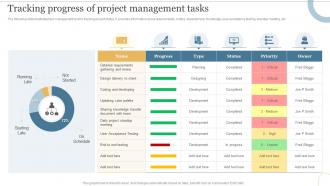
The following slide illustrates task management tool for tracking project status.It provides information about requirements, coding, development, knowledge, user acceptance testing, standup meeting, etc.
People who downloaded this PowerPoint presentation also viewed the following :
Tracking Progress Of Project Management Tasks Deploying Cloud To Manage with all 7 slides:
Use our Tracking Progress Of Project Management Tasks Deploying Cloud To Manage to effectively help you save your valuable time. They are readymade to fit into any presentation structure.






FAQs for Tracking Progress Of Project Management Tasks Deploying
Honestly, real-time collaboration is a game changer - no more of those nightmare email chains with different versions of spreadsheets floating around. Your whole team can jump in from wherever they are and see updates instantly. Plus you don't have to stress about losing stuff since everything backs up automatically. The money part is pretty nice too, skipping all those software licenses and server headaches. Oh, and everyone's actually working with the same info for once, which sounds basic but you'd be surprised how often that doesn't happen. Definitely try some free trials first though.
So cloud platforms basically layer their security pretty thick. Data gets encrypted whether it's sitting around or moving between servers. Most decent ones have SOC 2 and ISO certifications - that's the boring compliance stuff but it matters. You can set up role-based access so only certain people see sensitive info. Honestly, the audit trails are clutch when you're scrambling during compliance reviews. They track literally everything. Single sign-on and two-factor auth are standard now too. Just make sure whatever platform you pick actually matches your industry requirements - HIPAA if you're healthcare, GDPR for EU stuff, whatever. Don't skip reading their compliance docs first.
Honestly, integration with your current tools should be your top priority - you don't want to be switching between like 5 different apps just to mark something complete. Check if the pricing makes sense as your team grows too. Security's obviously huge if you're dealing with client stuff. The interface better be intuitive or people just won't use it (learned that the hard way). Oh, and definitely test out 2-3 options with a few team members first. Way better than committing to something everyone ends up hating.
Pick one platform and force everyone to use it - seriously, this is like herding cats otherwise. Set up shared workspaces so people can actually see what's happening without playing email tag all day. The notification thing is clutch for deadlines, but don't go overboard or people will just ignore them. What really works is when team members can jump into each other's work and help out. Half the time projects fail because someone's stuck on something but nobody knows about it. Get everyone checking the same dashboard regularly (good luck with that part honestly) and you'll save yourself so many headaches.
Start with real-time stuff - shared workspaces, live editing, instant notifications. Your team will actually stay on the same page that way. Task management is obviously crucial too, with custom workflows and deadline tracking. Integration matters more than you'd think since you're probably stuck with whatever tools your company already uses (Slack, Google, etc). Mobile access isn't optional anymore. Reporting features help you see who's actually getting stuff done. Honestly though? Just write down what's driving you crazy right now, then demo a couple options. The UI needs to click with your team or nobody will use it.
So basically you throw all your project stuff online and suddenly nobody cares where anyone's working from. Tokyo, your couch, whatever. Everyone can see the same updated deadlines and files instantly - no more digging through email chains trying to find that one document (ugh). Real-time updates mean you'll actually know what's happening without playing phone tag. Most platforms work on phones too, which is honestly pretty clutch when you're out and about. Just migrate your current docs over first and see how much smoother things get. The visibility alone is worth it.
Honestly, data security freaks people out the most - everyone's paranoid about where their files end up. Your team will probably drag their feet learning the new system too. Connecting it to your current tools? That's gonna be a mess, trust me. Plus when your internet craps out, good luck getting any work done. Oh, and expect productivity to tank at first while people figure things out. I'd definitely test it on just one project first instead of going all-in right away. Way less painful that way.
So integrations basically make your project management tool the center of everything. No more bouncing between Slack, GitHub, Google Drive - it all flows together. Code gets pushed? You'll see it automatically. Team sends messages? They pop up right there. Files sync without you having to manually drag stuff around (which honestly saves so much time). The real win is that all your project info stays up-to-date everywhere, so you're never working with old data. Oh, and start with whatever tools you use most - don't try to connect everything at once.
Yeah so upfront you're looking at way less cash since you're not buying servers and all that expensive licensing stuff. Just monthly subscription fees instead. Your IT team will probably love you because they don't have to babysit hardware anymore - updates happen automatically. But here's the thing, those monthly costs never stop, whereas before you'd make big purchases then coast for a while. Most companies I know cut costs by like 20-40% the first year though, especially when systems actually stay up and running. Really you gotta look at what you'll spend over maybe 3-5 years total, not just month-to-month.
Analytics basically let you see what's actually happening with your project instead of just guessing. You'll catch bottlenecks early, see where money's getting wasted, and figure out if your deadlines are totally unrealistic. Honestly, it's wild how often our instincts are completely off about this stuff. The data shows you where to move people around and which teammates are struggling. I always set up those automated dashboards - saves me from having to hunt down numbers every week. Way better than crossing your fingers and hoping things work out.
Dude, training is seriously everything. Skip it and your team will either hate the new system or use it so badly you'd be better off with spreadsheets. People need to get how it actually fits their day-to-day work, not just where the buttons are. I've watched so many bosses think "oh it's user-friendly, they'll figure it out" - spoiler alert, they won't. Do real hands-on sessions from day one. Make some cheat sheets too. Honestly, the fanciest cloud tool is useless if nobody knows how to use it properly.
Most cloud PM tools today are built with Agile/Scrum in mind. Jira, Asana, Monday - they've all got sprint boards, backlog management, burndown charts that update as you work. Pretty sweet compared to those sticky note disasters we used to deal with! You can set sprint lengths, assign story points, track team velocity. Everything syncs instantly so your remote team stays on the same page. My advice? Start simple with a Kanban setup first. Then add the fancier Scrum stuff once everyone's comfortable. The automation features are solid too - transitions happen automatically and you'll get retrospective reports without lifting a finger.
Look, scalability can make or break your cloud project. When demand spikes, you'll handle it no problem instead of watching everything crash. Plus you're not paying for resources sitting there doing nothing - which honestly saves so much money in the long run. I've watched projects tank because they hit growth but couldn't scale fast enough. The trick? Design for it from the start. Trust me, retrofitting scalability later is a nightmare compared to building it in from day one.
Okay so first thing - get everyone on the same platforms because otherwise it's chaos. I'd use Slack or whatever for quick stuff, video calls when things get complicated, and some kind of project board to track where everything's at. Set up regular check-ins too, like daily standups if you're doing that whole thing. The response time expectations are huge - people need to know if you expect answers in 5 minutes or 5 hours. Honestly, the hardest part is just getting people to stick with whatever system you pick. Oh and definitely clean house on your current tools first - you probably have way too many.
Honestly, AI automation is going to change everything - predictive analytics, smart scheduling that adjusts on the fly, automated resource allocation. The collaboration tools are getting way better too, with smoother integration and real-time editing that actually works. Security's becoming more sophisticated (zero-trust is basically the new standard). The speed of all this is kind of insane if you think about it. My take? Start messing around with AI features in whatever tools you're using now. Trust me, you don't want to be the person trying to figure it out when everyone else is already ahead.
-
No second thoughts when I’m looking for excellent templates. SlideTeam is definitely my go-to website for well-designed slides.
-
I've been looking for a good template source for some time. I'm happy that I discovered SlideTeam. Excellent presentations must try!