

Tracking Progress Of Project Management Tasks Cloud Computing For Efficient Project Management




Try Before you Buy Download Free Sample Product
 Impress Your
 Audience
 100%
100% Editable
 Save Hours
 of Time


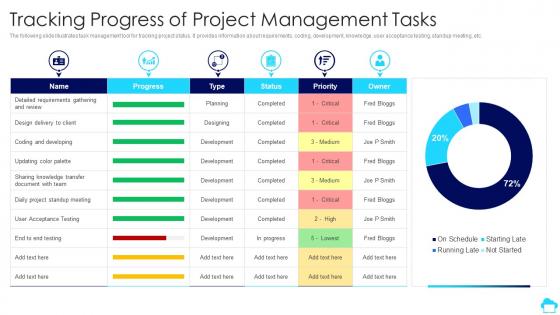
The following slide illustrates task management tool for tracking project status. It provides information about requirements, coding, development, knowledge, user acceptance testing, standup meeting, etc.
People who downloaded this PowerPoint presentation also viewed the following :
Tracking Progress Of Project Management Tasks Cloud Computing For Efficient Project Management with all 7 slides:
Use our Tracking Progress Of Project Management Tasks Cloud Computing For Efficient Project Management to effectively help you save your valuable time. They are readymade to fit into any presentation structure.





FAQs for Tracking Progress Of Project Management Tasks Cloud Computing For
Honestly, the real-time collaboration thing is huge - everyone can jump in from wherever they are. No more "oh I don't have access to that file" nonsense. Automatic backups are nice too since you don't need IT babysitting everything. Money-wise, you're not dropping tons upfront on licenses you might not even use fully. Most of these tools connect pretty well with whatever apps you're already stuck using (looking at you, Slack). I'd mess around with a free trial first though - see if your team actually likes it before you commit to anything.
Honestly, these tools are game-changers for team stuff. Everything lives in one spot - tasks, deadlines, messages, the whole deal. No more digging through a million emails (thank god). Your team can jump on projects together in real-time, see what everyone's working on, and actually stay on the same page. Works great for remote teams too. The biggest win? Everyone sees updates instantly, so nobody's confused about who's doing what or when things are due. I'd say just pick one tool - there's like a thousand options out there - and start with your main team first.
Honestly, start with the basics - encryption for data moving around and stored data, plus multi-factor auth for everyone. SOC 2 and ISO 27001 certifications are worth checking (your IT folks will probably ask about these anyway). Don't forget to look into their backup systems and who gets access to what. Oh, and figure out where they're actually storing your stuff geographically - that matters more than you'd think. Before going all-in, test it out with some low-risk projects first. See how their security actually works in practice.
So cloud platforms don't replace your PM methods - they just make them way better. Agile, Waterfall, whatever you're using works fine. Tools like Asana or Monday.com give you real-time collab and everything syncs instantly. Your sprint meetings still happen, but now everyone can actually see dashboards and timelines from their couch if they want. Honestly, the automated reporting alone is worth it. You'll still do gate reviews and all that. Just start small - pick one tiny project first to see how it feels. Don't go all-in right away.
Ugh, data migration is honestly the worst part - always takes way longer than you think. Your team's gonna push back hard, especially the people who've used the same stuff forever. Security gets tricky with client data too. Oh, and don't even get me started on trying to make everything play nice with your current software. Everyone's productivity tanks at first while they figure things out. But seriously, do a small pilot first instead of going all-in. Training matters way more than most people realize.
Honestly, cloud analytics are a lifesaver for project management. You get real-time data on everything - resource usage, timeline risks, budget burn rates, team performance. Bottlenecks become visible way before they wreck your project. The predictive stuff is where it gets really cool though - it'll warn you about delays or budget issues weeks ahead. No more flying blind with gut feelings when you can use actual data patterns. Set up some automated dashboards first (seriously, start there). Oh and industry benchmarks help too - gives you context for whether your numbers are normal or not.
Dude, trust me on this - scalability matters way more than you think. Your team's gonna grow faster than you expect, and you don't want to be scrambling for a new tool when you go from 5 people to 50. I made this mistake once and it was such a headache. The smart move? Find something with flexible pricing that scales up without destroying your budget. Most cloud tools are pretty good about adding users and storage as you need it - way better than getting locked into some massive enterprise contract you're barely using. Just watch out for weird usage limits that might sneak up on you later.
Honestly, these cloud tools are such a game-changer for remote work. Everything lives in one spot - tasks, calendars, files, all of it. Your team can collaborate in real-time even if someone's in Tokyo and you're in Denver. The async stuff is clutch when people are sleeping while you're working. No more digging through email chains trying to figure out what happened overnight. Progress tracking becomes way easier too. I'd say just pick one tool (there are tons out there) and move your current project over. You'll notice the difference in coordination almost immediately.
Get yourself a cloud-based project tool that syncs instantly - honestly, this alone will save you so many headaches. I'd start with just one platform and move your timeline there first. The drag-and-drop feature is clutch when deadlines inevitably get moved around (and they will). Set up auto notifications for big milestones and connect it to everyone's calendars. Oh, and definitely give stakeholders read-only access - learned that one the hard way when someone accidentally deleted half our timeline. Back up your data regularly too. Having everything in one dashboard where the whole team can see updates right away? Total game-changer.
So basically, cloud stuff is way cheaper upfront - you're just paying monthly instead of dropping huge money on software licenses. No servers or IT headaches either. Traditional software? Ugh, the initial cost alone will hurt your wallet, plus all that hardware and support adds up fast. Honestly, most companies I know save like 30-50% switching to cloud. The cool part is it grows with your team size, so you're not overpaying. Maybe run the numbers for both options over a couple years - you'll probably be shocked at the difference.
Honestly, start with collaboration stuff - real-time editing and commenting are must-haves or your team will hate you. Integration is clutch because switching between a million apps gets old fast. Security matters if you're dealing with anything sensitive, and mobile access is pretty much expected now. Oh, and definitely test the interface during free trials. I've seen teams completely abandon tools just because they were confusing to use. Analytics help you catch problems early too, which saves headaches later.
Honestly, cloud computing is a game changer for tracking projects. Your team logs work or hits a snag, and boom - your dashboards update instantly. I can't tell you how nice it is to ditch those weekly status meetings where everyone's just catching up on old news. Everything syncs automatically, so stakeholders can peek at budgets and timelines whenever they want through their phones or laptops. Real-time visibility beats stale reports every time. Oh, and set up alerts for big milestones - trust me, you don't want important stuff falling through the cracks when you're juggling multiple projects.
Honestly, I'd start with Asana or Trello - they're both solid for different reasons. Trello's got that visual card thing going on which some people love. Asana's better if you need more detailed task tracking. Monday.com looks really polished (maybe too polished?) but their customization is pretty sweet. Microsoft Project Online is the heavy hitter if you're doing serious Gantt charts and resource stuff. ClickUp tries to be everything to everyone, which... jury's still out on that one. Oh, and Notion if your team's super into organization. Just grab free trials of like 2-3 and see what doesn't annoy your team after a week.
Honestly, cloud computing changes everything for project resource management. You get scalability on demand instead of trying to predict what you'll need months ahead. The budget side is huge too - pay for what you use, not some server collecting dust in a corner. Your team can jump in from anywhere and access the same tools and data in real time. Oh, and collaboration becomes way smoother when everyone's working off the same cloud setup. I'd start by figuring out which resources vary the most in your projects. That's where you'll feel the difference first.
Honestly, the AI stuff is getting wild - it'll handle all your boring scheduling and budget tracking automatically. Cloud platforms are making team collaboration way less painful too, especially for field crews who used to be stuck with spotty connections. Predictive analytics is probably the coolest part though - you can actually see problems coming before they blow up your timeline. Edge computing means instant data access even in the middle of nowhere (construction teams are gonna love this). My advice? Start messing around with AI project tools now before everyone else catches on and you're playing catchup.
-
Colors used are bright and distinctive.
-
Design layout is very impressive.