

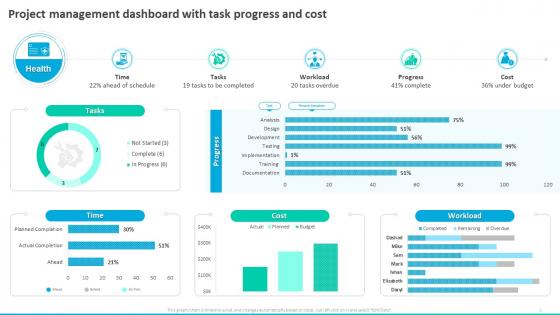
Project Management Dashboard With Task Progress And Cost Earned Value Management




Try Before you Buy Download Free Sample Product
 Impress Your
 Audience
 100%
100% Editable
 Save Hours
 of Time


Our Project Management Dashboard With Task Progress And Cost Earned Value Management are topically designed to provide an attractive backdrop to any subject. Use them to look like a presentation pro.
People who downloaded this PowerPoint presentation also viewed the following :
Project Management Dashboard With Task Progress And Cost Earned Value Management with all 7 slides:
Use our Project Management Dashboard With Task Progress And Cost Earned Value Management to effectively help you save your valuable time. They are readymade to fit into any presentation structure.
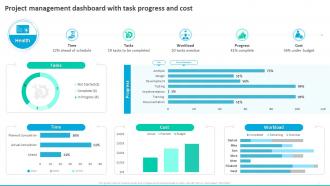





FAQs for Project Management Dashboard With Task Progress And Cost
Okay so definitely get project timelines, budget tracking, and task progress on there first. Team workload is clutch too - you don't want anyone burning out. I'd add risk indicators because projects love to go sideways when you least expect it. Oh, and keep a stakeholder communication log somewhere visible. Resource allocation gets tricky if you're managing multiple things at once. Deliverable status is obvious but easy to forget about. The whole thing should look clean but not like... overwhelming? Honestly, start basic and add stuff as you figure out what actually matters for your team.
Dude, you've gotta try data visualization for your project stuff. Those messy spreadsheets? Turn them into actual charts and suddenly you can see what's going wrong (or right) without squinting at endless rows of numbers. I swear it's like night and day - progress bars and timeline charts will save your sanity. When budgets start getting wonky or deadlines slip, the visual dashboards make it super obvious. Your boss and stakeholders won't have to decode anything either, which honestly makes everyone's life easier. Start simple though - don't go crazy with fancy stuff right away.
Dude, you absolutely need real-time data or your dashboard is pretty much useless. Like, why would you make decisions based on old info? I found this out the hard way last year when we missed a huge issue because our data only updated once a day. With live updates, you catch problems instantly - someone's over budget, deadlines are slipping, whatever. Way better than scrambling to fix things after they've already gone sideways. Just make sure your tool actually syncs live data, not some weak daily refresh thing. Trust me on this one.
Okay so basically it's like giving everyone on your team the same bird's-eye view of everything happening. Task progress, deadlines, who's doing what - all right there in real time. Honestly, it kills those annoying "hey what's the status on that thing?" messages that clog up Slack. Everything gets centralized - updates, comments, files - so you're not hunting through a million emails and random chats. People actually start seeing how their work fits with everyone else's, which is pretty cool. Oh and here's the key part: you gotta get everyone updating their stuff regularly or it just becomes another dead tool collecting digital dust.
Look, start with the basics: timeline milestones, budget tracking, and task completion rates. Those three will tell you if you're screwed or not lol. Team workload is super important too - nobody wants burnout drama. Oh and definitely add a blockers section! I can't tell you how many fires that's helped me catch early. Resource utilization matters if you're juggling multiple projects, but honestly? Don't go overboard with widgets. Too many metrics and you'll just stare at a mess of numbers without actually learning anything useful. Build from there based on what your boss keeps bugging you about.
Honestly, just think about what each person actually needs to see. Execs want the big picture stuff - budget burn, are we on track, that kind of thing. Your team needs the nitty gritty: tasks, what's blocking them, etc. They don't care about financial stuff they can't control anyway. Clients? They want milestones and deliverables mostly. Most tools let you save different layouts or set permissions by role. Here's what works: ask each group what decisions they're making week to week, then build views around exactly that. Way easier than trying to cram everything into one messy dashboard that nobody finds useful.
So Microsoft Project and Asana are the big ones most teams use. Trello's super simple if you want something basic. Monday.com is solid too. Jira's powerful but honestly kind of a pain to learn - only go there if you really need the heavy features. ClickUp and Smartsheet are decent middle-ground options. A lot of people I know just stick with Excel or Google Sheets since they already know how to use them. Really depends on your budget and how complicated your projects get. I'd grab free trials of like 2-3 different ones and see what feels right for how your team works.
Honestly, dashboards are a game-changer for catching problems before they blow up. You get everything in one spot - budget, timeline, resources, whatever. I actually spotted scope creep last week just from our burn rate looking weird. Way better than digging through endless spreadsheets, trust me. The visual stuff makes patterns super obvious. Set up alerts for the big risks so you don't have to babysit everything constantly. Budget overruns, missed deadlines - let it ping you when something's actually wrong. Oh and pro tip, don't go overboard with notifications or you'll just ignore them all.
Ugh, data inconsistencies are gonna be your worst enemy. Every tool formats dates and project statuses totally differently - you'll be cleaning that mess forever. Rate limits are brutal too, especially with older CRMs that barely let you breathe between API calls. Real-time syncing is another headache. Your team updates Jira and expects it everywhere instantly, not three hours later when the batch job finally runs. Honestly? Don't try to connect everything at once. Pick 2-3 tools, get those working smoothly first. Way less painful than debugging six broken integrations simultaneously.
User feedback is honestly everything for dashboards. Half the time what you think matters isn't what people actually use. I've seen gorgeous dashboards that just sit there collecting digital dust because nobody finds them useful day-to-day. Run feedback sessions regularly and A/B test different layouts. Watch which widgets get clicked versus ignored - that tells you way more than any planning meeting. Simple navigation usually wins over fancy features. Survey users about their biggest headaches first, then tackle those. You might discover they want totally different metrics than what you originally built.
Dude, start with the critical stuff right at the top - deadlines, blockers, status updates. Don't make people hunt for it. Stick with the same colors and icons throughout so your team isn't constantly figuring out what everything means. I swear, half the dashboards I've seen look like complete chaos. You'll want filtering options too - by team member, project phase, whatever makes sense. Oh, and actually test it with real people who'll be using it daily. If they can't find what they need in 10 seconds or less, you've overcomplicated things. Sometimes simple is way harder than it sounds.
Honestly, dashboards are a game changer - you get all your important project stuff in one spot instead of hunting through random spreadsheets. Real-time budget tracking, timelines, who's working on what. I can catch issues way before they blow up into actual problems. Takes me like 2 minutes to check project health vs the 30 minutes I used to spend digging around. My boss loves the quick updates too since I've got actual numbers to show her. Oh and resource shuffling becomes super easy when you can see everything laid out. Pick your top 5-6 metrics that actually matter and build around those first.
So static dashboards are basically like screenshots - they show your data frozen at one point until you manually refresh them. Dynamic ones pull live info from your project tools automatically. Honestly? Static feels pretty ancient unless you need those historical snapshots for something specific. With dynamic dashboards, you're getting real-time updates on task progress, budget shifts, team performance - all that good stuff. Way better for actually staying on top of projects instead of just looking back at what already happened. I'd definitely go dynamic if you want to manage things as they're happening.
Honestly, mobile accessibility is huge for dashboards because people need to check stuff on the go. Your team won't wait until they're back at their desks to update project statuses - they'll do it from job sites, during their commute, wherever. If your dashboard sucks on mobile, people just stop using it. Period. I learned this the hard way on a project last year. Make the text big enough to read without squinting and buttons you can actually tap with your thumb. Test it on your own phone regularly - you'll catch issues fast that way. Real-time updates are what make dashboards actually useful.
Honestly, your dashboard is gold for post-project reviews. All that real data shows exactly where things went sideways - timeline slips, who got swamped, budget vs reality. I always forget half the pain points by the end, but the dashboard doesn't lie. Pull those reports for your retrospective instead of just asking "so what went wrong?" You'll start noticing patterns too. Like maybe you suck at estimating testing time or that one stakeholder always creates chaos. Way better than trying to remember everything.
-
I downloaded some of the presentations for work. They were simple to modify and saved me a lot of time and effort.
-
I faced no difficulty while searching for the slide I wanted. Honestly, the website’s interface is easy to use and can be navigated easily!