

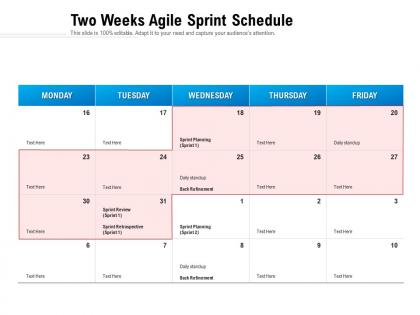
Two weeks agile sprint schedule




Try Before you Buy Download Free Sample Product
 Impress Your
 Audience
 100%
100% Editable
 Save Hours
 of Time


Our Two Weeks Agile Sprint Schedule are topically designed to provide an attractive backdrop to any subject. Use them to look like a presentation pro.
People who downloaded this PowerPoint presentation also viewed the following :
Two weeks agile sprint schedule with all 2 slides:
Use our Two Weeks Agile Sprint Schedule to effectively help you save your valuable time. They are readymade to fit into any presentation structure.
FAQs for Two weeks
Okay so basically you're trying to figure out what your team can actually get done this sprint - not what you hope to do, but what's realistic. Break down those user stories into actual tasks and estimate how long stuff will take. Everyone needs to know what they're responsible for too. Oh and definitely hunt for blockers early because they're always hiding somewhere annoying. The goal is walking out with a sprint backlog that doesn't make everyone panic. Honestly, most teams mess this up by being too vague instead of making real commitments to specific work.
Business value and effort - that's where I'd start with backlog prioritization. Your Product Owner should drive the "what delivers most customer value or revenue" part. Then you factor in technical dependencies and what your team can actually handle. Honestly, I'm a big fan of keeping it simple with something like MoSCoW (Must, Should, Could, Won't) instead of getting bogged down in overcomplicated frameworks. Also check for any blockers or prerequisites that might mess with your delivery order. The real magic happens when you have those brutally honest team conversations about what's doable in the sprint timeframe.
So basically - Product Owner decides what gets built and ranks stuff by importance. Scrum Master runs the meeting and clears roadblocks. Dev team does the real work though, estimating how long things take and breaking stories into actual tasks. They get final say on what's realistic since they're coding it. Everyone talks it through, but devs know their limits best. Oh and make sure your PO shows up with clear requirements! Nothing worse than burning half the meeting figuring out what a story actually means. Been there, it's painful.
Dude, timeboxing is a game changer. Set strict limits for each part - maybe 15 mins for backlog stuff, 30 for capacity talk. Your team will actually make decisions instead of debating story points forever. Those "but what if" conversations that go nowhere? They just die when there's a timer ticking. People stay way more focused too - nobody's scrolling their phone when they know you've only got 20 minutes left. Honestly, I was skeptical at first but it works. Get a visible timer and stick to it religiously. You'll cut those brutal 4-hour sessions in half.
So you've got a few solid options here. Story points are probably your best bet - teams rate complexity instead of trying to guess hours, which honestly we suck at anyway. Planning poker is great too because everyone votes and discusses estimates together, so you catch stuff that might slip by. For quick and dirty estimates, t-shirt sizing works well (XS through XL). Some people still use actual hours but that usually backfires. I'd start with story points and planning poker since they get people talking about the work upfront. Oh, and don't overthink it at first - you'll get better at estimating as you go.
Okay so here's the thing - your sprint goal needs to be crazy specific, not some fluffy "improve user experience" nonsense. Ask yourself what actual value you're delivering this sprint instead of just dumping features into a list. One sentence that sticks in everyone's head, that's it. Honestly, I've seen teams waste so much time on goals that sound like corporate speak. Connect it to your roadmap and make sure your stories actually help you hit that goal. Quick test: would missing this goal make the whole sprint feel like a bust even if you finished everything else? That tells you if it's focused enough.
Oh man, sprint planning can be a mess if you're not careful. Your team will overcommit every single time - I swear it's like they forget how long things actually take. Plus you'll get vague user stories that nobody really understands. Do your homework first though. Review everything beforehand and break down those massive tasks. Honestly, timebox the sessions or you'll be there all day arguing about story points. Push back when stakeholders try changing priorities halfway through (they always do). Dependencies are another killer - figure those out early. Most important thing? Everyone needs to walk out knowing exactly what they're building, otherwise you're just setting yourself up for chaos later.
Get stakeholders into those refinement sessions beforehand - trust me, it saves so much drama later. They can share what's actually urgent (vs what they think is urgent lol) and give context. During sprint planning, your team should still be the ones deciding what fits based on capacity. Just present stakeholder input as guidance, not orders. Be super transparent about trade-offs: "We can knock out A and B, or focus on just C - what do you prefer?" This keeps everyone happy without your team burning out. The whole point is alignment, but don't let them steamroll realistic estimates.
Start with your velocity from the last few sprints - that's honestly the most reliable baseline you've got. Check who's gonna be out on vacation or tied up with other stuff too. Then look at your burndown charts and any leftover work that didn't get finished this sprint. Your definition of done criteria matters here, plus any blockers that might roll over. Oh, and definitely revisit whatever came out of your last retro - those action items should totally influence how much you bite off next time. I know it sounds like a lot to juggle, but velocity first, then capacity.
Dude, your Definition of Done totally controls how much you can bite off each sprint. So when you're sizing up stories, you gotta include ALL the DoD stuff - testing, code reviews, docs, whatever. I've watched teams crash and burn on this one! They'd estimate just coding time but completely space on the two days for security reviews and deployment that were sitting right there in their DoD. Pretty painful to watch, honestly. Just use your DoD like a checklist during planning so each estimate covers everything you actually need to ship it.
Honestly, you've gotta protect your sprint scope but still leave room for actual emergencies. Set up a simple rule: anything new means something else gets bumped - no exceptions. I learned this the hard way watching teams just keep adding stuff until everyone's miserable! Reserve maybe 10-15% of your capacity for urgent things that pop up. Make your Product Owner handle the prioritization calls and document why changes happened. The key thing? Show stakeholders what these mid-sprint swaps actually cost. Have that awkward conversation early about what's truly urgent vs. what just feels urgent because someone's panicking.
Do it at the start of every sprint - so every two weeks if that's your cycle. Your team really needs that consistent rhythm to stay on the same page about what matters most. I've watched teams skip it when things get crazy busy, but honestly? That's when you need it most. Use the time to break down stories, figure out effort levels, and make sure everyone actually gets what they're signing up for. Oh and definitely timebox it - like 2 hours max for a two-week sprint or it'll drag forever. Just block your calendar now for recurring sessions so there's no excuse to bail.
Get a solid video tool and share your screen so everyone can actually see the backlog. Send user stories out early - trust me, nobody wants surprises during the meeting. I'd grab something like Miro for collaborative estimation, or honestly even a shared spreadsheet works fine. Cameras on helps a ton since you can read people's reactions. Time-box everything hard because remote meetings will eat your entire day otherwise. Short bursts keep people focused. Oh, and definitely have someone facilitate actively - dead silence kills these sessions fast.
So velocity is like your team's planning GPS - shows you how much work you can actually handle next sprint. Just average out the story points you finished in your last 3-4 sprints. Super simple math but honestly, most teams I've worked with just guess randomly which is... not great. Don't treat it like gospel though - use it as a guide when you're committing to work. If you're always way over or under, that's telling you something about your estimates or maybe there's stuff blocking you. Oh and definitely check your recent trends before every planning meeting starts.
Honestly, don't skip the retrospective review at the start of sprint planning - I used to do this all the time and regretted it. Spend like 10-15 minutes going through what broke last time, velocity trends, blockers that keep popping up. It's way better than jumping straight into new backlog items. Your capacity estimates will actually make sense when they're based on real data from previous sprints. Plus you'll stop making the same dumb mistakes over and over. Trust me, your team will thank you for building this into the standard agenda instead of winging it every time.
-
Content of slide is easy to understand and edit.
-
Very unique and reliable designs.
-
Easy to edit slides with easy to understand instructions.
-
Colors used are bright and distinctive.
-
Amazing product with appealing content and design.