


Uipath automation tool ppt powerpoint presentation portfolio examples




Try Before you Buy Download Free Sample Product
 Impress Your
 Audience
 100%
100% Editable
 Save Hours
 of Time


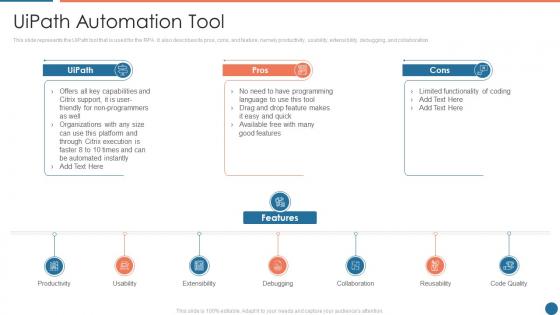
This slide represents the UiPath tool that is used for the RPA. It also describes its pros, cons, and feature, namely productivity, usability, extensibility, debugging, and collaboration.
People who downloaded this PowerPoint presentation also viewed the following :
Uipath automation tool ppt powerpoint presentation portfolio examples with all 6 slides:
Use our Uipath Automation Tool Ppt Powerpoint Presentation Portfolio Examples to effectively help you save your valuable time. They are readymade to fit into any presentation structure.





FAQs for Uipath automation tool ppt powerpoint
Dude, the drag-and-drop thing is a game changer - you don't need to be a coding wizard. Their AI stuff works really well for processing documents and visual recognition. Plus they've got this marketplace with pre-made components, which honestly saves tons of time. Integration is solid too, works with basically any system you throw at it. Oh, and there's a free community version you can mess around with first. The orchestration features are clutch if you're running multiple bots. I'd definitely play with the free version before dropping money on enterprise licenses - no point paying until you know it'll work for your specific stuff.
So UiPath basically connects your whole automation setup in one place. You design bots in Studio, manage them through Orchestrator, then watch everything happen live. Pretty neat honestly. Some bots work right next to people, others just run by themselves in the background. The platform talks to different systems - your bot could grab Excel data, update the CRM, fire off emails, you name it. There's AI stuff too for processing documents and making decisions. Oh, and definitely map out one complete process first before you start building anything around it.
So UiPath Studio is where you'll build all your automations - it's basically your main workspace. Drag and drop activities to create workflows, debug stuff, test before you deploy. Pretty much like Visual Studio but for bots, which honestly is kind of neat. The interface works for simple tasks or complex enterprise stuff using the same visual method. You can hook it up to version control, handle dependencies, publish straight to Orchestrator. Definitely grab the free Community Edition first to mess around with it. Way better than jumping into advanced features right away.
Dude, UiPath handles tons of stuff - web scraping, email automation, Excel tasks, file moving, database work, you name it. Browser automation is where it really shines though, since most business processes live online anyway. You can automate form filling, pull data from PDFs, send emails automatically. Oh and API integration too, which is clutch. Desktop apps work great with it. Honestly I got a bit obsessed when I first started because there's so much you can do. Start with something simple like scraping a website - you'll see results fast and it's not overwhelming.
So UiPath has Try-Catch blocks that basically wrap your risky stuff so when things break, your whole automation doesn't just die. There's also this Global Exception Handler that catches whatever slips through - honestly pretty handy. When errors hit, you can set it to continue, ignore, retry, or just quit entirely. Oh and definitely set up logging so you actually know what went wrong later. I learned this the hard way but seriously, build your error handling from day one. Don't wait until production when everything's on fire and you're scrambling to figure out why your bot keeps crashing.
Nah, you don't need to be some coding wizard for UiPath. Most stuff is just drag-and-drop with their visual designer - way easier than I expected when I first tried it. Basic programming logic helps you think through the steps better, but it's not required. VB.NET or C
-
Great experience, I would definitely use your services further.
-
Innovative and attractive designs.