

User Acceptance Testing Dashboard For Test Cycles





Try Before you Buy Download Free Sample Product
 Impress Your
Audience
 100%
Editable
 Save Hours
of Time


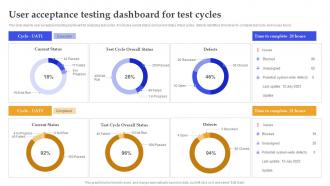
This slide depicts user acceptance testing dashboard for analyzing test cycles. It includes overall status and current status of test cycles, defects identified, time taken to complete test cycle and issues found.
People who downloaded this PowerPoint presentation also viewed the following :
User Acceptance Testing Dashboard For Test Cycles with all 7 slides:
Use our User Acceptance Testing Dashboard For Test Cycles to effectively help you save your valuable time. They are readymade to fit into any presentation structure.






FAQs for User Acceptance Testing Dashboard
UAT is basically your last chance to make sure the software actually works for real people doing real work. You want actual end users - not your dev team - testing out scenarios they'd face every day. It's less about catching bugs and more about "does this thing actually solve our problems?" Honestly, I've seen too many projects skip this step and regret it later. The whole point is bridging that gap between what you built and what people actually need to get stuff done. So grab some real users and have them run through their normal workflows before you ship.
Honestly, pick people who actually do the job day-to-day - not just whoever volunteers. I made that mistake once and got useless feedback from people who had no clue about the actual workflow. Get different user types too: newbies, veterans, various departments. Experience levels matter way more than you'd think. Also make sure they can actually show up for testing sessions - flaky participants are the worst. The whole point is finding people who'll give you real feedback about how this thing works in practice, not just polite "looks good" responses.
So UAT is totally different from your regular functional and system testing. Those check if features work as coded and if everything integrates properly - basically the technical stuff. But UAT? That's where you find out if your software actually solves real problems for real people. The business folks do this testing, not your QA team. Honestly, I've seen too many projects skip proper UAT and regret it later. You want to run this after your technical testing is rock solid, and make sure actual end users are the ones putting it through its paces.
Don't get caught up in weird technical scenarios nobody will ever hit. Write test cases like you're the actual person using this stuff every day - their words, their real tasks. I honestly think the best approach is getting actual business users to look over your cases before you run them. Cover the normal flow but also what happens when things go wrong (because they will). Start with whatever would completely break the business if it failed. Each test needs super clear expected results so there's no confusion later. Keep it realistic but thorough enough to catch the annoying stuff that'll drive users crazy.
Set up surveys, direct interviews, and some kind of bug tracker where people can report stuff as they find it. Oh, and give users actual scenarios to test - way more useful than "just mess around with it" (trust me on this one). Ask what's broken but also what feels weird or slow. Then sort everything by how bad it is and how often it happens. If multiple people complain about the same thing, fix that first. Daily check-ins during testing help too - feedback gets stale fast if you wait.
So for UAT tools, TestRail and Zephyr are pretty solid for organizing test cases and tracking bugs. Azure DevOps works too if you're already in that ecosystem. Jira's great for collaboration and managing feedback from users. Honestly though, if your team's small you might get away with just shared Excel sheets - I know it sounds basic but sometimes simple works better. Oh, and FullStory or Hotjar are clutch for seeing exactly what users are doing during tests. My advice? Don't go overboard with fancy tools if you don't need them. Start simple and scale up.
Honestly, the biggest pain points are getting users to actually show up and test stuff, plus dealing with requirements that keep shifting around. Users will find bugs that somehow slipped through earlier testing - happens every time, I swear. Get people committed to specific dates upfront, that helps a lot. Make sure your acceptance criteria are rock solid before you even start. Oh, and run proper system testing first so you're not wasting everyone's time on obvious issues. Your test environment should match production as closely as possible too. Treat UAT like a real project phase, not just something you tack on at the end.
Honestly, just map out the stuff users actually do day-to-day first. Start with the workflows that would totally screw over the business if they broke - that's your priority list right there. Skip the weird edge cases for now (save those headaches for system testing). Focus on what people hit most and anywhere failure = disaster. Oh, and definitely loop in the business folks early. They'll spot gaps you missed because, let's be real, they know their processes way better than we do. Don't overthink it - just cover the critical paths and high-risk areas first.
Honestly, the biggest thing is getting them involved in writing the test scenarios from day one. People care way more when they help create the tests themselves. Set up regular check-ins during testing - don't just ghost them until the end. Quick wins matter too, so when they catch bugs or validate stuff, make a big deal about it. Fix issues fast and show them their feedback actually changes things. Oh and be upfront about timelines and how much time you'll need from them (nobody likes surprises). I learned this the hard way - treat them like actual partners, not just people you're temporarily stealing from their real jobs.
Honestly, just focus on the basics first - pass/fail rates and how many bugs users actually catch. Coverage is key too (are you testing the stuff people actually do?). User satisfaction scores matter way more than most people think. I'd also track how long your testing cycles take - nobody wants UAT dragging on forever. The real test though? Check your post-launch defect rates. If users keep finding major stuff after you go live, something's broken in your process. Oh, and compare what you expected to find versus what actually came up. Keep tracking this stuff and you'll start seeing patterns that'll help next time.
Just use whatever bug tracker you guys already have - Jira or Azure DevOps, whatever. Same drill as always: steps to reproduce, expected vs actual, screenshots, severity. UAT bugs are annoying though because you constantly need to loop in business people for clarification. Route the critical stuff straight back to dev. Minor issues can wait for later releases - honestly, half of them probably will anyway. Track what actually blocks launch versus wishlist items. Daily standups help a ton during UAT. Sounds like overkill but trust me, things get dropped otherwise.
Okay so basically in Agile your users are testing stuff as you build it throughout each sprint. Way different from waterfall where everyone just waits until the very end to do UAT. The feedback comes so much earlier which honestly is a lifesaver - nobody wants to find out their feature sucks after months of work. Waterfall makes UAT this huge formal checkpoint right before launch, and that's when all the nasty surprises hit. But with Agile? Your users feel more like teammates who catch problems while they're still easy to fix. Trust me, that continuous testing beats the hell out of one massive testing phase.
Honestly, get real users involved instead of just your product team guessing what people actually do. Analytics data, support tickets, user interviews - mine all that stuff for your test cases. Most UATs I've seen test these perfect scenarios that literally never happen. Test with messy data and weird edge cases because users will find them anyway. Different browsers, devices, slow internet - test in environments that match reality. Oh and if your test is so complex that your grandmother couldn't follow it, you've probably made it way too perfect and idealized.
Honestly, pick one communication tool and stick with it - Slack or Teams or whatever. Document everything there so nobody's left wondering what's happening. Short daily check-ins are super helpful, even just 10 minutes to catch any issues early. I've watched projects completely fall apart because someone found a major bug but didn't tell anyone! Oh, and make a glossary if your team uses weird jargon - trust me on this one. Give everyone specific roles so they know who handles what. Better to overcommunicate than have people sitting around confused about where things stand.
Honestly, do it way more than just major releases - like every sprint if you can swing it. I learned this the hard way when users absolutely hated something we'd spent months building lol. Try getting people to test small chunks as you go instead of waiting until the end. Even 30 mins with 2-3 users will catch stuff before it becomes a nightmare to fix later. The trick is keeping it super lightweight so your testers don't burn out on you. If you're doing agile anyway, just fold it into your regular cycle. Trust me, catching UX problems early beats scrambling right before launch.
-
They saved me a lot of time because they had exactly what I was looking for. Couldn’t be happier!
-
The pricing page of this website is very sorted. I felt no pain while buying the PPTs.