

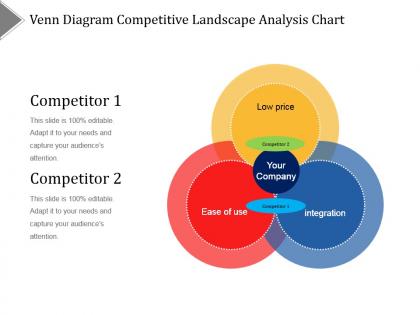
Venn diagram competitive landscape analysis chart ppt diagrams




Try Before you Buy Download Free Sample Product
 Impress Your
 Audience
 100%
100% Editable
 Save Hours
 of Time


Create friends forever with our Venn Diagram Competitive Landscape Analysis Chart Ppt Diagrams. Build a closer connection with acquaintances.
People who downloaded this PowerPoint presentation also viewed the following :
Venn diagram competitive landscape analysis chart ppt diagrams with all 5 slides:
Our Venn Diagram Competitive Landscape Analysis Chart Ppt Diagrams include every detail imaginable. Be able to elaborate on the job.
FAQs for Venn diagram competitive landscape analysis
So basically you've got circles representing different groups or categories. Where they overlap shows what those groups share in common. The parts that don't touch? That's what makes each group unique. Start with just two circles - way easier to wrap your head around before jumping into those crazy multi-circle ones. You can compare anything really - like what movies you and your friend both like versus what only one of you enjoys. The whole overlapping thing clicks pretty fast once you play around with it. Super useful for organizing thoughts visually.
Honestly, Venn diagrams are lifesavers for complicated stuff. They make you actually see how different ideas connect instead of just reading walls of text. Super helpful for biology, lit analysis, policy work - basically anything where multiple things overlap. Start by mapping your main concepts, then figure out where they intersect or split apart. I swear this would've saved me so much headache in grad school if I'd used them more. My economics prof never used visual stuff and I suffered for it lol. Try making one for whatever you're working on - it'll probably click way faster than just taking notes.
Oh man, the worst thing you can do is mess up the overlaps - like having circles touch when they shouldn't, or keeping them separate when there's actually shared stuff. Also label everything! I've seen so many where you're just guessing what each circle means. Pro tip: make the circle sizes match your actual data proportions. Sounds obvious but people skip this all the time. And don't go crazy with like 5+ circles - it gets messy fast. Stick to 2-3 max, then just double-check that your overlaps actually make sense before you show anyone.
Honestly, Venn diagrams are perfect when you need to show how things overlap - something other visuals just can't pull off as well. Charts work for data, flowcharts for processes, but when you're dealing with shared features or comparing stuff? That's where Venn diagrams crush it. They make complex relationships super obvious to people. Sure, they're useless for timelines or showing hierarchy - total fail there. But if you're presenting overlapping market segments or shared responsibilities, ditch the bullet points. Your audience will grasp it immediately instead of squinting at a wall of text trying to figure out the connections.
Honestly, I'd just go with draw.io first - it's free and you can whip up something decent in like 10 minutes. Lucidchart's really clean too if you don't mind paying. PowerPoint works fine if you're lazy and everyone already has it anyway. Canva's okay for prettier stuff but sometimes looks too... I dunno, Instagram-ish? Visio's obviously the best but who actually has that unless your company pays for it. Oh, and I totally forgot about the Google Drawings thing - super basic but gets the job done. Start with draw.io though. Web-based, no downloads, actually looks professional.
Oh totally! Venn diagrams are actually pretty solid for data stuff. Like when you're trying to figure out overlaps - customers buying multiple products, or which marketing channels hit the same people. They won't replace your usual charts obviously, but honestly they're perfect for showing stakeholders intersections without making their eyes glaze over. I always throw them into my exploratory phase because you'd be surprised what patterns jump out visually that you'd totally miss buried in spreadsheet rows. Then you can dig into the real detailed analysis after.
Dude, color coding totally saves your butt with Venn diagrams. Makes everything so much clearer - like, you don't have to decode messy labels anymore. Your audience gets it right away when each circle's a different color. The overlapping parts? Super obvious now. I actually discovered this the hard way during a presentation last year lol. Black and white diagrams are fine but you'll miss patterns that jump out with color. Just don't go crazy with it. Stick to maybe 4-5 colors max and make sure they contrast well, otherwise it looks like a rainbow threw up.
You need one circle per set you're comparing, so three customer segments = three circles. Pretty straightforward. But here's where it gets tricky - anything beyond three circles turns into a hot mess. Two circles? Perfect, clean, everyone gets it. Three works but starts feeling cramped. Four or more and you've basically created a puzzle nobody wants to solve. Honestly, I've seen people try to cram like six circles together and it's just painful to look at. If you've got more than three sets, just make separate diagrams or find a different chart type. Your brain (and everyone else's) will appreciate it.
Math class is where you probably first saw them - set theory, probability stuff. But honestly they're everywhere now that I think about it. Database design in computer science, business people analyzing markets, teachers explaining pretty much anything with overlapping ideas. Scientists love them too for comparing data or grouping species. I use them sometimes when I can't decide between options - sounds nerdy but it actually helps. Statistics, project planning, even just explaining concepts to people. They're weirdly useful once you get the hang of it.
Oh man, there's so much you can do! I've seen people use pizza slices for food stuff, puzzle pieces for presentations - way more interesting than boring circles. Hula hoops work surprisingly well if you're doing workshops (trust me on this one). Try overlapping photos or those transparent sheets on whiteboards. You could flip it and show what DOESN'T overlap instead. Digital ones where people click around are pretty cool too. Honestly though, just think about your audience first - what'll actually make sense to them? Then pick whatever format won't make their eyes glaze over.
Honestly, Venn diagrams are clutch for group discussions. When people keep talking past each other (happens way too often), throw one up on the whiteboard. You can actually see where everyone's ideas overlap instead of just arguing in circles. The quiet people on your team will love them too - they can just write their thoughts directly instead of fighting to get a word in. I've done this in brainstorming sessions and it's wild how much clearer everything becomes. Next time you're comparing options or looking for common ground, just start sketching circles. Works way better than I expected it would.
Dude, Venn diagrams are seriously underrated. They turn messy problems into something you can actually wrap your head around. Like when you've got multiple categories or conditions overlapping - instead of getting lost in all that info, you just draw some circles and boom, everything clicks. I probably use them way more than I should, but they're perfect for logic problems. You'll spot patterns you totally missed before, see what different groups share, and figure out what's unique to each one. My math teacher in high school was obsessed with them and honestly? She was right. Next time you're stuck, just sketch some circles first.
Honestly, Venn diagrams work for basically everything - they're like the Swiss Army knife of teaching tools. Start with simple two-circle ones comparing characters in English or different animal groups in science. Math teachers use them all the time for set theory stuff. History's great too - comparing empires, wars, whatever. My favorite thing about them is watching kids have those "aha!" moments when they finally see how concepts overlap instead of just memorizing facts. Some students are just visual learners, you know? Once they're comfortable, throw in a three-circle diagram. Way more engaging than another worksheet.
Canva's probably your best bet - their templates actually look good without much work. Lucidchart has more bells and whistles if you need fancy features. Creately and Miro work too, though I always forget Creately exists until someone mentions it. Google Drawings has some but they're kinda dated looking. Oh, and Figma if you're already doing design stuff there. Honestly, you'll spend more time picking a platform than actually making the diagram, so just grab Canva and get it done!
Yeah, cultural stuff totally matters with Venn diagrams! People from right-to-left reading cultures scan differently than we do. Colors are tricky too - red means danger here but luck in China, so that could mess up your color coding. Some cultures are fine with fuzzy boundaries while others want everything crystal clear. Honestly, I'd just stick with neutral colors and clear labels. Maybe run it by a few people from different backgrounds first? Better safe than accidentally confusing everyone, you know?
-
Easily Understandable slides.
-
Informative design.