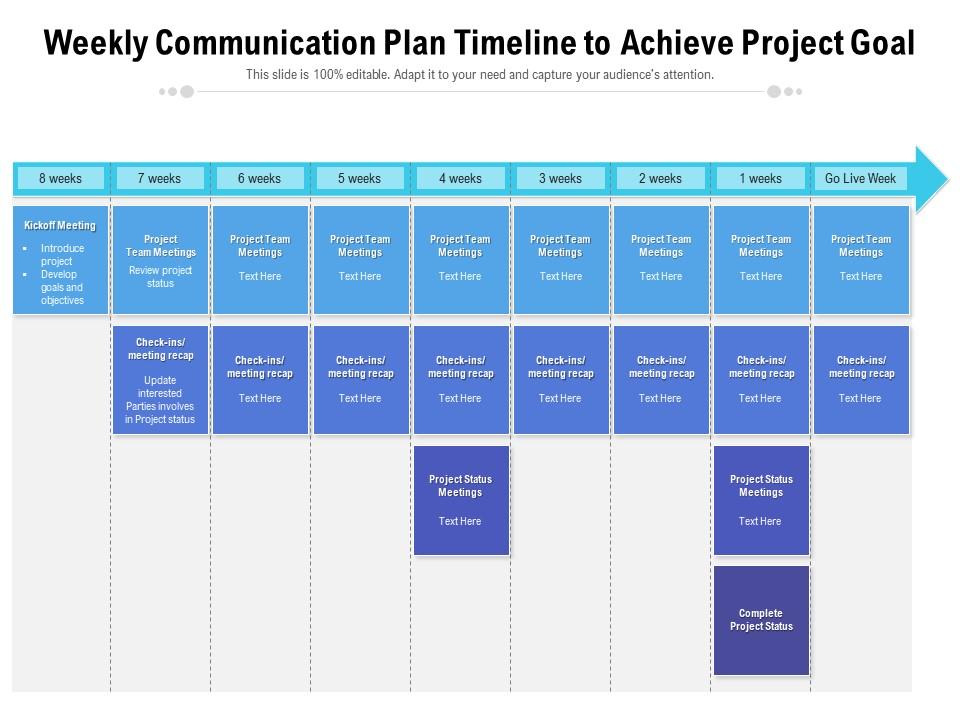
Weekly communication plan timeline to achieve project goal

Rating:
93%
Weekly communication plan timeline to achieve project goal
Slide 1 of 2
Favourites Favourites

Try Before you Buy Download Free Sample Product

Audience Impress Your
Audience
Editable 100%
Editable
Time Save Hours
of Time
The Biggest Sale is ending soon in
0
0
:
0
0
:
0
0
Rating:
93%
Presenting our well structured Weekly Communication Plan Timeline To Achieve Project Goal. The topics discussed in this slide are Project Team Meetings, Kickoff Meeting, Project Develop. This is an instantly available PowerPoint presentation that can be edited conveniently. Download it right away and captivate your audience.

FAQs for Weekly communication plan timeline to

Okay so you need four main things for your weekly comm plan. First, figure out who you're talking to and what you actually need to tell them. Then map out when these conversations happen - like are you doing Monday check-ins or Friday wrap-ups? Pick the right channels too because honestly, some stuff just hits different over Slack vs email vs in person. Don't forget the why behind each touchpoint though (I always space on this part). List out your recurring meetings, project updates, stakeholder stuff - whatever you've got going on. That way nothing gets forgotten. Oh and mix up your methods - some updates work way better as quick messages than full meetings.

Honestly, just watch how your team actually communicates first. Some groups want daily check-ins, others hate that and prefer weekly updates - I learned this the hard way lol. If it's a formal workplace, stick with structured emails and proper meetings. Casual teams? Slack messages and quick calls work way better. Figure out if they like detailed written stuff or just want the highlights verbally. I'd start with whatever feels normal for your group, then adjust when you see what actually gets people responding and staying in the loop.

Honestly, I'd just do a quick 15-minute standup every Monday to map out who's handling what. Skip the vague goals though - be specific like "boost engagement 20%" instead of just "post more stuff." Wednesday check-ins are clutch for catching problems early. Also, set up a shared doc or Slack channel where people can update progress and ask random questions. I'm obsessed with simple project boards lately - sounds basic but seeing who's doing what and when really keeps everyone on track. The visibility thing makes such a difference, trust me.

Honestly, just automate what you can first - Slack schedulers or email platforms handle weekly updates without you having to remember. Asana or Monday.com are solid for keeping everyone on the same page with deadlines. Quick Loom videos are amazing too, way better than writing novels in email (learned this the hard way). The analytics from these tools actually show you what people are reading, which is super helpful. But don't go crazy - pick maybe 2-3 max and stick with them. Nothing's worse than confusing your team with a new platform every other week.

Look at your open rates and click-throughs first - basic stuff but it tells you if anyone's actually reading. Response rates matter too. But honestly? The numbers only go so far. What you really want is qualitative feedback - like, are people still asking "wait what's happening with that project?" all the time? Survey your team quarterly about whether they feel informed. I'd track maybe 3-4 key things max. Don't overthink it. The best metric is probably just fewer confused faces in meetings and people actually following through on what you've communicated.

Honestly, just pick one day a week and make it your feedback day. Friday pulse surveys work great, or throw 10 minutes into your usual team meeting. Anonymous suggestion boxes are clutch - people will actually tell you what they're thinking instead of just being polite. Oh, and rotate who speaks up each week so you're not hearing from the same three people every time. The trick is keeping it simple and predictable. Don't overthink it. Stick with whatever method feels right for your team for at least a month, otherwise you won't see any real patterns.

Honestly, transparency is what saves weekly meetings from being total time-wasters. Share the real stuff - what's blocking you, where you messed up, why certain decisions got made. Your team will actually start helping each other instead of everyone just staying in their own bubble. Trust builds way faster when people aren't left guessing about the "why" behind everything. I've found that once you start being honest about struggles (not just wins), people get so much more engaged. Try it yourself next week - like actually model it - and see what happens. It's kind of wild how much the dynamic shifts.

Honestly? Check it every 2-4 weeks - that sweet spot works best. Weekly feels way too obsessive (trust me, you'll burn out), but if you wait longer than a month you'll totally miss when things aren't clicking. I made that mistake once and kept sending updates nobody actually read for like 3 months straight. Look at the real stuff - are people responding to your messages? Getting what they need? Your team changes, projects shift, so your communication should too. Just throw a reminder on your calendar and tweak it when needed.

Honestly, the worst thing you can do is jam too much stuff in there. Everything becomes chaos and nothing gets done. I'd say pick maybe 2-3 big things per week, tops. Another killer mistake? Being vague about who's doing what. Updates just disappear into the void that way. Make someone own each task with real deadlines - not everything can be "ASAP" (though every manager I've worked with thinks it can be lol). Oh, and always pad your timeline. Something random will definitely pop up. Start super basic with a template, then tweak it based on what actually works for your people.

Honestly, templates are a game changer for weekly updates. Your brain processes visuals way faster than text blocks, so people actually pay attention. I always put metrics in the same spot, action items in another - that way everyone knows where to look. Saves me tons of prep time too since I'm not building slides from zero every week. Charts make complicated stuff way clearer than bullet points ever could. Oh, and I've noticed people don't zone out as much when there's actual visual stuff to look at. Just make 2-3 layouts you can swap between depending on what you're covering that week.

Okay so here's what works: break it into 3-4 sections - wins, current stuff, roadblocks, deadlines. One line per bullet max because honestly nobody reads long updates anymore. Make it scannable in 30 seconds tops. Skip the vague "making progress" nonsense and use actual metrics or project names. People need real info. If you need something from someone else, bold that part or call it out separately - don't bury it in paragraph three where it'll get missed. The whole point is giving folks enough context to know whether they need to bug you for details or if you've got things handled.

You need regular touchpoints between departments - like weekly check-ins or joint project updates. Map out which teams actually work together and bake those connections into your schedule. Most plans only focus on internal team stuff, then everyone acts shocked when projects get siloed (so predictable). Set up shared Slack channels or doc spaces for async collaboration too. Oh, and those rotating department spotlights in all-hands meetings? They're surprisingly effective. Don't just hope collaboration happens naturally - it won't. Be deliberate about creating these connections.

Honestly, just pick Slack or Teams for internal stuff - you can schedule messages and set up channels so people actually see them. For external updates, Mailchimp works but fair warning, those open rates will crush your soul sometimes lol. Loom's solid if you're into the video thing, or throw everything in Notion so people can comment. But here's the thing - don't go crazy with like 5 different tools. Pick maybe two max and actually stick with them. Figure out where your people are already hanging out first, then work backwards from there.

Try flipping the whole thing - ask your team about their challenges and wins FIRST, then give your updates based on what you heard. People need to feel heard before you start talking at them, you know? I made this mistake for way too long and realized I was basically monologuing every meeting. Reserve those last 10-15 minutes for open discussion about your stuff. Oh, and rotate who leads different agenda items each week. Keeps everyone awake and you'll get way better perspectives. Don't force participation though - make it feel natural.

Start with last week's action items - shows you're actually paying attention to what people said they'd do. I throw in a "Status Update" section right at the top covering what's done, what's behind, and why (because let's be real, everyone forgets). When stuff's overdue, tag whoever owns it and ask for real timelines. None of that "working on it" nonsense. Keep a simple tracker going - even a basic spreadsheet works fine. You'll start seeing who delivers vs who doesn't pretty quickly. Oh, and celebrate when people actually follow through! Positive reinforcement works way better than just nagging about the late stuff.

Ratings and Reviews

93% of 100
Review Form
Write a review
Most Relevant Reviews
  1. 100%

    by Dallas Medina

    Great product with highly impressive and engaging designs.
  2. 100%

    by Jacob White

    Informative presentations that are easily editable.
  3. 100%

    by Derrick Rice

    Unique and attractive product design.
  4. 100%

    by Dong Santos

    Use of different colors is good. It's simple and attractive.
  5. 80%

    by Darell Vargas

    Very unique, user-friendly presentation interface.
  6. 80%

    by Earnest Carpenter

    Qualitative and comprehensive slides.
  7. 100%

    by Thomas Garcia

    Qualitative and comprehensive slides.
  8. 100%

    by Connie Simmons

    Excellent work done on template design and graphics.
  9. 100%

    by Cory Reynolds

    Easily Understandable slides.
  10. 80%

    by Damien Murray

    It saves your time and decrease your efforts in half.

Items 1 to 10 of 11 total

    Page:
  • You're currently reading page 1
  • Page 2
  • Next
per page: