

Weekly schedule management plan for construction project




Try Before you Buy Download Free Sample Product
 Impress Your
 Audience
 100%
100% Editable
 Save Hours
 of Time


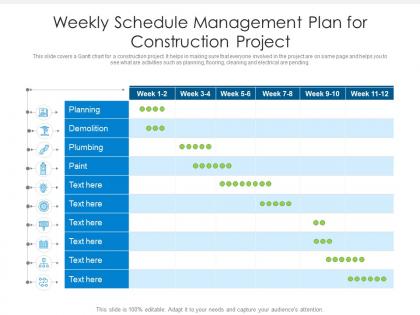
This slide covers a Gantt chart for a construction project. It helps in making sure that everyone involved in the project are on same page and helps you to see what are activities such as planning, flooring, cleaning and electrical are pending.
People who downloaded this PowerPoint presentation also viewed the following :
Weekly schedule management plan for construction project with all 2 slides:
Use our Weekly Schedule Management Plan For Construction Project to effectively help you save your valuable time. They are readymade to fit into any presentation structure.

FAQs for Weekly schedule management plan
Start with a solid breakdown of all your tasks and realistic timeframes. Dependencies matter - figure out what needs to happen before what. Track progress weekly or you'll miss problems until it's too late. Build in buffer time because weather and deliveries will screw you over, guaranteed. Critical path planning is where projects succeed or fail, so nail that down first. Get everyone to agree on major milestones upfront - saves so many headaches later. Oh, and map out when you need specific crews and equipment. Honestly, the scheduling part is almost more important than the actual construction sometimes.
Dude, get yourself some project management software with real-time updates. Your crews can punch in progress right from their phones, GPS tracks where equipment actually is, and everything syncs automatically. No more waiting around for those useless weekly reports that are already ancient history by the time you see them. The AI stuff is pretty cool too - it'll spot delay patterns before you even notice them. Way better than wrestling with spreadsheets all day (been there, it sucks). Most cloud-based tools have free trials, so you can mess around and see what clicks before spending money.
Look, you'll save yourself so much headache if you just keep everyone in the loop constantly. Owners, subs, suppliers, that one city inspector who's perpetually late - they all need regular updates on delays and changes. When people get blindsided by permit issues or material shortages, that's when your timeline goes to hell. I learned this the hard way on my first big project. Set up weekly check-ins and maybe use some shared tracking system so everyone can see what's happening in real time. Trust me, playing catch-up phone tag when problems hit is way worse than over-communicating upfront.
Ugh, delays are the worst but you gotta jump on communication right away - people hate finding out bad news secondhand. Check if it's actually on your critical path first, or maybe you've got some wiggle room. Options are pretty straightforward: throw more people at it, overlap some tasks that normally run in sequence, or shuffle things around. I always think being brutally honest about new timelines beats sugarcoating it, even if the truth stings. Update your schedule baseline and document what happened. Trust me, your reputation survives honesty way better than missed promises.
Honestly, most projects blow up because of three things. First, everyone sets these crazy unrealistic deadlines from day one. Then communication falls apart between trades - your plumber doesn't know what the electrician's doing and vice versa. Weather delays? Material shortages? Nobody plans for that stuff but it always happens. Here's what actually works: pad your timeline by at least 15-20% (trust me on this), do weekly check-ins with everyone, and update your schedule constantly. Oh, and change orders will mess up everything downstream, so try to nail down specs early. Don't let small hiccups turn into disasters.
So CPM basically finds which tasks will screw over your whole timeline if they get delayed. First, list out everything you need to do with how long each takes and what depends on what. Then run it through scheduling software - honestly, don't try calculating this manually unless you hate yourself. The software shows your critical path, which is the longest route through all your tasks. Those critical ones? Zero wiggle room. But the others have "float" time, so you can shift resources around without panicking. It's pretty clutch for knowing where to actually worry.
Procore and Autodesk Construction Cloud are solid choices - your team can update schedules on their phones and everyone sees changes right away. Microsoft Project Online's decent if you're already using their stuff. For smaller jobs, Monday.com works fine even though it's not built for construction specifically. Testing a few options with your crew first is smart since getting people to actually use the thing consistently is honestly harder than finding good features. We learned that the hard way on my last project. Pick whatever won't make everyone groan when you bring it up.
Focus on critical path stuff first - any delay there screws your whole timeline. Custom materials and permits need early attention too since they take forever. Weather work gets priority during good seasons (trust me on this one). You can't wire before framing, so sequence based on what trades need to happen when. Also factor in crew availability - no point scheduling if your guys aren't free. Oh, and definitely pad time around anything you're unsure about. Murphy's Law is real in construction and you'll thank yourself later when something inevitably goes sideways.
Get everyone using the same scheduling software and format first - that's half the battle right there. Make subs submit their schedules 2-3 weeks early so you can actually review them properly. The critical path stuff is where people always screw up, so double-check those links connect to your master schedule. Weekly meetings work for most projects, though complex ones might need twice a week. Oh, and always pad some buffer time between their deliverables and whatever comes next. Trust me on this - set your submission requirements upfront and don't budge on them later.
Your schedule lives or dies by how you distribute your resources - seriously, I've seen so many projects tank because of this. Tasks move at the speed of whatever crew you give them. Short-staff your critical path stuff? You're toast. But here's the thing - cramming too many people onto one job backfires too. You end up with chaos instead of speed. I learned this the hard way on a project last year. Map out what each phase actually needs first, then see if your timeline makes sense. When resources don't match up, something's gotta give - either adjust your crew or push your dates.
Honestly, just stick to three things that actually work. Start with historical data from similar projects - even when your current one feels totally different, it's still your best baseline. Rolling wave planning is a game changer too. Detail the immediate stuff but keep future phases loose until you need them. Way less stressful than trying to predict everything upfront. Update your forecasts weekly based on real progress and new risks that pop up. Don't wait for disasters to hit before adjusting. Oh, and track how accurate your estimates are so you get better at this over time.
Dude, you've gotta work around the weather or it'll bite you. Can't pour concrete when it's freezing, and roofing in heavy rain? Forget about it. I'd tackle exterior stuff during good weather months, then switch to interior when it gets nasty outside. Learned this lesson the expensive way - had a project get delayed three months because we ignored rainy season like idiots. Oh, and deliveries during snowstorms are basically impossible. Check your area's weather history and add extra time for delays. Trust me on this one.
Honestly, rushing construction is a recipe for disaster. Quality tanks when crews skip inspections and cut corners on materials. I've watched projects where exhausted workers made dumb mistakes because everyone was stressed about impossible deadlines. Safety goes out the window too - that's when people actually get hurt. If you absolutely have to compress the schedule, focus on activities that won't mess up your critical path first. Adding more crew usually works better than forcing overtime. But real talk? Sometimes you gotta push back on the client rather than risk someone's safety. It's not worth it.
Honestly, you've gotta think of those three as one big puzzle instead of separate problems. Rush the timeline? Yeah, you're looking at higher costs or crappy quality. Cut the budget too much and suddenly everything takes forever or you're using cheap materials that'll bite you later. What I do is sketch out like 3-4 different scenarios showing various time/cost/quality combos. Clients always say they want "fast AND cheap" until they actually see what that disaster looks like! First, figure out what you absolutely can't compromise on in each area. Then work around those hard limits. And dude, always build in some buffer time for when things go sideways - because they will.
So basically, traditional scheduling maps out your whole project timeline upfront - fixed milestones, set dates, the works. Agile breaks everything into short sprints instead. You're constantly checking in and tweaking things as you go. Traditional's solid when you know exactly what you're building and nothing changes (rare, honestly). But most construction projects? There's always design changes, permit delays, or some random site issue pops up. That's where agile saves your butt - you can actually pivot without your entire schedule falling apart. I'd say test it on smaller phases first though.
-
Excellent Designs.