

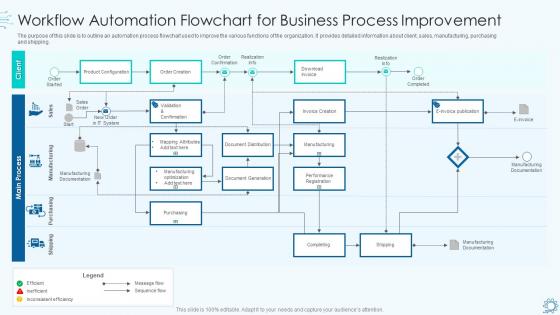
Workflow automation flowchart for business process improvement




Try Before you Buy Download Free Sample Product
 Impress Your
 Audience
 100%
100% Editable
 Save Hours
 of Time


Our Workflow Automation Flowchart For Business Process Improvement are topically designed to provide an attractive backdrop to any subject. Use them to look like a presentation pro.
People who downloaded this PowerPoint presentation also viewed the following :
Workflow automation flowchart for business process improvement with all 6 slides:
Use our Workflow Automation Flowchart For Business Process Improvement to effectively help you save your valuable time. They are readymade to fit into any presentation structure.





FAQs for Workflow automation flowchart for
Honestly, the time savings alone make it worth it - no more mind-numbing repetitive stuff. Your team can actually work on things that matter instead of copying data between spreadsheets all day (ugh). Everything gets tracked automatically so you're not constantly wondering "wait, where are we on this?" Plus Sarah doesn't have to remember every single follow-up email anymore. Processes stay consistent regardless of who's handling them. The money you save scales pretty fast too. I'd pick your most annoying repetitive tasks first and automate those - you'll probably see results right away.
Dude, workflow automation is honestly a game changer - no more constantly bugging people about where things stand. It automatically pings everyone when tasks move forward or deadlines are coming up. Creates this nice trail of who did what too, which saves you when someone asks about that project from like a month ago. Honestly, the best part? Way fewer "quick sync" meetings that could've been avoided. Your email won't be clogged with "what's the status on..." messages either. I'd start small though - just pick your most annoying repetitive handoffs first.
Honestly, the worst part is dealing with people who freak out about change - like, Karen from accounting will fight you on everything. Integration between systems is a nightmare too, and mapping current workflows takes forever because nobody actually knows how things work. Oh, and your data is probably trash, so fix that first. Start with something super basic though. Get a few people on your side early, maybe bribe them with coffee or whatever. Don't go crazy trying to automate the whole company day one - you'll burn out and everyone will hate you.
So basically, when you automate stuff, you're cutting out all those spots where people mess up - like copying data wrong or forgetting steps. The system just does the same thing every time without getting distracted or tired. You can even set up checks that catch problems early, which honestly saves so much headache later. I started with our invoice processing (what a nightmare that was manually) and it's been a game changer. Way fewer angry emails about billing errors. Just pick whatever you do most often that always seems to go sideways and automate that first.
Zapier's probably your best bet to start - super easy and connects everything without coding. I'd also check out Microsoft Power Automate if you're already using Office stuff. Monday.com handles project workflows really well, though honestly I think their interface is kinda cluttered. For data stuff, Airtable's solid. Pick one annoying repetitive task first and automate just that. Don't go crazy trying to automate everything at once (learned that the hard way). Once you see how much time it saves, you'll want to automate everything. If you need something more complex later, Nintex or ProcessMaker are worth looking into.
Just grab Zapier's free version or IFTTT to start connecting your apps. The basic stuff like syncing CRM contacts to your email list? Total game changer. I'd focus on whatever's eating up most of your time - auto social posts, follow-up emails, lead sorting. You know those apps you're already paying for? They probably have automation features buried in there somewhere that you haven't touched yet. Pick one thing that annoys you daily. Set it up, make sure it actually works (learned this the hard way), then tackle the next workflow.
So AI basically acts like the brain behind your workflows - it can predict next steps, auto-sort requests, and make decisions without you coding every single rule. Picture having a smart assistant that picks up on your patterns. Beyond just shuffling data around, it actually analyzes everything, catches weird stuff, and pivots when things go sideways. Honestly, you don't need to be some data wizard anymore to use it. I'd start small though - find those annoying repetitive tasks where you're always making judgment calls, then check if your platform has AI features that could handle that stuff instead.
Start by figuring out what's actually slowing your team down - like, what processes make everyone groan? Then map those out before you even touch any automation platform. Most tools let you create custom triggers and actions that fit your exact workflow. So if you're in healthcare, maybe automate patient intake stuff. Manufacturing? Focus on inventory tracking or quality checks. Here's the thing though - don't go crazy trying to automate everything right away. That's a recipe for disaster. Just pick your biggest time-waster first and build it out slowly.
First thing - document exactly how things work right now, not how they're supposed to work. I always end up with a whiteboard covered in arrows and boxes because it gets chaotic quickly! Map out who's doing what and when. Look for those annoying bottlenecks and handoffs between people. Don't skip the weird stuff that only happens monthly - trust me on this. Once you've got everything mapped, find the repetitive, rule-based tasks. Those are gold for automation. Actually walk through your map with someone who does the work daily. They'll catch stuff you missed.
Track time savings and cost cuts first - that's your bread and butter. Before automating anything, measure how long manual tasks actually take (seriously, do this or you'll have no clue if it worked). Then compare after implementation. Don't forget error rates and throughput - honestly those numbers can be way more impressive than time savings sometimes. Employee happiness matters too since miserable people aren't productive. Set up monthly tracking on a simple dashboard. Oh, and baseline everything upfront because guessing at impact later makes you look amateur to leadership.
Dude, Netflix went from taking weeks to approve content down to just days by automating their whole workflow - which is insane considering how much stuff they release. Spotify does something similar with those playlists that somehow know your music taste better than you do. Amazon's warehouses? Basically robots doing all the picking and packing now. Even JPMorgan automates loan approvals and catches fraud automatically. Honestly, the best approach is just picking one boring, repetitive thing you do at work and seeing if you can automate that first.
Build your compliance stuff right into the automation from day one - trust me, retrofitting sucks. Map out what regulations you actually need to hit first, then design around those. Set up approval checkpoints at the important steps and make sure everything gets logged automatically. Rule-based validation catches most problems early. The real challenge? Speed vs. being thorough. Nobody wants slow workflows, but regulatory headaches are infinitely worse than waiting a few extra seconds. Document everything so you can pull compliance reports easily when auditors come knocking.
Get your team actually clicking through the new stuff instead of just watching demos - trust me, hands-on beats slides every time. Find your tech-savvy people first and get them comfortable, then let them help the others. Peer teaching is honestly way more effective than you'd think. Document why you're making each change, not just how to do it. People hate change less when they get the reasoning behind it. Quick reference cards for their desks are clutch too. Don't forget follow-ups after a few weeks - that's when the real questions surface.
Honestly, automation is a game changer for keeping customers happy. Your support tickets get routed faster, orders process without delays, and way fewer mistakes slip through. I mean, who wants to manually send the same confirmation email 50 times a day? That's soul-crushing work. The cool thing is your team can actually tackle the interesting problems that need real human judgment instead. Customers get consistent service every time too - no more "depends who you talk to" situations. I'd start by looking at whatever customer processes eat up most of your time. That's usually where you'll see the biggest wins from automating things.
Honestly, the AI stuff is getting wild - it's not just basic automation anymore, it can actually make decisions now. Hyperautomation is everywhere, basically stitching together different tools for complete workflows. The no-code platforms are insane too, your team won't need to bother IT for every little thing. Oh, and process mining tools are finding bottlenecks you didn't even realize were there. I'd say pick one area and just mess around with it. The tech moves so fast that if you wait for the perfect solution, you'll never catch up.
-
Great designs, really helpful.
-
Colors used are bright and distinctive.