

0414 sales and profit column line chart powerpoint graph




Try Before you Buy Download Free Sample Product
 Impress Your
 Audience
 100%
100% Editable
 Save Hours
 of Time


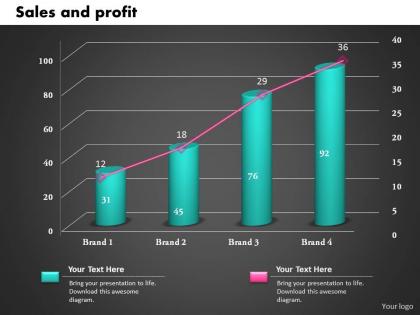
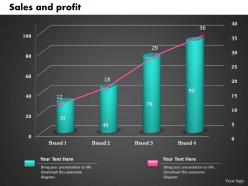
To obtain a healthy profit, you need to know what level of turnover and sales your business requires. For this purpose, our designing team has crafted this sales and profit column line chart PPT graph slide. The PowerPoint template has both a line chart and a column chart for displaying all your important content in an eye-pleasing manner. These charts are excel linked so you can easily change the values while representing these slides to your team. Future forecasting related to your sales and profits can be made in no time by using our slide show. Charts are the most fundamental aspect of technical analysis. It’s important for business traders to understand what’s being shown on a chart and the information it provides. Good entrepreneurs measure their profitability very frequently, perhaps on a daily basis. Make use of our slide chart, solely or as part of any other presentation model. Simply click on the download link and modify it to suit your organizational needs. Our 0414 Sales And Profit Column Line Chart Powerpoint Graph don't allow you to get hampered. Go forward in a free environment.
People who downloaded this PowerPoint presentation also viewed the following :
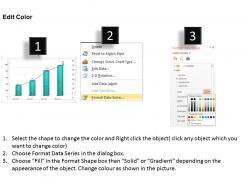
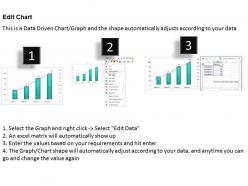
0414 sales and profit column line chart powerpoint graph with all 3 slides:
Create firm bonds with our 0414 Sales And Profit Column Line Chart Powerpoint Graph. Your team will advance hand in hand.
FAQs for 0414 sales and profit column line
Start with the basics - revenue, cost of goods sold, and gross profit. Those three tell your main story. Margins are super important too (gross and net) because raw numbers don't mean much when you're comparing different periods. Units sold is clutch if you can get it - sometimes profits tank just because volume dropped, not because your margins went to hell. Year-over-year comparisons help a ton too. Honestly, I'd stick with these fundamentals first. You can always dig deeper once you see what patterns emerge or what questions people start asking.
Yeah, seasonal stuff will mess with your head when you're looking at sales charts. Like, you'll see February tank and think you're failing, but maybe you just sell patio furniture or whatever. Compare the same months from different years instead of looking month to month - way more helpful. I made this mistake once and spent a whole weekend stressed about nothing lol. Try plotting a few years together or do that rolling 12-month average thing to smooth everything out. Winter dips don't mean you're screwed, they just mean it's winter.
Ugh, the worst thing you can do is cram everything onto one chart - it's just visual chaos. Don't mess with your y-axis either, like making tiny changes look huge by cutting off the bottom. I swear some people do this on purpose lol. Label your time periods clearly or nobody knows what they're looking at. Keep your profit calculations the same throughout (sounds obvious but you'd be surprised). Short sentences work better than cramming ideas together. If you're showing multiple products, throw in a legend. Honestly, simple charts get used way more than fancy complicated ones.
Your sales chart is basically a roadmap for what's coming next. Seasonal spikes, growth streaks, regular dips - they tend to repeat. I'd grab at least 12-18 months of data for decent predictions. Don't forget about outside stuff that messed with your numbers, like that marketing push you did or whatever was happening in the market. Honestly, once you spot your strongest patterns, those become your go-to for forecasting next quarter. It's not perfect, but it beats guessing.
Start with green for profits, red for losses - makes the good/bad stuff pop instantly. Throw in some trend lines too. Bar charts work great when you're comparing different products or regions, but go with line charts for anything time-related. Interactive tooltips are a lifesaver, trust me. You can dig into specifics without making everything look messy. Oh, and axis scaling matters way more than people think - it literally changes how dramatic your data looks. Before you even start though, figure out what decision your audience needs to make. That'll guide everything else.
Honestly, bar graphs are perfect when you want people to compare specific numbers - like seeing how much Q3 beat Q1 by. Your brain just automatically looks at those bar heights and goes "oh wow, big difference." Line charts though? Those are clutch for showing trends over time. You can instantly see if profits are going up, down, or just kinda flat. I'm probably weird about this stuff, but the chart type really does change what people notice first. Need to show steady growth? Go with lines. Want them to see one quarter absolutely demolished the others? Bars all the way.
Dude, color coding seriously saves your life with sales charts. Red for losses, green for profits, amber for breaking even - boom, instant clarity. I can't tell you how many bland blue charts I've stared at wondering what the hell was going on. Short sentences work great here. Pick your colors once and use them everywhere though, otherwise your team's gonna be confused every time they look at a new report. Oh, and amber might seem weird but it's way better than using gray - gray just looks depressing honestly. Consistency is everything with this stuff.
Just use different colors for each product line on the same chart - way easier to compare them that way. Don't go crazy with more than 3-5 products though, or it'll look like someone threw up a crayon box. A legend helps people figure out what's what. If your lines are crossing all over the place, throw in some different markers like dots or squares. Oh, and make sure your y-axis actually works for all the data ranges - learned that one the hard way once. Start with your best sellers first when picking colors. More than 5 products? Maybe group the similar ones together instead.
Tableau and Power BI are your best bets for dynamic sales charts - both handle real-time data really well. Excel can work if you're tight on budget, especially with pivot charts and some VBA tricks, but updates aren't as seamless. Google Sheets has gotten surprisingly good lately too. Actually, before diving into new software, check if your CRM (Salesforce, HubSpot, whatever) has decent built-in reporting since it's already connected to your data. Trust me on this - wrestling with data connections will burn way more time than just learning a new tool. Go with whatever plays nice with your current setup first.
Honestly, I'd say weekly at minimum, but daily's way better if you can manage it. You don't want to find out about a profit drop weeks after it happened - that's just painful. During busy times or launches, daily updates are totally worth it though. The trick is being realistic about what you'll actually do. Like, don't tell yourself you'll check daily then completely forget for two weeks (been there). Pick whatever schedule works and stick to it. Oh, and set a calendar reminder or you'll definitely forget.
Dude, these charts are game-changers for figuring out what's actually making you money. I mean, you'd be shocked how many "top sellers" barely turn a profit – happened to me last year with our best product line. Pull up last quarter's numbers first and look for those profit gaps. Short bursts show you trends fast, plus you can catch issues early. Use that info to kill the dead weight campaigns and focus your budget on what works. Oh, and it makes pricing decisions way easier when you can actually see the data instead of guessing.
Look, customer segmentation will totally change how you read those profit charts. You'll spot which groups actually make you money vs the ones bleeding your margins dry. Maybe your enterprise clients are only 20% of sales but drive 60% of profits - who knew, right? Or certain demographics always buy your pricier stuff. Without breaking this down, you're basically guessing at what works. Honestly, I'd start simple - just overlay your top 3 customer segments on whatever chart you're using now. The patterns that pop up might surprise you.
Honestly, those regional profit charts are super helpful for figuring out what's actually working. Like, maybe your West Coast team is killing it with bundles while the East Coast guys are better at upselling premium stuff. Pull your last quarter's numbers and look for the biggest gaps first - that's where you'll find the easiest wins. You can basically steal strategies from your best regions and try them in the slower areas. Plus you might catch some seasonal patterns you totally missed before. It's kind of like having insider info from your top performers, if that makes sense.
Throw in expense breakdowns and customer acquisition costs first - those hit your bottom line hardest. Inventory turnover rates are clutch too for seeing the full picture. Your cost per unit will show if margins are actually getting better or if you're just selling more stuff at the same crappy rate. I'd also track operating expenses and marketing spend by season since that's when things get weird. Way easier to spot if profit drops are from pricing, runaway costs, or inventory sitting around. More context = better trend spotting, honestly.
Check your charts for products with crappy profit margins or sales that keep dropping. Once you see it all mapped out visually, the losers become super obvious - honestly kinda shocking sometimes. Bottom quartile performers or anything trending downward? Those are your problem children. Pull their data and figure out what's going wrong. Maybe it's pricing, maybe demand just sucks, or costs got out of hand. Some you can probably fix with tweaks. Others... might be time to cut them loose and focus on what's actually making money.
-
Perfect template with attractive color combination.
-
Much better than the original! Thanks for the quick turnaround.