

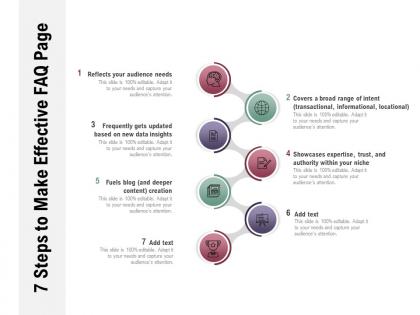
7 steps to make effective faq page




Try Before you Buy Download Free Sample Product
 Impress Your
 Audience
 100%
100% Editable
 Save Hours
 of Time


Display genuine concern with our 7 Steps To Make Effective FAQ Page. The depth of your feelings will come across.
People who downloaded this PowerPoint presentation also viewed the following :
7 steps to make effective faq page with all 2 slides:
Exhort them gently with our 7 Steps To Make Effective FAQ Page. Carefully build their faith in you.
FAQs for 7 steps to make
Start with the obvious stuff - file formats, software compatibility, licensing. But honestly, the real game-changer is covering what people actually get stuck on: customization steps, font requirements, and those annoying technical glitches. Categories help too - "Getting Started," "Technical Problems," whatever makes sense. A search bar saves everyone's sanity because nobody wants to scroll forever. Real customer examples work great since people want to see how others actually use your templates. Keep answers short and ditch the corporate nonsense. Oh, and update it regularly based on your actual support tickets - that's where the gold is.
Group your questions by topic first - billing, setup, whatever makes sense for your stuff. Write the questions how people actually ask them, not in corporate speak. Most companies totally blow this part because they think like employees instead of confused customers. Definitely add a search bar at the top. Maybe throw in a "popular questions" section too since people are lazy and won't scroll through everything. Oh, and test it with real users - you'd be surprised what seems obvious to you but confuses everyone else. Makes a huge difference.
Hey! So customers mostly bug me about three things with template customization. Can they swap out colors and fonts for their brand? Yep. Logo stuff and ditching watermarks comes up a lot too. Then there's the whole compatibility mess - will it work on Mac, different PowerPoint versions, whatever. People also wonder about setting custom templates as defaults and sharing with their team. Oh, and here's something that actually works - make a visual guide showing the steps. Sounds obvious but it seriously cuts my follow-up questions in half. Way better than explaining it over and over.
Definitely make a whole troubleshooting section just for template stuff - that's where people get stuck the most. List out the usual suspects: file won't upload, formatting gets weird, compatibility issues. Screenshots help a ton here. Oh, and definitely mention browser requirements upfront because I swear half the problems come from people using some ancient version of Chrome or whatever. Give them backup options too like "if Method A bombs, try Method B." The key is updating it based on what support tickets you're actually seeing come in. Template bugs are seriously the worst to debug!
Match your template to who's watching, honestly. Executives want bare bones with just the data - they're busy and don't have time for fluff. Technical people? Go nuts with details and charts, they actually like that stuff. Client presentations need to look professional but not like you're showing off (learned that one the hard way). Boardrooms = formal, team meetings = whatever works. Also test a slide first because nothing's worse than realizing your fonts are tiny when you're already presenting. Room setting matters too - you'll adjust differently for each situation.
Here's what I'd do - flip those boring FAQ answers into mini success stories. So instead of "Yes our product works," start with "Sarah from Austin told us this after 3 months..." then drop her actual quote. Way more convincing, honestly. You could also add questions like "What results have other customers seen?" - gives you a perfect excuse to showcase testimonials. Just match each story to whatever concern the question's really asking about. Oh, and throw in specific numbers when you've got them. People love concrete details way more than vague promises.
Honestly, just be super specific about what people can actually do with your templates. Commercial use, reselling, attribution - spell it all out. Most folks want to know if they can use it for client work (they almost always do), so just say that upfront. Give concrete examples like "yeah, use this for your photography biz" or "nope, don't resell it as yours." Bullet points work way better than paragraphs of legal stuff nobody reads anyway. If you've got different license levels, maybe throw in a simple table? Makes it easier to compare without the headache.
So basically think of it like organizing your room - everything needs a place but you still gotta find stuff easily. I'd use collapsible sections so people don't get hit with a massive wall of text right away. Group similar questions together and honestly, don't be afraid of white space. It looks way cleaner. If you've got more than 15 questions, definitely add search because nobody wants to scroll forever. Keep your formatting consistent and maybe throw in some icons to help categorize things. Oh and test it on mobile - I swear half the internet lives on their phones now.
Make contacting you feel super easy, not like some dreaded last step. I'd throw a "Still have questions?" section at the bottom with email, chat, phone - whatever you've got. Skip the corporate speak and say something like "We love hearing from you!" Put your contact info where people can actually see it. Maybe add a quick form right on the FAQ page too. Here's the thing - if people have to dig around hunting for your contact details, most just won't bother. Oh, and definitely test it yourself first to make sure everything actually works smoothly.
Honestly, I'd check it every 3-6 months minimum. But here's what I actually do - whenever I keep getting the same question over and over in emails or calls, I just add it right then. Don't wait for some formal review. Do a bigger quarterly deep-dive too. Check your analytics to see which FAQs nobody clicks and what's totally missing. I learned this the hard way after ignoring mine for like a year - total mess. Set a calendar reminder or you'll definitely forget. It's boring work but cuts down support tickets like crazy.
Write your FAQ headings like actual questions people would ask you face-to-face. Your customers probably email or chat you with real questions already - start there instead of making up random ones. Work your keywords into the questions and answers naturally, but don't go crazy with it. Google's gotten way better at spotting keyword stuffing anyway. Break up your answers with headings and bullet points so they're easy to scan. Here's the thing though - you'll get way better results if you focus on genuinely helping people first. The SEO stuff should come second, not drive everything you write.
Check your support tickets and chat logs first - that's where the good stuff is. Your support team probably answers the same 10 questions constantly, so just ask them what they're tired of explaining. Social media comments are gold too since people complain there when they're confused. I'd also throw up a quick survey for recent customers asking what tripped them up. Honestly, this approach beats trying to guess what people want to know. You'll have real FAQ content in like a week instead of making stuff up.
Screenshots are your best friend here! Instead of writing paragraphs about where to click, just grab a quick screenshot and circle the button. Way easier for everyone. I love doing numbered screenshots for step-by-step stuff - people can actually see what they're supposed to do. Video clips work too if it's something with multiple steps. Oh, and make sure your screenshots aren't ancient versions of the interface (learned that the hard way). Before/after examples are solid for showing changes. Flowcharts help when things get technical, but honestly? Visual beats text every time.
Dude, you absolutely need a search bar on your FAQ page. People hate scrolling through tons of questions when they're looking for something specific. I learned this the hard way - had an FAQ with like 30 questions and users were just leaving instead of digging through everything. Search lets them find answers instantly. Make it smart too, so it catches typos and related terms. Once you hit 15-20 questions, it becomes pretty much mandatory. Your support team will love you because they'll get way fewer tickets about stuff that's already covered.
Honestly, pretend your users know absolutely nothing - like, zero. I know it feels weird "dumbing it down" but trust me, you're not going far enough. Number your steps and ditch the jargon completely. Those engineer-written FAQs make me want to scream. Screenshots help tons, and here's the thing - always test your explanation on someone clueless first. If they're lost, you rewrite it. Period. Short sentences work. Longer ones should actually flow naturally when you read them out loud. You're trying to help people succeed, not flex your technical vocab. That's the whole point really.
No Reviews