

8 circles hub and spoke graphic





Try Before you Buy Download Free Sample Product
 Impress Your
 Audience
 100%
100% Editable
 Save Hours
 of Time


The designs of our 8 Circles Hub And Spoke Graphic can be immensely inspiring. It is a joy to behold.
People who downloaded this PowerPoint presentation also viewed the following :
8 circles hub and spoke graphic with all 5 slides:
Our 8 Circles Hub And Spoke Graphic address your deepest concerns. All your doubts will fade away.
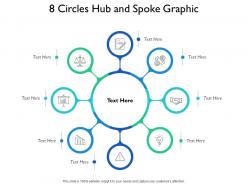


FAQs for 8 circles hub
So basically you pick your main topic - that goes in the center as your "hub." Then you draw lines (spokes) out to all the related stuff. Like literally imagine a bicycle wheel, that's the whole concept. Each spoke connects back to your central idea. You can throw in as many as you want honestly. Some people get fancy and connect the outer bits to each other too, but whatever works. I'd start with figuring out your core concept first. Then just think about what relates to it directly - boom, there's your spokes. It's way less complicated than it sounds.
Honestly, hub and spoke diagrams are game-changers for messy projects. Stick your main goal in the middle, then map out how everything connects to it. Way better than drowning in spreadsheets, trust me. Your team will actually understand the workflow instead of sitting through those painful explanation meetings we all hate. Dependencies become super obvious. Stakeholders can see where they fit in without squinting at tiny Gantt charts or whatever. Plus you'll catch bottlenecks before they bite you. Just grab a whiteboard and try it - you'll be surprised how much sense your project suddenly makes.
Honestly, hub and spoke diagrams are clutch when you've got one main idea connecting to a bunch of smaller pieces. Perfect for org charts or network stuff. I probably overuse them in meetings, but whatever - they work great for presentations where everything radiates out from the center. The key thing is making sure your connections are mostly one-to-many, not some crazy interconnected mess. Oh, and they're super helpful for breaking down complex topics into digestible chunks. Next time you're explaining something with a clear focal point, definitely try one out.
Honestly, I'd just go with draw.io - it's free and does everything you need. Lucidchart is pretty solid too if you want something a bit fancier. Already using Microsoft stuff? Visio works but feels kind of outdated to me. Miro's awesome for team projects since everyone can edit at once. Oh, and weirdly enough, Canva has some decent diagram templates now - who knew? Figma's another good collaborative option. Really though, start with draw.io. You can always switch later if it doesn't work out, but it'll probably be perfect for what you're doing.
So you want to pick whatever has the strongest connections to everything else - like the thing that would make your whole diagram collapse if it disappeared. Sometimes it's super obvious (company name when you're mapping departments), but other times you gotta step back and think "what's the common thread here?" I usually just list everything out first, then see which one all the others naturally circle around. That's your hub right there. Build your spokes out from there and you're golden. Honestly, once you nail the center piece, the rest basically organizes itself.
Ugh, the worst thing you can do is cram like 15 spokes around one hub. Gets super cluttered. Don't make your hub something vague like "stuff" either - that's useless. Keep spoke labels short and similar in style. People always want to add sub-spokes everywhere but honestly? It turns into a total mess. Your spokes should actually connect to the main idea too (seems obvious but you'd be surprised). I'd stick with maybe 5-7 spokes first and see how it works out.
Yeah totally! I do this stuff all the time at work. Hub and spoke diagrams work great with other types - like you can throw flowcharts into the spokes to show processes, or add org charts for team stuff. Network diagrams too if you're dealing with tech relationships. Just don't let the extra elements overshadow your main hub, that needs to stay the focal point. Honestly, I'd start with just one type of integration first since it can get messy fast. Then build from there once you see what works.
Honestly, these diagrams are game-changers for team projects. You'll instantly see who's the main hub and which teams connect as spokes - no more wondering who to include in meetings. Complex projects become way less chaotic when everyone can actually visualize how info flows between groups. Plus you avoid those super awkward moments where someone hears about big changes secondhand (been there, it sucks). I'd definitely make one for your next cross-team thing. Share it right at the kickoff so everyone's on the same page from day one.
Oh man, you definitely need color coding or your diagram will look like spaghetti. I'd group the spokes by whatever makes sense - maybe department, priority level, or project type. Honestly I've stared at way too many all-black diagrams trying to figure out what connects where. Keep it simple though, like 3-4 colors tops. Any more and it gets overwhelming. Don't forget a legend either - people shouldn't have to play detective to understand your color choices. Makes such a huge difference in readability.
Ok so hub and spoke diagrams are actually super useful for marketing stuff. Put your main brand in the middle, then all your different channels branch out like spokes - social media, email, ads, whatever. Makes it way easier to see how everything fits together. I use them all the time to catch gaps in campaigns or show my boss how messages flow between platforms. Honestly, they're kind of a lifesaver when you're planning something big and need to make sure you're not missing obvious channels. Just sketch one out next time - you'll probably spot holes you didn't notice before.
Dude, once you notice hub and spoke patterns, they're literally everywhere. Airlines are the obvious one - Delta funnels everything through Atlanta. FedEx does the same thing but with packages through Memphis (which is kinda genius when you think about it). Your bank probably works this way too, with branches connecting back to some central processing place. Even most company IT setups follow this. It's just really efficient for managing complex stuff. Honestly, whenever I'm setting up any system with multiple connection points, I always sketch out hub and spoke first - saves so much headache later.
Dude, animations make hub and spoke diagrams so much better! Have your central hub pop up first, then each spoke appears one by one - builds the story nicely. Make everything clickable so people can explore at their own speed. Way better than boring static slides, trust me. Color-code your spokes by importance and throw in some icons instead of just text everywhere. Prezi's pretty solid for this, or Miro if you're feeling fancy. Even PowerPoint's morph thing works. Oh, and don't dump everything on screen at once - reveal sections as you go.
So the biggest issue is they get super messy when you've got a million connections everywhere. Also, they only show how things connect to the center - not to each other, which is kinda limiting. Everything has to flow back to that one main point, so complex systems end up looking way too simple. Oh, and if your "central" thing isn't actually the most important part? The whole diagram just feels wrong. They're perfect for basic hierarchies though. For messier, more interconnected stuff, I'd probably go with a network diagram or mind map instead.
So basically you put your decision in the middle of a page and draw lines out to all the stuff you need to think about - costs, risks, who's involved, different options, whatever applies. Way better than trying to keep track of everything in your head or making random lists. Each "spoke" covers one factor, but you can see how they all connect back to the main choice. I use these all the time now (honestly wish I'd discovered them sooner). The visual part really helps - like you're looking down at the whole situation instead of getting lost in the weeds. Just grab some paper and try it next time you're wrestling with something big.
Honestly, getting feedback on your Hub and Spoke diagram is a game-changer. People will immediately call out confusing connections or point out spokes that don't make sense with your main hub. They'll also suggest stuff you totally missed – I swear, fresh eyes are everything. But here's what's really helpful: they'll tell you about pathways they want to follow but can't because your diagram doesn't support how they're thinking. It's like watching someone get lost in your own creation. So definitely show it to a few people first and actually pay attention when they seem confused about something.
No Reviews