

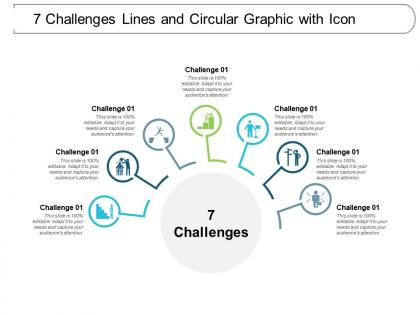
7 challenges lines and circular graphic with icon




Try Before you Buy Download Free Sample Product
 Impress Your
 Audience
 100%
100% Editable
 Save Hours
 of Time


Get your act going with your ideas. Our 7 Challenges Lines And Circular Graphic With Icon will be your growth engine.
People who downloaded this PowerPoint presentation also viewed the following :
7 challenges lines and circular graphic with icon with all 5 slides:
Our 7 Challenges Lines And Circular Graphic With Icon ensure you get through. They will answer your call for action.

FAQs for 7 challenges lines and circular
Ugh, the worst is when people cram everything onto one slide with microscopic text. Nobody past the first row can see anything. Also mixing fonts and colors randomly just looks messy - pick a theme and stick with it. Red text on dark backgrounds? Total nightmare, it just vanishes. Oh and please don't use blurry images from Google, it screams amateur hour. The biggest sin though is reading your slides verbatim to everyone. Your slides should back up what you're saying, not BE what you're saying. High contrast colors are your friend btw.
Dude, colors and symbols are tricky when you're presenting internationally. Red might scream "danger" in one country but mean good luck somewhere else. Hand gestures? Total minefield - I've definitely messed that up before. Some cultures read right-to-left too, which throws off how they look at your slides. Religious stuff and even body language in photos can be loaded with meaning you don't expect. Honestly, it's wild how much cultural baggage visuals carry. Do yourself a favor and research your audience first. Maybe run your presentation by someone from that culture before you go live.
Colors are seriously underrated when it comes to getting your point across. Red and orange amp people up - perfect for urgency. Blues and greens? Way more calming and trustworthy. I bombed a financial presentation once using bright yellow everywhere (rookie mistake lol). You'll want to think about what vibe matches your message. Pick maybe 2-3 colors max that actually support what you're trying to say, then stick with them throughout everything. Your audience has expectations about colors whether they realize it or not.
Dude, infographics are genius because our brains are wired for visuals. You'll actually remember pictures and charts way better than boring paragraphs - it's wild how much faster people absorb info when it's laid out with icons and colors. Text walls? Nobody has time for that anymore. Your brain creates these little memory hooks from the visual stuff, so you can recall it later. I swear, anytime you've got data or step-by-step processes to explain, just throw it in an infographic format. The difference in how quickly people "get it" is honestly pretty dramatic.
Three big things to nail: contrast, readable text, and backup options. High contrast colors are your friend, but don't just rely on color alone - throw in some icons or patterns too. Text should be 18pt minimum with clean fonts (and yeah, still skip Comic Sans lol). Alt text for images is crucial. I always test my slides in grayscale first - if it still makes sense, you're golden. Honestly, providing handouts ahead of time is a game-changer. The whole idea is giving people multiple ways to get the same info. Works way better than scrambling to fix things last minute.
Honestly, it depends on your audience and where you're presenting. Slides are great for telling a story step-by-step, but don't stuff them with walls of text - nobody reads that anyway. Posters work well when people can walk around and absorb info at their own speed, like at conferences. Interactive stuff like dashboards? Those are cool because people can click around and explore the data themselves. I'd say just think about how your audience actually wants to consume the info. Oh, and conference posters are weirdly addictive to browse if they're done right.
Dude, charts and graphs are game-changers for boring data stuff. People's brains just shut off when they see giant spreadsheets - mine does anyway. But throw that same info into a simple bar chart? Suddenly everyone can spot trends and weird outliers in like 2 seconds. Visuals stick way better in memory too. I learned this the hard way after bombing a presentation with nothing but tables. Even basic line graphs make such a difference. Your audience will actually stay awake and might even ask good questions for once.
Ugh, visual clutter is the worst - it's like your audience can't figure out where to look so they just give up. Too many fonts and colors? Their brain goes into overdrive trying to process everything at once. I swear it's exhausting just watching some presentations. Think of it like walking into a messy room - you can't find anything important because there's junk everywhere. Your main message gets buried under all that noise. Honestly, just strip away anything that doesn't directly support what you're trying to say. Clean designs actually work better anyway.
Dude, seriously - turn your data into a story and people will actually pay attention. Start with a problem, walk through how you solved it, boom. Way better than just throwing charts at them. I learned this the hard way after watching people zone out during my budget presentations lol. Stories stick in people's heads longer too. You can structure which visuals to show when based on your "plot." Next time, open with like a customer problem or something, then show how your data reveals the solution. Trust me, even boring stuff becomes interesting when there's a narrative thread.
Honestly, just start with Canva. Super easy and the templates don't suck. PowerPoint's actually gotten decent for visuals too if you're already stuck using it. Want more advanced stuff? Figma or Adobe Creative Suite are solid but yeah, they'll take some time to figure out. Oh and Unsplash has great free photos - I use it constantly. Google Drawings works too in a pinch, though it's pretty basic. My advice? Pick one tool and actually get good at it instead of bouncing around like I did when I started. Canva's your safest bet though.
Honestly, less is more with slides. Stick to that 6x6 thing - 6 bullets, 6 words max each. Big fonts are your friend since half the room will be squinting otherwise. High contrast colors too. Tell actual stories instead of just dumping bullet points everywhere. People zone out with lists. Pause between slides! Give them a second to absorb what you just showed them. Those generic stock photos? Skip them entirely - they're just noise. Practice moving between slides smoothly so you're not clicking around like crazy while everyone's watching you fumble. The tech stuff always goes wrong at the worst moments.
Okay so timing is everything - you want your slides to pop up right as you're talking about them, not weird seconds before or after. I used to mess this up constantly and just stand there like an idiot! Keep your visuals super simple too, like just highlight the important data or show exactly what you're discussing. Oh and definitely pause after bringing up something new so people can actually look at it. Honestly the best thing is just practicing out loud beforehand (I know, I know, but it works). And always have a backup ready because tech loves to fail at the worst moments.
Dude, typography can totally make or break how professional you look. I've literally watched amazing presentations die because someone used Comic Sans - it's brutal. Bad fonts or weird spacing make people doubt you before they even start reading. Pick a clean sans-serif like Helvetica for business stuff since it's super easy to read fast. Stick with ONE font across everything though. Different weights help organize info without looking messy. Honestly, consistency matters way more than being fancy. People scan content quickly these days, so readability wins every time.
Start with what story you're trying to tell, then pick your chart type. Bar charts work great for comparisons. Line graphs show trends over time. Pie charts? Honestly just avoid them - they're impossible to read accurately. Don't cram everything into one visual or people will zone out completely. Simple colors with good contrast are your friend. Label your axes and units clearly (sounds obvious but you'd be surprised). Oh, and definitely test it on someone first. I learned this the hard way - what makes perfect sense to you might be total gibberish to everyone else.
Honestly, feedback loops are a lifesaver - they help you spot problems before you're standing there bombing in front of everyone. Test your visuals with a few people first. See where they get lost or zone out, then fix those parts. I learned this after completely tanking a client presentation once (still cringe thinking about it). Ask specific stuff like "what's confusing here?" instead of the generic "any thoughts?" thing. Set up multiple check-ins - quick slide review, practice run, final adjustments. Way better than just crossing your fingers and hoping people will follow along.
No Reviews