

Account Plan Powerpoint Ppt Template Bundles





Try Before you Buy Download Free Sample Product
 Impress Your
 Audience
 100%
100% Editable
 Save Hours
 of Time


Introducing our comprehensive Account Plan PowerPoint PPT template, designed to streamline your strategic account management process. This dynamic tool empowers businesses to effectively develop and execute their account plans, ensuring long-term success and growth. The template offers a clear and visually engaging roadmap, guiding users through the entire account planning cycle. With customizable sections for objectives, key stakeholders, competitive analysis, and quarterly-based action plans, our PPT equips you with a strategic account agenda that aligns with your organizational goals. This user-friendly template is ideal for sales teams, account managers, and executives seeking to optimize their account management efforts. Elevate your account planning with our PPT and unlock the potential of your key accounts.
People who downloaded this PowerPoint presentation also viewed the following :
Account Plan Powerpoint Ppt Template Bundles with all 25 slides:
Use our Account Plan Powerpoint Ppt Template Bundles to effectively help you save your valuable time. They are readymade to fit into any presentation structure.
-

Account Plan
-
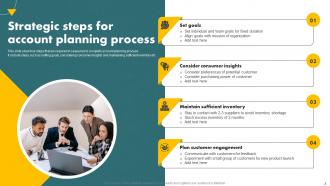
Strategic steps for account planning process
-
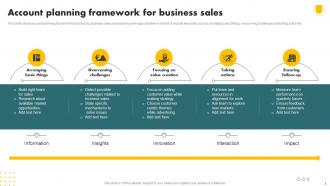
Account planning framework for business sales
-
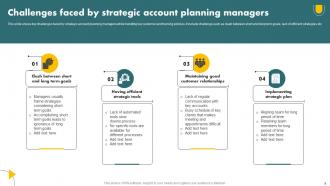
Challenges faced by strategic account planning managers
-
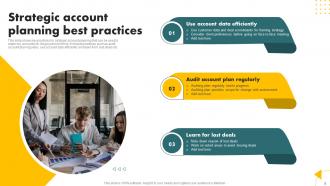
Strategic account planning best practices
-
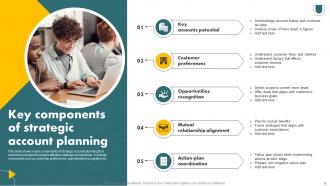
Key components of strategic account planning
-
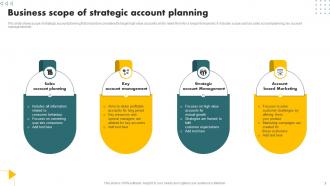
Business scope of strategic account planning
-
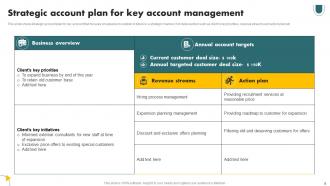
Strategic account plan for key account management
-
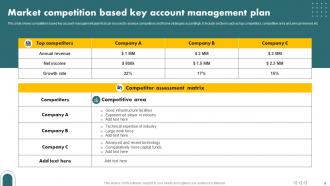
Market competition based key account management plan
-
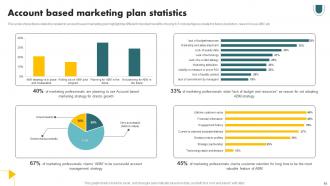
Account based marketing plan statistics
-
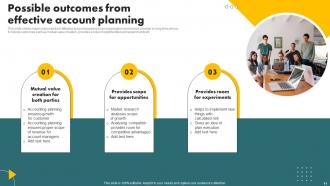
Possible outcomes from effective account planning
-
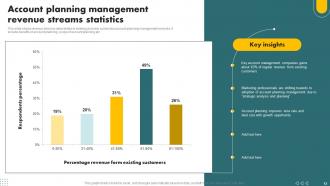
Account planning management revenue streams statistics
-
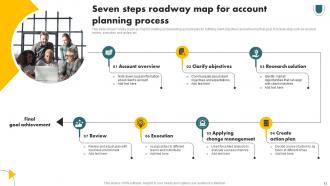
Seven steps roadway map for account planning process
-
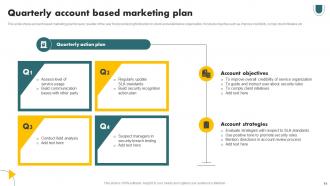
Quarterly account based marketing plan
-
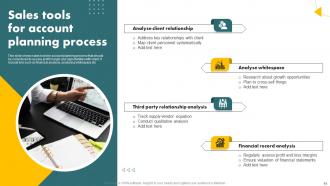
Sales tools for account planning process
-
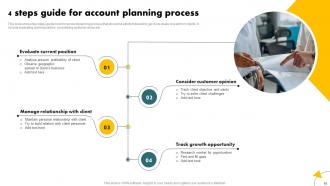
Account Plan
-
Financial analysis for account planning icon
-
Budget allocation for account planning icon
-
Monthly account planning schedule icon
-

Thanks for Watching
-

-

-

-

-

FAQs for Account Plan Powerpoint
Definitely need an exec summary upfront, plus account overview with stakeholders and org chart. Include current relationship status and their business challenges too. Your value prop and solutions roadmap are crucial - don't skip those. SWOT analysis is worth adding (sounds corporate but honestly catches stuff you'd miss). Revenue projections and success metrics keep everyone on the same page. Oh, and competitive landscape section helps tons. Make it flexible enough for different account sizes but keep the structure so your team can just plug in details and go. Clear next steps with timelines wrap it up nicely.
Look, nobody wants to sit through slides packed with bullet points and spreadsheets. Your account plan needs to tell a story instead of just dumping data on people. Use visuals, infographics, whatever works to show the client's journey and your solution. Executives will actually pay attention when they can see the bigger picture, not just numbers. I mean, we've all been in those meetings where everyone's checking their phones halfway through, right? Map out your key messages first, then figure out which visuals hit each point. Trust me, it'll stick way better than another PowerPoint full of text blocks.
White space is your best friend - don't cram everything together. Stick to 6-7 words per line max, otherwise people just read instead of listening to you. One idea per slide, high-contrast colors. I actually think most people have zero attention span now, so animations help but don't go nuts with transitions. Charts and images are great if they actually relate to what you're saying (random stock photos are the worst). Oh, and for account plans? Match your client's colors - seems small but they notice that stuff.
Just swap out the sections that actually matter to each client. Tech companies? Focus on user acquisition and retention stuff. Manufacturing? Hit the supply chain and operational efficiency angles instead. Honestly, templates are pretty useless if you don't customize them anyway. Change up the colors and fonts to match their branding, then rebuild those KPI dashboards around metrics they actually care about. I always start by figuring out their top 3 business priorities first - makes the whole restructuring thing way easier. Oh, and don't forget to adjust the visual elements to fit their style guide.
Honestly, charts and graphs are your best friend here - way better than walls of text that nobody wants to read. Lead with your main point first, then back it up with numbers. Before/after comparisons work really well (I use them constantly). Don't try cramming everything on one slide though - break it up across multiple ones. Callout boxes help draw attention to the important stuff. Focus on metrics that actually matter for your strategy, not just every data point you have. Your audience needs to get the "so what" immediately, otherwise they'll tune out.
Put your main goal right up front and keep coming back to it - nobody wants to guess what you're trying to accomplish. Bullet points are your friend here, not wall-of-text paragraphs. Here's the thing though: you don't need to prove how smart you are by shoving every piece of data onto one slide. One big idea per slide, maybe 2-3 bullets to back it up. That's it. Focus on what your stakeholders actually care about, not whatever internal drama is happening on your end. Oh, and do the "fresh eyes" test - would someone totally new to this get your point? If you're squinting at your own slides, they're too complicated.
Honestly, don't skip the branding part - it makes such a huge difference. Get their logo front and center, use their colors throughout, grab their fonts if you can. Trust me, presenting in Times New Roman when they're all sleek and modern just looks... off. Their brand guidelines are usually buried on their website somewhere (or just ask for them). The whole thing should feel like it belongs to them, not like you slapped their name on your generic template. It shows you actually get their vibe and aren't just phoning it in.
Okay so templates are honestly a lifesaver for this stuff. You can split up the work way easier - like Sarah does competitive research while you handle growth opportunities. No more confusion about who's doing what or showing up with totally different ideas about the scope (been there lol). The consistent format makes reviewing each other's sections so much smoother. Oh and make sure everyone can edit from day one - learned that one the hard way when people couldn't access it until the last minute. Trust me, it'll save you headaches later.
Don't cram everything onto your slides - honestly, less is way more here. Your account plan needs to tell a story, not read like a textbook. Keep bullets short and hit the big insights instead of drowning them in details. Definitely customize each deck for that specific client's industry and problems. Generic templates are so obvious and kinda lazy. Skip those flashy transitions too - nobody wants to sit through that in a business meeting. Make sure your data actually backs up what you're recommending. Oh, and always test the deck first! You'll catch weird formatting stuff that way.
Charts and graphs are your best friend for telling your account's story visually. Think revenue trends, market share growth, customer satisfaction - that stuff. But here's the thing: don't just randomly scatter them everywhere (I've seen way too many presentations that do this). Put them right after you've explained the context so they actually back up what you're saying. Keep each chart super focused - like 2-3 key points max. Your audience should look at it and instantly get the message. Oh, and always write a headline that clearly states what the chart proves about your strategy. Makes a huge difference.
Look, timelines basically save you from creating another useless strategy doc that just sits there. Executives eat this stuff up – they want to see actual dates and what winning looks like at each step. Without milestones, you're just winging it and nobody knows if you're succeeding or totally bombing. The deadlines help you catch problems before they blow up too. Oh, and make sure you track both your internal stuff AND what the client expects to see. Trust me, that's where things usually go sideways if you're not careful.
Definitely dig through your old presentation feedback - it's gold for template design. Where did people look confused or zone out? Fix those sections with better visuals or clearer flow. Questions afterward usually mean something wasn't explained well enough, so redesign those parts. Oh, and executives are impatient - they want the "so what" immediately, not buried on slide 15. Start with outcomes, always. If stakeholders kept asking for the same missing data points (happens to me constantly), just build those into your template permanently. Problem solved.
For your template, definitely include client background, stakeholder mapping, current challenges, and success metrics - can't skip those. Add relationship timelines and competitive landscape stuff too. Honestly, most people totally butcher the stakeholder section because they don't map out who actually makes decisions (learned this the hard way). Growth opportunities need their own slide. Make it modular so you can mix and match sections - quarterly reviews are way different from renewal meetings. Oh, and always have space for action items. Trust me, three weeks later nobody remembers what we agreed on. Keep sections flexible based on each client situation.
Dude, you really need to think about who's in that room before you present. Japanese audiences want ALL the details and data - like, every single number. Germans? Complete opposite. They want you to get straight to the point, no fluff. And don't even get me started on colors - red's lucky in China but screams "danger" everywhere else. Some cultures expect you to present to the big boss first, others want everyone chiming in. Honestly, the whole thing's more complicated than it should be. Just do some quick research on their business culture first and you'll be fine.
Your last slide needs to spell out exactly what you want from them - budget approval, resources, whatever. Don't be vague about it! I've watched so many solid presentations just... die because people buried their ask or made it confusing. Throw in specific deadlines and who's doing what. Also, remind them what they'll actually get out of saying yes (not just your to-do list). Honestly, most executives appreciate when you make the decision super obvious for them. Give them a simple framework that makes "no" feel like the weird choice.
-
Great combination of visuals and information. Glad I purchased your subscription.
-
Excellent work done on template design and graphics.