

Training Plan Strategy Powerpoint Ppt Template Bundles




Try Before you Buy Download Free Sample Product
 Impress Your
 Audience
 100%
100% Editable
 Save Hours
 of Time


Our Training Plan Strategy Powerpoint Ppt Template Bundles are topically designed to provide an attractive backdrop to any subject. Use them to look like a presentation pro.
People who downloaded this PowerPoint presentation also viewed the following :
Training Plan Strategy Powerpoint Ppt Template Bundles with all 25 slides:
Use our Training Plan Strategy Powerpoint Ppt Template Bundles to effectively help you save your valuable time. They are readymade to fit into any presentation structure.
-
Training Plan Strategy
-
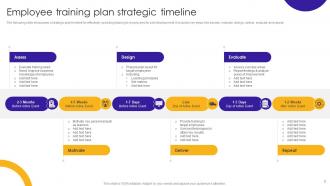
Employee training plan strategic timeline
-
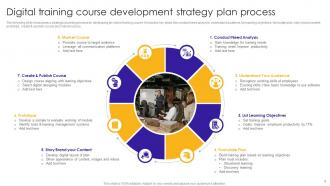
Digital training course development strategy plan process
-
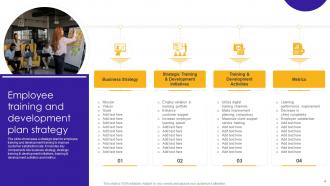
Employee training and development plan strategy
-
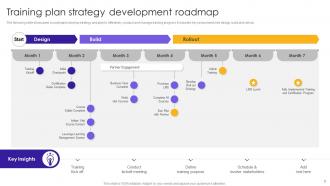
Training plan strategy development roadmap
-

Strategy to develop employee training plan
-
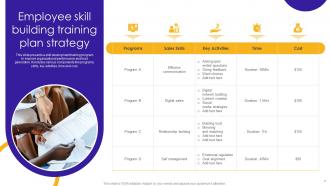
Employee skill building training plan strategy
-
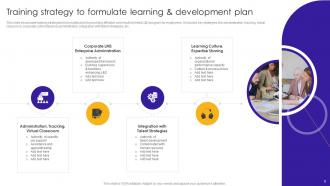
Training strategy to formulate learning development plan
-
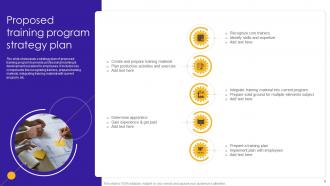
Proposed training program strategy plan
-
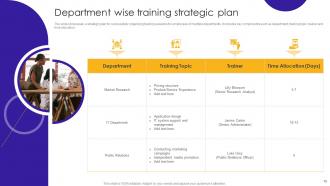
Department wise training strategic plan
-
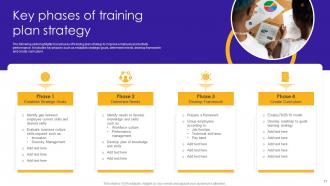
Key phases of training plan strategy
-
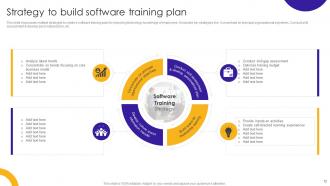
Strategy to build software training plan
-
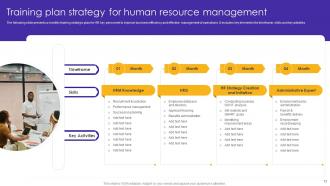
Training plan strategy for human resource management
-
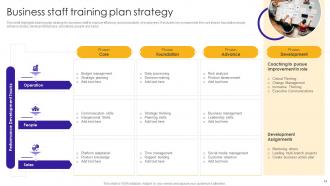
Business staff training plan strategy
-
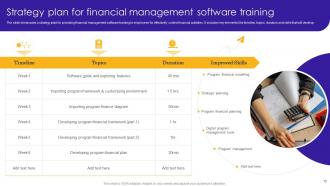
Strategy plan for financial management software training
-
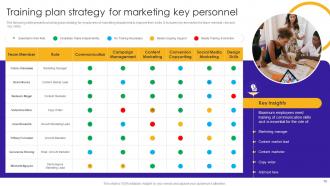
Training plan strategy for marketing key personnel
-
Time management skill training plan strategy icon
-
Business training plan strategy icon
-
Employee skill development training plan strategy icon
-
Thanks for watching
-

-

-

-

-

FAQs for Training Plan Strategy Powerpoint
So first thing - figure out what you actually want people to learn, then work backwards from there. You'll need some way to deliver content that doesn't bore everyone to death, plus hands-on stuff where they can practice. I always throw in checkpoints to see if it's working or if I need to pivot. Oh, and don't assume everyone's starting from the same place - some people might already know half this stuff. Build in feedback loops because you'll definitely need to tweak things. Honestly, the sweet spot is having structure but not being too rigid about it.
Honestly, start by figuring out where your team is versus where they need to be - that's your skills gap analysis right there. Surveys work well, but I've found one-on-ones tell you way more. Look at performance reviews too. Here's what really helps though - pay attention to the same mistakes popping up over and over. That's your biggest clue. Don't just think about today's problems either; what'll they need in 6 months? Oh, and make it ongoing. I learned this the hard way - quarterly check-ins beat doing some massive assessment once a year.
Honestly, audience analysis is everything - without it you're just guessing what people need. Survey your learners first (or their bosses) to figure out their skill levels and learning preferences. Are they total beginners or seasoned pros? Do they learn better hands-on or through theory? Time-crunched managers vs. eager new hires need completely different approaches. I learned this the hard way once when I misjudged my audience's experience level... awkward! But when you nail it, you can actually design content that hits right. Short sessions for busy people, interactive stuff for hands-on learners. Makes all the difference.
Okay so you'll want to track the obvious stuff first - completion rates, test scores, how people actually perform afterward on the job. But honestly? The survey feedback is where you get the real insights. Ask if they feel more confident, if they're engaged, whether they're using what you taught them day-to-day. I'd also check retention over time instead of just immediate results - that's where most programs fall short. Set your success criteria upfront though, then stick to measuring against those. Start with maybe 2-3 key metrics so you don't drown in data overload.
ADDIE's probably your best bet to start with - it's that classic analyze, design, develop, implement, evaluate thing. Works for most situations. If you need something more flexible, SAM is solid for iterative stuff. Honestly? People way overthink this whole model thing. Just pick one that fits your timeline. For performance training specifically, Gagne's Nine Events is worth looking into. Oh, and Kirkpatrick's great for planning how you'll measure success later. Don't just copy what everyone else does though. ADDIE's fine if you're new to this, but you'll probably end up tweaking it once you figure out what clicks with your audience anyway.
Start with whatever tech actually fixes your biggest headache first - don't try to do everything at once. LMS platforms and mobile apps are solid basics. VR simulations are getting really good now, and AI can personalize learning paths for each person. Microlearning works awesome for people who barely have time to breathe. Honestly, gamification beats boring traditional training every single time. Use data analytics to spot who's struggling before they fall behind. AR lets people practice without screwing anything up in real life. Video calls work great for remote coaching too.
Dude, don't just talk at people for an hour - that's brutal for everyone. Mix it up every 15-20 minutes with polls or quick discussions. I bombed so hard doing this early on, just watching faces glaze over lol. Connect everything to their actual jobs with examples they'll get. Honestly, the best sessions feel more like conversations anyway. Throw in questions throughout instead of dumping everything first. Give them something concrete they can try tomorrow - people want that "aha, I can actually use this" moment when they walk out.
Don't wait until the end to ask how things are going - build feedback right into your training from day one. Quick pulse surveys after each module work great. So do brief check-ins with participants while you're still running sessions. Honestly, I've watched way too many programs bomb because they only collected feedback at the very end when it's useless. Exit tickets are super simple but effective. Peer feedback helps too if you can swing it. The whole point is tweaking your approach while you can still actually fix things, you know?
Don't cram everything into one session - that's where most people mess up. Space it out instead. I'd do follow-ups at 1 week, then 1 month, then 3 months. Seriously, I've watched so many trainings just evaporate after two weeks because nobody circles back. Make some quick reference sheets they can actually grab when they need help. Also, tie whatever you're teaching directly to stuff they're already doing at work - that's when it actually clicks. Oh, and schedule those check-ins before you even finish the first training session, or you'll never get around to it.
Culture totally shapes how you should design training - learned this when my casual lunch sessions bombed at a stuffy corporate place. Collaborative teams love group learning and peer stuff. More traditional companies? They want formal sessions with clear leadership. Risk-averse places need everything documented and rolled out slowly (honestly such a pain), but innovative cultures will try whatever. The timing, communication style, even rewards that motivate people - it all depends on your company's vibe. Don't just pick a training method you like. Figure out your culture first, then match what'll actually work with your people.
Honestly, just mix things up based on how people actually learn. Some folks need visuals - throw in diagrams or flowcharts. Others are super hands-on, so simulations work great for them. Don't forget the people who learn by listening - discussions or even podcasts can be clutch. Breaking stuff into smaller chunks has saved my butt so many times. Also, give people options! Same content but in different formats - written guides, videos, interactive stuff. I'd definitely survey your team first about what they prefer. You'll probably get way more variety than you expect, which is actually pretty cool when you think about it.
Honestly, remote learning is all about bite-sized content now. People's attention spans are completely fried from back-to-back Zoom calls, so keep sessions short. Self-paced modules are your best friend since nobody's on the same schedule anymore. Make everything mobile-friendly too - I can't tell you how many times I've had to switch from laptop to phone mid-session. Set up discussion boards or Slack channels to replace those random office conversations we used to have. Oh, and definitely do regular check-ins or people will just... disappear. Test everything virtually first because tech always fails at the worst moment.
Honestly, the worst thing you can do is jam way too much stuff into one session. People's brains just shut off. Don't assume you know what your team actually needs either - I learned this the hard way. Survey them first or you'll be teaching the wrong things entirely. Also, skip the boring lecture format. Nobody retains anything without practicing it themselves. I'd stick to maybe 2-3 main points per session, tops. Always leave room for questions because that's where the real learning happens. And please don't make it a one-time thing - check back in a few weeks to see what actually stuck.
Honestly, most training programs are just feel-good BS that don't actually help the business. What works? Pick a real problem first - like if customer satisfaction sucks, focus training on communication and problem-solving skills. Get your key people involved in planning so they can tell you what's actually broken. Don't just track completion rates either - that's useless. You need to see if training participants are actually performing better afterward. The whole thing should connect back to money somehow. If you can't draw a line from "people took this course" to "our results improved," you're probably wasting time.
Honestly, just start with what you already have - Excel or Google Sheets work fine for basic curriculum mapping. If you're doing e-learning stuff, Articulate Rise and Adobe Captivate are solid choices. I've watched so many people get stuck researching the "perfect" tool instead of actually building anything lol. Bloom's Taxonomy and ADDIE model resources are clutch for structuring your content properly. Canva's got decent presentation templates too if you need visuals. Don't overcomplicate it at first - you can always upgrade once you figure out what you actually need vs. what sounds cool.
-
Stunning collection! With a wide variety of options available, I was able to find a perfect slide for my presentation. Thank you, SlideTeam!
-
“Easy to use. I always wanted to have a quick search for products and SlideTeam has helped me have it.”