


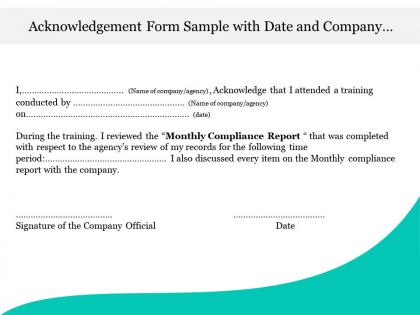
Acknowledgement form sample with date and company official signature




Try Before you Buy Download Free Sample Product
 Impress Your
 Audience
 100%
100% Editable
 Save Hours
 of Time


Bring the actual criminals to book with our Acknowledgement Form Sample With Date And Company Official Signature. Ensure the innocent get their due.
People who downloaded this PowerPoint presentation also viewed the following :
Acknowledgement form sample with date and company official signature with all 5 slides:
Do not despair, help is at hand. Our Acknowledgement Form Sample With Date And Company Official Signature will come to your aid.
FAQs for Acknowledgement form sample with date and
Hey! So your acknowledgment form needs the basics - clear statement of what they're actually acknowledging, their full name, date, and signature. Digital signatures are totally fine now. Throw in any deadlines or what happens next if there are any. Oh, and definitely add a quick summary of what they're agreeing to because people forget stuff constantly. I'd organize these somewhere you can actually find them later - trust me on this one. You'll be digging through them eventually when someone claims they "never saw that email."
Look, acknowledgment forms basically show you're not just making stuff up on the spot. Your audience sees you've actually researched real sources and aren't winging it (we've all been there though). It covers you legally too if you're borrowing copyrighted stuff or someone else's data. Plus giving credit where it's due just makes you look more trustworthy - people appreciate when you acknowledge their work. Honestly, I'd just make a template you can tweak for each presentation. Way easier than starting fresh every time.
You'll need acknowledgment forms for plagiarism stuff, research ethics, and accessing confidential materials like exam keys or student records. Lab safety protocols too. Field work requires them - honestly, the paperwork never ends at universities! But they're actually protecting you and the school by documenting that procedures were followed properly. When you're dealing with restricted databases or archives, same thing applies. Always save copies of whatever you sign, especially for research projects or sensitive data handling. I learned this the hard way when I couldn't find my lab safety form last semester.
So basically simple acknowledgment forms are super bare bones - just your name, signature, date and like "yep I got this." Quick but not much protection. Detailed ones actually spell out what you're acknowledging with specific terms and way more comprehensive language about what you understand and agree to. I've honestly seen so many headaches from people using the simple versions when things go sideways later. You dealing with policy changes or training stuff? Definitely go detailed. Takes a few extra minutes but trust me, worth it when someone tries to claim they didn't know what they were signing.
You'd be surprised how much design matters for those forms. Dense text blocks? People just sign without reading - I've totally done that myself. Break things up with bullet points and white space so it's actually scannable. Clear headings help too. Honestly, if someone has to hunt around for where to sign, that's already a red flag. Use colors or boxes to highlight the important stuff. Short version: make it easy on the eyes and you'll get people who actually engage instead of just scribbling their name and moving on.
Definitely add a date! You'll want that timeline documented if compliance issues come up later. Trust me, I've watched people scramble during audits because they couldn't prove when someone actually got the info. Plus it helps with basic record-keeping stuff. A simple "Date: ____" line by the signature does the trick. Honestly, it's one of those tiny details that saves you major headaches down the road - like when you need to show a policy was in effect before some incident happened. Your future self will be grateful you didn't skip this step.
Hey! So when you're writing acknowledgments, be super specific about what you're actually confirming - like "I acknowledge receipt of..." or "I understand that..." instead of mushy language. Don't beat around the bush with obligations or next steps either. People need to know what they're signing up for, you know? I swear, half the acknowledgments I see are just confusing legal nonsense. Keep it formal but readable. Throw in dates and reference numbers if you've got them. Oh, and definitely have someone else read it first - what makes sense to you might be total gibberish to them.
Honestly, just drop a Google Form or Typeform right into your presentation. QR codes work great - stick them on slides so people can scan during breaks. Or throw the link in chat when there's a natural pause. Here's the thing though - if you don't explain upfront WHY you need their acknowledgment, people will ignore it completely. Like, way worse response rates. Also make sure it's mobile-friendly since everyone's gonna use their phone anyway. Oh, and definitely test the whole thing with someone first. I learned that the hard way when half my links didn't work during an actual presentation.
Hey! So the main thing is being super specific about what they're actually acknowledging - vague wording will totally screw you over later. Don't accidentally turn it into a contract or give up rights you need (honestly, this stuff gets messy quick). Check if there's any industry rules you have to follow too. Oh, and definitely get your legal people to look it over before you use it, especially if liability's involved. Trust me on that one.
Honestly, just throw your logo and brand colors on there - makes a huge difference. Match the fonts you normally use too. The tone should sound like how your company actually talks, whether that's super professional or more chill. Some places even add their mission statement at the bottom, which is kinda nice actually. Headers and footers with your branding help too. Really though, anyone signing it should instantly know it's from you guys. Oh, and definitely check your brand style guide first - that'll have everything you need to get started.
Okay so acknowledgment forms are basically your backup when project stuff goes sideways. You send them when people need to confirm they got important info - like deliverables, changes, requirements, whatever. Trust me, you'll thank yourself later when someone pulls the "I never agreed to that" card during scope creep (which always happens). They prove people actually received your messages and signed off on things. Creates accountability too. Honestly saved my butt more times than I can count. Use them for any major communications where you need solid proof someone was in the loop and said yes.
Send your drafts to the people who'll actually use them - recipients, legal folks, department heads. They'll catch stuff you totally missed, like confusing wording or missing signature spots. I swear, forms always look perfect until someone points out there's no basic checkbox for the main thing. Ask what's unclear or unnecessary. Real users spot weird dates and language that sounds too formal. Short sentences work better than long ones anyway. Test everything before you lock it in - their feedback beats guessing what works!
Canva's my go-to for this stuff - super easy templates and you don't need design skills. Adobe InDesign works if you want something really polished, though it's overkill for most people. Google Forms is clutch for digital ones since it handles responses automatically. Adobe Acrobat Pro's great for PDFs with interactive fields. Word can work but honestly the formatting drives me nuts sometimes. Just make sure your signature areas are obvious and stick with your usual branding colors or whatever.
Oh totally, culture plays a huge role in this stuff. Some people want direct shout-outs, others get super uncomfortable with public praise. I learned this the hard way when I embarrassed a teammate once lol. Hierarchical cultures usually expect formal language, but casual works better for egalitarian backgrounds. Honestly? Just ask people how they like to be recognized - saves you from guessing wrong. You could also make templates with formal and casual versions. That way you're covered either way. Public praise can actually backfire in some cultures, so it's worth checking first.
Ugh, the worst thing you can do is be super vague about what they're actually confirming. Like, don't just say "I acknowledge company policies" - spell it out! "I got the handbook and I'll follow the dress code." Way clearer. Also skip the legal mumbo-jumbo that makes everyone's eyes glaze over. Oh, and this drives me nuts - so many forms forget the date line next to signatures. Amateur hour! Don't ask people to confirm stuff they haven't even seen yet either. Run it by someone else first because what makes sense to you might be total gibberish to everyone else.
-
Presentation Design is very nice, good work with the content as well.
-
Great designs, really helpful.