

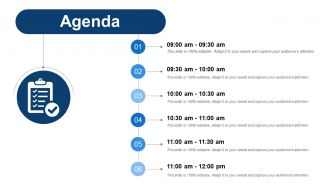
Agenda ppt show slide portrait






Try Before you Buy Download Free Sample Product
 Impress Your
 Audience
 100%
100% Editable
 Save Hours
 of Time


Be awarded the hamper with our Agenda Ppt Show Slide Portrait. Their fabulous designs are difficult to beat.
People who downloaded this PowerPoint presentation also viewed the following :
Agenda ppt show slide portrait with all 5 slides:
Guide the frontrunners with our Agenda Ppt Show Slide Portrait. Enable them to indulge in free and fair competition.

FAQs for Agenda ppt
Start with your main point right up front. Then list out 2-4 topics with rough time estimates - seriously, most people bomb this part and wonder why everything runs over. Throw in some Q&A periods and quick transitions between sections. Oh, and don't forget next steps at the end. People need to know what they're supposed to do after sitting through your presentation. Share the whole agenda upfront too so folks can prepare mentally. That way they're not interrupting when you're trying to explain something complex because they know questions come later.
Honestly, agendas are game-changers because people can actually follow what you're saying instead of zoning out halfway through. Your audience knows what's coming next, which keeps them engaged. Short sentences work. But you also want to give them that mental roadmap so they're not sitting there wondering "how much longer is this thing gonna drag on?" Nobody wants to be trapped in meeting hell, you know? When you lay out your main points upfront, everything just clicks better. Oh, and reference it during transitions - keeps people anchored to where you're going.
Ugh, the worst thing you can do is cram way too much stuff in there. Like, be super specific with your agenda items - instead of "Project Update" write "Q3 Sales Results & Next Steps." Skip all that opening small talk that burns 10 minutes (seriously, we all hate it). Also don't lie to yourself about timing. If you need 15 minutes for something, don't give it 5 or you'll either rush or go way over. Oh and actually leave room for people to talk if you want them engaged. I learned this the hard way lol. Just keep it focused and realistic - people notice when you respect their time.
Honestly, it depends on how long you're talking. Short stuff like 10-15 minutes? Just do a basic 3-point thing and you're fine. But once you hit 30+ minutes, you really need clear sections with time slots mapped out. Trust me - I've bombed presentations where people just checked out halfway through my endless rambling. Break longer ones into maybe 10-15 minute chunks. Each chunk should have its own little goal. Oh, and throw in some interaction or breaks if you can. People's brains literally can't handle sitting there listening forever. The longer your presentation, the more your agenda becomes like GPS directions - short trip needs less detail than a cross-country drive.
Dude, visual elements are a game changer for agendas! They stop people from zoning out when faced with massive text blocks. I always throw in icons or bullet points - makes it so much easier to scan through sections quickly. Color coding works too, especially for tracking where you are in the presentation. Charts are solid if you want to show how topics connect (though honestly, don't go overboard or it gets distracting). The worst meetings I've been in had these boring, text-heavy agendas that just... ugh. Simple icons next to each item? Perfect. Your audience will thank you.
Dude, timing can seriously make or break your whole presentation. I'd start by actually timing yourself going through each section - then add like 20% extra because trust me, things always take longer than you think. Build in little buffers between parts too. People will ask random questions, someone's laptop will freeze, or Dave from accounting will derail things with some story about his weekend (classic Dave). Practice the timing beforehand so your main points don't get completely rushed at the end. You don't want to be that person frantically speed-talking through your conclusion because you're already 10 minutes over.
Know your crowd before you walk in there. Executives want the big picture - outcomes, not process. Technical folks? They'll want all the nitty-gritty details. Mixed groups are honestly the worst to present to, but you can do layers - start broad, then offer deeper dives for whoever wants them. Time matters too. C-suite probably has 15 minutes max, while your dev team might sit through an hour-long technical deep dive. Oh, and definitely ask the meeting organizer what people are expecting beforehand. Saves you from that awkward moment when you're explaining APIs to the finance director.
Definitely share your agenda in the first 2-3 minutes - I always stick mine on slide 2 right after the title because people get restless when they don't know what's coming. You can either show it as a slide or just mention the main topics you'll hit. Honestly, audiences follow way better when they have a roadmap. If it's a formal thing, shoot it over via email beforehand too, but still go through it verbally when you start. Oh, and number your agenda items - makes it super easy for people to track where you are in the presentation.
So online meetings are totally different - people zone out way faster on screens, so cut your agenda chunks in half. Always start with a tech check (trust me on this one). Interactive stuff every 10-15 minutes keeps people awake. Buffer time is crucial because someone's internet will definitely crash. In-person lets you go longer since you can actually see if people are glazed over. Virtual needs way more structure and shorter segments. Real meetings? You can read the vibe and adjust on the fly.
Honestly, I'd start with Canva or PowerPoint - both have decent templates that won't make you look lazy. Miro's pretty cool if you want people actually clicking around and engaging during the meeting. But here's the thing... even Google Docs works if you're not trying to be fancy. Just use clear headings and bullet points. Time blocks are your friend. Highlight what actually matters for discussion. Oh, and always include what you expect to get out of each section - saves everyone from those "so what now?" moments. Pick whatever you're comfortable with first, then get fancier later if you want.
Okay so first thing - figure out what you actually want to accomplish, then work backwards from there. Every single agenda item needs to tie back to those goals. If something doesn't help your audience understand, decide, or take action on what you need? Just cut it. I know that sounds brutal when everything feels urgent, but trust me on this one. Think of your agenda like directions - you're getting people from where they are now to where you need them to be. Once you've got it mapped out, read through the whole thing and make sure it flows logically. Does each piece actually serve your bigger picture?
Honestly, just shoot out a quick survey beforehand asking what topics matter most to people. Or when you send the agenda, throw in "anything else we should cover?" - super simple. Slack polls work surprisingly well too, people actually vote on those things. If it's a big deal meeting, maybe grab 5 minutes with the main stakeholders over the phone? I mean, that's probably overkill for most stuff but whatever. The trick is giving yourself enough time to actually use their feedback. Two or three days minimum, otherwise you're just asking for the sake of asking.
Set time blocks for each section and actually stick to them - I learned this the hard way! Always add buffer time because discussions drag on forever. When switching topics, say something like "alright, moving to our next point" so people can follow along. Keep your agenda up where everyone can see it. Here's the thing though - if you're running late, just cut stuff instead of racing through everything like you're on speed. Nobody retains info when you're talking a mile a minute. Oh, and set that phone timer! It's honestly a lifesaver.
Definitely build in Q&A breaks and interactive stuff like polls or small group chats. Don't save all the questions for the end though - people's minds wander and they forget what they wanted to ask. Breakout sessions work well, or even just simple hand-raising for quick feedback. Case studies are honestly my favorite because everyone has opinions about real situations. Oh, and live demos where people can actually participate instead of just watching. Mix these throughout so you're not just lecturing for 45 minutes straight. I'd say aim for about 30% interaction time.
Just be upfront about it - tell your audience you're switching gears to cover something else that came up. People actually respect that honesty more than watching you stumble through a rigid plan. I always rank my talking points beforehand so I know what I can cut or rush through if time gets weird. The key thing? Make it sound deliberate, not like you're panicking. Practice some bridge phrases like "let me shift focus here" so you don't sound awkward when pivoting. Honestly, most people won't even notice if you're smooth about it. Keep your main message loose enough that you can shuffle sections around without it falling apart.
No Reviews