

Agile Methodology For Data Migration Project IT Powerpoint Presentation Slides





Try Before you Buy Download Free Sample Product
 Impress Your
Audience
 100%
Editable
 Save Hours
of Time


Agile methodology is an efficient method of software development. It is an iterative and incremental project management method that focuses on the rapid delivery of business value. Here is a professionally designed template for the Agile Methodology for Data Migration Project IT that will assist the businesses in identifying different agile methodologies and adopting the suitable one for their project. The performance slide in our previous projects will help the companies illustrate their previous data conversion project performances, on-time delivery rate, average cost, and schedule overrun. To provide information about different agile methodologies, project context, and successful implementation, businesses can use sections such as identifying various agile methodologies to overcome the previous project challenges. Furthermore, companies can use slides such as implementation timeline, communication plan, impact on a data project, challenges, and solutions to execute and accomplish project goals. Also, one can throw some light on the principles of agile software development, focus areas of agile transformation, and improved capabilities for effective change. At last, the project monitoring dashboards section will help the company monitor project progress and risk management. Get access now.
People who downloaded this PowerPoint presentation also viewed the following :
Content of this Powerpoint Presentation
Slide 1: This slide display the title Agile Methodology for Data Migration Project.
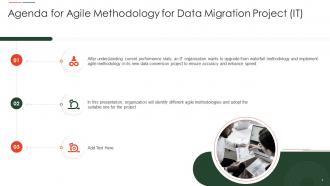
Slide 2: This slide display Agenda.
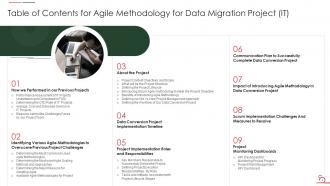
Slide 3: This slide exhibits Table of Contents.
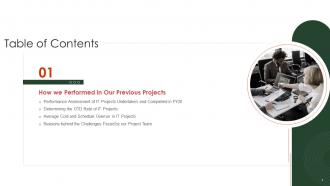
Slide 4: This slide exhibits Table of Contents- How we Performed in Our Previous Projects.
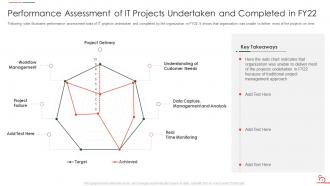
Slide 5: This slide illustrates performance assessment stats of IT projects undertaken and completed by the organization in FY22.
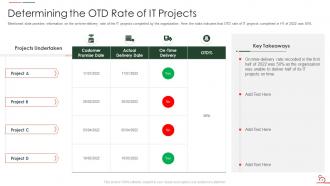
Slide 6: This slide provides information on the on-time-delivery rate of the IT projects completed by the organization.
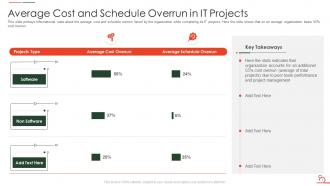
Slide 7: This slide portrays average cost and schedule overrun faced by the organization while completing its IT projects.
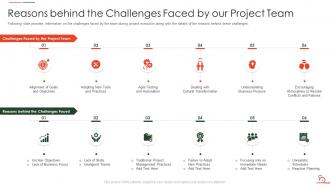
Slide 8: This slide provides information on the challenges faced by the team during project execution.
Slide 9: This slide exhibits Table of Contents- Identifying Various Agile Methodologies to Overcome Previous Project Challenges.
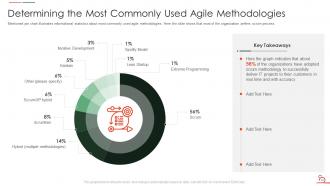
Slide 10: This slide showcase pie chart illustrates informational statistics about most commonly used agile methodologies.
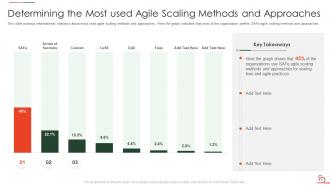
Slide 11: This slide Determines the Most used Agile Scaling Methods and Approaches.
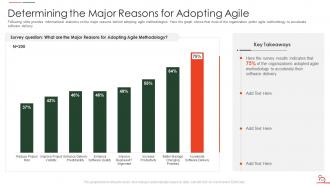
Slide 12: This slide Determines the Major Reasons for Adopting Agile.
Slide 13: This slide shows Available Agile Methodologies for Project – Extreme Programming Process.
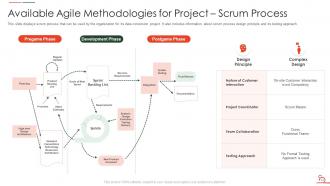
Slide 14: This slide displays scrum process that can be used by the organization for its data conversion project.
Slide 15: This slide portrays kanban process that can be used by the organization for its data conversion project.
Slide 16: This slide exhibits Table of Contents- About the Project.
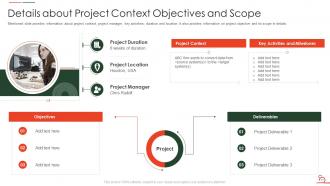
Slide 17: This slide provides Details about Project Context Objectives and Scope.
Slide 18: This slide discuss What will be the Project Structure.
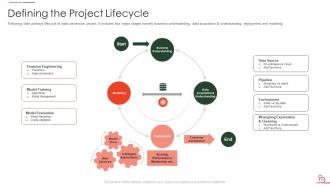
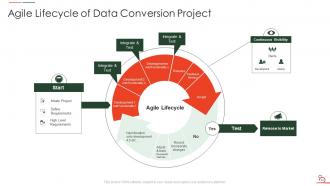
Slide 19: This slide portrays lifecycle of data conversion project.
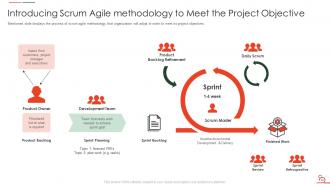
Slide 20: This slide displays the process of scrum agile methodology to meet its project objectives.
Slide 21: This slide exhibits Table of Contents- About the Project.
Slide 22: This slide showcase Benefits of Introducing Agile Methodology.
Slide 23: This slide portrays information about the old versus new project management approach.
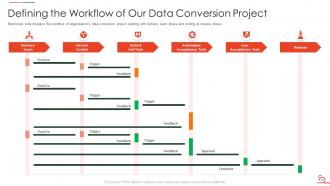
Slide 24: This slide Definies the Workflow of Our Data Conversion Project.
Slide 25: This slide exhibits Table of Contents- Data Conversion Project Implementation Timeline.
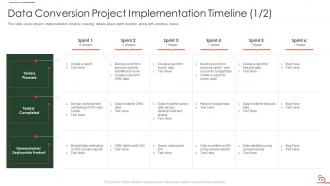
Slide 26: This slide shows project implementation timeline.
Slide 27: This slide also shows project implementation timeline.
Slide 28: cProject Implementation Roles and Responsibilities.
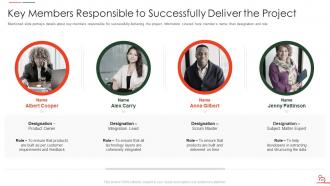
Slide 29: This slide portrays details about key members responsible for successfully delivering the project.
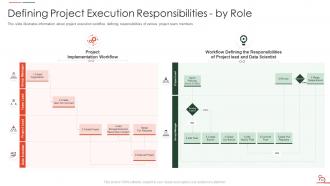
Slide 30: This slide illustrates information about project execution workflow defining responsibilities of various project team members.
Slide 31: This slide portrays information about project tasks and artifacts associated with project lifecycle.
Slide 32: This slide exhibits Table of Contents- Communication Plan to Successfully Complete Data Conversion Project.
Slide 33: This slide portrays Communication Plan to Successfully Complete Data Conversion Project.
Slide 34: This slide exhibits Table of Contents- Impact of Introducing Agile Methodology in Data Conversion Project.
Slide 35: This slide shows Impact of Introducing Agile Methodology in Data Conversion Project.
Slide 36: This slide exhibits Table of Contents- Scrum Implementation Challenges and Measures to Resolve.
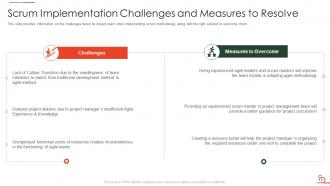
Slide 37: This slide showcase Scrum Implementation Challenges and Measures to Resolve.
Slide 38: This slide exhibits Table of Contents- Project Monitoring Dashboards.
Slide 39: This slide portrays KPI dashboard for monitoring project progress.
Slide 40: This slide displays project risk management dashboard.
Slide 41: Icons Slide for Agile Methodology for Data Migration Project (IT) 41
Slide 42: 42 Additional Slides
Slide 43: This slide showcase Agile Lifecycle of Data Conversion Project.
Slide 44: This slide showcase Data Value Pyramid.
Slide 45: This slide showcase Traditional Vs Agile Project Management Method.
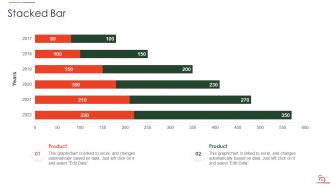
Slide 46: This slide exhibits yearly stacked bars for different products.
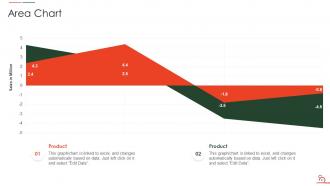
Slide 47: This slide exhibits yearly sales area chart for different products.
Slide 48: This slide display Our Goal.
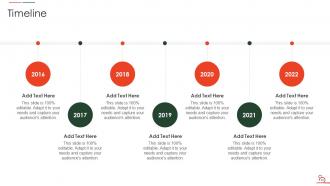
Slide 49: This slide display Timeline.
Slide 50: This slide shows puzzle for displaying elements of company.
Slide 51: This slide display Venn.
Slide 52: This is thank you slide & contains contact details of company like office address, phone no., etc.
Agile Methodology For Data Migration Project IT Powerpoint Presentation Slides with all 57 slides:
Use our Agile Methodology For Data Migration Project IT Powerpoint Presentation Slides to effectively help you save your valuable time. They are readymade to fit into any presentation structure.



















FAQs for Agile Methodology For Data Migration Project IT
So basically you break it into small pieces instead of doing everything at once. Way less scary that way. Focus on your most important data first - get some quick wins to show progress. Test stuff constantly with real users because they'll catch things you missed. Honestly, the old-school approach where you plan every detail upfront is kinda unrealistic these days. Requirements change, stuff breaks, life happens. Better to stay flexible and adjust as you go. It's like moving apartments one room at a time rather than cramming everything into one chaotic weekend. You'll actually sleep better too.
Honestly, Agile fixes the biggest problem with data migrations - teams not talking to each other. Daily standups get your database people, ETL devs, and analysts actually syncing up instead of disappearing for weeks. Sprint planning means you're delivering small working pieces every couple weeks, not some giant handoff that inevitably breaks. The retrospectives are clutch too - that's where you catch the communication gaps before they bite you. Most migration disasters I've witnessed? Yeah, it's always teams working in silos. Set up dedicated Slack channels for each sprint and make sure every team sends someone to planning meetings. Trust me, it makes a huge difference.
Dude, you HAVE to set up continuous feedback or you'll regret it later. Get your stakeholders and users constantly checking the migrated data - like, don't wait until the end. Think of it as your GPS recalculating when there's traffic ahead instead of driving into a mess. Your team needs to hear about data quality issues and performance problems right away so you can pivot mid-sprint. Honestly, most people skip this part and then wonder why everything's broken. Schedule regular check-ins and make users actually test stuff frequently. It's the difference between catching problems early vs. a total disaster.
Check three main things before jumping in. Does your team know how to work iteratively and collaborate across departments? Most places totally bomb this part because they're stuck in old-school waterfall thinking. Look at how messy your data situation is too - all those dependencies will bite you later. Leadership needs to be cool with constant feedback and changing direction mid-stream, which honestly some executives hate. I'd definitely try a small pilot first with some dataset you don't care about. You'll spot problems fast without risking anything important.
Go with cloud ETL tools - AWS Glue, Azure Data Factory, or Talend are solid picks. They're flexible and handle the grunt work while you iterate fast. Docker's clutch for keeping environments consistent between sprints. Git for your migration scripts is absolutely mandatory, no exceptions there. Pick whatever plays nice with your current setup first, then expand. The tool itself isn't as crucial as your team actually knowing how to use it well. I've watched way too many teams get stuck endlessly debating which platform to choose instead of just... you know, starting.
Treat it like any other user story - rank by business value and risk. Go after your most critical data first, the stuff you absolutely need for MVP. Dependencies matter too since some datasets unlock others (like you need customer records before orders, obviously). But honestly? Hit the scary migrations early while you've got time to mess up and fix things. Save the nightmare data transforms for last sprint and you're asking for trouble. Build a backlog, estimate the work, get your PO's input on priorities. Then just adjust each sprint based on what breaks... I mean what you learn.
You'll need both tech and business metrics to see if things are actually working. Data accuracy should hit 99%+ and track your migration velocity - how many stories you're knocking out each sprint. Downtime during cutover is obviously critical too. Honestly, user acceptance scores matter more than anything else - if people can't do their jobs with the migrated data, you're screwed no matter how perfect the technical side looks. Don't forget defect rates and rollback incidents. Oh, and start measuring from day one so you can fix stuff early instead of panicking at launch.
Don't try to migrate everything at once - that's a recipe for disaster. Map out what depends on what first, then tackle the critical stuff. Legacy systems are usually a hot mess of random connections nobody documented (shocking, I know). Break it into chunks and test each piece before moving on. Run both systems side by side for a while so you can double-check everything matches up. Start with the boring, straightforward data that won't blow up if something goes wrong. You'll build momentum and figure out the weird edge cases before hitting the scary parts.
Honestly, data quality problems will be your biggest headache. Legacy systems are a nightmare too - there's always some weird dependency nobody told you about. Start with data validation checkpoints right away and run tests throughout each sprint. Breaking everything into smaller chunks is way smarter than trying to migrate all at once. Scope creep during sprints will drive you crazy if you're not careful. Focus on high-impact data first, keep your data and dev teams talking constantly, and definitely have rollback plans ready. Oh, and parallel testing is clutch for catching issues early.
Don't wait until the end to check your data quality - build those checks right into each sprint. Automated validation is your friend here: set up data profiling, consistency checks, and business rule validation after every migration batch. Honestly, catching issues early beats finding out you screwed up millions of records later. The iterative thing actually works in your favor for once. Get a shared dashboard going so everyone can see the quality metrics in real-time. Oh, and start with your most critical data first - establish clear acceptance criteria for each sprint so you're not guessing what "good enough" looks like.
Honestly, hands-on workshops are your best bet - get everyone practicing with real data migrations. Cross-functional pairing is clutch here. Have your data engineers work directly with analysts and business people. That's where you actually learn what everyone's struggling with. Oh, and definitely start with a pilot project where it's okay to mess up. People need room to experiment. Keep doing retrospectives to see what's working. Your team will basically become the walking knowledge base, so document everything as you go - trust me on this one.
Look, stakeholders will make or break your data migration project. Don't let them vanish after the kickoff meeting - I've watched that disaster movie too many times. Get them reviewing actual data samples during sprints, not just sitting through PowerPoints. Weekly check-ins beat those monthly reports everyone ignores anyway. Visual dashboards help, but honestly? Nothing beats putting real migrated data in front of them early. They need to make quick calls on mapping rules, validate samples, and stay engaged throughout. Sprint reviews aren't optional for them - make that crystal clear upfront.
Yeah, totally! Breaking your migration into smaller chunks works great - do it by data domain or app or whatever makes sense. You can test everything way earlier this way instead of some massive big-bang approach that'll probably blow up in your face. Run parallel systems during the transition so you're not completely screwed if something goes wrong. Honestly, I'd start with your most critical datasets first as like an MVP thing. Gets you comfortable with the process and you'll catch any weird issues before hitting the really messy data later.
So iterative data validation is like your safety net during migration - you're checking data quality at each sprint instead of waiting till the end. I learned this one the hard way, but it's like proofreading while you write rather than after the whole thing's done. Problems get caught early when fixes are cheaper. You can validate business rules bit by bit and show stakeholders real progress (they love seeing that). Plus your validation gets smarter as you learn what actually matters. Honestly, just start validating from sprint one and you'll thank yourself later.
Automate everything you can and treat data pipelines like actual code. CI/CD for migration scripts is a game-changer. Version control all your transformation logic too. Infrastructure as Code helps you spin up identical test environments fast - honestly, this saves so much headache down the road. I used to think containerizing migration processes was excessive, but manual deployments will destroy you eventually. Set up automated rollback procedures early. Also get automated testing running at each stage. Sounds like a lot upfront but you'll avoid those nightmare 2am debugging sessions later.
-
The presentations are very helpful. I am always able to get appropriate templates for the different topics related to my profession.
-
Their products can save your time, effort and money. What else you need. All in one package for presentation needs!