

Agile project management approach powerpoint presentation slides




Try Before you Buy Download Free Sample Product
 Impress Your
 Audience
 100%
100% Editable
 Save Hours
 of Time


The Agile project management technique refers to the capacity to create and act on changes. It's a strategy for dealing with, and eventually excelling in, an unexpected environment. Agile, according to the developers of the Agile manifesto, represents adaptability and responsiveness to change. It's about teams knowing what's going on in the environment, identifying the uncertainty they're dealing with, and working out how to adjust as they go. SlideTeam’s agile technology PowerPoint templates can help you get up to speed on the basics of Agile project management. With our templates, you can learn about the different phases of the Agile methodology, understand what tasks need to be completed in each phase, and see how work is tracked and reported on in an Agile project. Plus, with our professionally designed slides, you can present your findings in a clear and concise way that will help convince your team or clients to try out Agile for themselves. So don’t wait – download our project management ppt PowerPoint templates today.
People who downloaded this PowerPoint presentation also viewed the following :
Content of this Powerpoint Presentation
Slide 1: This is the introductory slide of “Agile Project Management Approach.” Add your company name here.
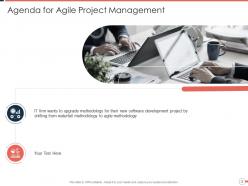
Slide 2: Use this slide to share the agenda for your presentation. Focus on the need to upgrade your software development from waterfall methodology to agile methodology.
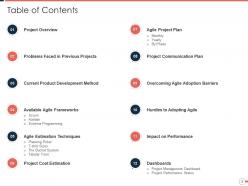
Slide 3: Here is a slide to introduce the table of contents for your presentation like project overview, problems faced in previous projects, available agile frameworks, dashboards, etc.
Slide 4: This slide can be used to introduce the first heading of your presentation, i.e., the project overview.
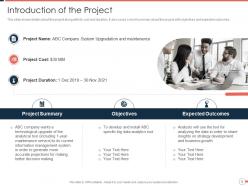
Slide 5: This slide shows details about the project along with its cost and duration. It also covers a short summary of the project with objectives and expected outcomes.
Slide 6: Introduce the second heading of your presentation, i.e., the problems faced in previous projects in this slide.
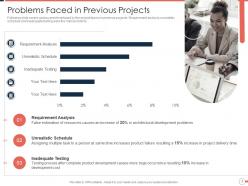
Slide 7: This slide covers various problems faced by the project teams in previous projects. Emphasize how requirement analysis, unrealistic schedule, and inadequate testing were the main problems in your early projects.
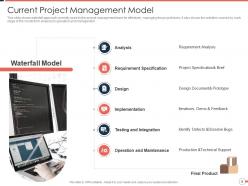
Slide 8: This slide shows the waterfall approach currently used by the project management team for effectively managing the project tasks. It also offers the activities covered by each stage of the model, from analysis to operation and management.
Slide 9: Introduce the third heading of your presentation in this slide, i.e. the available agile frameworks.
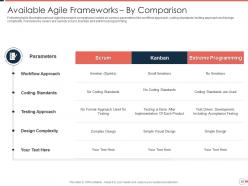
Slide 10: Use the tabular format of this slide to illustrate various agile framework comparisons based on multiple parameters like workflow approach, coding standards, testing approach, and design complexity.
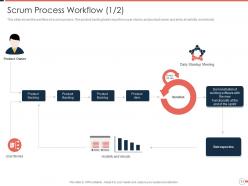
Slide 11: This slide shows the workflow of the scrum process. The product backlog takes user stories and product owner's input and ends at visibility and velocity.
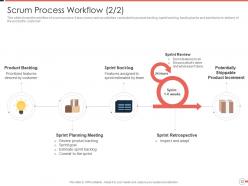
Slide 12: This slide shows the workflow of the scrum process. It also covers various activities conducted in the product backlog, sprint backlog, backlog tasks, and sprint before delivering the product to customers.
Slide 13: In this slide, the workflow process of Kanban is depicted. The process covers phases such as customer requirement, feature preparation & selection, product development, testing, and delivery.
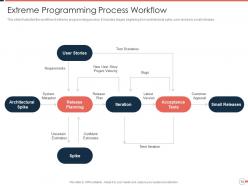
Slide 14: This slide illustrates the workflow of the extreme programming process. It includes stages beginning from the architectural spike, user stories to the small releases.
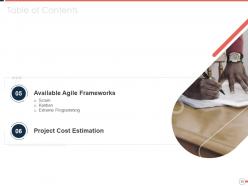
Slide 15: Introduce the fifth heading of the Table of Contents, i.e., the available agile frameworks and the project cost estimation.
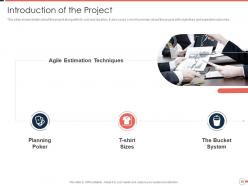
Slide 16: This slide shows details about the project along with its cost and duration, and it also covers a short summary of the project with objectives and expected outcomes.
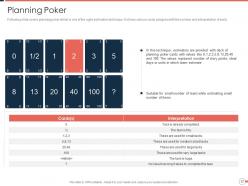
Slide 17: This slide covers planning poker, one of the agile estimation techniques. It shows various cards assigned with the number and interpretation of each.
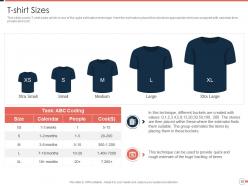
Slide 18: This slide covers T-shirt sizes which is one of the agile estimation techniques. Here the estimators place their stories to appropriate shirt size assigned with calendar time, people and cost.
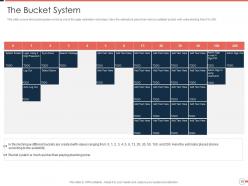
Slide 19: This slide covers the bucket system, which is one of the agile estimation techniques. Here the estimators place their story in a suitable bucket with a value starting from 0 to 200.
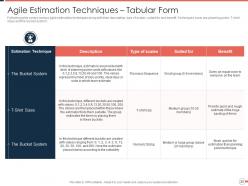
Slide 20: This tabular slide covers the various agile estimation techniques and their description, type of scales, suited for and benefit.
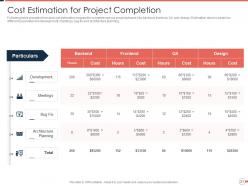
Slide 21: In this tabular slide, share the time and cost estimation required to complete various project phases like backend, frontend, QA, and design.
Slide 22: Introduce the seventh heading of your presentation, the agile project plan in this slide prepared monthly, yearly, and phase-wise.
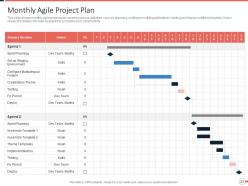
Slide 23: This slide shows the monthly agile project plan covering various activities such as planning, configuring multilingual features, testing, and deployment in different sprints.
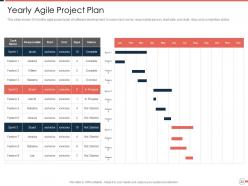
Slide 24: This slide shows the 12 monthly agile project plans of software development. It covers task name, responsible person, start date, end date, days, and completion status.
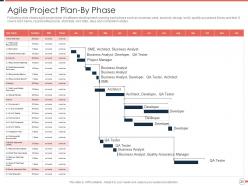
Slide 25: The following slide shows the agile project plan of software development covering each phase, such as business case, analysis, design, build, quality assurance library, and test.
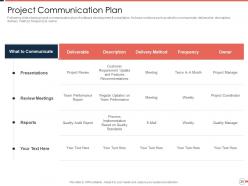
Slide 26: The following slide presents the project communication plan of software development & installation. It shows sections such as what to communicate, deliverable, description, delivery method, frequency & owner.
Slide 27: Introduce the 9th and 10th heading of your table of contents in this slide, i.e. the hurdles to adopting agile and overcoming agile adoption barriers in this PPT slide.
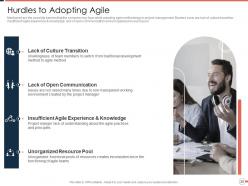
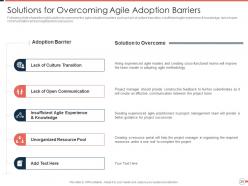
Slide 28: This slide shares the possible barriers that the company may face while adopting agile methodology in project management. Specify barriers like lack of culture transition, insufficient agile experience & knowledge, lack of open communication, and unorganized resource pool.
Slide 29: The following slide shows the right solution to overcome the agile adoption barriers shared in the last slide such as hiring experienced agile leaders, project managers sharing constructive feedback, seeking experienced agile practitioners etc.
Slide 30: Share the titles of your presentation's 11th and 12th contents, i.e. the impact on performance and the dashboards in this slide.
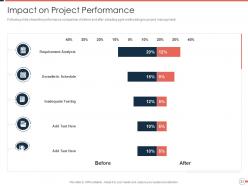
Slide 31: This slide shows the performance comparison of before and after adopting agile methodology in project management.
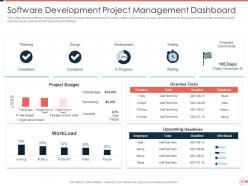
Slide 32: This slide represents the software development project management dashboard. It covers the status of planning, design, development, testing project launch date, project budget, overdue tasks, workload, and upcoming deadlines.
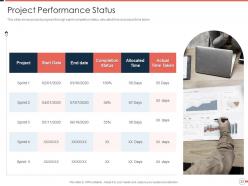
Slide 33: This slide shows project progress through sprint completion status, allocated time, and actual time taken.
Slide 34: This is the icons slide for this presentation titled: “Agile Project Management Approach.”
Slide 35: This slide marks the beginning of additional slides to follow that comprises graphs, feedback review, and contact information.
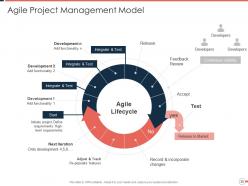
Slide 36: This slide ushers the agile project management model that covers the agile lifecycle in a circular diagram form.
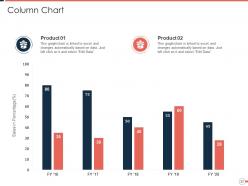
Slide 37: This slide presents a column chart to compare the performance of two years for fiscals.
Slide 38: This slide contains Post It Notes that can be used to express any brief thoughts or ideas.
Slide 39: This is the location slide to share any meaningful information about the agile framework from a geographical point of view.
Slide 40: This is an additional slide to suggest any creative ideas that can be deployed in this project.
Slide 41: This is a Thank You slide where details such as the address, contact number, email address are added.
Agile project management approach powerpoint presentation slides with all 41 slides:
Use our Agile Project Management Approach Powerpoint Presentation Slides to effectively help you save your valuable time. They are readymade to fit into any presentation structure.



FAQs for Agile project management approach
So basically Agile is all about short sprints - like 2-4 weeks instead of those crazy long projects that drag on forever. You're constantly talking to customers, not just dumping requirements on them once and disappearing. Working software matters way more than perfect documentation (thank god). Here's the thing though - requirements WILL change, and Agile actually lets you roll with it instead of having a meltdown. I've seen too many teams stress about launch day when they could've been getting feedback weeks earlier. Just chunk your next project into smaller pieces and test stuff out as you go. Way less painful.
Honestly, just pick a team that won't freak out about change and start small. Don't try to flip your whole company overnight - that's a recipe for disaster. Run Agile alongside whatever you're doing now, maybe in some area that won't break everything if it goes sideways. Train people on the actual mindset shift, not just the daily standups and sprint planning stuff. Use those early wins to convince the skeptics. Oh, and don't follow Scrum like it's gospel - tweak it so it actually works with your company's weird quirks. Start with one approach and build from there.
So your Scrum Master isn't really a manager - more like the team's process coach. They handle all those sprint ceremonies and clear blockers that slow everyone down. Pretty much shields you from outside chaos so you can actually get work done. During retros, they'll push for honest conversations and make sure quieter people speak up too. My last Scrum Master was amazing at catching team tension early and sorting it out before things got weird. If your team's feeling off, definitely ask them to run a team health check session.
User stories are great because they slice features into manageable pieces your team can actually wrap their heads around. Plus they keep everyone thinking about the user's perspective instead of getting bogged down in tech stuff. Stick with "As a [user type], I want [goal] so that [benefit]" - yeah it's formulaic but it works. Size matters though. If a story takes longer than a sprint, break it down more. Each one should stand alone and be testable. Oh and seriously, write acceptance criteria for everything. Your team will thank you when they're not guessing what "done" looks like.
Honestly, the biggest pain points are always people hating change and nobody getting proper training. Daily standups turn into these weird status meetings that feel totally useless - I swear half the teams I've seen do this wrong. Leadership will say they want "Agile" but still expect those massive upfront project plans. Start with pilot projects instead of going all-in company-wide. Get your leadership on board first, invest in decent Scrum Master training, and focus on shifting how people actually think about work. Quick wins help a ton. Once you've got something working well, then you can spread it around to other teams.
Honestly, continuous feedback is a game changer for projects. You catch problems way before they become disasters. Think of it like having GPS that keeps updating your route - way better than just hoping your original directions don't suck. Instead of spending months building something only to discover users hate it, you're adjusting after every sprint based on what people actually tell you. The whole feedback-adjust-repeat cycle means you deliver real value faster with less wasted effort. Even adding quick informal check-ins to each sprint makes a massive difference. Trust me on this one.
Honestly, start with velocity - how many story points your team knocks out each sprint. Burndown charts help too for tracking what's left. But sprint goal achievement? That's probably your best indicator of whether things are actually working. Cycle time matters - basically how long stuff sits in progress. Don't sleep on team happiness surveys either because cranky developers write terrible code. Lead time and defect rates are solid picks too. Just don't go overboard with metrics. Pick maybe 4 that actually tell you something useful, track them for a few sprints, then tweak from there.
Yeah so Agile is actually built for this - changing requirements is like one of its main things. You do these sprint cycles where stakeholders see what you're building every few weeks and can pivot without breaking everything. The product backlog just keeps getting reshuffled based on what matters most. Honestly, some clients will always want crazy stuff they didn't think of initially, but that's where you gotta draw lines between real changes and totally new scope. Sprint planning becomes your negotiation tool - you're constantly showing working software and letting them reprioritize. Way less stressful than waterfall where changes feel like disasters.
Dude, just go with Jira if you want something that handles everything - sprints, backlogs, the whole nine yards. Trello's way cleaner if your team likes the visual board thing (honestly less overwhelming). Azure DevOps makes sense if you're already doing Microsoft stuff. Here's the thing though - I've watched teams waste weeks debating tools instead of actually shipping code. Pick whatever your team will consistently use. Don't overthink it. Oh and you'll need Slack or Teams for daily chatter. That part's non-negotiable.
Honestly, you need way more touchpoints than just those daily standups. I do quick check-ins and pair programming sessions - retrospectives too, but make them actually useful. Slack works great for async stuff, though anything complex needs a video call since text just... loses so much context, you know? Make your user stories super clear because you can't just tap someone's shoulder to ask questions. Shared workspaces in Miro or Figma are clutch for visual collaboration. Oh, and overcommunicate everything - what feels like overkill is usually perfect for remote teams.
Retros are honestly where teams stop sucking at working together. Ask three basic questions: what went well, what was trash, what you'll fix next time. Don't let people sugarcoat everything - fake positivity kills these meetings. Pick 1-2 actual changes to make, not just a wishlist of complaints. Switch up who runs it so Bob doesn't drone on every two weeks with the same format. Oh, and actually follow through on your action items or you're basically paying people to complain professionally. That's it - pretty straightforward but most teams still mess it up somehow.
Short sprints are amazing because teams can experiment without worrying about massive failures. You're iterating constantly instead of overthinking everything to death - which honestly drives me crazy on traditional projects. When different departments actually work together (shocking concept, right?), you get way better ideas from all the different perspectives. The whole "respond to change" mindset means creative stuff doesn't get killed by rigid processes. Oh, and try setting aside some innovation time during your sprint retros. Your team will probably come up with solutions you'd never think of otherwise.
Break down your user stories into tiny tasks right when the sprint starts - saves you from that "oh shit, this is huge" panic later. Daily standups are clutch for catching blockers before they wreck everything. Time-box literally everything: meetings, code reviews, even research stuff. Otherwise it all spirals. Your product owner needs to be the bouncer for scope creep - any new requests mid-sprint go through them, not your team. Honestly, burn-down charts seem boring but check yours daily. You'll spot problems way earlier that way.
Get your stakeholders showing up to sprint reviews and demos - that's honestly where everything clicks. Don't wait around for formal meetings either; chat with your product owner way more often. I've watched so many projects crash when stakeholders just vanish for weeks (it's painful). Story maps and kanban boards help them actually see what's happening instead of guessing. Weekly check-ins beat those brutal monthly meetings every time. Oh, and start with your most important stakeholders first - get them locked into regular touchpoints before you worry about everyone else.
Okay so Scrum's got those structured sprints with clear roles - works great when your team needs regular check-ins and frameworks. Kanban's different though. It visualizes your workflow and limits work-in-progress so bottlenecks jump out at you immediately. Lean's more philosophical, honestly - it's about cutting waste and maximizing what customers actually value. Complex projects? Go Scrum. Continuous delivery teams love Kanban. Lean principles can work with whatever you're already doing, which is nice. I'd just pick whichever fits how your team currently operates. No point fighting your existing structure, you know?
-
Use of icon with content is very relateable, informative and appealing.
-
Nice and innovative design.
-
The Designed Graphic are very professional and classic.
-
Excellent products for quick understanding.
-
Qualitative and comprehensive slides.
-
Helpful product design for delivering presentation.
-
Colors used are bright and distinctive.
-
Really like the color and design of the presentation.