

Agile Scrum Methodology Powerpoint Presentation Slides




Try Before you Buy Download Free Sample Product
 Impress Your
 Audience
 100%
100% Editable
 Save Hours
 of Time


Agile scrum enables an iterative and incremental process for development wherein each step is called a sprint. Scrum is required for the project, which focuses on defining roles, procedures, tools, and techniques for efficient and effective project delivery. Check out our professionally designed Agile Scrum Methodology template that focuses on the scrum overview, the scope of lifecycles, and the phases of the scrum model. In the scrum overview, we have covered the scrum design and features, advantages and disadvantages of scrum software development methodology, Agile Scrum roles, and benefits of implementing the model. In the scope of lifecycles, we have focused on agile scrum construction lifecycle, agile system development, disciplined agile delivery, continuous lifecycle, and agile software development lifecycle. Steps involved in agile scrum model software, scrum product backlog creation, sprint planning, daily agile scrum meeting, the follow-up process, product increment and sprint review, retrospective and next sprint planning and daily tracking are covered in phases of the agile scrum model. This PPT template ensures the possibility of continually increasing product value by maintaining flexibility in further iterations. Get access now.
People who downloaded this PowerPoint presentation also viewed the following :
Content of this Powerpoint Presentation
Slide 1: This slide introduces Agile Scrum Methodology. State Your Company Name and begin.
Slide 2: This is an Agenda slide. State your agendas here.
Slide 3: This slide presents Table of Content for the presentation.
Slide 4: This slide shows title for topics that are to be covered next in the template.
Slide 5: This slide presents scrum design and features which focuses on steps such as plan, build, test, etc.
Slide 6: This slide displays advantages and disadvantages about the scrum development methodology.
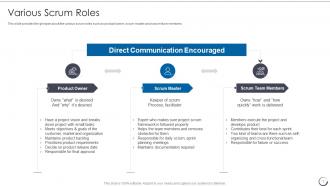
Slide 7: This slide represents various scrum roles such as product owner, scrum master and scrum team members.
Slide 8: This slide represents benefits which are implemented due to scrum method such as tasks estimation, quality, quality control, etc.
Slide 9: This slide shows title for topics that are to be covered next in the template.
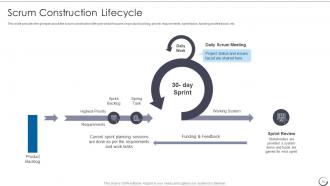
Slide 10: This slide showcases scrum construction lifecycle which focuses on product backlog, priority requirements, etc.
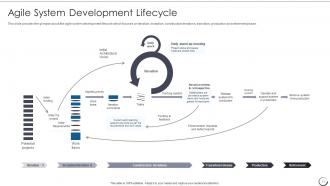
Slide 11: This slide displays agile system development lifecycle which focuses on iteration, inception, construction iterations, etc.
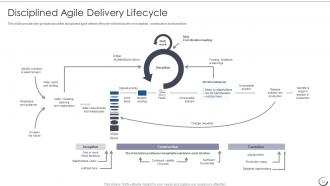
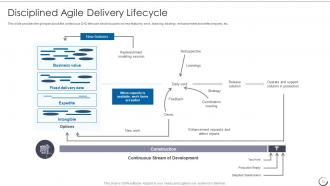
Slide 12: This slide represents disciplined agile delivery lifecycle which focuses on inception, construction and transition.
Slide 13: This slide showcases continuous DAD lifecycle which focuses on new features, work, learning, etc.
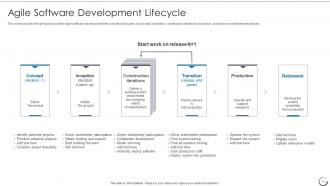
Slide 14: This slide shows agile software development lifecycle which focuses on concept, inception, etc.
Slide 15: This slide shows title for topics that are to be covered next in the template.
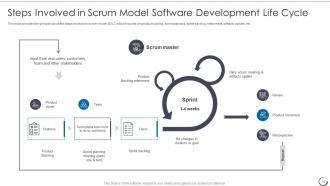
Slide 16: This slide represents steps involved in scrum model SDLC which focuses on product backlog, sprint planning, sprint backlog, etc.
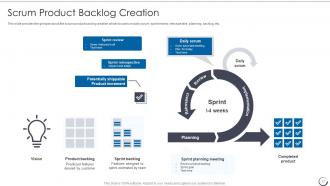
Slide 17: This slide showcases scrum product backlog creation which focuses on daily scrum, sprint review, retrospective, etc.
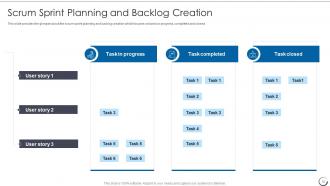
Slide 18: This slide shows scrum sprint planning and backlog creation which focuses on tasks in progress, completed and closed.
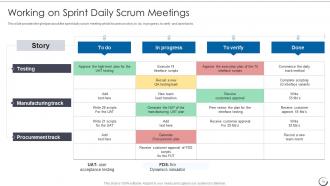
Slide 19: This slide presents sprint daily scrum meeting which focuses on story, to do, in progress, to verify and done tasks.
Slide 20: This slide displays Follow-up Progress by Using Burn-Down Chart.
Slide 21: This slide provides the glimpse about the product increment and sprint review flowchart.
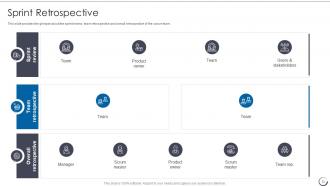
Slide 22: This slide provides the glimpse about the sprint review, team retrospective and overall retrospective of the scrum team.
Slide 23: This slide represents next sprint planning and tracking which focuses on task name, owner, estimated time, etc.
Slide 24: This slide displays Icons for Scrum Software Development Life Cycle (IT).
Slide 25: This slide is titled as Additional Slides for moving forward.
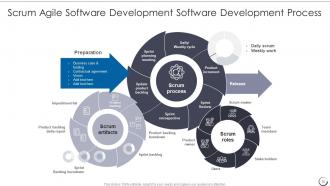
Slide 26: This slide shows Scrum Agile Software Development Software Development Process.
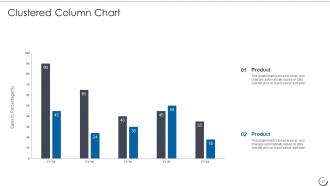
Slide 27: This slide provides Clustered Column chart with two products comparison.
Slide 28: This is About Us slide to show company specifications etc.
Slide 29: This is Our Target slide. State your targets here.
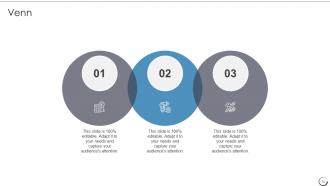
Slide 30: This slide depicts Venn diagram with text boxes.
Slide 31: This slide shows Post It Notes. Post your important notes here.
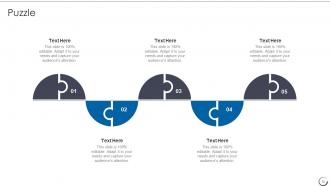
Slide 32: This slide contains Puzzle with related icons and text.
Slide 33: This is a Timeline slide. Show data related to time intervals here.
Slide 34: This is a Thank You slide with address, contact numbers and email address.
Agile Scrum Methodology Powerpoint Presentation Slides with all 39 slides:
Use our Agile Scrum Methodology Powerpoint Presentation Slides to effectively help you save your valuable time. They are readymade to fit into any presentation structure.



















FAQs for Agile Scrum Methodology
So Scrum breaks work into these 2-4 week chunks called sprints instead of planning everything upfront like old school waterfall. Way more flexible. You'll have daily check-ins, sprint reviews, and retrospectives to keep everyone on track. The main thing? Waterfall pretends you can predict every detail from the start (lol good luck with that), but Scrum knows requirements change constantly. My team learned this the hard way on our last project. First step is figuring out who's your product owner and scrum master - those roles are crucial for making it actually work.
Your Scrum Master is basically there to clear roadblocks and keep meetings from sucking. They'll handle distractions, sort out team drama, and actually make your standups useful instead of painful. Not your boss though - more like a coach helping everyone work better together. Honestly, they care way more about *how* your team functions than *what* you're actually building. Got process problems? Team acting weird? That's their whole job. Oh, and they're supposed to help you self-organize too, which sounds fancy but just means figuring stuff out as a group instead of waiting for orders.
So there are three main artifacts in Scrum. Product Backlog is your master wishlist - everything you want to build, ranked by what matters most. Sprint Backlog pulls specific items from that list for your current sprint, plus how you'll actually get it done. The Product Increment is whatever working product you've got at the end of each sprint - should be ready to ship if needed. These things aren't set in stone though, they change as you learn more. Honestly, I think people get too hung up on the formal names. Just use them to stay aligned on what you're building and track progress during standups and planning sessions.
Honestly, timeboxing is a game-changer because it stops teams from overthinking everything to death. You set hard limits - like 2-week sprints, 15-minute standups - and suddenly people can't waste time debating minor details forever. Forces you to actually prioritize what matters instead of trying to build the perfect thing (which never happens anyway). The real win is getting feedback every sprint, so you catch issues early rather than finding out you built the wrong thing six months later. My advice? Start with shorter timeboxes if your team keeps missing deadlines. Works way better than you'd expect.
So basically Scrum has all these set sprints and ceremonies - pretty structured. Kanban's more like a board where you just drag stuff through columns as you work on it. Honestly, Scrum's perfect when you need to hit deadlines consistently and your team likes having clear goals every few weeks. But if you're doing support work or dealing with random requests all the time? Kanban's way better for that chaos. I'd probably start with Scrum though - the structure actually helps you build good habits first. Plus you can always switch later once everyone gets comfortable with the whole iterative thing.
Honestly, structure saves your ass here. I always go with "what worked, what sucked, what's next" - keeps things moving. Don't let anyone dominate the convo, and shut down blame games fast (we've ALL sat through those nightmare sessions). Document everything with actual owners and deadlines or you'll just rehash the same crap next sprint. Stay solution-focused even when calling out problems. Oh, and timebox discussions to like 15 mins max per topic - trust me on this. Before you dive into new issues, actually check if you followed through on last retro's commitments first.
Honestly, the hardest part is getting people unstuck from waterfall habits - they're just so used to it. Leadership dragging their feet is brutal too. Your teams will probably fumble around with the whole self-organizing thing initially. Plus nobody really gets what Product Owners are supposed to do (still confuses me sometimes). Start small with pilot projects instead of flipping everything at once. Train everyone properly, make sure your leadership actually backs it up, not just lip service. You need psychological safety or people won't be honest in retrospectives. Oh, and get a solid Scrum Master - they'll save you from so many rookie mistakes.
Business value comes first - work with your Product Owner to figure out what'll actually move the needle for customers. Dependencies matter too though. Don't pick something that's gonna be blocked by another team's work. Honestly, sprint planning is kind of messy and that's normal. Check your team's velocity from last sprint, look at story points, but don't pack everything in just because it theoretically fits. We always think we can do more than we actually can. Better to finish what you commit to than scramble at the end. Quick gut check against your Definition of Done helps too.
Oh man, the worst thing I see teams do is turn standups into these endless status meetings - like, nobody cares that you updated 47 Jira tickets yesterday. Planning gets skipped or rushed, then scope creep just demolishes everything. People also get way too rigid about following Scrum "rules" instead of making it work for their team. My advice? Pick one thing to fix first - maybe start with actually useful standups where you talk through blockers. Keep sprint goals tight, and don't skip retros even when you're swamped.
So for big projects, check out SAFe, LeSS, or Scrum of Scrums - they help multiple teams work together without stepping on each other. SAFe's the most common but man, it gets bloated with all the meetings and roles. LeSS stays cleaner, sticks closer to actual Scrum. You'll need shared backlogs and regular syncs to keep everyone aligned. Oh, and don't go crazy with the rollout - seriously, just pilot with 2-3 teams first. I've seen companies try to transform everything at once and it's a mess. Pick one framework and test it small before scaling up.
Honestly, I'd start with velocity - just track how many story points your team knocks out each sprint. Super helpful for planning ahead. Burndown charts are solid too, shows if you're falling behind daily (though don't panic if it looks wonky sometimes lol). The big one though? Whether you actually hit your sprint goals. Completing random tasks means nothing if you're not delivering real value. Oh and definitely track retrospective action items - otherwise those meetings are just complaining sessions. Team happiness scores are clutch too but maybe add those later once you've got the basics down.
So Scrum and Agile are basically made for each other. Your daily standups? That's putting people first over rigid processes. Each sprint delivers actual working software instead of endless documentation. The product owner keeps customer needs front and center rather than getting stuck in contracts. Plus you're constantly adapting based on what you learn - way better than blindly following some ancient plan. Scrum's probably the most naturally Agile framework I've seen. Those short sprints, retrospectives, self-organizing teams... it all just clicks. If you're doing Scrum right, you're already living the Agile manifesto without overthinking it.
Oh man, continuous feedback is huge in Scrum! It's literally what stops you from spending weeks building something nobody wants. During sprint reviews you hear from stakeholders, retrospectives give you team insights, and user demos show if you're on track. I've seen teams crash and burn without it - not pretty. The whole point is catching problems fast so you can pivot before they become disasters. Short bursts of input beat waiting until the end to realize you've gone off course. My advice? Start gathering feedback from day one and don't ignore what you're hearing.
Honestly, the biggest thing is just talking way more than you think you need to. Video calls for everything - standups, planning, retros. I know it sounds obvious but make everyone turn cameras on, it actually matters. Digital boards like Jira help since everyone can see what's happening in real time. Short standups work better remotely anyway, people ramble less when they're staring at a screen. Switch up who runs retros so it doesn't get stale. Oh and stick to your schedule religiously - when you can't just tap someone on the shoulder, consistency becomes everything for building trust.
Honestly, most teams go with Jira, Azure DevOps, or Trello for the main stuff - sprint planning, backlogs, burndowns. Jira's like the industry standard but can be totally overwhelming if you're just starting out. Trello's way simpler and works great for kanban boards. You'll need Slack or Teams obviously for daily communication. Oh and Miro's clutch for retros and story mapping sessions. Don't overthink it though - I've seen teams do amazing work with just sticky notes and whiteboards. Pick whatever your team will actually stick with, then upgrade later if needed.
-
A big thanks to SlideTeam! An incredible and diverse library of templates helped me with my business project presentation.
-
Extensive range of templates! Highly impressed with the quality of the designs.