

Agile methodology templates powerpoint presentation slides




Try Before you Buy Download Free Sample Product
 Impress Your
 Audience
 100%
100% Editable
 Save Hours
 of Time


Agile software management refers to software development methodologies that are based on the concept of iterative development. Here is a competently designed Agile Methodology Templates that showcases a way of project management that divides a project into stages. The template covers the collaboration of self-organizing cross-functional teams, which leads to the evolution of criteria and solutions. Scrum and Kanban are two of the most common Agile methodologies used in this template. Further, the template provides information on Agile Methodologys phases and goals. Additionally, our template covers details on Agile techniques and scaling agile transformation model and Agile Diagram- Software Design Thinking and Lean Startup Phases, etc. Our IT template also covers information on the Agile-driven approach for software development. Further, this module provides details on the Agile lifecycle, the role of the Agile team, and learning-oriented techniques for the Agile Team. It also highlights Agile performance evaluation metrics and Agile enterprise developed architecture-Post Implementation attributes. Making changes in the template is as easy as a piece of cake. Customize this 100 percent editable template based on requirements now.
People who downloaded this PowerPoint presentation also viewed the following :
Content of this Powerpoint Presentation
Slide 1: This slide introduces Agile Methodology Templates. State Your Company Name and begin.
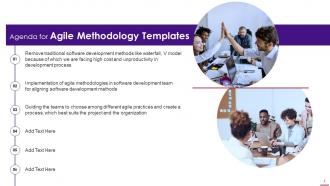
Slide 2: This slide presents Agenda for Agile Methodology Templates.
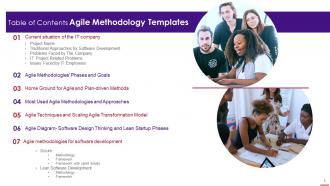
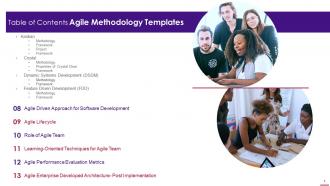
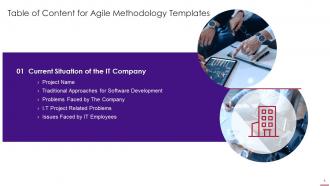
Slide 3: This slide presents Table of Content for the presentation.
Slide 4: This is another slide continuing Table of Content for the presentation.
Slide 5: This slide highlights title for topics that are to be covered next in the template.
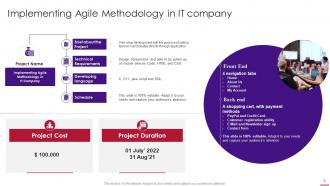
Slide 6: This slide depicts Implementation of agile methodology in IT company.
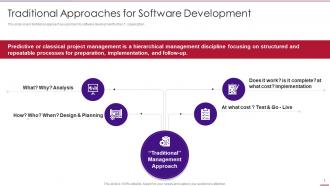
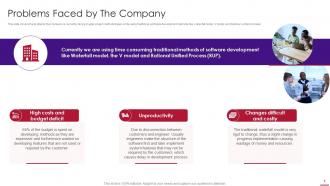
Slide 7: This slide covers traditional approach as a problem to software development for the I.T organization
Slide 8: This slide covers the problems that company is currently facing in agile project methodologies.
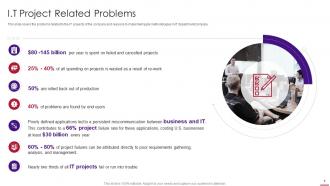
Slide 9: This slide covers the problems related to the IT projects of the company and reasons to implement agile methodologies in IT department/company.
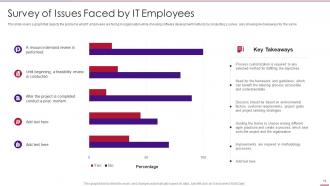
Slide 10: This slide covers a graph that depicts the problems what IT employees are facing in organisation.
Slide 11: This slide depicts title for 'Agile Methodologies phases & goals'.
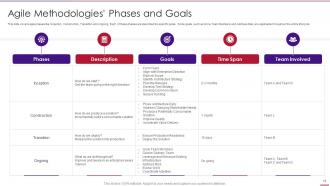
Slide 12: This slide covers agile phases like Inception, Construction, Transition and ongoing.
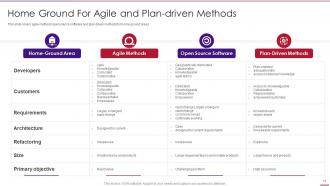
Slide 13: This slide covers agile methods open source software and plan driven methods for home ground areas.
Slide 14: This slide displays title for 'Most used agile methodologies and approaches.
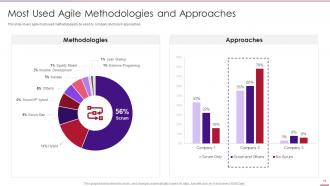
Slide 15: This slide covers agile most used methodologies to be used by company and scrum approaches.
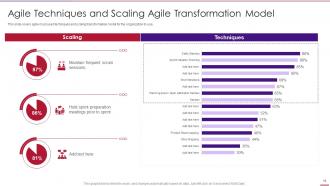
Slide 16: This slide covers agile most used techniques and scaling transformation model for the organization to use.
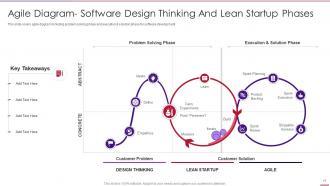
Slide 17: This slide covers agile diagram including problem solving phase and execution & solution phase for software development.
Slide 18: This slide presents title for 'Agile methodologies in IT for software development'.
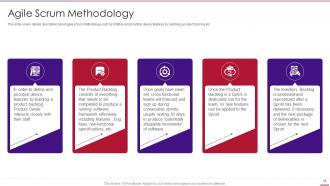
Slide 19: This slide covers details description about agile scrum methodology.
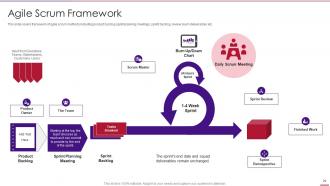
Slide 20: This slide covers framework of agile scrum methods including product backlog sprint planning meetings, etc.
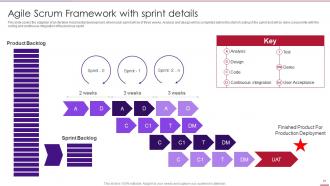
Slide 21: This slide covers the adaption of an Iterative-Incremental development, where each sprint will be of three weeks.
Slide 22: This slide exhibits title for 'Lean software development'.
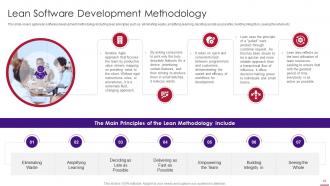
Slide 23: This slide covers agile lean software development methodology including lean principles.
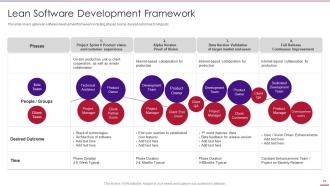
Slide 24: This slide covers agile lean software development framework including phases, teams, desired outcomes, timings etc.
Slide 25: This slide shows title for 'Lean software development framework'.
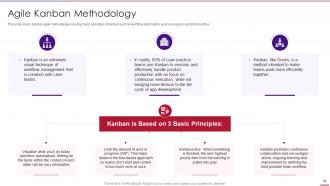
Slide 26: This slide covers Kanban agile methodology including basic principles of Kanban.
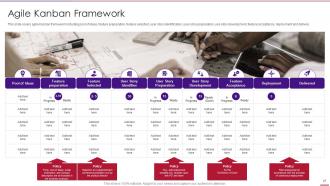
Slide 27: This slide covers agile Kanban framework including pool of ideas, feature preparation, etc.
Slide 28: This slide depicts title for 'Extreme programming'.
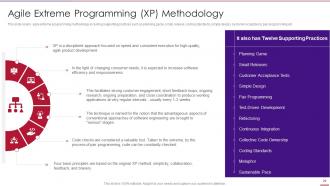
Slide 29: This slide covers agile extreme programming methodology including supporting practices.
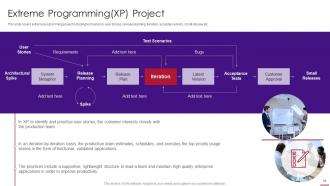
Slide 30: This slide covers extreme programming project including test sensors, user stories, etc.
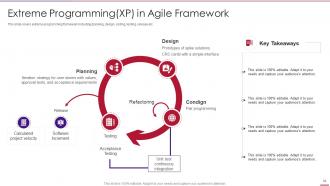
Slide 31: This slide covers extreme programming framework including planning, design, coding, testing, release etc.
Slide 32: This slide displays title for 'Crystal'.
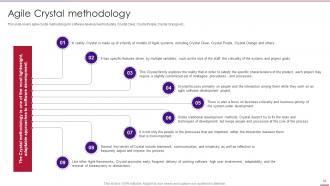
Slide 33: This slide covers agile crystal methodology for software development.
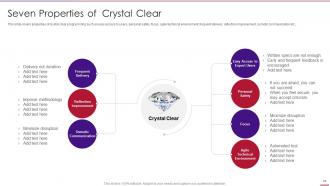
Slide 34: This slide covers properties of crystal clear programming.
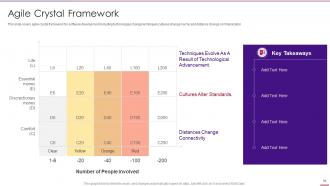
Slide 35: This slide covers agile crystal framework for software development.
Slide 36: This slide presents title for 'Dynamic systems development'.
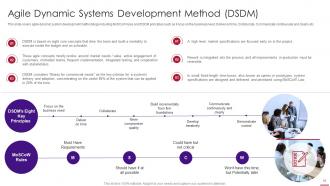
Slide 37: This slide covers agile dynamic system development methodology.
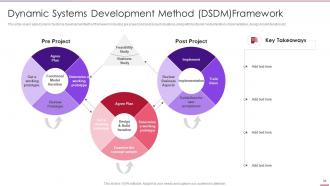
Slide 38: This slide covers agile Dynamic Systems Development Method framework.
Slide 39: This slide exhibits title for 'Feature driven development'.
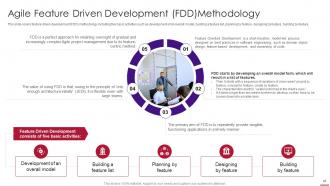
Slide 40: This slide covers feature driven development (FDD) methodology.
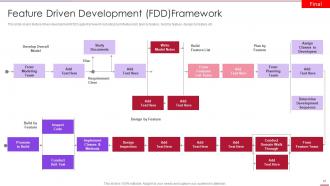
Slide 41: This slide covers feature driven development (FDD) agile framework.
Slide 42: This slide shows title for 'Agile lifecycle'.
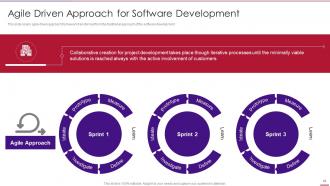
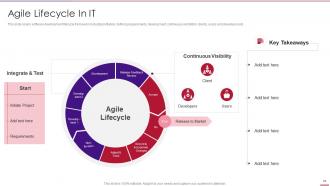
Slide 43: This slide covers agile driven approach framework transformed from the traditional approach of the software development.
Slide 44: This slide covers software development lifecycle framework.
Slide 45: This slide depicts title for 'Role of agile team'.
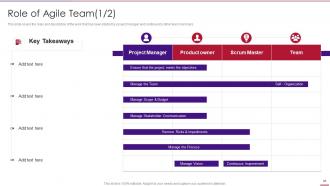
Slide 46: This slide covers the roles and description of the work that has been started by project manager and continued by other team members.
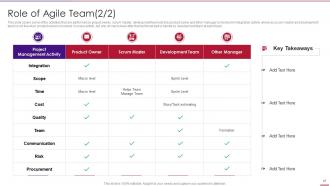
Slide 47: This slide covers some of the activities that are performed by project owner.
Slide 48: This slide covers the learning-oriented techniques.
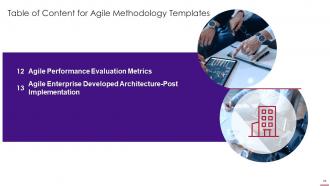
Slide 49: This slide displays title for 'Agile performance evaluation metrics'.
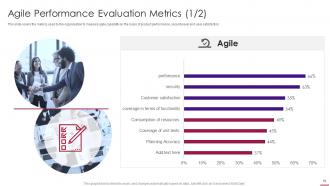
Slide 50: This slide covers the metrics used by the organisation to measure agile capability.
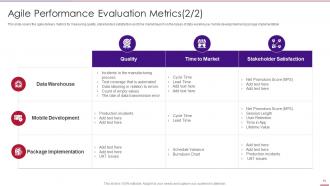
Slide 51: This slide covers the agile delivery metrics for measuring quality.
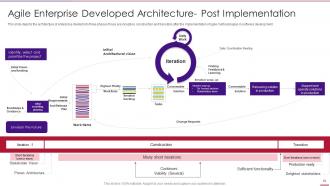
Slide 52: This slide depicts the architecture of enterprise divided into three phases.
Slide 53: This slide displays Icons for Agile Methodology Templates.
Slide 54: This slide is titled as Additional Slides for moving forward.
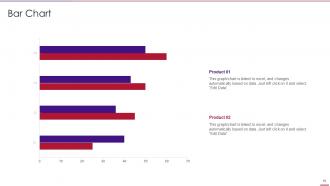
Slide 55: This slide presents Bar chart with two products comparison.
Slide 56: This is Our Mission slide with related imagery and text.
Slide 57: This is About Us slide to show company specifications etc.
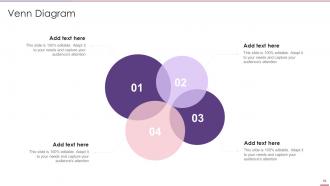
Slide 58: This slide depicts Venn diagram with text boxes.
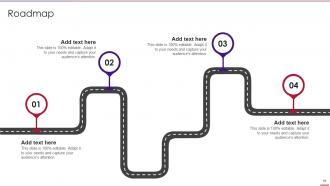
Slide 59: This slide presents Roadmap with additional textboxes.
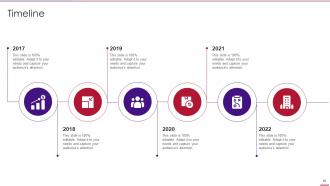
Slide 60: This is a Timeline slide. Show data related to time intervals here.
Slide 61: This is an Idea Generation slide to state a new idea or highlight information, specifications etc.
Slide 62: This is a Thank You slide with address, contact numbers and email address.
Agile methodology templates powerpoint presentation slides with all 67 slides:
Use our Agile Methodology Templates Powerpoint Presentation Slides to effectively help you save your valuable time. They are readymade to fit into any presentation structure.






FAQs for Agile methodology templates
So most Agile templates have user stories, sprint boards, retrospectives, and burndown charts. Product backlogs and definition of done checklists too. Daily standup stuff. Honestly, there's way too many variations out there - kind of annoying when you're starting out. But everything basically comes down to breaking work into smaller pieces, tracking it visually, and getting feedback to improve. I'd just start with a simple Kanban board and basic user story format. Don't overthink it. You can always pile on more components once your team gets the hang of things.
Templates basically give your whole team the same playbook, which is huge for staying on the same page. Nobody's confused about where stuff goes or how to write user stories. Meetings move way faster too since everyone knows what's coming. Honestly, I'd start simple - just grab basic sprint planning and retro templates. You can tweak them later once you figure out what works. The best part? Eventually your team stops overthinking the process and just gets shit done. It's like... once the structure becomes automatic, you can focus on actual work instead of wondering if you're doing everything right.
Look, first figure out your team size and how complex your projects actually are. Those cookie-cutter Scrum templates? They're basically useless out of the box. Adjust sprint lengths based on what makes sense for your team's speed and expertise. Story point scales too - some teams love fibonacci, others think it's overcomplicated nonsense. Strip out ceremony formats that waste everyone's time. Maybe add custom fields if your industry needs weird tracking stuff. Honestly, just test whatever you build on something small first. Then tweak it until it actually works instead of fighting against it constantly.
Honestly, templates are a game changer for sprint planning. You get pre-built frameworks for backlog grooming, story estimates, capacity planning - all that tedious setup work is already done. Your team will actually document user stories and acceptance criteria the same way instead of everyone doing their own thing. They're clutch for tracking standups and burndowns too. The best part? No more staring at a blank board wondering how to start your planning session. Find templates in whatever tool you're using and tweak them for your team's quirks. You'll probably save like 2 hours every sprint, which honestly adds up fast.
Honestly, agile templates are game-changers for team reflection. You know those retrospective boards and sprint review sheets? They basically give your discussions actual structure instead of just random complaining (which let's be real, happens way too often). What I love is they help you spot patterns - like what keeps breaking vs what's actually working well. Short sentences work. Longer ones help you track improvements over time, which feels pretty great when you realize how much you've grown. Oh, and they prevent that thing where someone brings up a good point but it gets totally forgotten by next week. Try a basic retrospective template first - you'll see the difference immediately.
Honestly, most Agile templates already have the good stuff built in, which is clutch. Velocity tracks how much your team actually gets done each sprint. Burndown charts show if you're gonna hit your goals or crash and burn. Then there's lead time and cycle time - basically how fast stuff moves from "hey, what if we..." to actually shipping. Oh, and don't sleep on sprint completion rates and defect tracking. Team satisfaction scores matter too, though some folks forget about those. My advice? Pick like 3-4 metrics your stakeholders actually care about and stick with those. Otherwise you'll drown in data.
Dude, visual stuff in Agile templates is a total game-changer. Color coding for sprint statuses, icons for story types, progress bars - all that makes things so much clearer. I swear, half the teams I've worked with just sit there squinting at walls of text during standups. What a waste of time. When you've got good visual hierarchy and status indicators, people know what's up immediately. No decoding required. Oh, and flowcharts help too if you're into that. Just throw some simple visual cues into whatever templates you're using now. Your meetings will fly by.
So user stories are basically how Agile teams capture what users actually need. The format's super simple - "As a [user], I want [goal] so that [benefit]." Way better than those 50-page requirement docs nobody reads anyway! Sprint planning templates, backlog stuff, release planning - they all use these. Most include spots for acceptance criteria and story points too. Jira and Azure DevOps have templates built right in, which is pretty handy. Oh, and priority levels obviously. Try writing a few for your next sprint - you'll be surprised how much clearer everything gets when you think from the user's angle instead of just listing features.
Oh totally! Mixing Scrum and Kanban works great. Take Scrum's sprints and ceremonies, then throw in Kanban's visual boards and WIP limits. Most teams I know swear by this approach - honestly it just makes sense. Your templates need sprint planning stuff plus the continuous flow boards. Daily standups with visual tracking. Retros that look at both sprint goals and how smoothly things actually flowed. The trick is tweaking it for your specific team rather than following some textbook version. Nobody has time for rigid frameworks anyway!
Honestly, the worst thing you can do is treat templates like they're set in stone. Your team will hate you for it. I've watched people spend forever just filling out boxes instead of actually getting stuff done - which is so backwards when you think about it. Don't just steal what another team uses either. Their setup probably won't work for you anyway. Keep things simple and actually ask your team if the template helps or just creates busywork. If it's not making life easier, scrap it. Templates should work for you, not the other way around.
Templates are honestly lifesavers for remote agile teams. They give everyone the same playbook to follow, which matters way more when you can't just tap someone on the shoulder. Sprint planning templates keep distributed teams on the same page. Daily standup templates maintain that connection virtually. Retrospectives help you capture what worked across different time zones. Without that structure, remote work gets messy fast - I've seen it happen. Start simple with a basic sprint board and add stuff as you figure out what your team actually needs. Way better than winging it every time.
Jira and Azure DevOps are your best options if you want all the fancy project management stuff built in. For simpler setups, Trello's amazing - I'm literally obsessed with how clean it is for personal projects. Asana works well too. Miro or Mural are great for visual boards when your team likes collaborating that way. Notion's solid if you're into that wiki vibe, though honestly it can get messy fast. Don't sleep on Google Sheets either - works surprisingly well for basic sprint planning. My advice? Start with whatever tool your team's already comfortable with, then upgrade later if you need more features.
Honestly, agile templates are way more flexible than people think. You can totally scale them up or down depending on what you're working on. Small projects? Just use the basic stuff - simple sprint boards and user story templates. But if you've got something massive and complex, then yeah, break out the detailed epics, multiple backlogs, stakeholder maps, all that jazz. What I love is you don't have to commit to anything upfront. Start small and add pieces as things get bigger. Or take those heavy enterprise templates and strip them down for quick projects. Just match it to your team size and scope, then tweak from there.
Honestly, just bake the feedback right into your templates from the start instead of scrambling for it later. Add specific spots in your user stories for stakeholder sign-off and build feedback checkpoints into sprint reviews. Your retros should ask about stakeholder happiness too, not just whether the team's getting along. The balance is key though - you want consistent feedback without creating some bureaucratic nightmare that kills momentum. I'd probably start small, like adding one stakeholder checkpoint to what you're already doing. See how that feels before you go crazy redesigning everything.
So basically, agile templates force you to connect every feature back to actual business value in each sprint. User story formats make you spell out the "why" behind tasks - yeah, it's a pain initially but pays off. Regular checkpoints help you reassess priorities when business needs shift. Backlog templates are clutch because they make you rank by business impact instead of just what's technically easier. Oh, and definitely try an epic-to-business-goal mapping template for your next planning session. Trust me, it'll save you from building cool stuff nobody actually wants.
-
Excellent template with unique design.
-
Very well designed and informative templates.