

Architecture of automation framework ppt powerpoint presentation ideas inspiration




Try Before you Buy Download Free Sample Product
 Impress Your
 Audience
 100%
100% Editable
 Save Hours
 of Time


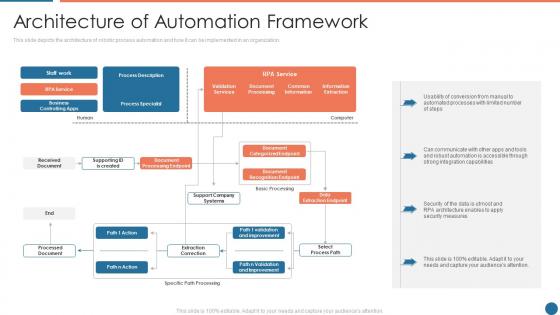
This slide depicts the architecture of robotic process automation and how it can be implemented in an organization.
People who downloaded this PowerPoint presentation also viewed the following :
Architecture of automation framework ppt powerpoint presentation ideas inspiration with all 6 slides:
Use our Architecture Of Automation Framework Ppt Powerpoint Presentation Ideas Inspiration to effectively help you save your valuable time. They are readymade to fit into any presentation structure.





FAQs for Architecture of automation framework ppt powerpoint
You'll want to start with test data management and page objects for your UI stuff. Configuration management is huge - handles environments, browser settings, all that. Add some utility libraries for the common functions you'll use everywhere. Oh and seriously, build in good logging from day one. I learned that the hard way when I had to debug tests with zero visibility into what was breaking. Your execution engine needs to handle different environments smoothly. Don't forget a decent reporting setup so you can actually see what passed or failed. Honestly, sketch this whole thing out first before you write any code. Trust me on that one.
So basically, modular frameworks let you add new test stuff without breaking what's already working. Think Lego blocks vs carving from stone - way easier to swap pieces around. Each module does one thing well, like handling logins or managing data. When your app grows, you just snap in new modules instead of rewriting everything from scratch. Plus your whole team can work on different modules at once without getting in each other's way, which is honestly a lifesaver. Oh, and you'll reuse modules across projects too. I'd start with whatever you're copy-pasting the most - modularize that first.
Dude, maintainability is everything. Without it, your framework turns into this massive headache that nobody wants to touch. Design things modularly so you can swap pieces without breaking the whole system. Clear separation of concerns, reusable components - the usual stuff but actually do it. When the UI inevitably changes (and it will), your team can update tests fast instead of rewriting everything. Good coding standards from the start save so much pain later. Oh, and document as you go because future you will thank present you when onboarding new people doesn't take forever.
Keywords make tests way more readable - you're basically writing in plain English instead of messy code. Like, anyone can glance at "LoginUser" or "VerifyOrderTotal" and instantly get what's going on. All the technical stuff gets hidden in those keyword functions, so your actual test cases stay clean. Plus non-technical people can actually understand what you're testing, which is pretty huge for collaboration. I'd start with whatever actions you do most often and turn those into keywords first. Honestly beats staring at a wall of syntax any day.
So BDD basically lets you write tests in plain English instead of confusing code. You get scenarios like "Given I'm on the login page, When I enter valid credentials, Then I should see the dashboard." Way easier to read, right? The cool part is non-tech people can actually understand what's being tested and spot issues early. When something breaks, anyone can figure out what went wrong without digging through code. I'd say just pick a few tests you already have and convert them to Gherkin format - you'll see the difference immediately. Makes collaboration so much smoother.
Dude, CI/CD will expose every weak spot in your test framework - trust me on this one. Your tests need to run the same way whether it's on your laptop or some random server environment. Flaky tests become your worst enemy because they'll fail constantly and drive everyone nuts. Build everything assuming it'll get hammered hundreds of times daily, because that's exactly what happens. Parallel execution isn't optional anymore. Neither is rock-solid reporting when stuff breaks (and it will). The upside? All this constant running actually makes your framework way more bulletproof over time.
Ugh, compatibility issues are the worst part honestly. Your old systems probably run on ancient protocols with zero decent documentation. Half the time you can't even find drivers that work anymore. Data formats never match up, and don't get me started on their weird authentication systems that modern tools just ignore. Speed's another nightmare - these things crawl compared to what you're used to. I'd map out whatever interfaces you can actually access first. Then maybe throw some middleware in between to translate everything? It's messy but beats trying to force old stuff to speak new languages.
Your language choice is basically everything - it sets up your whole framework's vibe. Java and C
-
Enough space for editing and adding your own content.
-
Qualitative and comprehensive slides.