

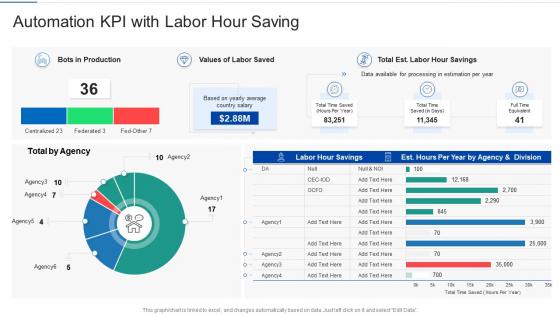
Automation kpi with labor hour saving




Try Before you Buy Download Free Sample Product
 Impress Your
 Audience
 100%
100% Editable
 Save Hours
 of Time


Our Automation KPI With Labor Hour Saving are topically designed to provide an attractive backdrop to any subject. Use them to look like a presentation pro.
People who downloaded this PowerPoint presentation also viewed the following :
Automation kpi with labor hour saving with all 10 slides:
Use our Automation KPI With Labor Hour Saving to effectively help you save your valuable time. They are readymade to fit into any presentation structure.








FAQs for Automation kpi with
Track time savings and error reduction first - those are your bread and butter metrics. Cost per process matters too, obviously. I'd throw in employee satisfaction because honestly, if your team hates the new system, you're screwed regardless of the numbers. ROI calculation is pretty straightforward - just compare what you're saving against what you spent. Process speed and cycle times will tell you if things actually got faster (sometimes they don't, weirdly). Oh, and compliance stuff if you're in healthcare or finance or whatever. My advice? Pick maybe 3-4 that actually matter for your situation instead of drowning in data.
Honestly, measuring your current setup first is gonna save you so much headache later. I'd track processing times, error rates, resource stuff - the works. Give it 2-3 months minimum to get decent data. Yeah, I know waiting sucks when you're excited about automation, but trust me on this one. Make sure you're capturing both your busy periods and slower times too. That way when you do implement changes, you'll actually know if they're helping or just making expensive noise. Oh, and definitely include some historical data if you have it lying around.
Look, the numbers don't tell you everything about your automation KPIs. Your team sees the real mess - bottlenecks, glitchy interfaces, weird problems that don't show up in reports. Maybe your efficiency looks amazing on paper, but if everyone's secretly fixing automation screw-ups for hours? That's not actually working. People notice when automation just shuffles problems around instead of solving them. Set up some regular check-ins where they can tell you what's actually happening. Oh, and create a quick way for them to flag issues - nobody wants to write a formal report every time something breaks.
So it really depends on what you're automating. Manufacturing tracks stuff like OEE, cycle times, defect rates - basically how well your equipment's performing. Service industries care more about processing times, error rates, customer satisfaction. Healthcare looks at wait times and diagnostic accuracy. Finance focuses on transaction speed and compliance stuff. Honestly, manufacturing KPIs are way more machine-focused while service ones are all about process efficiency and keeping customers happy. My advice? Figure out what success actually looks like for your situation first, then build your metrics around that. Don't just copy what everyone else is measuring.
Honestly, it depends on your budget and how complex you want to get. Datadog and New Relic are great if you've got money to spend - they handle real-time monitoring really well. But if you're trying to keep costs down, I'd go with Grafana and Prometheus. That combo is actually pretty solid and won't break the bank. For basic stuff, Google Sheets works fine (I know, I know, sounds boring). The main thing is making sure whatever you pick plays nice with your current automation setup. Oh, and customizable dashboards are a must - trust me on that one. Start simple and upgrade later when things get more complicated.
First things first - figure out what your company actually cares about. Revenue, cutting costs, happy customers, whatever. Then connect your automation wins directly to those goals. Nobody in leadership gives a damn about "we automated 47 processes" - that's meaningless to them. What they want to hear is how faster processing improved customer satisfaction by 15% or saved $200k annually. I'd pick maybe 3-4 solid metrics that scream ROI. Show the business impact, not just the technical stuff. Check in quarterly to make sure you're still tracking what matters to the people writing your budget.
Honestly, automation usually makes customers way happier. Response times get crazy fast, and people love getting help 24/7 without waiting around. Plus fewer mistakes since humans aren't involved in the boring stuff. Some folks do complain about missing real conversations though - can't win with everyone, right? The numbers don't lie though. CSAT scores almost always go up, especially for basic questions and simple transactions. Just track both the hard data (like how fast issues get resolved) and what people are actually saying in feedback. That combo will tell you if it's really working or just looks good on paper.
Honestly? Monthly check-ins work best, but quarterly's the bare minimum. Things move crazy fast with automation - you'll have new processes going live while old ones get tweaked constantly. I usually do quick monthly reviews to catch any weird trends, then go deeper every quarter to make sure I'm even tracking the right stuff. Don't waste time on metrics that just look pretty but don't actually help your business. Oh, and definitely set up a calendar reminder or you'll totally forget (learned that the hard way). Trust me, you'll be glad you stayed on top of it.
Honestly, most companies just measure everything and end up measuring nothing useful. They'll track "hours saved" and "error rates" but can't tell you if it actually helped the business. The 50% cost savings in month one thing? Total fantasy - I've seen so many teams crash and burn with those expectations. Oh, and here's the kicker - half don't even measure their baseline first, so they're flying blind on actual ROI. My advice? Pick 2-3 metrics that actually matter to your bottom line. Get your baseline numbers locked down before you change anything. Then just be patient because real results take time.
Check out industry benchmarks first - they'll show you what realistic automation targets actually look like. Most teams (mine included, honestly) shoot way too high without any real context. Look at stuff like completion rates, error reduction, ROI compared to similar companies. Industry reports and peer networks are good places to dig up this performance data. The benchmarks help you figure out which processes to tackle first too - basically shows you where you're really falling behind. Then just adjust your KPI targets based on what you find. Way better than guessing.
So there are some pretty solid new automation metrics worth watching. ROI velocity is my favorite - it shows how fast your automated stuff actually starts making money back instead of just eventual returns. Then there's human-AI collaboration efficiency, which sounds fancy but basically measures if people and bots are playing nice together. Process resilience scores tell you how your automation handles curveball situations. Oh, and definitely track employee satisfaction with your tools - nobody talks about this enough but it's critical. Honestly, I'd start with ROI velocity since it hits your bottom line directly. The rest you can layer in later.
So you'll want to track your cost savings vs what you spent on the automation stuff. Labor costs going down, fewer screw-ups, faster processing - that's your goldmine right there. Basic math: divide total savings by what you invested. Honestly though, the hardest part is catching all the benefits. Like, you save on manual work hours but also cut down on fixing mistakes and can handle way more volume. I'd say track everything for at least 6 months, maybe a year to really see the impact. Just make sure you measure your baseline first so you can actually prove it worked.
Think of automation KPIs as a health check for your processes. They'll catch bottlenecks and error patterns you'd totally miss otherwise. Track stuff like processing times, error rates, and throughput to see where things are breaking down. Honestly, I've watched teams realize their "automated" process was creating MORE manual work than before - kind of defeats the purpose, right? Focus on cycle times, exception rates, and how you're using resources. Once you spot the problem areas, you can figure out what needs fixing first. Start with 3-4 key metrics and check them monthly.
Honestly, ML is a game-changer for tracking automation KPIs. It spots patterns your regular methods totally miss and filters out all that messy data noise automatically. Historical data helps it get smarter over time too. The coolest part? It can connect dots between different data sources instead of you staring at random isolated metrics. Oh, and it's great at catching weird outliers that would mess up your numbers. I'd probably start with anomaly detection on whatever KPIs matter most to you - don't try to boil the ocean right away.
So there's a few ways to do this that actually work. First, just build automation KPIs right into your Definition of Done - like you can't call a story complete without 80% test coverage. During sprint reviews, track your automation metrics next to velocity and burndown stuff. Honestly, treating automation debt like technical debt in your backlog is pretty smart - make those automation stories visible on your board so everyone sees them. Oh and some teams get way too obsessed with metrics, but pick maybe 2-3 automation KPIs that genuinely matter to your specific team. Review them in retros consistently and you'll be good.
-
It saves your time and decrease your efforts in half.
-
Very well designed and informative templates.
-
Out of the box and creative design.
-
Informative design.