





 0 Comment
 Customer Reviews

Japan is known for its favorable employee policies, and one of its companies, Hitachi, proved this point.
The company is using an AI-driven onboarding process to hire new faces. From the beginning, the system scans the complete candidate profile and conducts role mapping.
Due to this, Hitachi has reduced onboarding time by four days and decreased HR staff involvement from 20 hours per new hire to 12.
But how did the company achieve this?
Hitachi trained its AI model by feeding data related to roles, expectations, and a dynamic recruitment process.
The question circles back again: Where did they get this data?
The human resource department is to blame for generating a well-mapped talent strategy that includes role profiling, employee onboarding, role clarity, workforce management, and more.
So, if you want to generate robust plans for your employees to increase their productivity and put them in their actual job roles, you can leverage SlideTeam’s Role Mapping Templates.
Undoubtedly, your recruitment, performance management, and employee training will become so much easier that you can save lots of time and money as Hitachi did.
Our 100% presentation templates help you define and align roles with only one motive: i.e., your team should thrive.
Let's review each PowerPoint Preset individually and see which fits your situation better.
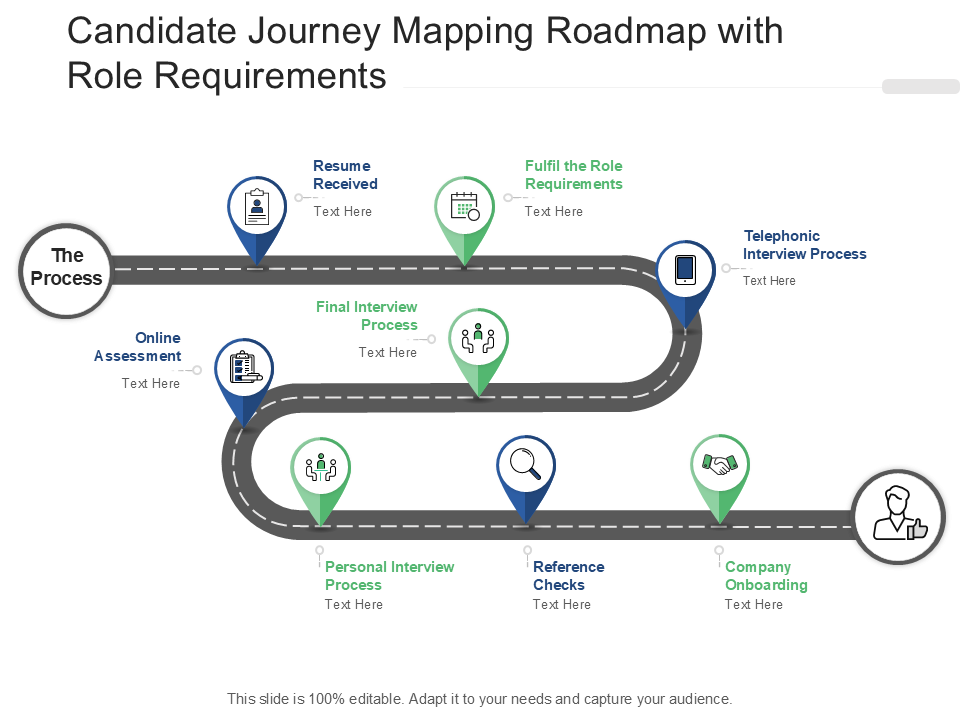
Template 1: Candidate Journey Mapping Roadmap with Role Requirements PowerPoint Template
Candidates should know what is required of them when they are hired. Therefore, use our PowerPoint Preset as a robust roadmap highlighting the recruitment process.
With this step-by-step product, you can describe the prerequisites for employees by highlighting essential stages like online assessment, the telephonic interview process, the final interview process, and reference checks.
Each phase is marked with intuitive icons and directional flow to help make the complex concepts more effortless.
In fact, this complete tool can generate structured hiring plans and align hiring teams.
Download this PowerPoint Template from the link below to improve your workforce management strategy.
Template 2: Role Mapping PowerPoint Deck
Our PowerPoint Bundle provides a robust base for optimizing your organization’s operations and improving team productivity.
This set includes several presentation themes. These will help you cover user-role assignment, organizational hierarchy, and the implementation of role mapping strategies.
Each tool is built by industry experts to enhance clarity, align goals, and manage talent in your organization.
Furthermore, you can leverage step-by-step presentation frameworks to define and review current roles.
With this one set, you can work towards building the robust ARCI framework to establish clear accountabilities, responsibilities, and consultation processes.
Download this PowerPoint Deck from the link below to increase your organizational hierarchy's transparency.
[product_image id=1194337]
Template 3: Factors Driving Adoption of Role Mapping PowerPoint Theme
Organizations are adopting role mapping due to several reasons. Our PowerPoint Theme can reveal those causes.
There is a circular diagram where you can describe clarity, goal alignment, change management, and talent management.
Furthermore, this product can streamline your internal processes by ensuring employees understand their roles and responsibilities. Additionally, they should be aligned with organizational goals and individual tasks.
Your main focus could be setting clear role expectations to achieve better performance and smoother transitions.
Download this PowerPoint Template from the link below to increase your productivity through workflow optimization.

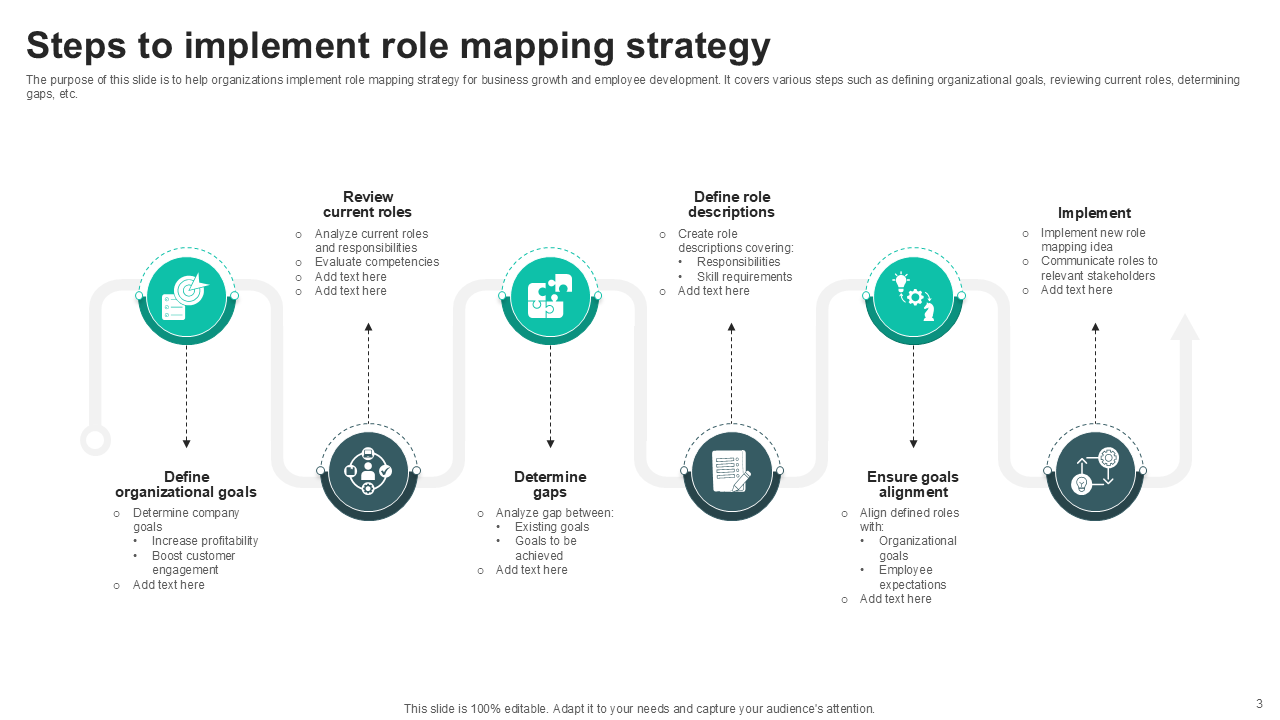
Template 4: Steps to Implement Role Mapping Strategy PowerPoint Preset
The work of the human resource department becomes unchallenging when there are proper steps to implement a role mapping strategy. Therefore, use our PowerPoint Layout to drive your organization's business growth and employee development.
You can prepare the complete outline with the key steps involved. In fact, you can begin by defining organizational goals and conclude by reviewing current roles.
Furthermore, you can focus on identifying gaps and aligning defined roles with company objectives and employee expectations.
The process shown in this product can also generate detailed role descriptions that include responsibilities and skill requirements.
Download this PowerPoint Template from the link below to incorporate skills assessment into your role mapping strategy.
Template 5: Mapping Of Project Manager Responsibilities with Scrum Management Roles PowerPoint Preset
Performing the manager's role is challenging; however, if proper instructions are provided, the duties can be carried out effortlessly.
Therefore, use our PowerPoint Framework to assist your organization in streamlining the project management activities.
You can illuminate the alignment between key roles, such as Project Owner, Scrum Master, Development Team, etc., for various departments.
Additionally, this presentation theme includes sections for several project management activities, such as integration, scope, schedule, costing, quality assurance, and team leadership.
Download this PowerPoint Preset from the link below to achieve better role alignment in your company.

Template 6: Team Mapping PowerPoint Bundles
Every individual working in the company should know who their team is and which responsibilities are handled by their group. Therefore, leverage our PowerPoint Bundle to increase performance and productivity in your business.
This product contains many presentation presets. You can use them for team sales mapping, task management, KPI achievements, and more.
Furthermore, when individual and team performance metrics (sales figures, target achievements, and task completion) are highlighted with powerful charts and diagrams, various decisions can be made on the spot that are aligned with business objectives.
Additionally, there are presentation themes related to feedback forms and assessment sheets that your HR department can use.
Download this PowerPoint Preset from the link below to sort job function mapping and role definitions with this tool.
[product_image id=459723]
Template 7: Team Mapping Evaluation and Assessment Form PowerPoint Slide
Our PowerPoint Layout works as a powerful team mapping evaluation and assessment form through which you can analyze and improve performance in your organization.
It is built to capture every insight about how team members analyze goals, communicate in groups, and make decisions.
There is a simple rating scale that team leaders or managers can use to evaluate clear work assignments and overall communication levels.
Download this PowerPoint Layout from the link below to ease the path of employee onboarding.

Template 8: Questionnaire for Critical Role Identification PowerPoint Layout
Our PowerPoint Layout offers a powerful platform to identify critical roles within different departments and plan for succession.
You can work towards various attributes, such as urgency, impact, skills required, external talent availability, and internal readiness for each role.
Furthermore, there is a scoring system through which you can judge each role's importance and the challenges associated with replacing personnel.
Additionally, organizations can quickly fill vacant positions by examining external hiring difficulty and internal candidate readiness.
Download this PowerPoint Slide from the link below to streamline process automation in your company.

Template 9: Talent Mapping Flowchart Client Consultation Role Profiling PowerPoint Layout
Our PowerPoint comprises a simple flowchart to simplify client consultation and role profiling processes.
This tool provides a professional approach, which begins with client consultation and ends with external market evaluation.
Furthermore, you can identify the best search and marketing strategies to build a robust talent pool.
Additionally, there is ample space to write key points that require attention from the audience.
So, this complete tool is a medium to bring new ideas to the table so that the right candidates are assessed and positioned perfectly in the company.
Download this PowerPoint Layout from the link below to implement role restructuring.

Define each employee’s organizational roles and responsibilities with our PowerPoint Frameworks.
Template 10: HR Employee Role in Succession Planning PowerPoint Layout
Our PowerPoint Preset is here to help you generate a comprehensive approach to HR's role in succession planning.
The human resource department can concentrate on recruitment, performance, training, and talent management under the same roof.
Furthermore, your recruitment team can provide complete details regarding the hiring and workforce development processes.
Additionally, they can portray employee performance through quality tests and offer monetary aspects to motivate employees.
Moreover, the training and development phase helps develop new skills and expertise, which is beneficial for both the organization and its employees.
Download this PowerPoint Template from the link below to improve your workforce management strategies.

Build Exceptional Role Mapping Plans
In conclusion, organizations can only survive in the long term when they have the right employees. Therefore, companies should leverage SlideTeam’s Role Mapping Templates to positively change their workforce management.
We have provided a list of the best PowerPoint Frameworks and Decks for recruitment, talent management, and performance evaluation.
So, the time has come to refine your HR strategies with these tools.
Therefore, they can be used to meet both current and future role mapping challenges.
FAQs
How does role mapping help in organizational efficiency?
Role mapping has become a vital part of today's business ecosystem. It enhances organizational efficiency by clearly defining each employee's responsibilities and expectations. This results in less confusion and more accountability.
What factors should be considered when mapping roles in a company?
Several factors should be considered when mapping roles in a company. These are organizational goals, required skills, employee competencies, and the alignment of roles with business objectives.
Additional factors, such as team dynamics, career development opportunities, and internal/external talent availability, can also be taken into account if required.
How can businesses update role mapping during structural changes?
Role mapping can be updated when there are structural changes, such as organizational goals, redefining roles, and more.
Therefore, it involves identifying skill gaps, redistributing responsibilities, and having clear communication of changes.


