

 0 Comment
 Customer Reviews

Ever bought a fancy new software, only to watch your team use 10% of its capabilities… or worse, abandon it entirely? It’s not the software’s fault (well, not always). It’s often the lack of a clear training plan that turns powerful tools into digital paperweights.
Successful software adoption doesn’t begin with installation—it begins with people. If your team doesn’t understand how to use a tool, why it matters, or when to apply it, you’re burning both time and budget.
This is where a good software training plan comes in handy. Training is your first line of defense against confusion, resistance, and expensive mistakes, whether you are onboarding new hires, implementing a system update, or deploying enterprise-wide solutions.
To make sure you hit it out of the park right from the beginning, SlideTeam offers its Top 10 Software Training Plan Templates that are pre-designed, fully editable, and outline timelines, topics, resources, milestones, and responsibilities.
Let’s explore the templates that turn software from a challenge to a champion.
Template 1: Software Development Training Program for Workplace PPT
This PPT Presentation provides a structured overview of the training program in a workplace, which is about software development. It starts with the discussion of the existing gaps in secure coding practices and compliance, continues with the gap analysis, and provides a comprehensive solution framework. These training modules are mobile app development, web design, DevOps, UI/UX, database administration, AI, and data analytics, and each of them covers online sessions, hands-on workshops, and certification tracks. Slides to support the training budget, anticipated results, ROI, and case studies are provided.
[product_image id=1178093]
Template 2: Strategy to Build a Software Training Plan PPT
This PPT Slide presents a strategic plan that can be used to develop a powerful software training program that can be used to improve the technological skills of employees. It focuses on the most important strategies, which are aligning organizational goals, skill gap assessment, training budget optimization, and experiential learning. The design introduces a cycle-based strategy that begins with the analysis of industry trends, the establishment of the knowledge-sharing culture, and the development of individual training tracks to guarantee the ongoing enhancement. The addition of practical activities and self-directed learning strengthens practical skills. This visual guide is perfect to help the HR and L&D teams create a strong goal-oriented training ecosystem.

Template 3: Developing Software Training Initiative Strategy PPT
This PPT Set provides a strategic plan for launching a long-term software training program based on organizational objectives. It focuses on four pillars: training in line with the core business goals, employee skills gap analysis, knowledge sharing within the company, and practical learning. All four quadrants provide actionable steps like mapping technical skills, conducting internship programs, and developing opportunities for experiential learning. Its visual structure and organized content make it a perfect tool that allows HR leaders and L&D teams to communicate and establish a unified approach to employee development.

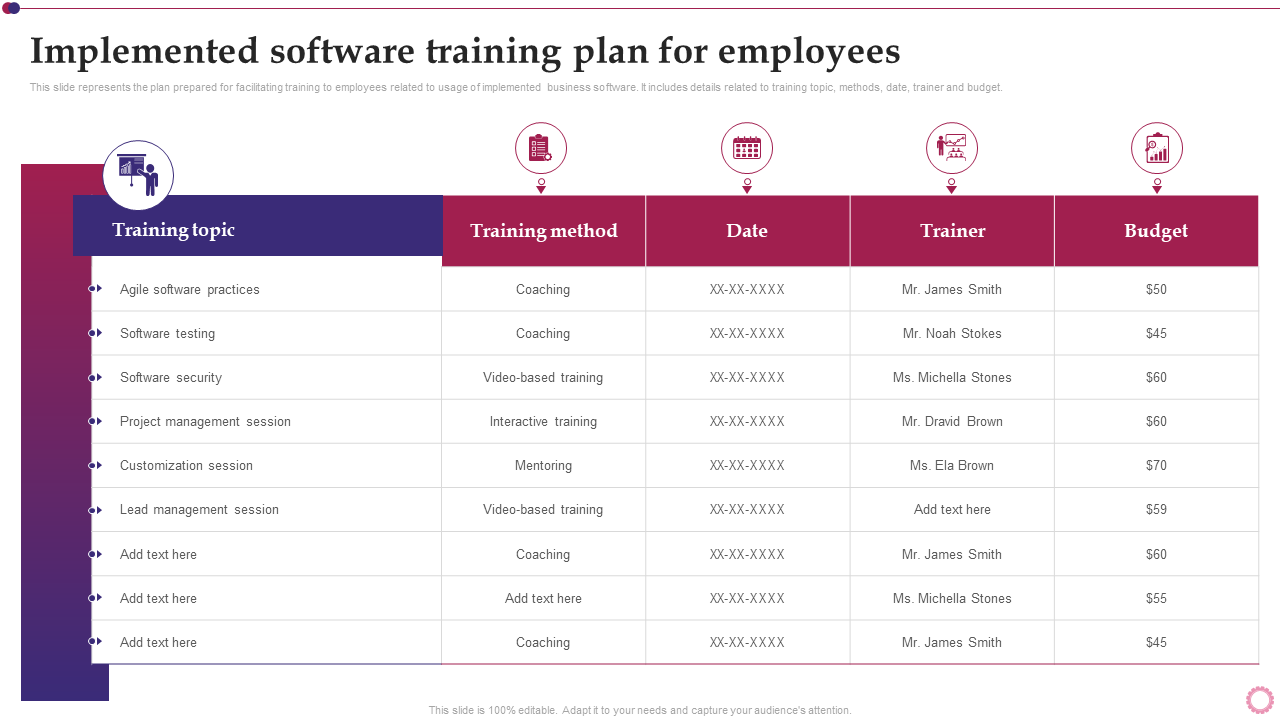
Template 4: Implemented Software Training Plan for Employees PPT
This PPT Preset provides a detailed software training plan that was conducted among the employees and highlights the main details of the training topics, methods, names of the trainers, schedules, and budgets. Among the topics are agile practices, software testing, security, and project management. The approaches range from coaching and mentoring to video-based and interactive training. Trainers are assigned to every session, and there is a budget attached to the planning of resources. This organized table will assist the HR and L&D departments in tracking training progress, spending funds effectively, and ensuring that the skills are developed according to organizational objectives.
Template 5: Software Development Training Plan for Full-Time Employee PPT Template
This PPT Slide provides a systematic training program that is specific to full-time employees, and it is based on the key software development skills. It defines training requirements, business issues that it is solving, trainers, schedules, the number of employees to be trained, and costs involved. The example involves cross-training of machines in software bug detection and upgrading of the MS Office Suite to improve efficiency in the workplace. This design assists the management to evaluate the training ROI, skill gaps, and future sessions in a clear and cost-effective manner.

Template 6: Software Training Plan to Increase Employee Efficiency
This PPT Design presents a formal software training matrix that will help to increase the efficiency of employees. It includes the most important ones like portfolio management, SQL, MS Project, and advanced Excel, their training hours, learning outcomes, delivery modes, and status. The strategy focuses on a combination of online and offline learning activities to achieve flexibility and interest. It can assist companies to track their training, match learning objectives to business requirements, and increase the productivity of their workforce by upskilling.

Template 7: New Software Development Employee Training Program PPT
This PPT Framework shows an organized training program that would help to improve productivity and reduce mistakes in the software development processes. It also describes certain training programs- Design, Technical Training, Software Testing, and Bug Fixing, corresponding to the job categories like engineers, development managers, and programmers. The plan will have the training hours per course, which will encourage specific skill development in the departments. This structure allows organizations to effectively convey training goals, monitor time, and make sure that essential positions are properly technically upskilled.

Template 8: CRM Software Training Program For Employees PPT
This PPT Preset shows a structured CRM employee training program, including sessions such as basic introduction, lead management, customization, and data security. Each session names the participants involved, assigned trainer, training method (classroom, onsite, or online), and duration. It delivers role-based training for team members, sales staff, and senior managers, with practical CRM functionality such as automation, filtering, custom rules, and data security. This structured layout also makes onboarding and system adoption across departments much more efficient.

Template 9: Software Development Project Improvement Training Plan
This PPT Slide shows a well-organized monthly training plan aimed at improving the results of software development projects. It describes some of the most important training themes that will be covered during April, including software development lifecycle, agile techniques, version control systems, test-driven development, continuous integration, DevOps practices, and cybersecurity awareness. The format will involve online and offline sessions that will be held in a conference hall. Such visual design guarantees the clarity of schedules and offers a holistic way of providing teams with the necessary technical and procedural skills.

Template 10: Agile Software Development Training Delivery Plan PPT Template
This PPT Set shows a well-organized training delivery schedule of Agile software development, which will be conducted on March 19th. The schedule of the session is between 11 AM and 5 PM and it covers the most important issues of Agile basics, estimation and planning, Scrum framework, and Scrum vs. XP comparison. It will also contain a lunch break and feedback session to guarantee a full learning process. It is an online training delivered through Google Classroom by a professional trainer, John Wills, and it offers a one-day interactive learning experience.

From Clicks to Competence—Make Training Count
Buying software is easy. Ensuring your team actually uses it right? That’s the real win. An effective software training strategy closes the gap between cost and contribution, turning licenses into productivity and frustration into fluency.
SlideTeam Software Training Plan Templates help you create a roadmap. One that arms users, synchronizes departments, and maintains rollouts on schedule. These templates will assist you in communicating effectively, training regularly, and measuring success at each step.
Because the finest software in the world is useless when your team does not know how to use it, let’s fix that, one template at a time.
FAQs on Software Training Plan
1. Why is a training plan important for software implementation?
A training plan plays a very important role in successful software implementation as it makes sure that the users are well prepared to use the new system, and this results in a higher adoption rate, fewer mistakes, and better overall performance. Users can have trouble with the new system without proper training; this will result in resistance, low productivity, and eventually the failure of implementation.
2. Who should be included in the software training program?
A software training program should include both new and experienced software professionals, as well as other employees who will be using the software. The specific content and delivery methods should be tailored to the needs of each group.
3. How do you assess training needs for different user groups?
A multifaceted method is essential to determine the training requirements of various user groups. This includes the collection of information using a number of techniques such as surveys, interviews, focus groups, and observation, the analysis of the data to establish the gaps in skills, and then the alignment of training programs to organizational needs and the needs of each group of users.