

 0 Comment
 Customer Reviews

How do the workers of Ferrari know that the next car model needs to be made available in the Winter of 2025? How do the company employees of Cadbury know that the next chocolate will be called by a particular name? How do TikTok team members know which new feature will drop in their app?
The answer to all questions is team meetings!
Major events happen in every company related to products and services, which different staff members discuss at each level. Team meetings are conducted to learn about the feasibility of the product, target audience, cost estimates, manufacturing process, and many more.
Product launches are preceded and succeeded with staff meetings. Company wide meetings or the all-hands also demonstrate importance for organizations wherein important updates are shared.
Similarly, weekly, monthly, quarterly, and even annual meetings have their relevance in tracking company operations and employee performance.
However, several companies lack the tools to prepare for team meetings and convey objectives to their employees. No need to worry! SlideTeam is here for you! We have powerful staff meeting PowerPoint Templates that can power up any type of meeting.
Plan quarterly meetings and discuss their agendas with our ready to use PPT Presets.
Why Should You Have Our Structured Staff Meetings Templates?
- Save Time: Efficiently planned and structured staff meetings help save time for your company.
- Proper Meeting Agenda: You will enter the meetings with a proper agenda so that there is no deviation from the real objective.
- Focus on Progress: Address key subjects with these PowerPoint Templates, such as project progress, fresh ideas, and evaluations of performance in the meeting.
- Understood by All: These presentation templates guarantee that all important points are covered and that everyone understands their assignments and goals.
Let’s begin!
Template 1: Staff Meeting PowerPoint Deck
Our PowerPoint Deck provides a wide range of presentation templates to enhance different types of meetings, such as project updates, sales presentations, and HR briefings.
You can use each presentation layout to focus on checklists, meeting agendas, and session breakdowns to help teams focus on objectives and deadlines.
Furthermore, this deck is perfect for professionals who want to improve internal communication and generate useful information during employee meetings. Enhance your team meetings by downloading this PowerPoint Bundle from the link below.
[product_image id=540361]
Template 2: Weekly Project Staff Meeting Checklist PowerPoint Theme
Do you require a robust tool to record your staff meeting plan through a checklist? Explore our PowerPoint Preset for this purpose.
You can monitor team progress and project updates in weekly meetings. Furthermore, your team managers can use this tool to address all vital tasks like client feedback, project timelines, team queries, and decision-making.
The task-to-status format helps teams stay concentrated and updated on important tasks, which means more transparency and accountability. Increase your team's efficiency by keeping things in order by downloading this PowerPoint Template from the link below.

Template 3: Digital Marketing Staff Meeting Agenda PowerPoint Layout
Are you looking for a tool through which you can discuss the staff meeting plan agenda? Explore our PowerPoint Theme for the same purpose. Now, you can guide the team to understand the main goals.
You can conduct team meetings on specific segments for regular agenda items, new ideas, and conversation topics to streamline the business processes.
Furthermore, you can provide time estimates for each topic to assist teams in remaining on schedule. There is a notes section, which permits additional information. Therefore, maintain focus in team meetings by downloading this PowerPoint Template from the link below.

Template 4: All Staff Meeting Plan with Allotted Time PowerPoint Preset
Assign relevant time to each department in your team meeting using our PowerPoint Theme.
This presentation layout offers a distinct organization system, through which you can address all the agenda topics, such as business updates, recruitment strategies, and office news.
There is a specific column for team leaders, time allocations, and microphone needs to facilitate successful communication at the meeting. Now, you can remain orderly and ensure all your hands-on staff meetings stay on schedule by downloading this PowerPoint Theme from the link below.

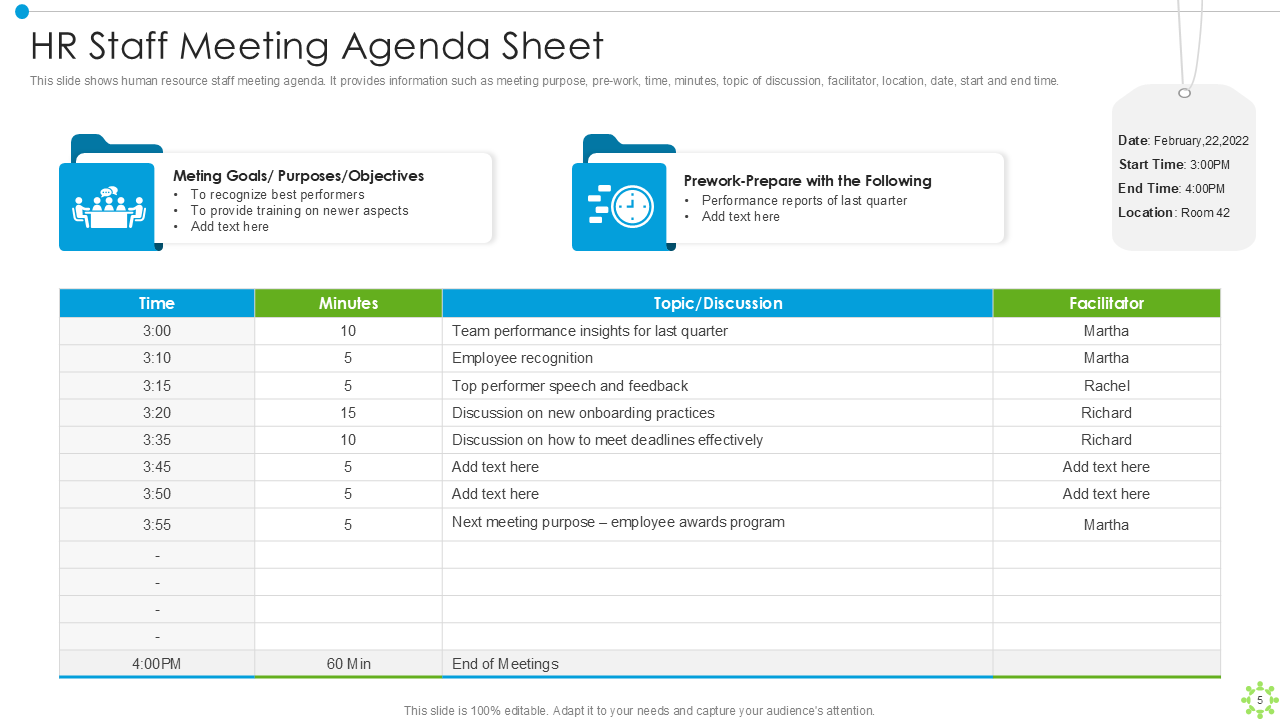
Template 5: HR Staff Meeting Agenda Sheet PowerPoint Template
The company's human resource department needs to convey its agenda during the HR staff meeting. That's why we have developed the best PowerPoint Template to show a detailed breakdown of time, subjects, and facilitators.
Now, you can focus on all important points—covering performance insights and onboarding practices.
The prework section prepares participants by establishing clear expectations beforehand, while the meeting's goals center on acknowledging top achievers and addressing fresh training requirements. Make sure HR meetings run smoothly by downloading this powerful PowerPoint Theme from the link below.
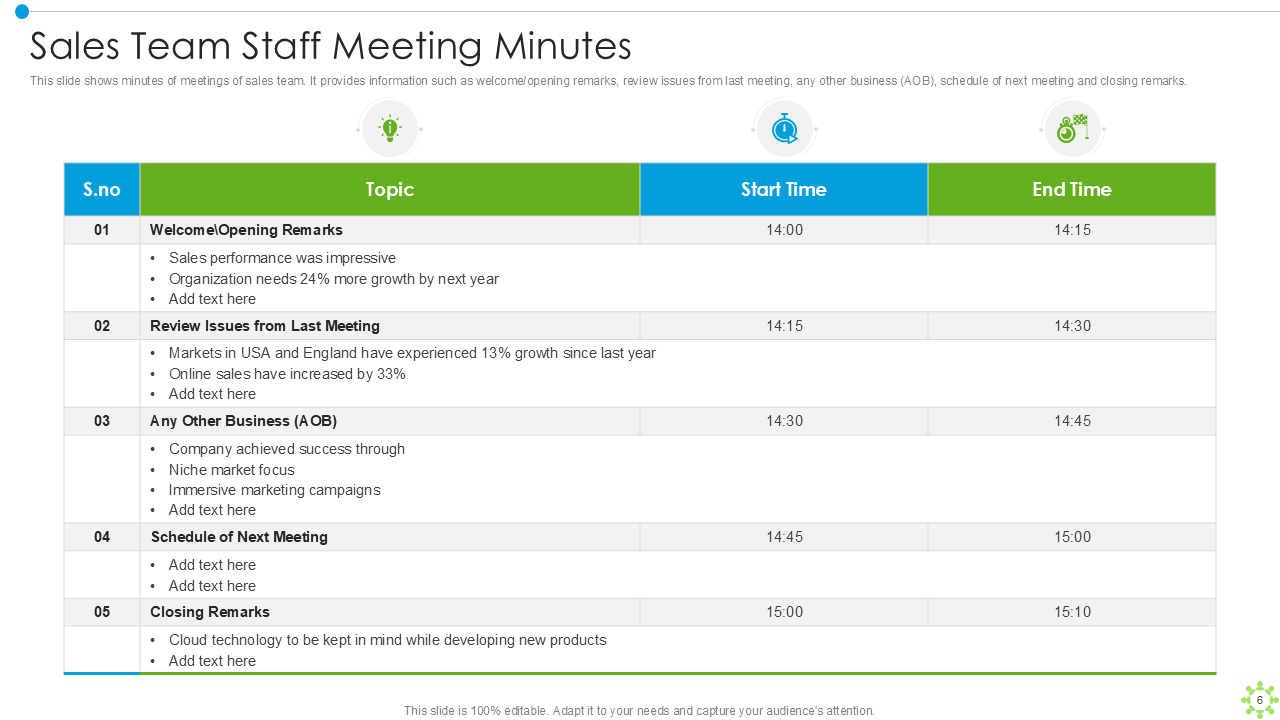
Template 6: Sales Team Staff Meeting Minutes PowerPoint Framework
Meeting time needs to be better utilized in the sales team to achieve more productivity. Therefore, you can use our PowerPoint Template to monitor meeting discussions and ensure all important points are covered.
You can use this presentation layout with distinct subjects, designated beginning and ending times, and comprehensive segments for analysis. Furthermore, your sales team will remain on the same page regarding their performance starting with introductory statements and ending with concluding observations. Enhance the effectiveness of your team meetings by downloading this PowerPoint Slide from the link below.
Template 7: Business Staff Meeting Detailed Structure PowerPoint Theme
Our PowerPoint is a perfect tool for arranging team meetings with an emphasis on extracting vital information.
You can mention the meeting agenda, starting with the Leader Overview and followed by the Team Member, with a Customer Focus portion and concluding with a Deep Dive session.
As a matter of fact, every stage is given an assigned time to make sure that conversations are effective and focused on objectives.
Do you want to make your business meetings well-structured? Download this PowerPoint Theme from the link below.

Template 8: Monthly Staff Meeting Teamwork Strategies PowerPoint Framework
Our PowerPoint Preset helps you plan collaborative tactics and build team coherence at monthly staff meetings.
You can discuss goals and performance metrics, which are vital for a monthly meeting.
Furthermore, you can mention necessary details specific to your company's requirements in this presentation layout so that your teams stay on track.
Moreover, it will help you convey the vital company message which you want to communicate to your stakeholders. Power up your team's ability to collaborate to the fullest by downloading this PowerPoint Slide.

Template 9: Staff Meeting Structure for Topics Review and Project Updates PowerPoint Theme
Sort your staff meeting plan structure with our PowerPoint Template. You will have the power to conduct staff team meetings with proper project updates.
You can schedule specific time slots for announcements, administrative updates, action item reviews, and project discussions with this presentation slide.
Furthermore, a new section for action items at the end of the document assists in maintaining team focus on future tasks, while the notes section is useful for recording feedback and key findings. Improve your team meetings by downloading this PowerPoint Preset from the link below.

Template 10: Seven Agenda Tips to Make Staff Meeting Effective PowerPoint Slide
Many meetings fail because they don't have a proper agenda for them. Hence, use our PowerPoint Preset to build a powerful agenda before entering the meeting.
You can prepare a meeting agenda based on seven key suggestions, such as deciding how often to meet, picking participants, and selecting appropriate subjects.
Furthermore, your team will be able to organize their meetings for optimal productivity. Download this PowerPoint Theme from the link below to extract optimum output from the team meetings.

Our Templates: Customizable Solutions for All Staff Meetings
In conclusion, our Staff Meeting PowerPoint Templates have the potential to improve the effectiveness and efficiency of your meetings. These robust PowerPoint Templates keep discussions on track and actionable during project reviews, team meetings, and all-hands meetings.
Furthermore, the best part is that all these presentation slides can be customized to suit any team or department.
Now, make each meeting efficient and motivate your team members to work together by downloading the PowerPoint Layouts from their respective downloadable links.
PS: Arrange your stakeholder meetings in a better way by planning crucial aspects and sharing invites in advance using our PowerPoint Frameworks featuring in this blog..