


Build and deploy android app launching powerpoint presentation slides





Try Before you Buy Download Free Sample Product
 Impress Your
Audience
 100%
Editable
 Save Hours
of Time


Introducing Build And Deploy Android App Launching PowerPoint Presentation Slides. The agenda of this slide deck to develop a healthcare app to provide more people with access to basic levels of healthcare technology. The objective of this android application framework presentation is to develop a healthcare app to provide more people with access to a basic level of healthcare and creating apps to monitor customer health conditions and nutrition levels. Highlight the major challenges faced by the customers with healthcare applications along with the solutions to overcome those challenges. The slide deck also provides information on industry overview describing the advantages of healthcare application, the number of downloads of healthcare application, key statistics, and available market of healthcare application. Discuss the reasons for investing in healthcare applications. This visually appealing deploying android app PPT presentation also describes the reasons for investing in healthcare applications, developed applications in different fields, management lead, competitive analysis with various factors, etc. Thus create an app to monitor customer health condition and nutrition level by downloading the android healthcare app PPT slide deck.
People who downloaded this PowerPoint presentation also viewed the following :
Content of this Powerpoint Presentation
Slide 1: This slide introduces Build and Deploy Android App Launching. State your Company name and begin.
Slide 2: This slide highlights the Agenda
Slide 3: This slide displays Table of Content of the presentation.
Slide 4: This slide shows Table of Content.
Slide 5: This slide shows the company overview, Healthcare Application project details and Healthcare industry details i.e. market value, market size etc.
Slide 6: This slide shows the process of developing android application related to healthcare which includes requirement analysis, application designing, development, application testing, etc.
Slide 7: This slide depicts the challenges faced by the customers in Healthcare application i.e. Data Confidentiality, Price Transparency etc
Slide 8: This slide shows the key solutions offered by the company to overcome the challenges faced by the customers. Major solutions includes Data Security, Price transparency, Informative, etc.
Slide 9: This slide shows the components of our healthcare application including exercise time, water tracker, body glucose, total calories consume etc.
Slide 10: This slide shows the various tests which are applicable on the Healthcare application i.e. UI Test, Privacy Test, Security Test etc. with their expenses.
Slide 11: This slide shows the architecture related to android application deployment on android platform which covers compiled and uncompiled resources, mobile devices, external storage etc.
Slide 12: This slide displays Table of Content.
Slide 13: This slides shows the Advantages related to healthcare application which includes les time consumption, relevant information, easy documentation, etc.
Slide 14: This slides shows the graph related to total numbers of downloads of healthcare application worldwide for the years 2016 to 2020.
Slide 15: This slides depicts the Key statistics and figures related to healthcare application which includes application downloads, customers focusing on wellness and exercise applications, doctors' recommendations, etc.
Slide 16: This slide shows the available market for the company to introduce healthcare application with market size, access to investors, Population size, etc.
Slide 17: This slide displays Table of Content
Slide 18: This slide shows the reasons to invest in healthcare application by the company which includes consumer focus on healthcare application, doctor recommendation, improve patient’s health, etc.
Slide 19: This slide shows the applications in different fields which are successfully developed by the company already i.e. photo editor, transportation, education, food and drinks, etc. with its total number of downloads and revenue share.
Slide 20: This slide presents the team management which successfully leads the company i.e. Founder/CEO, Business Heads, Android Tech Lead, Design Tech Lead, etc.
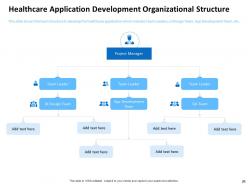
Slide 21: This slide shows the team structure to develop the healthcare application which includes Team Leaders, UI Design Team, App Development Team, etc.
Slide 22: This slide shows the company’s comparison of various factors i.e. Low price, Superior Quality, Installation, Data Security etc. with its competitors.
Slide 23: This slide shows the Interface or Sitemap related to Healthcare Application which includes Health Services, Patient Experience, Medical Devices, etc.
Slide 24: This slide showcases Table of Content
Slide 25: This slide shows the world map which depicts the application development rates by regions.
Slide 26: This slide depicts the pros and cons of local and outsourced employees hired by the company.
Slide 27: This slide shows the hiring cost required by the company to hire the team of application developers in different regions (North America, South America, Europe and Asia).
Slide 28: This slide shows the Features which includes User Login, File uploading, Profile Editing etc. with their cost related to the application.
Slide 29: This slide highlights the cost breakdown of healthcare application development for various segments i.e. Basic, Medium and Complex.
Slide 30: This slide shows the factors which influence healthcare application development cost i.e. Tech Complexity, Team’s Location, Technologies, etc.
Slide 31: This slide shows the approximate cost of healthcare application development according to various segments i.e. Simple Medium and High complex
Slide 32: This slide displays Table of Content.
Slide 33: This graph depicts forecasted total number of downloads of healthcare application from 2020 to 2024
Slide 34: This graph in the slide the Forecasted revenue generation of the company by industries i.e. Banking and Finance, Food and Drinks, Social Networking with comparison to Healthcare.
Slide 35: This graph shows the Forecasted revenue generation of the company by factors i.e. Downloads, Advertisements and Subscription.
Slide 36: This slide shows Table of Content
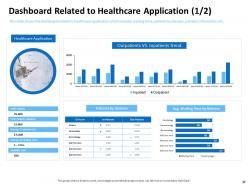
Slide 37: This slide shows the dashboard related to healthcare application which includes waiting time, patients by division, patients information etc.
Slide 38: This slide shows the dashboard of healthcare application which includes average length to stay, Lab test details, Patient metrics, etc.
Slide 39: This is Build and Deploy Android Application Design Icons Slide.
Slide 40: This slide displays Bar Chart for comparison of products.
Slide 41: This slide displays Bar Chart for comparison of products.
Slide 42: This slide displays Area Chart for products comparison.
Slide 43: This slide displays Vision, Mission and Goals.
Slide 44: This slide is titled as Post It Notes.
Slide 45: This slide displays Roadmap process.
Slide 46: This slide shows Puzzle
Slide 47: This slide displays Venn
Slide 48: This slide shows Magnifying Glass.
Slide 49: This is Financial slide.
Slide 50: This is idea generation slide to highlight important message and facts.
Slide 51: This slide displays Timeline process.
Slide 52: This is Thank you slide with Contact details.
Build and deploy android app launching powerpoint presentation slides with all 52 slides:
Use our Build And Deploy Android App Launching Powerpoint Presentation Slides to effectively help you save your valuable time. They are readymade to fit into any presentation structure.






FAQs for Build and deploy android app launching
Android and iOS app development differ in programming languages, development environments, device fragmentation, and app store policies. Android uses Java or Kotlin with Android Studio across diverse devices, while iOS uses Swift or Objective-C with Xcode for Apple's ecosystem, with many developers finding that Android offers broader market reach while iOS delivers higher revenue per user.
Android app development primarily utilizes Java, Kotlin, C++, Dart, and JavaScript, each offering distinct advantages for different project requirements. While Kotlin delivers enhanced safety and conciseness with seamless Java interoperability, Java provides extensive documentation and community support, with C++ enabling performance-intensive applications and Dart streamlining cross-platform development through Flutter frameworks.
Android architecture impacts app development through its layered structure comprising the Linux kernel, hardware abstraction layer, Android runtime, application framework, and applications layer. This architecture enables developers to optimize performance by leveraging efficient memory management, multithreading capabilities, and hardware-specific optimizations, while the modular design streamlines development cycles and enhances app responsiveness across diverse device configurations.
**INPUT**: What are the best practices for designing a user-friendly interface in Android applications? **OUTPUT**: Best practices for user-friendly Android interfaces include intuitive navigation patterns, consistent visual design, responsive touch targets, clear typography, and seamless performance optimization. These approaches streamline user experiences by reducing cognitive load, enhancing accessibility, and ensuring cross-device compatibility, with many retail and financial service applications finding that strategic interface design ultimately delivers higher engagement rates and improved customer retention. [Word count: 58 words]
Effective permission management involves implementing runtime permissions, requesting access only when needed, clearly explaining why permissions are necessary, and offering granular controls within your app settings. By adopting privacy-by-design principles and transparent communication, developers can build user trust while maintaining essential functionality, with many successful apps finding that respectful permission practices ultimately enhance user retention and satisfaction.
Essential Android app testing tools include Espresso for UI testing, JUnit for unit testing, Mockito for mocking dependencies, Firebase Test Lab for cloud testing, and Appium for cross-platform automation. These frameworks streamline quality assurance by automating regression testing, identifying performance bottlenecks, and ensuring consistent user experiences across diverse device configurations, with many development teams finding that comprehensive testing reduces post-launch issues and enhances customer satisfaction.
Developers ensure compatibility through API level targeting, responsive design frameworks, comprehensive device testing, and backward compatibility libraries like AndroidX. Through systematic testing across various screen sizes, hardware configurations, and OS versions, development teams streamline user experiences, minimize crashes, and ultimately deliver consistent app performance, with many organizations finding that strategic compatibility planning significantly reduces support costs.
Key considerations include user experience balance, pricing strategy, ad placement optimization, compliance with Google Play policies, and revenue model selection. These monetization approaches require careful integration timing, transparent purchase flows, and non-intrusive ad formats, with many developers finding that combining freemium models with targeted advertising delivers sustainable revenue while maintaining user engagement and app store approval.
Kotlin offers enhanced features like null safety, concise syntax, coroutines for asynchronous programming, and seamless Java interoperability, while Java provides extensive libraries and longer market presence. Both languages enjoy strong community support and Google backing, with many development teams finding that Kotlin's modern features streamline coding efficiency while Java's established ecosystem delivers proven stability and comprehensive resources.
APIs serve as essential bridges enabling Android apps to communicate with external services, databases, cloud platforms, payment systems, and social media networks. Through RESTful APIs and proper implementation practices, developers streamline data integration, enhance user experiences, and accelerate development timelines, with many businesses finding that strategic API utilization delivers scalable functionality and competitive advantage.
Developers implement push notifications through Firebase Cloud Messaging (FCM), configuring message targeting, scheduling delivery timing, and customizing notification appearance. Optimization involves segmenting users by behavior patterns, personalizing content based on preferences, and timing notifications strategically, with many e-commerce and news apps finding that targeted push campaigns increase user engagement rates by 25-40% while reducing uninstall rates.
Android performance optimization strategies include code profiling, memory management, background task optimization, efficient UI rendering, and network request batching. These approaches streamline app functionality by minimizing CPU usage, reducing memory leaks, and optimizing battery-intensive operations like location services, with many developers finding that strategic implementation delivers faster user experiences and significantly extended device battery life.
Android Jetpack components streamline app development by providing pre-built, tested libraries for navigation, data binding, lifecycle management, and UI construction, significantly reducing boilerplate code and development time. These components enable developers to focus on core functionality rather than infrastructure, with many development teams finding that Jetpack's architectural guidance delivers faster deployment cycles, improved app stability, and enhanced maintainability across complex projects.
Common Android app security vulnerabilities include insecure data storage, weak authentication mechanisms, improper session handling, insufficient encryption protocols, and inadequate input validation. These risks can be mitigated through secure coding practices, regular security audits, implementing robust encryption standards, and comprehensive testing frameworks, with many financial services and healthcare organizations finding that proactive security measures ultimately deliver enhanced user trust and regulatory compliance.
Following Google's Material Design guidelines is highly important for Android development, as it ensures visual consistency, improves user experience, and enhances app discoverability through Google Play's algorithm preferences. These guidelines help developers create intuitive interfaces that users already understand, reduce development time through standardized components, and increase user engagement, with many successful apps finding that Material Design compliance significantly boosts ratings and downloads.
-
Good research work and creative work done on every template.
-
Unique and attractive product design.
-
Enough space for editing and adding your own content.
-
Unique design & color.
-
Visually stunning presentation, love the content.
-
Awesome presentation, really professional and easy to edit.
-
Professional and unique presentations.
-
Much better than the original! Thanks for the quick turnaround.
-
Great experience, I would definitely use your services further.