


Business continuity plan powerpoint presentation slides






Try Before you Buy Download Free Sample Product
 Impress Your
 Audience
 100%
100% Editable
 Save Hours
 of Time


Showcase proactive plan to avoid & mitigate risk with our content ready Business Continuity Plan Powerpoint Presentation Slides. Create a system of prevention & recovery from possible risks using this professionally designed mitigation planning presentation deck. The visually appealing risk assessment process PowerPoint complete deck contains editable templates with relevant content & suitable graphics such as management oversight, risk management, business impact analysis, business continuity policy framework, recommend mitigations to name a few. Furthermore, the emergency management PowerPoint templates are apt to present various topics like crisis management, disaster risk reduction, scenario planning, natural hazards control, business continuity auditing and many more. Incorporate business continuity & resiliency planning PPT slides for crisis management & planning. The easy-to-use mitigation planning PPT slides also assist users to create an effective plan so that businesses can continue operating even during the time of emergency or disaster. Get access to this self-explanatory disaster recovery presentation deck now. World-class design and customer service come together to offer you these Business Continuity Plan Powerpoint Presentation Slides. Thousands of styles are available.
People who downloaded this PowerPoint presentation also viewed the following :
Content of this Powerpoint Presentation
Slide 1: This slide introduces Business Continuity Plan. State Your Company Name and begin.
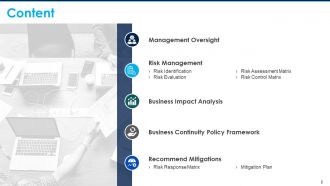
Slide 2: This slide shows Content of the presentation.
Slide 3: This slide is displays Management Oversight with related imagery.
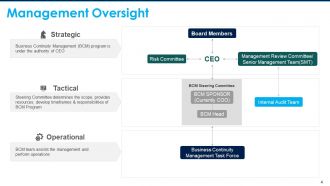
Slide 4: This slide presents Management Oversight with categories as- Strategic, Tactical, Operational.
Slide 5: This slide displays Risk Management with related imagery.
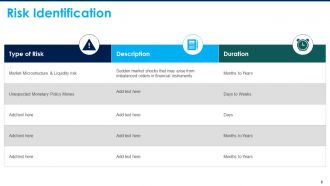
Slide 6: This slide represents Risk Identification with types of risk along with its duration and description.
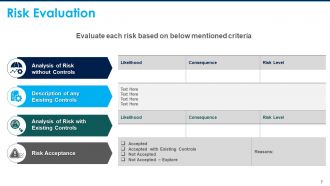
Slide 7: This slide showcases Risk Evaluation in tabular form.
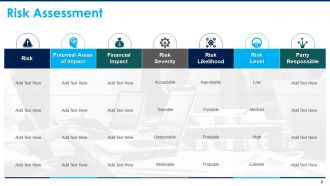
Slide 8: This slide shows Risk Assessment with financial impact, risk severity, risk likelihood, risk level and party responsible.
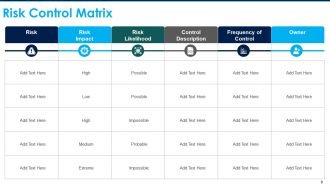
Slide 9: This slide presents Risk Control Matrix. Show relevant data accordingly.
Slide 10: This slide displays Business Impact Analysis with related imagery.
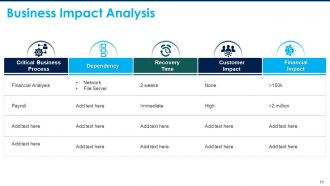
Slide 11: This slide shows Business Impact Analysis in tabular form.
Slide 12: This slide displays Business Continuity Policy Framework with related imagery.
Slide 13: This slide presents Business Continuity Policy Framework describing- Purpose, Roles & Responsibilities, Scope, Ownership, Risk Management, Plan Management, Description.
Slide 14: This slide displays Recommend Mitigations with related imagery.
Slide 15: This slide represents Risk Response Matrix describing- Retain, Retain, Transfer, Avoid.
Slide 16: This slide showcases Mitigation Plan. You can add data as per needs.
Slide 17: This is another slide for Mitigation Plan describing- Client Management, Server, etc.
Slide 18: This slide shows Business Continuity plan Icons.
Slide 19: This slide is titled as Additional Slides for moving forward.
Slide 20: This is Our Team slide with names and designation.
Slide 21: This is Our Mission slide with related imagery and text.
Slide 22: This is About Us slide to show company specifications etc.
Slide 23: This is a Timeline slide to show information related with time period.
Slide 24: This slide is titled as Post It. Post your important notes here.
Slide 25: This is a Thank You slide with address, contact numbers and email address.
Business continuity plan powerpoint presentation slides with all 25 slides:
Believe in your fortunes with our Business Continuity Plan Powerpoint Presentation Slides. They forecast a fabulous future.
-

Business Continuity Plan
-
Content
-

Management Oversight
-
Management Oversight
-

Risk Management
-
Risk Identification
-
Risk Evaluation
-
Risk Assessment
-
Risk Control Matrix
-

Business Impact Analysis
-
Business Impact Analysis
-
Business Continuity Policy Framework
-
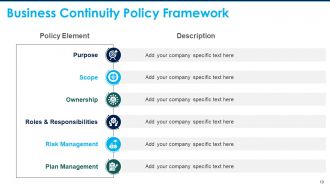
Business Continuity Policy Framework
-

Recommend Mitigations
-
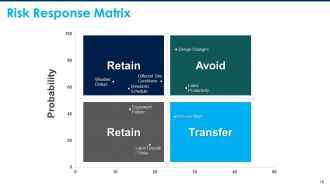
Risk Response Matrix
-
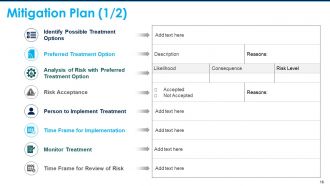
Mitigation Plan 1 2
-
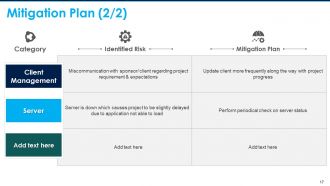
Mitigation Plan 2 2
-
Business Continuity Plan Icons Slide
-

Additional Slides
-
Our Team
-

Our Mission
-

About Us
-
Timeline
-
Post It
-

Thank You
FAQs for Business continuity plan
Start with figuring out what parts of your business absolutely can't go down. Then work backwards from there - what would you actually do if each thing broke? Communication is huge here, and honestly most companies totally bomb this part. Nobody knows who to call when stuff hits the fan. Get solid contact lists for everyone: staff, vendors, customers. You'll also want to test this regularly because what sounds good on paper usually doesn't work in real life. We do fake disaster scenarios every few months just to see where things fall apart. Trust me, they always do somewhere.
Start with mapping out what could actually mess up your business - natural disasters, cyber stuff, supply chain issues, losing key people, equipment dying. Don't just think obvious things though. Like, a major road closure could screw you depending where you're located (learned that one the hard way). Get different departments involved since they'll catch risks you'd never think of. Then rank each risk by how likely it is vs how badly it'd hurt your operations. Honestly, being systematic about this beats just winging it every time.
Look, training your people is what makes or breaks these plans. Most companies write up procedures then act shocked when nobody knows what to do during a crisis. Run drills twice a year minimum - sounds boring but trust me, you want this stuff to be automatic when everyone's panicking. Your team needs to know their exact role, not just wing it. Also update training whenever you change processes (which everyone forgets to do). I've seen too many "perfect" plans fail because nobody actually practiced them. It's like fire drills - repetitive but necessary.
Honestly, once a year minimum but that's kinda low. Big changes should trigger updates too - new office, key staff leaving, tech overhauls, whatever. Can't tell you how many plans I've seen still listing the old building they ditched ages ago lol. Also update after any real incidents or if regulations change. Set a calendar reminder and actually assign someone to own it - otherwise everyone assumes someone else will handle it and suddenly it's been three years. Short bursts work better than marathon review sessions too.
Start with FEMA's business continuity toolkit - it's free and covers everything. Ready.gov has good templates too, their planning worksheet is super helpful. ISO 22301 might be worth looking at if you need something official, though honestly it's pretty boring to read through. For tracking everything, Smartsheet or Monday.com work great. But real talk? A Google Doc works fine when you're starting out - I've seen companies overthink this part. Just pick whatever your team will actually open and update. That's honestly the hardest part.
Honestly, don't put all your eggs in one basket with communication. Mix it up - Slack, Teams, WhatsApp groups, whatever works for your crew. Get everyone's personal numbers too because work systems love to crap out at the worst times. We learned this during a massive server meltdown last year (still gives me nightmares lol). Pick specific people to be your communication leads so messages don't turn into total chaos. Oh, and actually test your backup channels! You'd be shocked how many "emergency" hotlines are basically dead when you need them most.
Start with small tests - don't jump into huge simulations right away or you'll just stress everyone out. Try tabletop exercises first where you literally sit around and talk through "what if the server crashes" scenarios. Then test individual pieces separately: can people actually reach each other during emergencies? Does data backup actually work? What happens if your main supplier disappears tomorrow? Write down everything that fails miserably and what surprisingly works fine. The annoying part is you've got to do this every few months so it becomes normal instead of that thing you tried once two years ago and never touched again.
Look, every department needs its own section because you're dealing with completely different stuff. IT's worried about getting systems back online and restoring backups. Meanwhile HR is figuring out how to communicate with everyone and set up remote work. Finance can't mess around - they need payment processing and cash flow handled ASAP. Operations might be scrambling for new suppliers or protecting physical assets, honestly depends on your business. Customer service needs backup communication ready. The basic structure? Pretty much the same everywhere. But timelines, who does what, specific steps - that's where it gets customized. Just don't forget to actually look at your section once in a while so you're not totally lost when crisis hits.
Set up daily automated backups to both cloud and an offsite spot - honestly, redundancy saved my butt once. Test your restores every month because broken backups are useless when you actually need them. Encrypt everything and use role-based access so random people can't mess with sensitive data. Multiple copies in different places means you won't panic if one fails. Oh, and start with whatever data would kill your business if it vanished - that gets priority. Sounds boring but you'll thank yourself later.
Okay so first thing - figure out which regulations actually matter for your industry. Data protection, financial stuff, healthcare rules, whatever applies to you. Then bake those requirements straight into your BCP from the start. Way less of a headache than trying to fix it later, trust me. Your plan needs to spell out exactly when you have to notify regulators and how fast you need to bounce back. Oh and document everything - they love their paperwork. Honestly, just grab your top 3 regulatory headaches and see if your current plan even mentions them. Compliance isn't some add-on feature, it's gotta be built right in.
Honestly, most people mess up by never actually testing their plan - it just sits there collecting dust. Don't overcomplicate it either. Everyone gets tunnel vision about IT stuff going down, but what if your main supplier disappears or your star employee gets hit by a bus? (Morbid but true.) The worst thing I see is when only one person knows where the plan even lives. Your team needs to access it when everything's broken, not hunt around for passwords. I'd start super basic - literally one page covering your must-have processes. You can always build from there.
Look, don't overthink this stuff. Figure out what would actually kill your business - losing your main supplier, office burns down, whatever - and tackle those first. You're not IBM, so skip the fancy corporate playbook. Two pages max. Seriously. Include backup ways to communicate, important phone numbers, and how people work from home if needed. Nobody's reading a novel when everything's on fire. Oh, and actually test it every few months with a quick run-through. Your business changes, so should the plan. Way too many people write these things once and forget they exist.
Look, you really can't skip involving stakeholders - they know the actual reality of how things work. IT will tell you they can restore everything in 2 hours, but then operations laughs because they know it's more like 6. Each department has different pain points and resources you won't think of otherwise. Honestly, people just won't follow a plan they had zero input on anyway. Map out the key players first, then bring them in early so they feel ownership. You'll catch dependencies and get realistic timelines that way. Trust me, their day-to-day experience beats theoretical planning every time.
Look, tech is what makes your BCP actually work when stuff hits the fan. Set up automated alerts so your team knows immediately when something breaks. Cloud storage keeps everything accessible - seriously, I can't imagine dealing with a crisis without it. Slack or Teams become your command center for coordinating everything. You'll want backup software ready to restore systems fast, plus monitoring tools to track how recovery's going. Oh, and test this stuff regularly! Nothing worse than finding out your backups don't work during an actual emergency.
So basically, a BIA helps you map out which business processes would totally screw you over if they crashed. You get real data on what downtime actually costs - not just wild guesses. Then you can set recovery timeframes that make sense for your budget and operations. Honestly, way too many companies just wing this stuff and then panic when something breaks. The analysis gives you hard numbers to back up your disaster planning investments. Plus you'll know exactly where to focus when things go sideways. It's kinda boring to do upfront, but it beats scrambling around clueless during an actual crisis.
No Reviews