

Business Reference Model Powerpoint Presentation Slides




Try Before you Buy Download Free Sample Product
 Impress Your
 Audience
 100%
100% Editable
 Save Hours
 of Time


Showcase the organizational aspects of the core business by employing this content ready Business Reference Model Powerpoint Presentation Slides. Give an overview of the implementation process by showcasing the planning and selection phase using this business model canvas PPT graphics. The relationship between the different business processes can be depicted with the enterprise modeling PPT visuals. You can utilize this business model PowerPoint slideshow to evaluate the internal and external conditions that affect an organization. Analyze, design and implement the business processes with the aid of this enterprise process modeling PPT templates. Describe how an organization creates, delivers and captures value and analyzes the processes by utilizing content ready business process modeling PPT layouts. Take the advantage of business architecture PPT slide to present the reporting relationship of the organization. Thus, describe the day to day business operations plan by downloading the business enterprise architecture PPT Presentation.
People who downloaded this PowerPoint presentation also viewed the following :
Content of this Powerpoint Presentation
Slide 1: This slide introduces the Business Reference Model. Add your Company Name to begin.
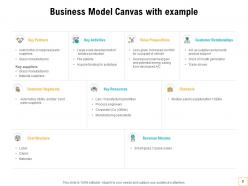
Slide 2: This slide showcases the Business Model Canvas with example.
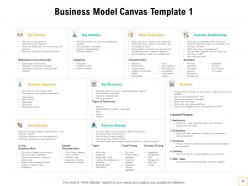
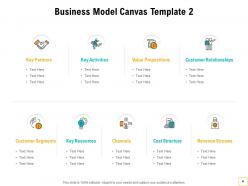
Slide 3: This slide showcases the Business Model Canvas Template.
Slide 4: This slide also showcases the Business Model Canvas Template- Customer Segments, Key Resources, Channels, Cost Structure, Revenue Streams, Key Activities, Value Propositions, Customer Relationships, Key Partners.
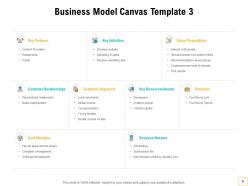
Slide 5: This slide again showcases the Business Model Canvas Template.
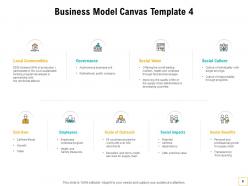
Slide 6: This slide showcases the Business Model Canvas Template- Local Communities, Governance, Social Value, Social Culture, End-User, Employees, Scale of Outreach, Social Impacts, Social Benefits.
Slide 7: This template contains the Business Reference Model Icons Slide.
Slide 8: This slide is titled as Additional Slides for moving forward.
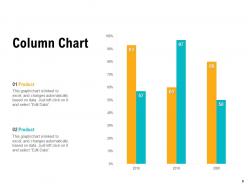
Slide 9: This slide comprises an editable Column Chart showing the MARKET SHARE of products for various years.
Slide 10: This slide reveals the names and designation of Our Team members.
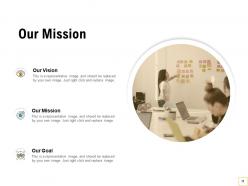
Slide 11: This slide showcases Our Mission.
Slide 12: This is a Thank You slide consisting of Address, Contact numbers and email Address.
Business Reference Model Powerpoint Presentation Slides with all 12 slides:
Develop commercial bonds with our Business Reference Model Powerpoint Presentation Slides. They are good for business conclaves.
FAQs for Business Reference Model
So there are four main pieces: your business processes, org structure, data flows, and tech systems. Processes show how work actually gets done (not how the manual says it should). Your org chart tells you who does what. Data flows are basically how info moves around between everything. Tech systems make it all possible - though half the time they're held together with duct tape, let's be honest. They all connect to each other, so when you change one thing, you'll probably have to tweak the others too. I'd map out what you've got now before trying to design anything new.
So basically, map out all your processes and functions first - like getting that overhead view of everything. Honestly, it's crazy how much duplicate work you'll find once you see it all laid out. Different departments doing the same stuff without realizing it. From there, you can spot where things don't line up and standardize workflows that actually make sense. The best part? Everyone finally understands how things are supposed to work instead of just winging it. Oh, and definitely document what you're doing now before designing your dream setup - trust me on that one.
So basically, a Business Reference Model is like your org's blueprint - shows all the functions and how they connect. More of the "what does this company actually do" view. Business Process Models are different - they get into the weeds of "how" things happen. All the specific steps and workflows that make stuff work day-to-day. Reference models stay pretty stable since they're strategic level. Process models? Those change constantly because operations are always getting tweaked. Honestly, I think of reference models for big planning sessions and process models when you're trying to fix or automate something specific. Makes sense?
So basically it's like giving everyone the same dictionary for how your company actually runs. No more of that BS where marketing talks about "customer journey" while IT's over here thinking about database fields, you know? The model shows how all the departments connect and what screws up what when things go sideways. Honestly, it saves you from those painful meetings where everyone's solving different problems. Start by figuring out where people misunderstand each other most - that's usually your biggest pain point. Think of it as a shared roadmap so nobody gets lost.
Think of a Business Reference Model as taking an X-ray of your whole company - you'll see exactly what's working and what's busted. It maps out your current capabilities so you can spot where you're bleeding money on redundant stuff. Plus it shows you the gaps where investment actually makes sense. Honestly, most companies just wing their strategic planning without knowing what they're working with. This gives you that baseline so you're not planning random initiatives that don't connect to reality. You can prioritize what needs fixing first and build timelines that won't completely wreck your team. Pretty much saves you from making expensive mistakes.
Start with basic BRM but cut out all the fancy stuff you don't need yet. Map what you're doing now first - that's actually the hardest part. Then pick maybe 2-3 things where having a real process would stop you from constantly putting out fires. Customer stuff, money tracking, whatever your main thing is. I see so many small biz owners get lost in the weeds trying to build some perfect system right away. Just fix the biggest pain points first. You can always add more complicated processes later when you're not scrambling to keep up.
So here's the thing - tech is what actually makes your Business Reference Model work instead of just being fancy paperwork. Without it, you're basically stuck. You need the right systems to automate stuff, connect different parts of your business, and get decent analytics to see if things are performing. Honestly, I've seen too many companies pick random tech that looks cool but doesn't fit their actual processes. Map out what you currently have vs what your model needs first. Then focus on stuff that matches your workflows and won't completely break when you scale up.
A Business Reference Model maps out how your business actually works - all your processes and functions laid out visually. Super helpful for IT planning because you can see exactly where tech fits and which areas need investment most. Map your current processes first, then spot the gaps where IT makes sense. Honestly, it beats guessing what'll move the needle. You'll prioritize better, avoid duplicate work, and actually solve real problems instead of just throwing technology at stuff. Kind of like having directions instead of driving around randomly hoping you'll find what you need.
Honestly, the hardest part is just figuring out what your processes actually look like right now - way messier than anyone wants to admit. Teams will push back hard because they think you're shoving another random framework down their throats. Resource-wise, it's a nightmare since mapping everything out eats up tons of time and you need people who actually know what they're doing. Oh, and good luck keeping it updated when things change constantly. But here's what worked for us - pick one small business unit first. Prove it's worth something there, then roll it out. Way less painful that way.
Honestly, do it yearly at minimum - but that's pretty basic stuff. Big changes like restructuring or new tech? Update it right away. Most teams I know just let these things get stale and wonder why nothing makes sense anymore. Try doing quick quarterly check-ins for smaller stuff that shifts around. Then your yearly review can be the real deep dive where you make sure everything still matches your actual strategy. Oh, and definitely set those calendar reminders now because this is the first thing that gets pushed when you're swamped with deadlines.
TOGAF is huge in enterprise architecture - most Fortune 500s build on it. Healthcare runs on HL7 FHIR for connecting different systems. Amazon basically created the playbook that every other marketplace copies now (which is kinda wild when you think about it). Banks are all over Open Banking for API stuff. Manufacturing uses ISA-95 to link business operations with control systems. These aren't just theory either - companies actually use them and make real money from it. Oh, and they're all proven frameworks, not some startup's wishful thinking.
So basically, a Business Reference Model gives you this clear picture of all your processes and controls - makes spotting compliance gaps super obvious. You can map regulations directly to specific functions and actually see where you're vulnerable. Honestly, it's been a lifesaver for audit prep in my experience. Different departments stay consistent with governance, and when regulations shift (which happens way too often), nothing gets missed. I'd start by mapping your current compliance stuff to existing business functions. You'll probably catch some blind spots immediately - I always do when I walk through this exercise.
So basically it's like having a shared playbook everyone can reference instead of you explaining the same stuff over and over. Maps out your processes and data flows so stakeholders actually get it - no more confused faces in meetings! When people ask for changes, you can point to exactly how it'll affect other departments. Makes setting realistic timelines way easier too. Honestly, the visual aspect is huge - people buy in faster when they see how their piece fits the whole puzzle. I'd start by showing key stakeholders the relevant parts before big discussions. Saves so much back-and-forth later.
Honestly, it's pretty cool how Business Reference Model training shows people where they actually fit in the bigger picture. Like, you finally get why your work matters beyond just your desk. People start seeing how their role affects other teams - and trust me, that makes everything feel less pointless. Plus everyone learns the same vocabulary for talking about processes, which cuts down on so much confusion. Cross-team projects get way smoother when people understand the ripple effects of their decisions. I'd probably start with the teams that seem most disconnected from the rest of the org.
Honestly, track the stuff that actually matters - like how many teams are using it and whether decisions happen faster. Baseline everything first, then check quarterly. Look at communication wins too (shorter meetings, less back-and-forth emails). Cost savings from cutting redundancies can be massive. But here's the thing - survey your people about whether it genuinely helps or just adds more red tape. That's your real litmus test. Process standardization scores matter, but don't get too caught up in fancy metrics if your teams think it's just bureaucratic nonsense. Focus on what moves the needle for your specific goals.
No Reviews