


9420217 style linear single 8 piece powerpoint presentation diagram infographic slide





Try Before you Buy Download Free Sample Product
 Impress Your
 Audience
 100%
100% Editable
 Save Hours
 of Time


Give your brains a good feed with our Implementation Process In Project. They contain the best food for thought.
Content of this Powerpoint Presentation
Description:
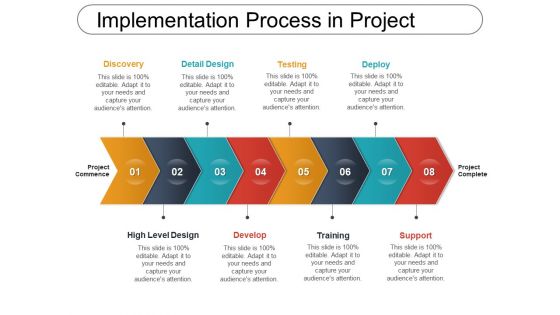
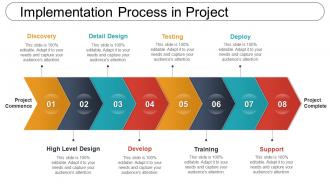
This image depicts a slide from a presentation that outlines the "Implementation Process in Project," a generic project management lifecycle model that includes eight main steps: Discovery, Detail Design, High Level Design, Develop, Testing, Training, Deploy, and Support. Each step is represented by a diamond shape with a corresponding number and label, arranged sequentially from left to right, signifying progression from project commencement to completion.
Text elements include:
1. The main header: "Implementation Process in Project"
2. Subheadings for each step in the process: "Discovery," "Detail Design," "High Level Design," "Develop," "Testing," "Training," "Deploy," and "Support," indicating stages of the project lifecycle.
3. Numeric indicators (01 to 08), suggesting an order of operations or steps.
4. A start and end label: "Project Commence" and "Project Complete," marking the beginning and end of the project lifecycle.
Use Cases:
Industries where this slide can be applied with use cases:
1. Software Development:
Use: To outline the stages of software development from initial concept to post-launch support.
Presenter: Project Manager or Team Lead
Audience: Development team, stakeholders, investors
2. Construction:
Use: To demonstrate the phases of a construction project including planning, design, and build.
Presenter: Construction Manager or Architect
Audience: Construction crew, contractors, clients
3. Education:
Use: For illustrating the development and implementation stages of a new curriculum or educational program.
Presenter: Curriculum Developer or Educational Consultant
Audience: Educators, school administrators, education policy makers
4. Healthcare:
Use: To describe steps involved in the implementation of a new healthcare initiative or facility opening.
Presenter: Healthcare Administrator or Project Coordinator
Audience: Medical staff, hospital management, healthcare providers
5. Manufacturing:
Use: To depict the process of bringing a new product from concept through to manufacturing and market support.
Presenter: Process Engineer or Product Manager
Audience: Manufacturing team, quality assurance, investors
6. Event Planning:
Use: To lay out the stages of planning and executing a large-scale event or conference.
Presenter: Event Planner or Coordinator
Audience: Event staff, vendors, event sponsors
7. Marketing and Advertising:
Use: To present the campaign development process from market research to campaign deployment and evaluation.
Presenter: Marketing Director or Campaign Manager
Audience: Marketing team, clients, advertising partners
9420217 style linear single 8 piece powerpoint presentation diagram infographic slide with all 5 slides:
Bring about changes the derive the desired impact with our Implementation Process In Project.Handle any ineffectual effort.
FAQs for 9420217 style linear single 8 piece powerpoint presentation
So basically there are five phases that flow into each other: initiation (figuring out your scope and goals), planning (mapping everything out), execution (actually doing the work), monitoring (tracking how it's going), and closure (wrapping up). Planning is huge - I've seen so many projects crash because people skip this part. You'll bounce back and forth between execution and monitoring constantly as problems come up. Don't think of these as rigid steps though. Get your initiation and planning solid first, then expect to go in circles with the middle phases until you can finally close things out.
Look, I can't stress this enough - bad communication kills projects faster than anything else. Set up your check-ins and shared docs right from the start, whatever actually works for your team (not what some blog post says you should do). Document stuff as it happens, not later when you're trying to remember who decided what. Map out who needs updates and when, then stick to it. I've watched so many teams crash because Bob thought Sarah knew about the deadline change, but surprise - she didn't! Stay ahead of problems instead of chasing them.
Okay so stakeholder engagement - this is huge. Seriously, I've watched so many solid projects crash and burn just because people didn't think about who needed to be in the loop. Figure out who's got influence or who'll be affected by what you're doing. Then actually talk to them regularly, not just once at the kickoff meeting. When things change (and they will), tell them what's happening. Listen when they complain too - sometimes they catch stuff you missed. Oh and map out who these people are first, then figure out how often you need to check in. Trust me on this one.
Don't just slap risk management on at the end - weave it into everything from day one. During planning, hunt down what could go wrong and bake solutions right into your timeline and budget. Weekly risk check-ins are clutch here. Get your team surfacing new problems and tweaking the plan as you go. Honestly, the teams that wing it always get burned later. Make someone own each major risk area so nothing falls through the cracks. It's gotta become routine, not something you remember when shit hits the fan.
Honestly, start with Gantt charts for timelines and burndown charts to see what's actually getting done. Kanban boards are my go-to though - bottlenecks jump right out at you. Weekly check-ins and milestone reviews keep everyone honest. If your team's into it, automated progress reports save tons of time. Monday.com or Asana work well for dashboards, but don't go crazy with tools. Pick like 2-3 max and stick with them. The fancy stuff doesn't matter if people won't update it. Whatever gets your team to actually track progress consistently - that's your winner.
Honestly, weekly check-ins saved my butt on my last project. You'll catch problems while they're still small instead of scrambling later. Gantt charts work great, but even a basic Kanban board does the trick - anything so people can actually see what's behind schedule. Don't sit on bad news either. The second something slips, tell your stakeholders right away instead of hoping it'll magically fix itself (spoiler: it won't). Oh, and move people around when needed. Some tasks just need more hands. Start scheduling those weekly meetings this week!
Oh man, scope creep is the worst - clients always want "just one more thing." Set those boundaries early and don't budge. Resource problems? I always pad my timelines now, learned that the hard way. Communication breakdowns kill projects, so I basically spam everyone with updates rather than assume they know what's happening. Having backup team members lined up saves your butt too. Honestly, most issues come from being reactive instead of planning ahead. Get a decent project management tool and make people actually use it. Trust me on this one.
Honestly, I've watched amazing projects completely crash because the team was a mess. Good communication and trust? Your deadlines practically hit themselves. But throw in some drama, unclear roles, or people who won't talk to each other - you're screwed. Everyone starts doing their own thing instead of actually working together. Regular check-ins help a ton. Jump on conflicts fast before they explode. Oh, and make sure people know what they're supposed to be doing! Sounds obvious but you'd be surprised. The actual work is usually straightforward - it's the people stuff that'll kill you.
Track the obvious stuff - timeline, budget, deliverable completion rates. But honestly, don't sleep on stakeholder satisfaction and team engagement. I've seen projects nail every deadline but completely miss the mark on what people actually wanted. Risk mitigation is huge too - are you solving problems before they blow up? Pick maybe 4-6 metrics that actually matter for your specific project instead of drowning in data. Weekly dashboard reviews work well, though sometimes I skip if nothing's changed. The soft metrics will save you from delivering something technically "successful" but useless.
Honestly, change management can make or break your project. I've watched really good projects crash just because teams weren't prepared for what hit them. You want people excited about changes, not fighting them every step of the way. Start by figuring out who's affected, then explain WHY you're doing this - not just what's happening. Get them involved early instead of dropping surprises on everyone. Oh, and actually listen when they raise concerns! It sounds basic but most people skip this part. When stakeholders feel heard, they'll actually help push things forward instead of becoming roadblocks.
Look, here's the thing - you absolutely need your project tied to what the company actually cares about. Otherwise you'll nail the execution but end up with something nobody really wanted (trust me on this one). Think revenue goals, market expansion, whatever keeps leadership up at night. When your project supports those bigger objectives, suddenly everyone's paying attention. You get resources, buy-in, clearer metrics - the whole deal. Oh and here's what I learned the hard way: keep checking this alignment throughout, especially when scope creep hits. Projects drift fast.
Honestly, you'll want to get everyone on something like Asana or Monday right away - can't just tap people on the shoulder anymore, right? Document way more than you think you need to. Set up regular check-ins, but keep them focused because endless Zoom calls are the worst. Also establish response time expectations upfront - like, is Slack for urgent stuff or casual chat? Over-communicate at first until everyone gets the hang of it. Oh, and pick your communication channels wisely. Trust me, remote teams need that structure or things fall apart fast.
Document everything while it's happening - trust me, you'll forget the important stuff otherwise. I keep a running project log with decisions, scope changes, and any issues that come up. Screenshots are clutch too, especially before/after shots. Honestly, I wish someone had told me this earlier because going back months later trying to remember "why the hell did we build it this way?" is the worst. Set up some basic template at the start and just update it weekly. Takes like 10 minutes but saves you from those awkward stakeholder meetings where you're scrambling for answers.
Honestly, you gotta bake feedback collection right into your timeline from day one. Don't just wait until the end - do mini retrospectives throughout the project and actually write down what you learn. I get it, feels like busy work when you're drowning already, but seriously it's worth it. Make a basic template for capturing wins, failures, and the why behind them. Oh and assign someone (doesn't matter who) to review these notes before the next project starts. Otherwise you'll keep hitting the same roadblocks and driving yourself crazy wondering why.
Dude, leadership makes or breaks everything. Seriously - I've watched amazing projects completely fall apart because the leaders checked out or couldn't make hard decisions when crapped hit the fan. You need solid people at every level, not just the big bosses. Those mid-level folks? They're making the day-to-day calls that actually matter. Find your key influencers early and get them on your side - trust me on this one. When things go sideways (and they will), these people become your lifeline. Also, leaders who can't explain the "why" behind changes are basically useless. People need to understand what's happening and see some wins along the way.
-
Qualitative and comprehensive slides.
-
Great product with highly impressive and engaging designs.