


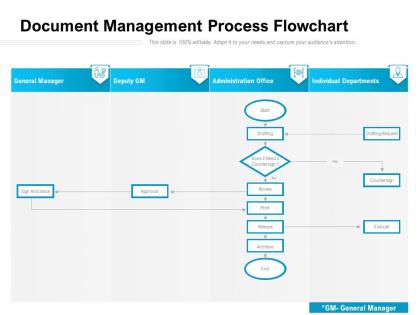
Document management process flowchart




Try Before you Buy Download Free Sample Product
 Impress Your
 Audience
 100%
100% Editable
 Save Hours
 of Time


Assist folks on the job with our Document Management Process Flowchart. Instruct them on how to go about it.
Document management process flowchart with all 2 slides:
Instruct folks on how to go about it with our Document Management Process Flowchart. Assist folks on the job.
FAQs for Document
Honestly, the time savings alone make it worth it - no more digging through filing cabinets for that one document you need right now. Everything's searchable and in one spot. Version control is a lifesaver too because you won't accidentally edit some ancient draft (been there, done that). Your whole team can grab files instantly, which makes collaboration so much smoother. Security and backup are way better than physical files obviously. Oh, and if you're in a regulated industry, compliance becomes way less of a headache. I'd start with whatever documents you use most - you'll see the difference immediately.
Honestly, it's a game changer. No more "wait, are we looking at the same doc?" moments because everyone's working from one master file. Real-time editing means your whole team can jump in simultaneously without creating chaos. The version history thing is clutch too - you can see exactly who changed what and when. Comments and suggestions keep feedback organized instead of scattered across random emails (which I hate). My advice? Pick your most important project files and just throw them on a shared platform first. You'll be shocked how much faster things move when everyone's actually on the same page.
Honestly, automation saves you from all the boring document stuff nobody wants to do. Set up workflows that automatically route things for approval and pull data from forms. Files get sorted by content without you touching them. Notifications pop up before deadlines - which is clutch because I forget everything. OCR tech has gotten ridiculously good lately too. Old documents archive themselves and retention policies just... happen. Your team stops burning hours on mindless tasks and can actually get real work done. I'd start with whatever document process currently makes you want to scream.
Oh man, definitely go multi-layered on this. Encryption first - both stored files and transfers (seriously, so many people get burned during file sharing). Set up role-based access so random people can't peek at everything. Audit trails are clutch for tracking who touched what. Regular backups with version control too, obviously. If you're printing stuff, lock that down physically as well. Honestly though? I'd tackle encryption and access controls first since they'll give you the most protection right off the bat. Everything else can come after.
Dude, cloud storage is honestly a lifesaver for document stuff. Your whole team can edit things at the same time without those awful version control headaches - you know, like "final_draft_v3_ACTUAL_FINAL.docx" nonsense. Everything syncs automatically which has saved my butt so many times when my computer crashed. You can search through all your files way better too, and set up permissions so only certain people see sensitive stuff. Oh, and you can access everything from anywhere which is clutch. I'd say start with your most important docs first and maybe set up some naming rules early on so things don't get messy later.
Oh man, version control is the worst. Files scattered everywhere with names like "final_FINAL_v3_actualfinal.docx" - you know how it goes. Search becomes impossible when everyone's doing their own thing. Security gets messy too. Here's what worked for us: pick one system and force everyone to use it. Set up clear naming rules and folder structures. Role-based access helps a ton. Honestly, the hardest part isn't the tech - it's getting people to break their weird habits. We started with just marketing first, then rolled it out. Way less painful that way.
Honestly, automated retention policies are a lifesaver here. Set up your document system to handle deletions automatically when retention periods hit - saves you from tracking every single file manually. Role-based access controls are clutch too. Map out your industry requirements first (this part's kinda boring but necessary), then build your system around those rules. Make sure everything's searchable so you can pull compliance reports fast when auditors show up. Oh, and train your team on the policies - they won't follow what they don't know.
Look for version control and search features first - those are non-negotiable. Security stuff like encryption and audit trails matter too, obviously. Make sure it handles different file types and has decent mobile access since everyone's always working from their phone now. Automated workflows are honestly where you'll save the most time on approvals and all that tedious stuff. Integration with your email and CRM is clutch. But here's what I'd actually do - write down what's driving your team crazy about documents right now, then find a system that fixes those specific problems. Way better than getting distracted by fancy features you'll never use.
Dude, version control is a lifesaver. It tracks every single change to your docs - who did what, when they did it, plus their notes. You can roll back if someone screws something up, and it stops that chaos where two people edit simultaneously and wreck each other's work. Honestly, the best part? No more "Final_v3_REAL_FINAL_edited.docx" files cluttering your desktop. Just set up auto-versioning on shared drives. Your future self will definitely thank you when you're not digging through twenty versions of the same presentation at 2am.
Definitely track your cost savings first - paper, printing, storage space, all that boring stuff that actually costs way more than you think. Time savings are huge too, like how fast people can find documents now vs. before. I'd measure processing speeds and maybe error reduction costs (compliance headaches, duplicate payments). Storage cost per document is pretty standard to track. Oh, and set up your baseline measurements before you implement anything - learned that one the hard way on a previous project. Otherwise you're just guessing at your ROI numbers later.
Okay so first thing - figure out a folder structure that actually matches how you work. Could be by project, department, dates, whatever clicks for you. Then stick to consistent naming like "YYYY-MM-DD_ProjectName_DocumentType" so stuff sorts right. I swear, nothing's worse than seeing "Final_FINAL_v3" everywhere - we've all been there though! Add some simple tags for searching later. The real trick? Pick your system and don't deviate. Seriously. Set it up once, get everyone on board, then do quick monthly cleanups. You'll thank yourself later when you can actually find things.
Honestly, document management saves your sanity with remote work. Everything lives in one spot instead of scattered across random email threads. No more "which version are we even looking at?" confusion - version control handles that mess. You can collaborate on stuff in real-time too, which is pretty sweet when everyone's in different time zones. Just set up permissions so not everyone can see everything (learned that one the hard way). The tricky part? Actually getting your team to stick with whatever folder system you create. Pick something that plays nice with tools you're already using.
Honestly, getting your documents organized will save you so much time it's not even funny. I used to waste like 20 minutes just hunting for basic files - super annoying. Now everything's searchable and centralized, so I can find stuff in seconds. No more version confusion either, which was driving me crazy when people kept working off old drafts. The automated approval workflows are pretty nice too since you don't have to chase people down via email constantly. I'd say tackle your most-used files first, then expand from there. Trust me on this one.
Dude, mobile document management is a game changer. You can pull up any file wherever you are - no more being stuck at your desk when you need that contract. Honestly, emailing files back and forth feels so 2015 now! Real-time collaboration is clutch, plus everything syncs automatically so no more version nightmare situations. I'd start with whatever documents you use most - maybe contracts or presentations? You'll notice the difference right away. Being able to get approvals on the spot instead of waiting around is worth it alone.
Document management is about to get way smarter with AI doing the heavy lifting - auto-sorting files, pulling out important data, search that actually gets what you're looking for. Cloud stuff will be seamless too. Voice commands are already becoming normal, which is honestly pretty cool. Mobile workflows aren't optional anymore either. Security's getting more advanced with better encryption and automated compliance checks. The whole industry's shifting from just storing files to making them intelligent. I'd start checking out AI-powered platforms soon because whatever you're using now will feel super outdated in like two years.
No Reviews