


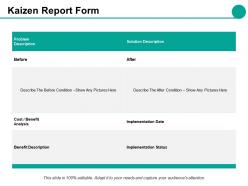
Kaizen report form ppt styles guidelines





Try Before you Buy Download Free Sample Product
 Impress Your
 Audience
 100%
100% Editable
 Save Hours
 of Time


Get dealt a good hand by our Kaizen Report Form Ppt Styles Guidelines. Get all the aces that you desire.
People who downloaded this PowerPoint presentation also viewed the following :
Kaizen report form ppt styles guidelines with all 5 slides:
Stay clear of danger with our Kaizen Report Form Ppt Styles Guidelines. They keep from coming to any harm.

FAQs for Kaizen report form
So you'll need a clear problem statement first - that's your hook. Describe what's currently happening, then dig into why it's broken (root cause stuff). After that, lay out your solution and what benefits you expect. Implementation steps and timeline are crucial too, plus how you'll measure if it actually worked. Oh and definitely highlight who was involved - managers eat that collaboration thing up. The results section is honestly what makes or breaks whether they'll listen to your next idea. Keep it detailed enough that someone could follow your process but don't write a novel. Work through it logically and you'll be solid.
Keep it super straightforward - problem first, then current situation, what you want to change, and why it'll help. Honestly, most of these forms are drowning in corporate nonsense that makes people's eyes glaze over. Skip the jargon completely. Photos work great if you can swing it, especially before/after shots. Make sure someone who's never seen your process could still get what's going on. Each section should be short but clear enough to actually understand. Oh, and definitely end with concrete next steps and when stuff needs to happen - otherwise it just sits there forever.
Honestly, bullet points are your best friend here - they force you to ditch all the unnecessary stuff. I always go: problem, what I did, actual results with numbers. Trust me, I used to write these crazy long paragraphs that put people to sleep! One change per form works way better than trying to cram everything in. Numbers are gold - "saved 15 minutes" or "cut costs by $200" hits harder than some fluffy description. Oh, and here's my test: if you can't explain it in 30 seconds, it's too long. Simple as that.
First thing - figure out exactly what you're trying to fix and stick to that. Map out which processes actually matter for your specific problem (trust me, this saves so much headache later). Your team can only handle so much, so be realistic about timelines and what you can actually control. Document everything clearly so people know what's included vs. what isn't. Otherwise you'll end up with scope creep and your data will be all over the place. Don't try to fix the entire company at once - I've seen that go sideways too many times.
Look, the biggest mistake people make is being way too vague about what the actual problem is. I see this all the time - they'll jump straight to solutions without figuring out why something's broken in the first place. Your proposed fix needs real details too, not just "we'll communicate better" or some other bland nonsense. Who's doing what? When? How will you know it worked? Honestly, just spend 10 extra minutes on each section. Read it back and think - would my coworker understand this without asking follow-up questions? That simple check catches most issues before they become headaches later.
Dude, charts are a game changer for Kaizen reports. Nobody wants to stare at a bunch of numbers in paragraph form - your brain just glazes over. Show them a simple bar chart comparing defect rates dropping from 15% to 3% instead. Way more impact. Line graphs work great for tracking trends over time, and flowcharts can map out your process changes. I always stick to one main point per visual though, otherwise it gets messy. Oh and definitely add captions explaining what each chart proves about your improvement - sounds obvious but people forget that step all the time.
Don't skip getting stakeholder feedback for your Kaizen report - you really need their input to make sure your findings actually make sense. Hit up everyone who's touched by the process changes: team members, supervisors, the people downstream who'll deal with whatever you implement. Their perspectives will catch stuff you totally missed and make your recommendations way stronger. Plus it gets them bought into the changes, which honestly is half the battle. Document what they tell you in the report so it shows you actually listened. Oh, and start asking for feedback early while you're still analyzing, not when you're scrambling to finish everything up.
So here's what you gotta do - pick your metrics first. Processing time, error rates, whatever makes sense for your specific change. Measure everything before you start, then check again at 30, 60, 90 days. Most people totally blow off this follow-up step (which drives me crazy because then how do you even know if it worked?). Set those calendar reminders or you'll forget. Numbers not improving? Time to adjust your approach or try something else entirely. Oh and document it all - future you will thank present you for keeping good records of what actually moved the needle.
Get the process owner, affected team members, and a manager who can actually approve stuff in the room from day one. Review within 48 hours while everything's still fresh in everyone's mind. I've watched too many reports collect dust for weeks - honestly, it's such a waste and kills all the energy. Don't just tear apart ideas during discussions. Instead, talk through feasibility, how you'll measure impact, and realistic timelines. Oh, and this is crucial - always wrap up by giving people specific action items with deadlines. Otherwise nothing happens.
Digital forms are a game changer for Kaizen reports - seriously, no more hunting down approvers. You can set up auto-fill for stuff like department and dates, plus dropdown menus make categorizing way easier. Taking photos with your phone and uploading them directly saves tons of time too. Templates handle all the recurring data automatically. The tracking feature is clutch because you'll actually know where your report is in the approval process instead of wondering if it disappeared into some void. Start with whatever form builder you guys already have. Even basic Google Forms beats dealing with paper - trust me on this one.
Honestly, you need both the numbers stuff and the softer metrics. Start with baselines first - learned this the hard way when I couldn't prove impact later. Time savings are huge (like how long processes took before vs after), plus cost cuts and quality improvements. Customer satisfaction scores, defect rates, that kind of thing. Employee engagement matters too, even though it's trickier to measure. Don't go crazy with data though - pick 3-4 metrics that actually mean something for your specific project. Otherwise you'll just drown in spreadsheets and lose track of what really moved the needle.
Definitely bring your whole team in from day one - way better than going solo on this. I'd do a quick brainstorming session first to nail down the actual problem. My best ideas usually come from just chatting with coworkers who notice stuff I totally miss. Split up different sections based on who knows what best, then have one person pull it all together. Everyone needs to feel like they actually own a piece of it, you know? Maybe start with a 30-minute huddle to figure out who's doing what sections.
Honestly, these report forms work because they make everyone feel like they have a voice, not just the bosses. People start thinking "hey, I can actually fix this" instead of just grumbling about problems. When you make it super easy to submit ideas and actually show what happened to them - that's huge. I've seen it turn into this cool ripple effect where one person's suggestion gets implemented, then suddenly everyone wants to throw in their ideas. The trick is you've got to actually respond to submissions though. Otherwise it's just another black hole suggestion box that nobody trusts.
Management wants to hear about ROI, cost savings, and timelines - basically how it affects the budget. Employees? They're wondering how this changes their actual day-to-day work and what training they'll need. I'd honestly just make two different versions of your report. High-level strategy stuff for the bosses, nitty-gritty "here's what this means for you" details for everyone else. You don't want to be like those generic Kaizen presentations that try to cover everything and just confuse people. Oh, and definitely highlight any safety improvements - that usually gets both groups on board pretty quickly.
Honestly, I'd go with bi-weekly updates if you can swing it. Monthly works too, but more frequent ones keep people actually paying attention instead of forgetting about the whole thing. Pick whatever schedule you won't flake out on though - better to do monthly consistently than start ambitious and burn out after like three weeks. Set a recurring reminder so you're not scrambling to remember. Oh, and batch similar updates together when you can. That way you're not constantly bugging people for status checks but everyone still sees stuff's actually happening.
No Reviews