


Example Kaizen Presentation Powerpoint Presentation Slides





Try Before you Buy Download Free Sample Product
 Impress Your
 Audience
 100%
100% Editable
 Save Hours
 of Time


Introducing Example Kaizen Presentation PowerPoint Presentation Slides that focuses on continuous improvement of work practices. Improving processes can directly increase profitability. Showcase the concept of kaizen and its implementation in various aspects with this quality circle PPT slides. Kaizen process PowerPoint complete deck includes content ready slides such as meaning of Kaizen, Kaizen 5S framework, 3 Mus of Kaizen, 4M checklist, types of waste, kaizen vs innovation, the PDCA cycle, problem statement, action plan, lead time and cycle time, data collection cycle time, cause and effect analysis, Pareto analysis, solution to the problem, re-evaluating goals, before and after template, report form etc. Additionally, the six-sigma presentation layout can be used to represent topics such as business process reengineering, experiential learning, process control, total productive maintenance, improvement strategy, lean management and many more. Download the Kaizen approach to operational efficiency Presentation layout to present improvement initiatives for your business Take the time to make your presentation perfect. Our affordable Example Kaizen Presentation Powerpoint Presentation Slides are only a heartbeat away.
People who downloaded this PowerPoint presentation also viewed the following :
Content of this Powerpoint Presentation
Slide 1: This slide shows Example Kaizen Presentation. State the name of your company and begin.
Slide 2: This slide shows your company Agenda. Add them here and use it accordingly.
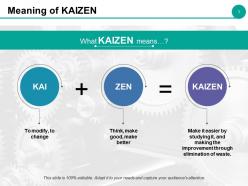
Slide 3: This slide states the Meaning of KAIZEN.
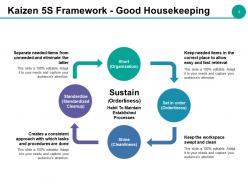
Slide 4: This slide shows Kaizen 5S Framework - Good Housekeeping which includes the following points- Short (Organization), Set in order (Orderliness), Shine (Cleanliness), Standardize (Standardized Cleanup), Sustain (Orderliness).
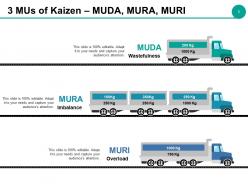
Slide 5: This slide presents 3 MUs Of Kaizen- MUDA, MURA, MURI as Wastefulness, Imbalance, Overload.
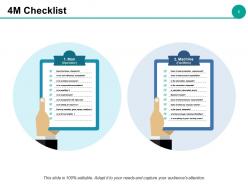
Slide 6: This slide shows 4M Checklist categorized as- 1.Man (Operator) Does the follow standards? Is his work efficiency acceptable? Is he problem-conscious? Is he responsible/accountable? Is he qualified ? Is he experienced? Is he assigned to the right job? Is he willing to improve ? Does he maintain good human relations ? Is he fit and healthy ? 2. Machine (Facilities): Does it meet production requirement? Does it meet process capabilities? Is the lubrication adequate? Is the inspection adequate? Is operation interrupted due to machine trouble? Dose it meet precision requirements? Does it make any unusual noises? Is the layout adequate? Are there enough machines/facilities? Is everything in good working order?
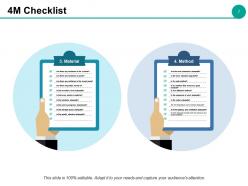
Slide 7: This slide also shows 4M Checklist categorized as- 3. Material: Are there any mistakes in the volume? Are there any mistakes in grade? Are there any mistakes in the brand name? Are there impurities mixed in? Is the inventory level adequate? Is there any waste in material? Is the handling adequate? Is the work-in-progress abandoned? Is the storage layout adequate? Is the quality standard adequate? 4. Method: Are the work standards adequate? Is the work standard upgraded? Is it a safe method? Is it a method that ensures a good product? Is it an efficient method? Is the sequence of work adequate? Is the setup adequate? Are the temperature and humidity adequate? Are the lighting and ventilation adequate? Is there adequate contact with the previous and next processes?
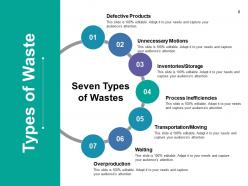
Slide 8: This slide shows Types of Wastes. We have mentioned seven of them which are as follows- Defective Products, Unnecessary Motions, Inventories/Storage, Process Inefficiencies, Transportation/Moving, Waiting, Overproduction.
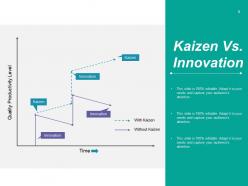
Slide 9: This is a Kaizen Vs. Innovation graph form slide. Use it as per your business need.
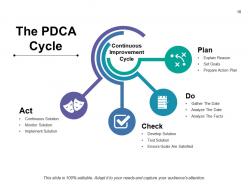
Slide 10: This slide displays The PDCA Cycle subheaded as Continuous Improvement Cycle further sub divided into- Explain Reason, Set Goals, Prepare Action Plan, Gather The Date, Analyze The Date, Analyze The Facts, Develop Solution, Test Solution, Ensure Goals Are Satisfied, Implement Solution, Monitor Solution, Continuous Solution, Act, Check, Do, Plan.
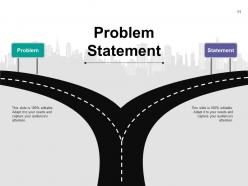
Slide 11: This slide presents the Problem Statement with roadmap imagery.
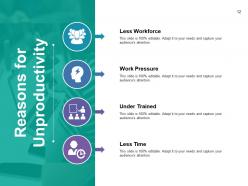
Slide 12: This slide states four major Reasons for Unproductivity- Less Workforce, Work Pressure, Under Trained, Less Time.
Slide 13: This is Our Goal slide with icon imagery. State your goals here.
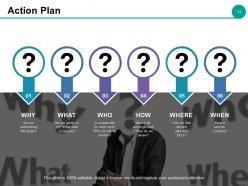
Slide 14: This slide showcases an Action Plan with- WHY are we undertaking the project. WHAT are we going to do? What date is required. WHO is responsible for each task? Who should be involved? HOW must it be accomplished? How do we review? WHERE can we find relevant data and facts? WHEN must a task be complete.
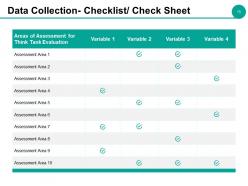
Slide 15: This slide showcases Data Collection- Checklist/ Checksheet.
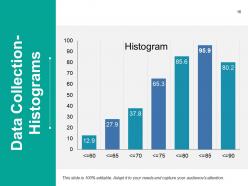
Slide 16: This slide presents Data Collection in a Histogram form.
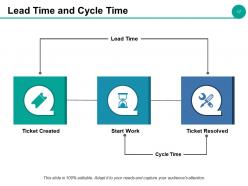
Slide 17: This slide shows Lead Time And Cycle Time as per Ticket Created, Ticket Resolved, Cycle Time, Lead Time, Start Work.
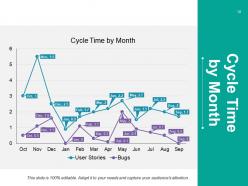
Slide 18: This slide shows Cycle Time By Month of products/ entities etc. graphically.
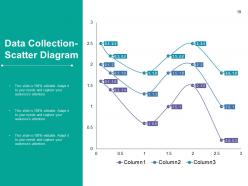
Slide 19: This slide shows Data Collection using Scatter Diagram.
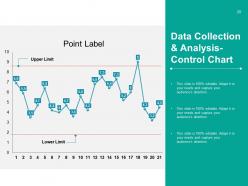
Slide 20: This slide presents Data Collection & Analysis- Control Chart to showcase- Upper Limit, Point Label, Lower Limit.
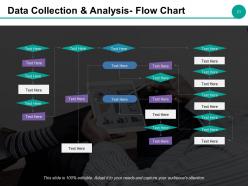
Slide 21: This slide shows Data Collection & Analysis in a Flow Chart form.
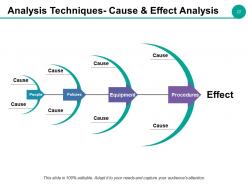
Slide 22: This slide presents Analysis Techniques- Cause & Effect Analysis in a fishbone diagram form to show- Cause, Equipment, Procedures, People, Policies, Effect.
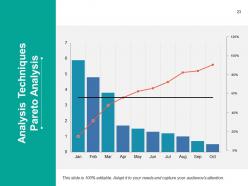
Slide 23: This slide shows Analysis Techniques- Pareto Analysis.
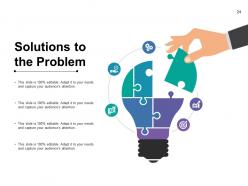
Slide 24: This slide shows Solutions to Problems provided with creative imagery.
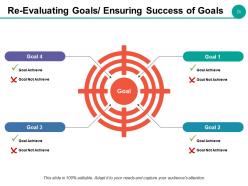
Slide 25: This slide helps Re-Evaluating Goals/ Ensuring Success of Goals. Showcase both your Goals- to achieve and not to achieve here.
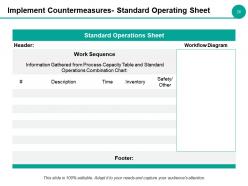
Slide 26: This is an Implement Countermeasures- Standard Operating Sheet slide. Fill relevant information and use it.
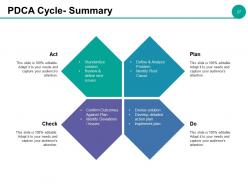
Slide 27: This slide presents PDCA Cycle- Summary with the following constituents- Plan, Do, Check and Act. Plan: Define & Analyze Problem, Identify Root Cause. Do: Devise solution, Develop detailed action plan, Implement plan. Check: Confirm Outcomes Against Plan, Identify Deviations / Issues. Act: Standardize solution, Review & define next issues.
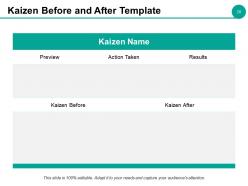
Slide 28: This slide presents Kaizen Before and After Template with Kaizen Name to be added.
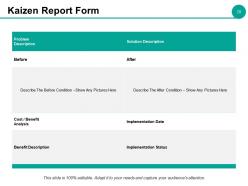
Slide 29: This is a Kaizen Report Form slide. Add in the necessary details and use it.
Slide 30: This is a Coffee break image slide. You can alter the content as per need.
Slide 31: This is Example Kaizen Presentation slide with various icons. Alter as per your need.
Slide 32: This slide is titled Additional slides. You can change the slide content as per need.
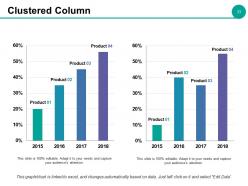
Slide 33: This is a Clustered Column slide to present product/ entity comparison, specifications etc.
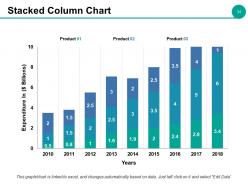
Slide 34: This is a Stacked Column Chart slide to present product/ entity comparison, specifications etc.
Slide 35: This slide is titled Our Mission with background imagery.
Slide 36: This slide presents Our Team with name and designation.
Slide 37: This is an About Us slide where you can show-Professional, Creative or Talented aspects of your company.
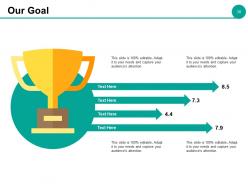
Slide 38: This is an Our Goal slide. State your goals here.
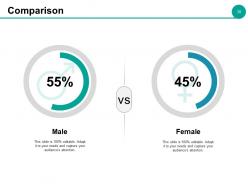
Slide 39: This slide displays Comparison on the basis of gender. It shows male and female image compared in terms of percentages.
Slide 40: This is a Quotes slide. Insert a quote or whatever you desire here.
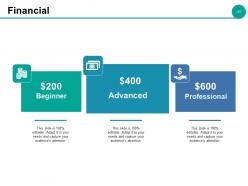
Slide 41: This slide showcases Financial score as per Advanced, Professional and Beginner levels.
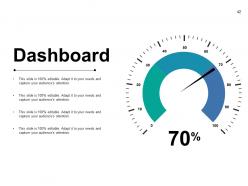
Slide 42: This is a Dashboard slide with numerals to use for presenting kpis, metrics etc.
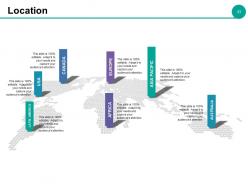
Slide 43: This is a World Map slide for pinning/ presenting Location for showing global presence, growth etc.
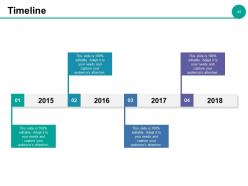
Slide 44: This is a Timeline slide. You can present yearly growth etc. with it.
Slide 45: This slide displays Post It Notes for pinning important facts, notices etc. related to the company.
Slide 46: This is a NEWSPAPER slide for representing any highlighted/ summarized text.
Slide 47: This is a Puzzle slide to show information, specifications etc.
Slide 48: This is Our Target slide. State your targets here.
Slide 49: This is a Venn diagram image slide to show information, specifications etc.
Slide 50: This slide showcases a Mind Map. State information, specifications etc. here.
Slide 51: This slide presents a Matrix with high, low and vice versa. You can add or modify text as per need.
Slide 52: This is a Lego slide to present information, specification etc.
Slide 53: This is a Silhouettes slide to present people specific information, specifications etc.
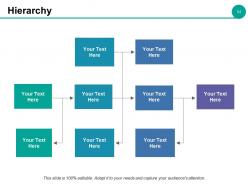
Slide 54: This is a slide for Hierarchical representation. Display the top to bottom management in the text boxes given.
Slide 55: This is an Idea slide in a creative bulb form.
Slide 56: This slide presents a Magnifying Glass image to showcase information, specifications etc.
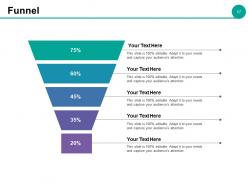
Slide 57: This is Funnel image slide to showcase funneling aspects etc.
Slide 58: This is a Thank You slide with Address# street number, city, state, Email Address, Contact Numbers.
Example Kaizen Presentation Powerpoint Presentation Slides with all 58 slides:
Cover the circuit with our Example Kaizen Presentation Powerpoint Presentation Slides. They allow you to go anywhere you desire.







FAQs for Example Kaizen Presentation
So Kaizen is basically about tiny improvements adding up over time - way better than trying to fix everything at once, honestly. Get your team spotting little inefficiencies daily and throwing out ideas, no matter how small. Quick regular meetings work great for this. You don't need big budgets or approvals, which is nice. Just standardize what works, track results, and make tweaking stuff part of your routine instead of some big project. Pick one workflow this week and ask everyone how to make it even 1% better. Those small changes really do compound.
Just grab a couple volunteers and pick one annoying problem to tackle first. Look for obvious waste - like people waiting around or doing the same task twice. That stuff's free to spot anyway. Weekly 15-minute huddles work great where everyone throws out one improvement idea. Honestly, changing how people think is way harder than the actual process. Sticky notes and whiteboards are fine - you don't need expensive software or anything. Make it routine instead of some big deal project. Oh, and definitely pick something you can measure so you've got wins to show off early.
Honestly, your employees make or break Kaizen - no joke. They're on the floor every day seeing stuff management totally misses. You need them feeling comfortable enough to actually speak up about improvements, even tiny ones. The trick is making sure people aren't scared they'll get dumped with extra work for suggesting changes. I'd probably start small - ask everyone to find just one thing they could tweak this week. Once people see their ideas matter, that's when things really start clicking. It's kinda like building trust first, then the improvements follow naturally.
Track the obvious stuff first - cycle times, defect rates, cost savings. Those numbers don't lie. But here's what I've learned: the team engagement piece is actually huge. Are people submitting more improvement ideas? Do they feel like they can actually change things? Survey them regularly. Oh, and measure before each Kaizen event, then check back months later to see if changes actually stuck around. That follow-up part is where most companies drop the ball, honestly. You can't just implement something and assume it's working forever.
Honestly, the biggest pain is just people hating change. Everyone's comfortable with their routine and thinks kaizen means extra work dumped on them. Leadership often wants magic overnight results too, which is super frustrating since it's really about tiny improvements building up. Plus teams are already swamped - where's the time for improvement stuff? Start with easy wins first, get some momentum going. Make sure your boss is actually on board and visible about it. Celebrate the small stuff! Don't try fixing everything at once either. Pick one area and nail that before moving on. Quick wins really do help people buy in.
So basically kaizen is about making tiny tweaks every single day instead of waiting for some massive company restructuring. Get everyone involved - like literally everyone from the warehouse guys to upper management. Those small 1% improvements? They stack up crazy fast, which honestly blew my mind when I first learned about it. The trick is making people feel comfortable speaking up about annoying little things without getting shot down. Rather than those quarterly "improvement initiatives" that everyone forgets about by month two, you're just baking it into how work actually gets done. Start simple: ask your team what one tiny thing drives them nuts during their shift.
Yeah, totally! Hospitals use it all the time for stuff like cutting down wait times or fixing how they handle meds. Schools do it too - tweaking how they teach or figuring out better ways to use their budgets. The whole point is making tiny improvements instead of huge overhauls, which honestly makes way more sense than trying to change everything at once. You can literally pick any process that's bugging you. Maybe just grab one annoying thing in your department and try fixing it this week? Even something super small works.
Here's the thing - Kaizen is way more accessible than the other two. You don't need a statistics degree or huge process overhauls. Six Sigma is super data-heavy and goes after specific defect problems (works great but kinda intense). Lean cuts waste but can get pretty rigid. With Kaizen, your whole team just looks for small daily improvements instead of waiting for some big initiative. Sure, Six Sigma might slash defects by 99%, but honestly? Kaizen builds this culture where people naturally think "how can we do this better?" Start there if you want quick wins without the headache.
Honestly, you've gotta walk the walk first - actually join those kaizen sessions instead of just preaching about them. When your team finds better ways to do stuff, celebrate it publicly. I see way too many leaders who say they want improvement but then get all pissy when things change or aren't perfect right away. Give people room to mess up without getting in trouble. Budget some time each week for this work - maybe even small experiments. Oh, and flip your questions around. Instead of "why didn't this work?" try "what'd we learn from this?" Makes a huge difference in how people approach failures.
So for Kaizen tools, you've got 5 Whys for digging into root causes, plus value stream mapping to see your whole process. A3 reports are solid for problem-solving. PDCA cycles are honestly addictive once you get the hang of them - my old boss was obsessed with Plan-Do-Check-Act everything. Gemba walks get you out there seeing what's really happening on the floor. Then there's 5S for workspace organization, standard work docs, and fishbone diagrams. I'd start with 5 Whys and PDCA though - they're dead simple but work on literally any problem you throw at them.
Oh, this is actually pretty cool - kaizen works because it gives people real input on their own work stuff. Instead of just being told what to do, employees get to spot problems and fix them. That feeling when your idea actually gets used? Pretty awesome. Everyone becomes a problem-solver rather than just going through the motions. I've seen it work best when you start super small though - like ask your team what one tiny thing annoys them daily and tackle that first. People naturally care more when they're helping shape how things run. It's way better than the old "shut up and work" approach honestly.
You need standardization before Kaizen can do anything useful. Think of it this way - how do you know if you're actually improving without a baseline? Everyone doing things their own random way makes it impossible to spot real problems or measure progress. Plus (and this drives me crazy) improvements just vanish when people drift back to old habits. Document whatever your best current process is first. That becomes your starting point. From there you can actually build on something solid instead of just throwing changes at chaos and hoping they stick.
Look, you can't just run Kaizen as a one-time thing and expect it to stick. Build it into how your team actually works - like weekly improvement sessions that become as routine as Monday meetings. Leadership needs to walk the walk too (which honestly is the hardest part). Pick one process first and make small tweaks part of their daily routine, not something extra they have to remember. Track what's actually working after 6+ months because initial wins don't mean much if people revert back. You want those little improvements happening automatically. Set up ways to measure if changes are really sticking - that's where most companies drop the ball.
So Toyota's the obvious answer - they literally invented Kaizen and still use it everywhere. 3M does it too, giving employees time to mess around with ideas (Post-it Notes came from this!). Canon cut their camera production time in half using it. Even Southwest Airlines applies the same thinking to their operations, which honestly makes sense when you think about it. My advice? Don't overthink it. Just grab your team and pick that one annoying process everyone complains about. Start there and see what happens.
So basically, tech makes Kaizen way less of a pain than those old paper systems. Digital suggestion boxes and mobile apps let your team drop ideas instantly - which honestly saves so much time. Real-time dashboards show you actual data instead of just hoping your changes worked. Remote teams can jump in too, which wasn't really possible before. Even basic stuff like shared digital boards speeds up those PDCA cycles. My advice? Don't go crazy with tools right away. Just grab one that fixes whatever's slowing you down most.
No Reviews