


Change management risk matrix ppt powerpoint presentation file infographic template




Try Before you Buy Download Free Sample Product
 Impress Your
 Audience
 100%
100% Editable
 Save Hours
 of Time


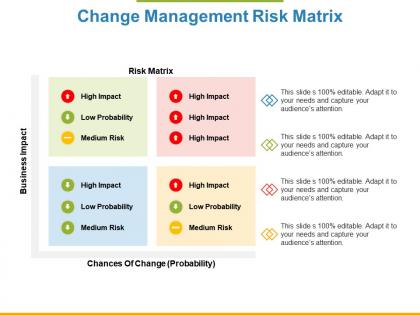
Handle your business with our Change Management Risk Matrix Ppt Powerpoint Presentation File Infographic Template. Build up an aura around your brand.
People who downloaded this PowerPoint presentation also viewed the following :
Change management risk matrix ppt powerpoint presentation file infographic template with all 5 slides:
Explain how all the elements combine with our Change Management Risk Matrix Ppt Powerpoint Presentation File Infographic Template. Be able to elaborate on your blueprint.

FAQs for Change management risk matrix ppt powerpoint presentation
Focus on impact severity, probability, and your org's risk tolerance - those are the big three. Getting everyone to agree on what counts as "high impact" is honestly the worst part because stakeholders love to argue about everything. Map out operational stuff like downtime and productivity hits, plus strategic risks like reputation damage. Don't forget your team's actual capacity to handle different scenarios - no point planning for things you can't realistically address. I'd start with 5-6 specific risk categories that actually match your situation. Way better than using some cookie-cutter template that doesn't fit.
So basically you plot everything on that probability vs impact grid, right? Tackle the high-prob/high-impact stuff first - that's your nightmare quadrant that'll totally wreck things. Next up are the medium risks, though tbh I always worry more about the high-impact ones even when they're super unlikely. Those low-prob/low-impact risks? Just keep an eye on them instead of stressing about active management. Start with that top-right corner and work down from there. Oh and don't spread yourself too thin trying to handle everything at once.
You gotta map out all your stakeholders before building that risk matrix - otherwise you're flying blind. Figure out who's got power, who cares about the change, and who's gonna fight you on it. Those high-influence people who hate your idea? They're your biggest risks right there. The supporters can actually help you deal with other problems though. I swear, half the change projects I've seen tank because nobody bothered figuring out who they were dealing with first. List everyone affected, rate their influence and attitude, then plug that info into your risk scenarios. Saves you from nasty surprises later.
Just map your Change Management Risk Matrix into whatever framework you're already using. Agile? Toss it into sprint retros and planning. Waterfall works too - stick it in your stage gates. PRINCE2 is actually perfect since they already do risk registers, so you're just adding change stuff to what exists. Honestly, the trick is pigging-backing on meetings you already have instead of creating new ones. Nobody has time for that. Find your current milestone reviews and throw in a quick 15-minute change risk chat. Way easier than starting from scratch.
Honestly, just track a few simple things and you'll know pretty fast if it's working. Start with prediction accuracy - like, are your "high risk" changes actually blowing up? I'd also watch how fast your team fixes problems once they're spotted. The metric I care about most though? Percentage of changes that finish without any nasty surprises. That's the real test. Oh, and definitely check if stakeholders seem more confident in your process - their buy-in makes everything smoother. Pick maybe 2-3 of these to track monthly. You don't need to go overboard with data.
Check it quarterly minimum, but honestly that's probably not enough if your company's always changing stuff. Monthly reviews work better when things are crazy busy. Don't just set it and forget it - that's how you end up with useless risk predictions six months later. I'd set a calendar reminder right now because you'll totally forget otherwise (I always do). The real trick is comparing what actually happened versus what the matrix said would happen. Then tweak your scoring when it's way off. Treat it like it's alive, not some document gathering dust.
Honestly, just start with Excel or Google Sheets - most teams never even need to upgrade from there. You can easily map out your risks and do the whole probability/impact thing. If you want something fancier later, tools like RiskWatch or LogicGate are solid. Monday.com has some decent risk templates too, though I've always found their interface a bit cluttered. Visio's great if you're into making it look all professional and visual. But seriously, don't overthink it at first. Build your basic matrix in Excel, see how it works for your team, then worry about bells and whistles later if you actually need them.
Get people from all over involved - operations, IT, HR, finance, actual end-users. Your core team will miss stuff. I've watched so many risk assessments completely bomb because they only caught the technical problems and totally ignored how people actually work. Brainstorming sessions help a ton. Look back at similar changes you've done before too - what went sideways last time? Use categories as prompts: financial, operational, people stuff, regulatory headaches. Oh, and do this early. Adding risks halfway through implementation is like trying to put sunscreen on after you're already burnt.
Honestly, don't overcomplicate it from day one - that's where most people mess up. Start simple with a basic 3x3 grid that actually makes sense to everyone using it. Get your stakeholders involved early to figure out what "high risk" means for your company, because trust me, your CEO and project managers probably worry about completely different things. You don't need to assess every little change either. Focus on stuff that actually moves the needle. Once people get comfortable with the basics, then you can add bells and whistles later. I've seen too many fancy matrices just sitting there unused because they were too confusing.
Your company culture is basically like wearing tinted glasses when you look at your Change Management Risk Matrix. Risk-averse teams? They'll blow communication and resistance risks way out of proportion. Super innovative cultures do the opposite - they're so pumped about adapting fast that they totally downplay technical or resource problems. I've seen this happen so many times. You gotta spot your cultural blind spots early and tweak those risk ratings. Maybe grab someone from outside your bubble to double-check your matrix - fresh eyes help tons.
So basically, the matrix gives everyone the same visual to work from instead of having random conversations where people use totally different priorities. Game-changer for avoiding those "wait, I thought we decided..." moments that drive everyone crazy. Your team discussions get way more focused because you're all staring at the same risk ratings and plans. Honestly, I'd just throw it up on the screen during your next meeting and use it as your main reference point - you'll see how much smoother things go when everyone's looking at the exact same thing. It's like having a shared brain or something.
First thing - get your people up to speed on risk assessment basics. How to spot risks, categorize them, score consistently. Change management fundamentals too (impact analysis, stakeholder mapping, all that). The matrix itself? Pretty easy once you get it. But here's the thing - the real magic happens in those group evaluation sessions. Make sure your facilitators can run discussions without letting the loudest person steamroll everyone else. Oh, and throw in some project management training so people actually understand dependencies. Practice run with something low-stakes first before going company-wide.
So scenario planning is basically stress-testing your Change Management Risk Matrix with different "what if" situations. You're not just looking at current risks - you're seeing how they'd change if budgets got slashed, leadership switched up, or the market went crazy. Run through maybe 3-4 realistic scenarios and watch how risk probabilities shift around. Honestly, it's pretty eye-opening because you'll catch risks that only pop up under certain conditions. That way you can prep contingency plans instead of scrambling later. I always find at least one blind spot I totally missed.
I've seen this work really well in different places. Kaiser Permanente mapped out risks when they rolled out new health record systems - they figured out which departments needed training first. Toyota does something similar with equipment upgrades, matching operational risks to how ready each area is for change. Target's pretty smart about it too when they update checkout systems. They identify stores that'll need extra help based on staff turnover and how complex the tech is. Honestly, the retail rollouts are probably the messiest but most interesting to watch. Bottom line - map your change impacts against who's actually ready for them, then put your resources where they'll make the biggest difference.
So basically, you plot all your stakeholder groups on this matrix thing - impact vs influence vs how they feel about the change. Super helpful for spotting trouble before it hits. Like, which departments are gonna get slammed by new processes? Who are the key people that aren't on board yet? Honestly, I think of it like a weather map for office drama. Once you see the patterns, you know where to focus your energy first. Just list everyone out, score them on those three factors, and boom - you've got your game plan for who needs the most attention.
No Reviews