Cloud Security Risks Or Threats Cloud Computing Security Ppt Brochure

Rating:
90%
Cloud Security Risks Or Threats Cloud Computing Security Ppt Brochure
Slide 1 of 6

or

Favourites Favourites

Try Before you Buy Download Free Sample Product

Audience Impress Your
Audience
Editable 100%
Editable
Time Save Hours
of Time
The Biggest Sale is ending soon in
0
0
:
0
0
:
0
0
Rating:
90%
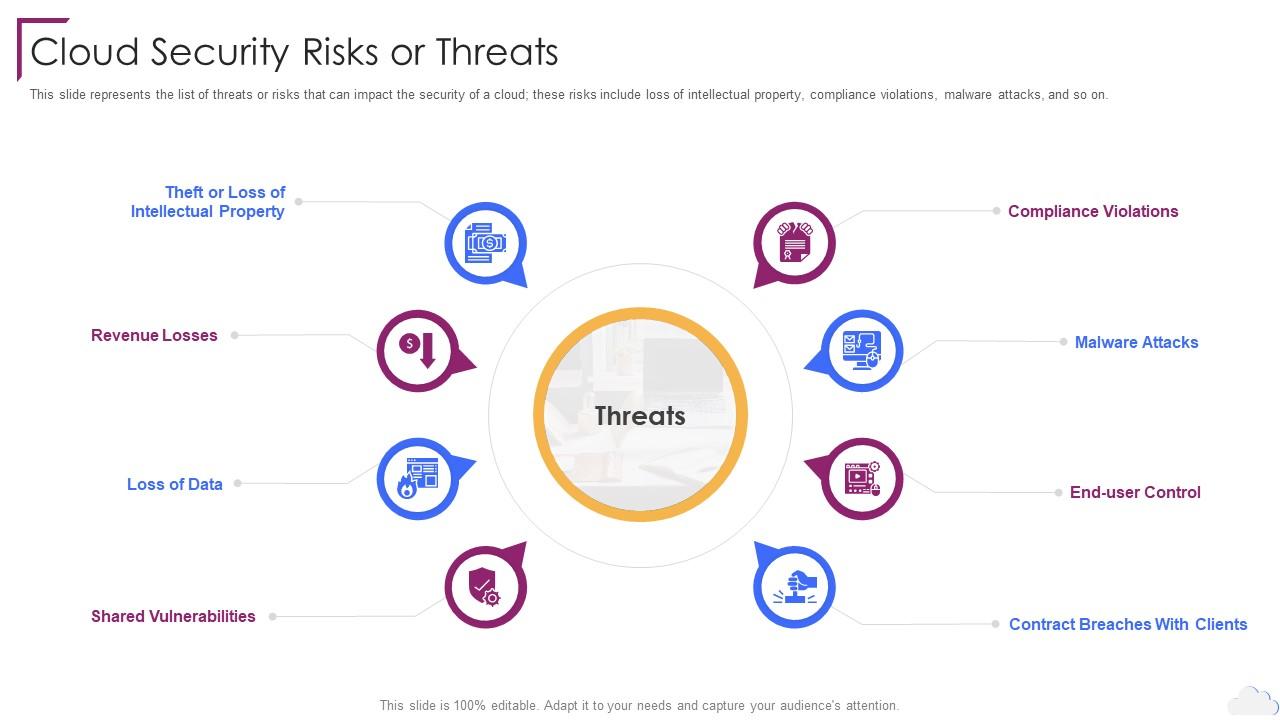
This slide represents the list of threats or risks that can impact the security of a cloud these risks include loss of intellectual property, compliance violations, malware attacks, and so on. Increase audience engagement and knowledge by dispensing information using Cloud Security Risks Or Threats Cloud Computing Security Ppt Brochure. This template helps you present information on eight stages. You can also present information on Revenue Losses, Loss Of Data, Shared Vulnerabilities, Compliance Violations, Malware Attacks using this PPT design. This layout is completely editable so personaize it now to meet your audiences expectations.
FAQs for Cloud Security Risks Or Threats Cloud Computing

Honestly, start with the basics: shared responsibility, least privilege, and layered security. Your cloud provider covers infrastructure stuff, but your data and apps? That's on you. Don't give people more access than they actually need - I know it's tempting to avoid constant permission requests, but trust me on this one. Multiple security layers work way better than putting all your eggs in one basket. Think encryption, monitoring, network controls. You can't protect what you can't see either, so visibility matters. Do a quick security audit first to figure out where you're most vulnerable.

First thing - encrypt everything, both when it's moving around and just sitting there. That's non-negotiable. Set up checksums and hash functions so you'll catch any sketchy changes to your files. Obviously do regular backups, but here's the thing - encrypt those too and store them separately from your main stuff. Multi-factor auth and role-based controls stop people from messing with your data in the first place. Cloud monitoring tools are pretty solid these days for catching weird activity as it happens. Honestly, the more redundant checks you build in, the better you'll sleep at night.

So with public clouds, you're basically sharing space with everyone else and trusting the provider to handle security - less headache for you but also less control. Private clouds are the opposite - total customization but man, you'll be doing ALL the security work yourself. Hybrid is honestly where things get messy because now you're juggling data between different systems and trying to keep policies straight across both. I'd say figure out how much control you actually want vs how much work you're up for managing.

So encryption scrambles your data - even if hackers grab it, they can't actually read anything without the key. There's two kinds you'll see: data sitting on servers and data moving around between your phone and the cloud. It's kinda like mailing a locked safe instead of just tossing stuff in an envelope. Most decent cloud companies do this automatically now (thank god), but I'd still double-check what encryption they're using. For really sensitive stuff? Add your own layer on top.

So the big cloud security threats you're gonna face are data breaches, screwed up access controls, sketchy APIs, and account hijacking. Most of the time it's embarrassingly simple stuff - someone literally left a database open to the world or used "password123." I swear, half these "cyber attacks" are just people clicking on obvious things they shouldn't. Strong identity management helps a ton. Encrypt everything, audit your configs regularly, and slap multi-factor auth on everything you can. Also make sure your team actually understands cloud permissions before they start clicking around. Just do a security assessment first and patch the glaring holes.

Start with role-based permissions - that's your bread and butter. Multi-factor authentication everywhere, no exceptions. I learned this the hard way when our old company got hit. Give people the bare minimum access they need, nothing more. You'd be shocked how many old accounts just sit there collecting dust, so review who has access regularly. Log everything and watch for weird login patterns. Oh, and always lock things down first, then open up as needed. Way easier than trying to tighten security after everyone's already used to having free reign.

So compliance stuff like GDPR and HIPAA basically makes you lock down your cloud way harder than you'd normally think to. They're super picky about encryption, who can access what, audit trails - all that fun stuff. Here's what trips people up though: you're still on the hook for compliance even when you're using someone else's cloud service. Learned that one the hard way at my last job. Pick providers who already have the certs you need. Trust me, building everything around those requirements from the start beats trying to fix it all later.

Ugh, multi-cloud is such a pain for security honestly. You're dealing with totally different systems that don't talk to each other well - like AWS does identity one way, Azure does it another. Monitoring becomes this huge mess since you can't see everything in one place anymore. Your attack surface gets way bigger too with all these extra entry points to worry about. I learned this the hard way last year. The trick is getting your security policies locked down early and finding tools that actually work across all your clouds. Otherwise you'll be pulling your hair out trying to keep track of everything.

So SIEM is basically your cloud security hub that pulls in logs from all your services and scans for weird activity. Like having a security guard who never takes breaks, you know? Real-time alerts pop up when something's sketchy, which is super helpful. It also handles compliance stuff since it tracks everything automatically. Oh, and it processes insane amounts of data - honestly blew my mind when I first saw it. Just make sure you tune the alerts right or you'll drown in notifications. Trust me on that one.

First thing - check their compliance certs like SOC 2 and ISO 27001. HIPAA too if you're in healthcare. Ask to see their penetration testing results and how they handle incidents. The good providers are usually pretty open about sharing this stuff, which I appreciate. You'll also want to understand their shared responsibility model - basically what security tasks are yours vs theirs. That part can get confusing honestly. Don't just trust everything though. Run your own security tests on whatever you deploy, and maybe get a third-party audit for anything mission-critical.

You'll want to build a solid incident response plan that's cloud-specific. Set up automated monitoring and alerts across all your services first. Cloud incidents spread fast between services, so create playbooks for the usual suspects - data breaches, outages, compromised accounts. Get to know your cloud provider's support team now, not when everything's on fire (learned that one the hard way). Clear escalation procedures are key. Oh, and run tabletop exercises regularly to practice your response. Honestly, most companies skip this step and regret it later.

So basically you and your cloud provider share the security work - they cover the backend infrastructure stuff while you handle whatever you put on top. It's kinda like renting an apartment where the landlord secures the building but you still gotta lock your own door. They deal with physical servers, networks, all that hardware nonsense. You're stuck with data protection, apps, user permissions, configs. The split changes depending on what service you're using too - SaaS means less work for you, IaaS means way more. Honestly, just check their responsibility matrix first so you don't get caught off guard later.

Start with the boring but crucial stuff - multi-factor authentication and making sure people only have access to what they actually need. Data encryption is non-negotiable, both when it's moving around and sitting in storage. Your APIs are probably your biggest weak spot honestly, so lock those down tight. Patch everything regularly (I know, I know, but seriously do it). You need solid monitoring and logging too - can't fight what you can't see. Oh, and run security assessments every so often. Begin with MFA and encryption, then work on getting your monitoring game strong.

Think of it like having security cameras that actually catch stuff in real-time instead of finding out you got robbed three weeks later. You'll get alerts the second someone tries accessing things they shouldn't or when traffic looks weird. Honestly, the trick is not drowning yourself in notifications - focus on your most important stuff first and set up automatic responses for the obvious threats. Oh, and make sure your dashboard doesn't look like a Christmas tree exploded. Start small with your critical assets, then build out from there once you've got the hang of it.

So IAM is like having a bouncer for all your cloud stuff - decides who gets in and what they can touch. You create user accounts, set permissions, make policies for everything. Picture those wristbands at concerts (random comparison but whatever). Different colors = different access levels. The whole point is giving people just enough access to do their jobs, nothing extra. Honestly, most companies mess this up big time. Start by checking who has what permissions right now. I guarantee you'll find tons of people with admin rights who definitely shouldn't have them. It's wild how careless organizations get with this stuff.

Ratings and Reviews

90% of 100
Review Form
Write a review
Most Relevant Reviews
  1. 80%

    by Charles Nguyen

    Loved the templates on SlideTeam, I believe I have found the go to place for my presentation needs! 
  2. 100%

    by Charlie Reed

    Loved the templates on SlideTeam, I believe I have found the go to place for my presentation needs! 

2 Item(s)

per page: