

Cyber security risk management cyber threats management dashboard




Try Before you Buy Download Free Sample Product
 Impress Your
 Audience
 100%
100% Editable
 Save Hours
 of Time


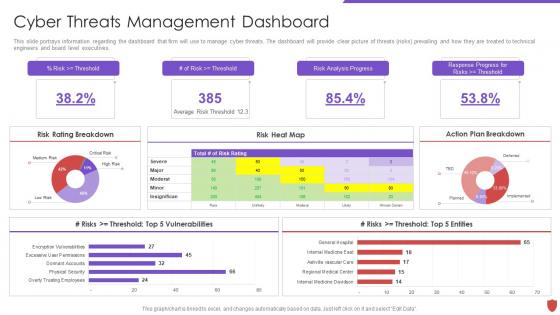
This slide portrays information regarding the dashboard that firm will use to manage cyber threats. The dashboard will provide clear picture of threats risks prevailing and how they are treated to technical engineers and board level executives.
People who downloaded this PowerPoint presentation also viewed the following :
Cyber security risk management cyber threats management dashboard with all 7 slides:
Use our Cyber Security Risk Management Cyber Threats Management Dashboard to effectively help you save your valuable time. They are readymade to fit into any presentation structure.





FAQs for Cyber security risk management cyber
Honestly, keep it simple at first - your cybersecurity dashboard needs four main things. Real-time threat alerts are crucial (basically your early warning system). Track security metrics like failed logins and malware hits. Compliance indicators help you avoid those awful surprise audit failures. Network traffic and user activity monitoring catches weird patterns too. Don't go overboard making it look like mission control or whatever. Visual and digestible beats complex every time. Start with basics, then add more as your team gets used to it. Trust me, overwhelming people right off the bat never works.
Honestly, visuals are a lifesaver for security stuff. Charts and heat maps let you spot threats instantly instead of staring at endless logs all day. Your team won't drown in alerts anymore - they'll actually see what's happening with attack patterns and vulnerabilities. Executives love it too since you can brief them without getting into the weeds. Oh, and prioritizing becomes way easier when everything's visual. You'll know what needs fixing right now versus what can wait. I'd start with real-time dashboards showing current threat status, then build from there.
Focus on the stuff that actually matters when things hit the fan - failed logins, weird network traffic, malware alerts, and vulnerability counts. Those give you the fastest heads up. Also track your active incident tickets and how long it takes to spot threats. Most dashboards are honestly just garbage filled with useless metrics that look pretty but don't help during a real attack. Keep your critical alerts right up front where you can see them immediately. Make sure you can quickly jump from the overview into detailed logs when something spikes - you'll need that drill-down capability.
So for cybersecurity dashboards, you'll want to tailor them to whatever industry you're in. Healthcare folks need HIPAA metrics and breach tracking. Financial companies gotta focus on PCI-DSS and fraud alerts. Manufacturing is trickier - you're dealing with operational tech security plus supply chain stuff, which honestly gets messy but you can't ignore it. Most platforms let you build custom widgets and set your own alert levels. Oh, and connect to threat feeds that actually matter for your sector. Figure out your top 5 compliance needs first, then your biggest risks. Build everything around those.
So basically, ML and AI turn your cybersecurity dashboard from just showing logs into something that actually predicts threats. Pretty neat stuff. They'll analyze network traffic patterns and user behavior to catch weird anomalies you'd miss completely. False positives drop over time since the system learns your specific environment - which honestly saves so much headache. Short version: the dashboard starts flagging real threats faster while ignoring the noise. Don't bother with basic log tools anymore. Go for dashboards with actual ML built in, not just fancy charts.
Honestly, cybersecurity dashboards are a game changer for compliance stuff. They give you that real-time view of your security setup - you know, tracking who's accessing what and catching any data breaches as they happen. GDPR and HIPAA auditors love seeing those automated audit trails, makes their job easier too I guess. You'll spot compliance issues before they turn into actual violations, which saves your butt later. The automated alerts are clutch because you don't have to watch everything 24/7. Plus when all those status indicators are green? Super satisfying. Makes reporting way less of a headache.
Honestly, Splunk and Elastic Stack (ELK) are where I'd start - they're the big players for SIEM stuff. Grafana's really solid for visualizations too. Budget tight? Go open-source first before you shell out for enterprise licenses. Kibana works great, or even Power BI if that's what your team already knows. Oh, and Tableau's decent but kinda pricey. Here's the thing though - don't try to integrate everything right away. Pick one main SIEM tool and build from there. Trust me, trying to do it all at once is a headache you don't need.
Honestly, just think of it like a newspaper - executives want the headline, tech teams want the full story. Start with the big picture stuff they can scan quickly, then let people drill down if they need more detail. Your C-suite should see "threat level: medium" right away, but your SOC guys can click through to the actual vulnerabilities behind that number. Color coding helps too - makes it obvious what's urgent versus what's just background noise. Oh, and definitely test it with real users first. Ask different departments what would make them actually take action versus what just clutters their screen.
Don't cram everything onto one dashboard - seriously, less is more here. Your team will just get overwhelmed trying to process 50 different charts during an incident (been there, it sucks). Start with maybe 5-7 metrics that actually matter for your security posture. Skip the fancy visualizations that need a manual to understand. Consistent colors help too. I'd focus on stuff that's actionable rather than just numbers that look impressive to executives. You can always add more later once you see what people actually use. Trust me, simple beats comprehensive every time when things hit the fan.
Definitely hook up those threat intel feeds through APIs or your SIEM connectors - Splunk and Elastic both handle this pretty well. The real magic happens when you map that threat data to your actual security events. So like, when weird stuff pops up, you instantly know if it matches known bad actors or sketchy IPs. Trust me, operating without this context is basically guessing half the time. Focus on feeds that actually matter for your industry though. Oh, and set up alerts for the high-confidence threats targeting your specific setup - saves you from drowning in noise.
Think of it as your war room during an attack - you'll see everything happening across your network in real time. Quick identification of scope and impact becomes way easier. The timeline tracking is clutch, plus you can watch if threats are spreading to other systems. Your whole team stays on the same page (no more confusion about what's actually going down). Oh, and the automatic logging is honestly a lifesaver for post-incident reviews. Set up those alerts beforehand though - you want critical stuff hitting your phone immediately, not buried in some report.
Look, cybersecurity dashboards are basically showing all your company's weak spots and security intel in one place. Without proper access controls, you're handing over a detailed map of your vulnerabilities to whoever walks by. Set up role-based permissions so people only see what they actually need for their job. Multi-factor authentication is non-negotiable here. Also do regular access reviews - I've seen too many companies forget about contractors who left months ago but still have full dashboard access. Honestly? Start by checking who has access right now. You'll probably be surprised.
Honestly, dashboards are a game-changer for this stuff. You'll see completion rates, quiz scores, and how people actually behave after training - all in real time. Way easier than digging through endless spreadsheets (trust me on that one). Track who's struggling with what topics, monitor phishing click rates before and after sessions. The visual setup lets you spot department trends super quickly. Here's the cool part - you can connect training performance to actual security incidents to see what's really moving the needle. Just set up automated reports so you're not pulling data manually every month like some kind of data zombie.
Watch for weird data spikes and login attempts from random countries - that's your early warning system. Network traffic changes are huge red flags too. Honestly, half the security dashboards I've seen are just eye candy that miss the actual important stuff. Set up alerts for new malware signatures and exploit attempts so you're not glued to screens all day. Oh, and user behavior analytics will catch insider threats way better than most realize. The whole point is getting alerts that actually matter, not drowning in useless notifications that'll just make you ignore everything.
Yeah, dashboards are clutch for this stuff. Instead of bombarding executives with technical nonsense, show them clean visuals they can actually parse - threat trends, how fast you're handling incidents, compliance status. Red/green indicators work way better than packet logs (obviously). Different people need different views though. Your CEO doesn't want the same granular data your CISO needs. Figure out what each group actually cares about first, then build something that makes sense to them. Keep updates regular and be ready to dig deeper when they ask questions. I learned this the hard way - executives tune out fast if you overcomplicate things.
-
Easily Editable.
-
Perfect template with attractive color combination.