

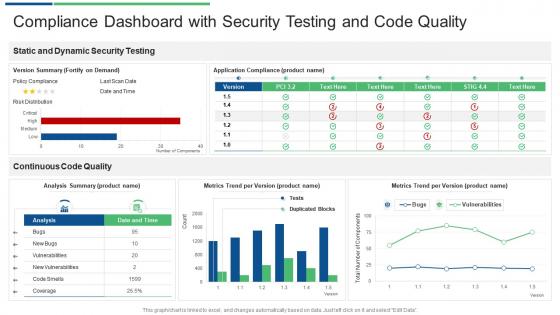
Compliance dashboard with security testing and code quality




Try Before you Buy Download Free Sample Product
 Impress Your
 Audience
 100%
100% Editable
 Save Hours
 of Time


Our Compliance Dashboard With Security Testing And Code Quality are topically designed to provide an attractive backdrop to any subject. Use them to look like a presentation pro.
People who downloaded this PowerPoint presentation also viewed the following :
Compliance dashboard with security testing and code quality with all 2 slides:
Use our Compliance Dashboard With Security Testing And Code Quality to effectively help you save your valuable time. They are readymade to fit into any presentation structure.
FAQs for Compliance dashboard with security testing
Track your compliance rate percentages and outstanding violations first - those are non-negotiable. Time-to-resolution matters too, plus audit findings status. Risk severity levels are huge because honestly, that's what executives freak out about most. Don't forget training completion rates and cert statuses since people always seem to let those slide. Oh, and policy adherence trends - super helpful for spotting patterns. Balance the big-picture KPIs with stuff you can actually act on. Start there, then add whatever industry-specific metrics match your actual headaches.
Dude, spreadsheets are the worst for compliance stuff - nobody wants to dig through rows of data. Heat maps are clutch for showing risk areas at a glance. Traffic light systems work great too. Your executives will eat up those clean dashboards (they're weirdly obsessed with pretty charts). But here's the thing - visuals actually help you catch patterns you'd totally miss otherwise. Trend lines show if you're improving over time. Color coding makes everything obvious. Oh, and add filters so people can focus on their specific areas. Figure out your main metrics first, then pick visuals that tell the story fast.
Automate your data sources and check them regularly - trust me, manual updates will destroy you when compliance deadlines hit. I'd set up alerts for the important stuff so you're not babysitting everything 24/7. Make sure someone owns each part of the dashboard too. We almost got burned in Q3 because our data went stale and nobody caught it until audit time. Refresh often enough to spot problems, but don't go crazy and bog down the system. Oh, and test your logic every quarter - document changes so the next guy doesn't have to figure out your weird setup from scratch.
So basically, new regulations just wreck your whole setup. You'll end up redesigning data models, adding tracking fields, and rebuilding how you show compliance stuff. Honestly the worst timing is when it hits mid-quarter - learned that the hard way last year. Your dashboard needs to be super flexible from day one though. Modular components are key, plus configurable widgets. New rules mean new data sources and fresh KPIs every time. Sometimes you're building entire sections from scratch. Make sure your dev team knows they'll be doing constant updates whenever things shift. Oh and always build in buffer space - trust me on that one.
User feedback is what separates dashboards people actually use from expensive digital paperweights. Ask your users regularly what's broken or confusing - don't wait for complaints. I've watched too many "executive-approved" dashboards become daily torture for compliance teams. Quick surveys work great, or just grab coffee with users occasionally. What executives think looks slick often makes zero sense to someone rushing through their morning compliance checks. Focus on what people really need, not what sounds impressive in meetings. Iterate fast when something's not working.
Honestly, the best compliance dashboards are the ones everyone can actually see. Put those metrics on lobby screens or bring them up in meetings - makes it way less boring when it's part of regular conversation. Nobody wants their team to look bad on the scoreboard, you know? I've seen places do leaderboards or give shout-outs to departments crushing their targets. Works surprisingly well. The real trick though? You've got to tie it to stuff people actually care about - bonuses, reviews, whatever. Otherwise it's just another corporate thing everyone ignores. Oh, and transparency is huge here.
Ugh, data quality issues will be your worst nightmare - trust me on this one. Plus getting different teams on board is like pulling teeth because nobody wants yet another tool to babysit. Your data's probably spread across a million systems that hate each other. Here's what actually works: don't go crazy trying to build some perfect dashboard right away. Start with maybe 3-4 key metrics max. Get your data feeds automated if you can, and honestly? Just loop people into the design process early so they don't trash it later. Oh, and make someone own the data accuracy piece from the start or you'll regret it.
So your compliance dashboard becomes like mission control instead of just another random tool sitting there. Connect it to HR, financial software, whatever systems you're already using - then data flows in automatically. No more updating spreadsheets manually (seriously, who has time?). You'll actually see what's happening right now across everything, not last week's outdated info. Way less room for mistakes too. Honestly, the time savings alone make it worth it. I'd start with whatever systems have your most important compliance stuff and work from there.
Tableau and Power BI are your best bets for dashboards that don't look like garbage. MetricStream or ServiceNow have compliance stuff built in, but they'll cost you. Honestly? Excel works fine if you're just testing things out. Zapier's pretty decent for pulling data from different places automatically - saves you from doing it manually every time. Oh, and don't overthink this. Pick whatever your team will actually open and use. I've seen too many companies blow money on fancy tools that just sit there. Start basic, then upgrade once you know what you need.
Start by figuring out what each group actually needs - not what they say they need, but what they'll really use. Executives want the bird's eye view: KPIs, trends, those colorful risk maps that make sense at a glance. Meanwhile, compliance folks are digging into the weeds with violation records and audit trails. Most platforms let you set different permissions and widgets for each role. Honestly, the hardest part isn't the tech setup - it's getting people to admit what they actually look at versus what sounds impressive in meetings. Build around their real habits and you'll get way more engagement.
Start with your main business systems - ERP, HRMS, financial stuff. Those are usually pretty solid since they get audited all the time. Regulatory databases work great too because that's literally what they're designed for. Manual spreadsheets are a nightmare though, trust me on that one. Way too many errors waiting to happen. Audit logs are your friend here - they capture everything automatically without people screwing things up. Oh, and automated monitoring systems too. First figure out exactly what compliance metrics you need, then trace back to see which systems can actually give you clean data. Makes the whole process way less of a headache.
Honestly, compliance dashboards are game-changers for catching problems early. Real-time alerts pop up when your metrics start looking sketchy, which beats finding out about issues weeks later. The trend analysis stuff shows you where things are headed too. Visual charts make way more sense than drowning executives in spreadsheets - trust me, they'll actually pay attention to colorful graphs. You can track whether your fixes are working and pivot when they're not. My old boss used to make decisions based on "experience" until we got dashboards showing him the actual data. Way better than playing guessing games with compliance risks.
So static dashboards are basically frozen snapshots - perfect for those monthly board meetings where you don't want numbers suddenly changing while you're presenting (been there, super awkward). Dynamic ones update live as data comes in. I'd go static for regulatory stuff or formal reports where you need that exact moment captured. But for day-to-day monitoring? Dynamic all the way. You'll catch compliance issues way faster when everything updates automatically. Really depends on whether you need rock-solid documentation or real-time alerts to jump on problems quickly.
So ML algorithms are pretty great at catching patterns in your compliance data that you'd probably miss. They get smarter over time too - learning from past violations and regulatory updates to predict future issues better. It's like having a super-powered analyst who never gets tired, honestly. Plus they can crunch through way more data than any human could handle manually. The whole system adapts as compliance rules change, which is huge. I'd start small though - pick your biggest risk areas first and build ML models around those.
Honestly, most people just stare at those dashboards like deer in headlights. Start with teaching your team what the numbers actually mean - not just how to click around. Do hands-on sessions where they practice navigating and drilling down into problem areas. Set up some power users in each department who can answer the random questions that always pop up. Don't forget about compliance training either, since that's usually why you're tracking this stuff anyway. Monthly check-ins work well for covering new features. Oh, and make sure they know how to set up alerts - saves everyone headaches later.
-
Graphics are very appealing to eyes.
-
Informative presentations that are easily editable.
-
Much better than the original! Thanks for the quick turnaround.